> ## Documentation Index
> Fetch the complete documentation index at: https://notes.kodekloud.com/llms.txt
> Use this file to discover all available pages before exploring further.
# EC2 Instance Lifecycle
> This guide explains the Amazon EC2 instance lifecycle, detailing each state from launch to termination and their implications for resource management.
Understanding the Amazon EC2 instance lifecycle is crucial for managing compute resources efficiently. This guide walks you through each state an EC2 instance passes—from launch to termination—highlighting resource allocation, billing implications, and transition triggers.
## EC2 Instance States
| State | Description |
| ----------------- | --------------------------------------------------------------------------------------------------------------------- |
| **Pending** | AWS reserves capacity, initializes the instance, and performs setup operations. |
| **Running** | The instance is fully provisioned. You can connect via SSH/RDP, serve traffic, and access instance-store volumes. |
| **Stopping** | Triggered by a stop command; the OS shuts down gracefully and compute resources prepare for release. |
| **Stopped** | The instance is shut down. Compute charges stop, but EBS volumes, private IPs, and Elastic IPs remain allocated. |
| **Shutting-down** | Initiated by termination; AWS deallocates CPU, memory, and networking before deletion. |
| **Terminated** | The instance is permanently removed. All resources flagged for deletion (instance-store, default EBS) are cleaned up. |
Stopping an instance does **not** delete attached EBS volumes or Elastic IP addresses—you will continue to incur charges for those resources until you release them.
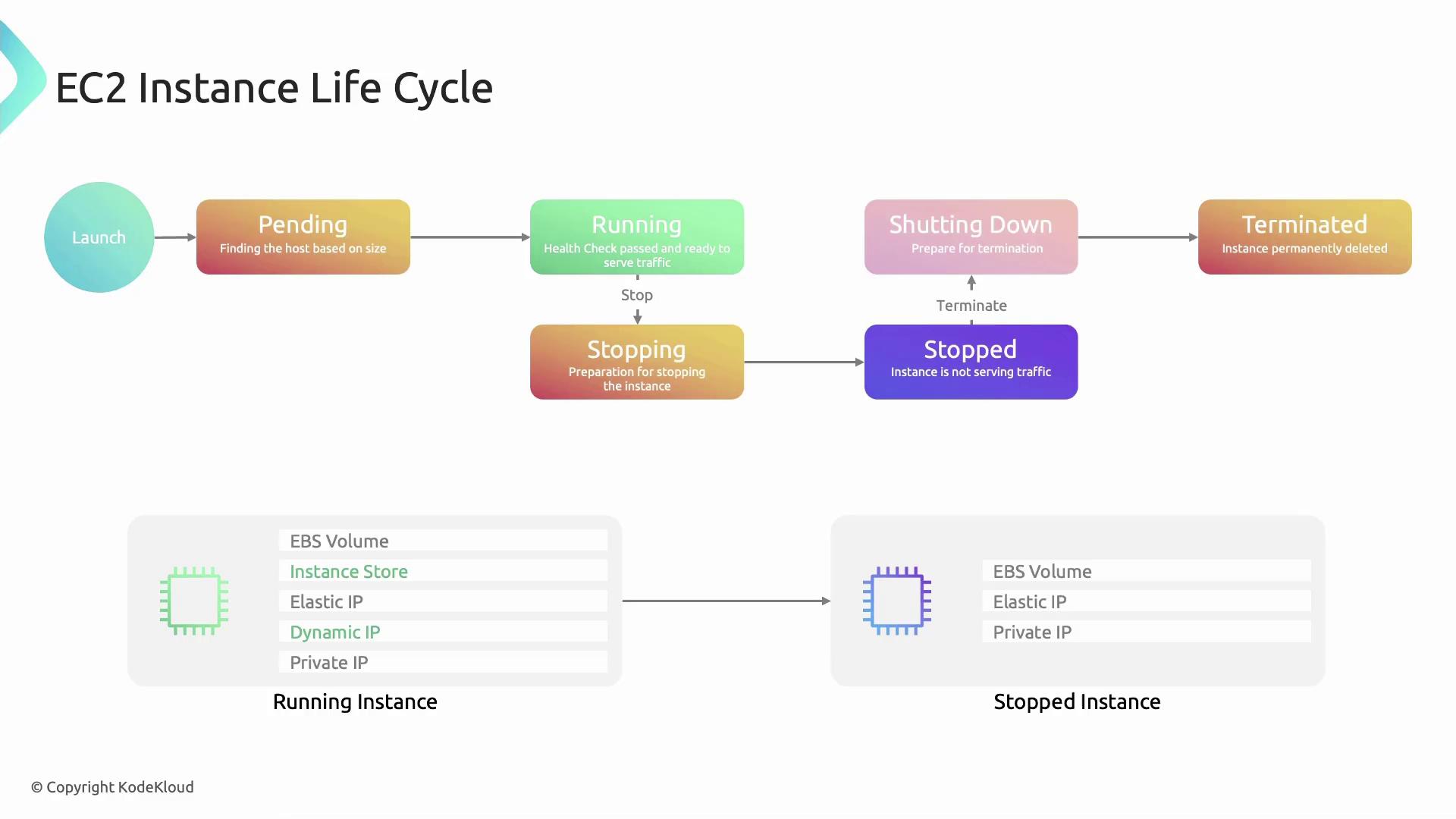
## Detailed State Transitions
1. **Pending**
* AWS locates capacity for your chosen instance type.
* Resources are reserved, networking is configured, and the hypervisor initializes the VM.
2. **Running**
* Health checks complete and instance-store volumes attach.
* A public IP is assigned (if enabled at subnet level).
* Your applications can now serve traffic.
3. **Stopping**
* Issued via Console, AWS CLI (`aws ec2 stop-instances`), or within the guest OS.
* The guest OS performs a clean shutdown; the hypervisor marks resources for release.
4. **Stopped**
* Compute resources are released, halting billing for CPU and memory.
* Storage (EBS), private IP, and Elastic IP remain allocated.
5. **Shutting-down**
* Occurs when you terminate an instance from either the `running` or `stopped` state.
* AWS deallocates virtual hardware; cleanup operations begin.
6. **Terminated**
* The instance record is removed from your account.
* Instance-store volumes and default EBS volumes flagged for deletion are erased.
## Edge Cases and Best Practices
Sending a terminate command is **irreversible**. Ensure you’ve backed up any critical data on instance-store volumes or unencrypted EBS volumes before terminating.
| Scenario | Behavior |
| ------------------------------------------------- | --------------------------------------------- |
| Termination issued during `stopping` or `stopped` | Instance immediately moves to `shutting-down` |
| Health check failure in `pending` | AWS automatically issues a terminate signal |
## Additional Resources
* [Amazon EC2 User Guide](https://docs.aws.amazon.com/ec2/index.html)
* [EC2 Instance Lifecycle](https://docs.aws.amazon.com/AWSEC2/latest/UserGuide/ec2-instance-lifecycle.html)
* [Managing Instance Stops, Starts, and Termination](https://docs.aws.amazon.com/AWSEC2/latest/UserGuide/Stop_Start.html)