> ## Documentation Index
> Fetch the complete documentation index at: https://notes.kodekloud.com/llms.txt
> Use this file to discover all available pages before exploring further.
# EC2 Storage
> Amazon EC2 offers various storage solutions with unique performance, durability, and cost characteristics to meet application requirements.
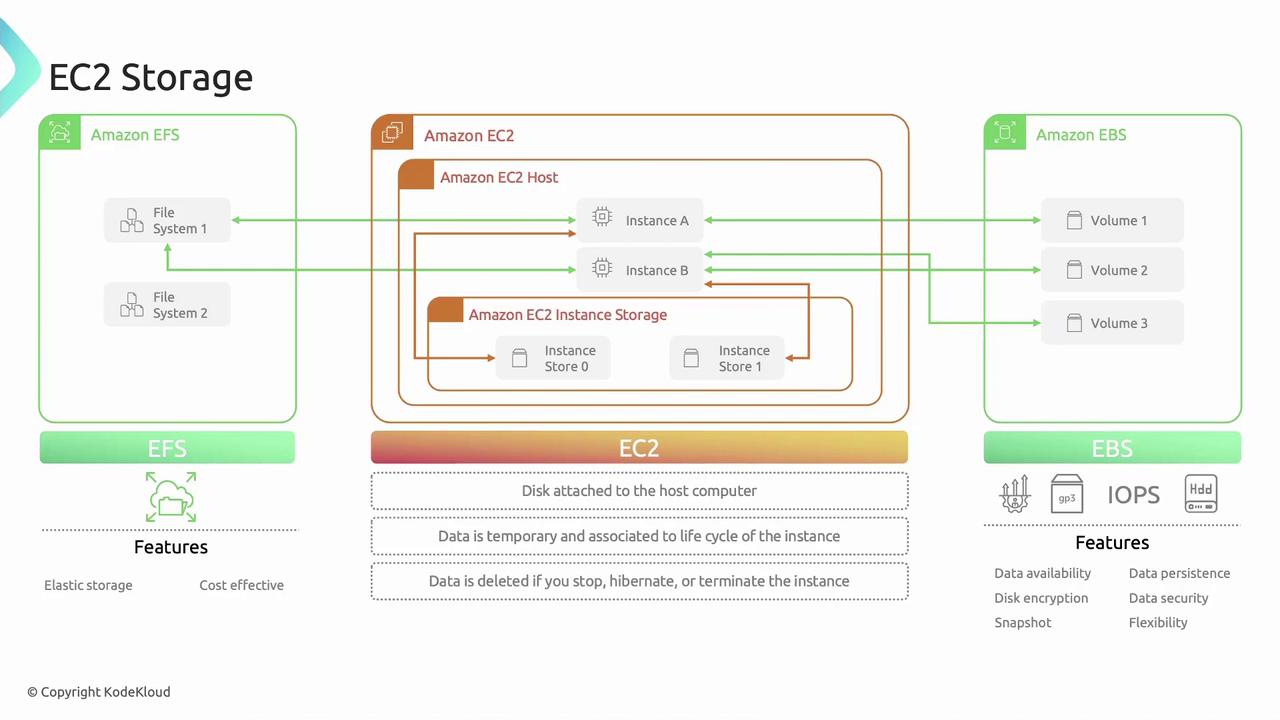
Amazon EC2 provides flexible, cost-effective, and easy-to-use storage solutions for your compute instances. Each option offers a unique combination of performance, durability, and cost. You can mix and match these storage types to meet your application’s requirements.
Common EC2 storage options:
* Instance Store
* Amazon Elastic Block Store (EBS)
* Amazon Elastic File System (EFS)
***
## 1. Instance Store
Instance Store volumes are temporary, high-performance disks physically attached to the host server. They deliver very low-latency I/O but are **ephemeral**.
Data on an Instance Store is lost if the instance stops, hibernates, or terminates. Use it only for non-persistent workloads.
Key characteristics:
* Ephemeral storage tied to instance lifecycle
* Ideal for scratch data, buffers, and caches
* Automatic deletion on stop/terminate (reboot retains data)
Use cases:
* Temporary caches (e.g., in-memory databases, processing buffers)
* Scratch disks for big data workloads
* High-speed swap or buffer space
***
## 2. Amazon Elastic File System (EFS)
Amazon EFS is a fully managed, elastic NFS file system that can be mounted concurrently by multiple EC2 instances across Availability Zones.
EFS scales automatically—you pay only for the storage you consume.
Features:
* Elastic capacity: grows and shrinks as you add or remove files
* Shared access: mount the same file system on multiple instances
* Fully managed: AWS handles provisioning, patching, and maintenance
* Supports NFSv4.1 and NFSv4.2 protocols
Common commands:
```bash theme={null}
# Create an EFS file system
aws efs create-file-system --performance-mode generalPurpose
# Mount on Linux instance
sudo yum install -y amazon-efs-utils
sudo mkdir /mnt/efs
sudo mount -t efs fs-0123456789abcdef0:/ /mnt/efs
```
Use cases:
* Web serving and content management
* Shared development or build environments
* Data science, analytics, and media workflows
***
## 3. Amazon Elastic Block Store (EBS)
Amazon EBS offers persistent, block-level storage that you can attach to a single EC2 instance at a time. Volumes behave like raw block devices you can format, mount, and use as you would an on-premises disk.
| Volume Type | Use Case | Throughput/IOPS |
| ------------------------ | ---------------------------------------------- | ----------------------- |
| General Purpose SSD | Balanced price/performance (web servers, apps) | Up to 16,000 IOPS (gp3) |
| Provisioned IOPS SSD | I/O-intensive databases (Oracle, SQL Server) | Up to 256,000 IOPS |
| Throughput Optimized HDD | Large, sequential workloads (big data, logs) | Up to 500 MB/s |
| Cold HDD | Infrequently accessed data (archival, backups) | Up to 250 MB/s |
Core features:
* Data Persistence: volumes persist independently of the EC2 instance
* High Availability: data is replicated within the same AZ to prevent hardware failures
* Encryption: AES-256 at rest and in transit (managed with [AWS KMS](https://aws.amazon.com/kms/))
* Snapshots: create point-in-time backups stored in Amazon S3
* Dynamically adjustable: modify size, volume type, and IOPS without detaching
Sample commands:
```bash theme={null}
# Create a 100 GiB gp3 volume in us-east-1a
aws ec2 create-volume \
--availability-zone us-east-1a \
--size 100 \
--volume-type gp3
# Attach the volume to an instance
aws ec2 attach-volume \
--volume-id vol-0123456789abcdef0 \
--instance-id i-0abcdef1234567890 \
--device /dev/xvdf
```
***
## Storage Comparison at a Glance
| Feature | Instance Store | EBS | EFS |
| ------------- | -------------------- | ----------------------------- | ------------------------------------- |
| Persistence | Ephemeral | Persistent (AZ-level replica) | Persistent (region-wide) |
| Performance | Very high IOPS | High IOPS / throughput | Scalable throughput |
| Protocol | Direct-attached disk | iSCSI block device | NFSv4 |
| Shared Access | No | Single instance per volume | Multiple instances concurrently |
| Best for | Scratch, caches | Databases, boot volumes | Shared file storage, home directories |
***
## Links and References
* [AWS EC2 Instance Store Documentation](https://docs.aws.amazon.com/AWSEC2/latest/UserGuide/InstanceStorage.html)
* [Amazon EBS Documentation](https://docs.aws.amazon.com/ebs/latest/)
* [Amazon EFS Documentation](https://docs.aws.amazon.com/efs/latest/)
* [AWS Key Management Service](https://aws.amazon.com/kms/)
* [Amazon S3](https://aws.amazon.com/s3/)