> ## Documentation Index
> Fetch the complete documentation index at: https://notes.kodekloud.com/llms.txt
> Use this file to discover all available pages before exploring further.

# EC2 and Load Balancer amp Target Groups

> This article explores the integration of Amazon EC2 instances, Elastic Load Balancers, and target groups for scalable applications on AWS.

In this lesson, we explore how Amazon EC2 instances, Elastic Load Balancers (ELBs), and target groups work together to deliver scalable, fault-tolerant applications on AWS.

## Why Use a Load Balancer?

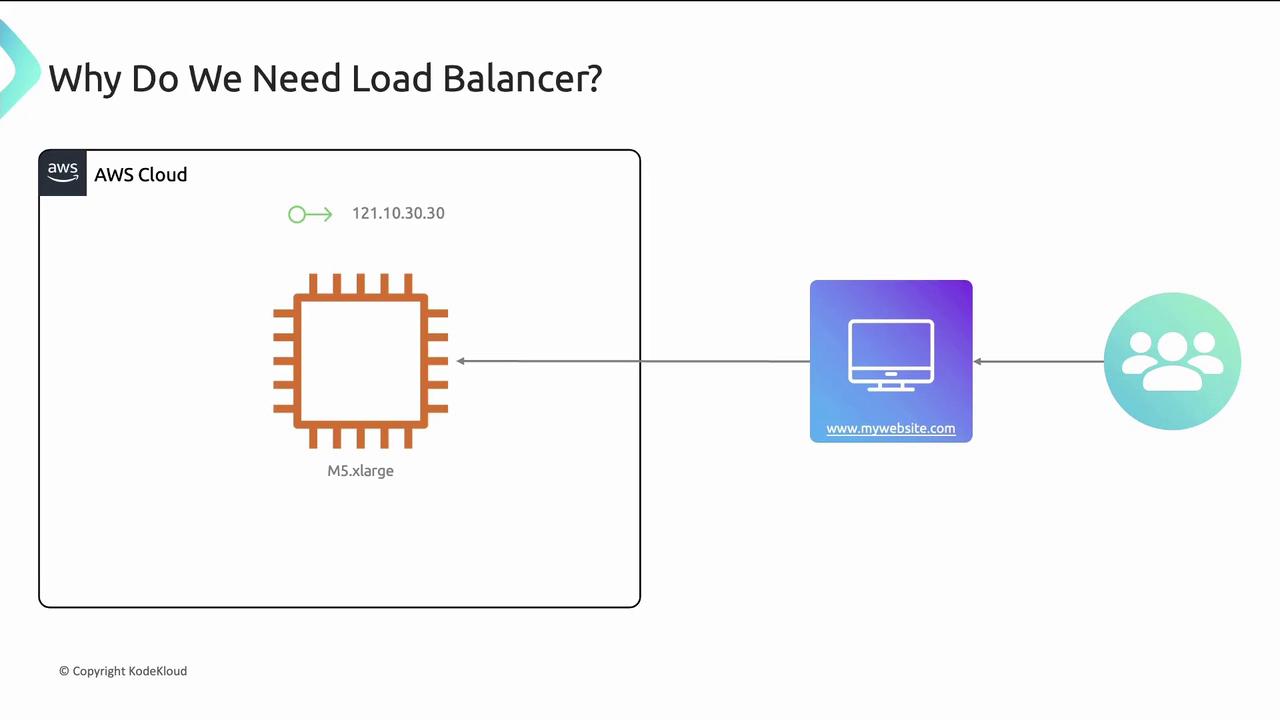
Running a single EC2 instance for `mywebsite.com` can become a bottleneck as traffic grows. There are two primary scaling strategies:

**Vertical Scaling**\
Scale up by increasing instance size.

<Callout icon="triangle-alert" color="#FF6B6B">
  Vertical scaling has limits and can be cost-inefficient when traffic is variable.
</Callout>

<Frame>
  ![The image is a diagram illustrating the need for a load balancer, showing a connection from AWS Cloud to a website and users.](https://kodekloud.com/kk-media/image/upload/v1752869020/notes-assets/images/Amazon-Elastic-Compute-Cloud-EC2-EC2-and-Load-Balancer-amp-Target-Groups/load-balancer-aws-cloud-diagram.jpg)
</Frame>

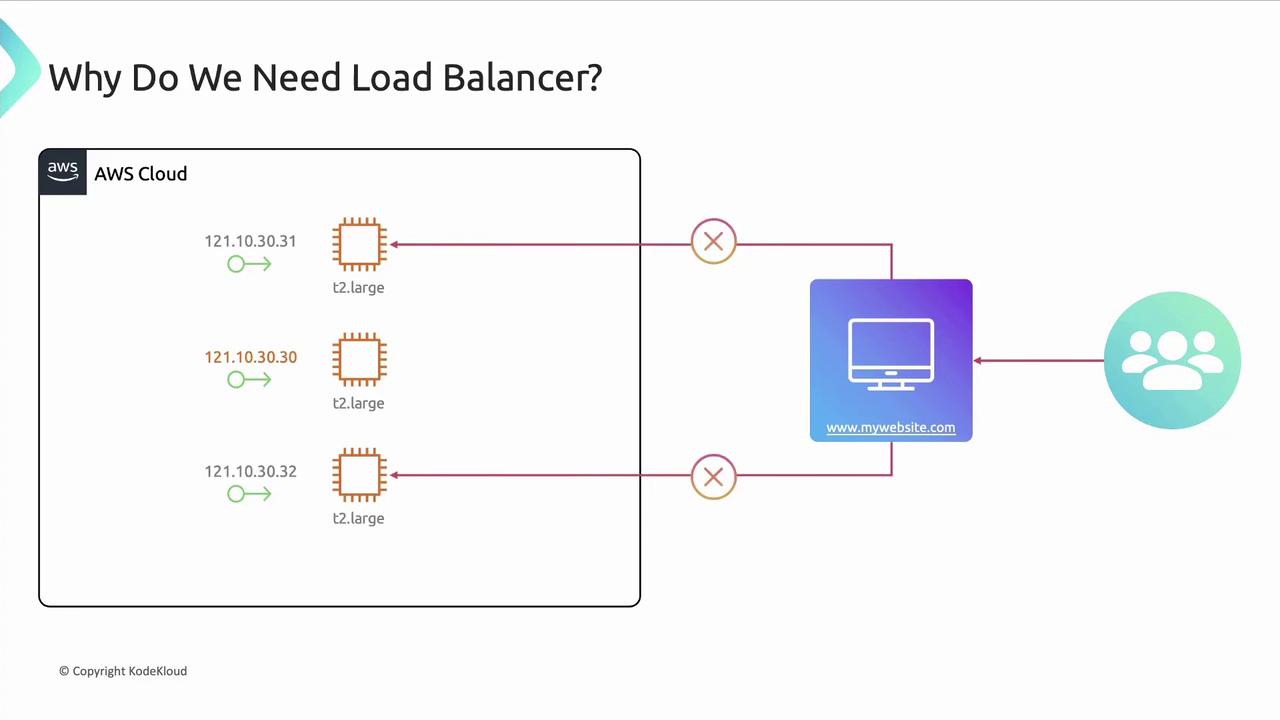
**Horizontal Scaling**\
Run multiple identical instances behind a single endpoint. DNS still points to one IP, so without a load balancer new servers receive no traffic.
<Frame>
  ![The image is a diagram illustrating the need for a load balancer in an AWS cloud setup, showing multiple servers connected to a website and users.](https://kodekloud.com/kk-media/image/upload/v1752869021/notes-assets/images/Amazon-Elastic-Compute-Cloud-EC2-EC2-and-Load-Balancer-amp-Target-Groups/aws-load-balancer-diagram-servers-users.jpg)
</Frame>

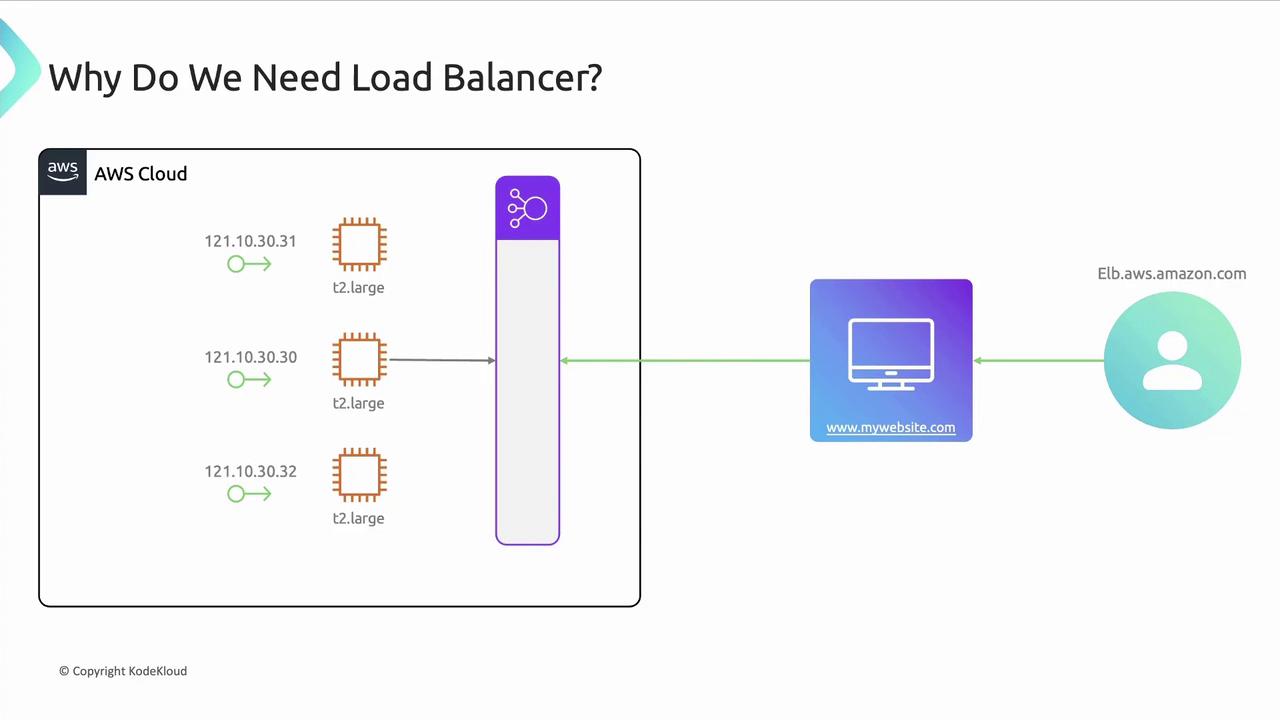
Introducing an **Elastic Load Balancer** solves this:
<Frame>
  ![The image is a diagram illustrating the use of a load balancer in an AWS cloud setup, showing multiple servers distributing traffic to a website.](https://kodekloud.com/kk-media/image/upload/v1752869022/notes-assets/images/Amazon-Elastic-Compute-Cloud-EC2-EC2-and-Load-Balancer-amp-Target-Groups/aws-load-balancer-traffic-distribution-diagram.jpg)
</Frame>

As demand grows, new EC2 instances register automatically with the ELB, making scaling transparent to end users.

***

## How Load Balancing Works in AWS

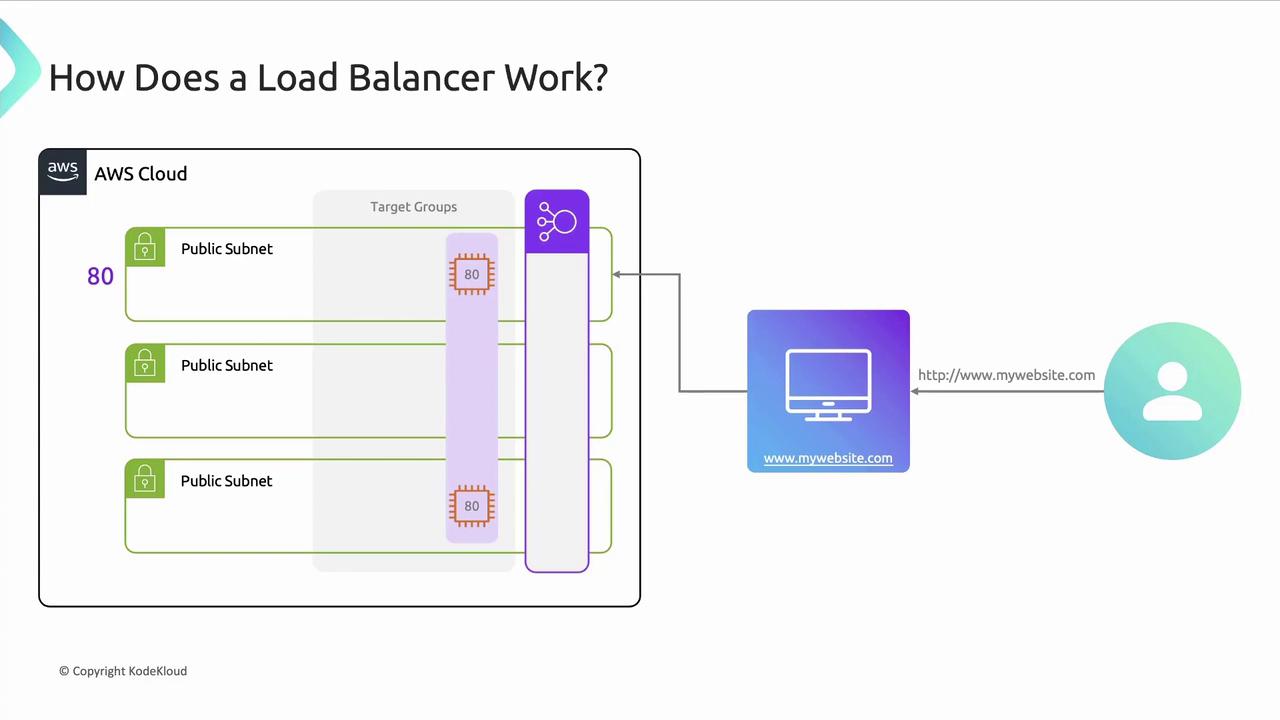
AWS ELB is highly available and fault tolerant across multiple Availability Zones (AZs). It distributes incoming traffic to **target groups**—collections of instances, IP addresses, or Lambda functions.

Each load balancer uses one or more **listeners** to check for connections on a port (e.g., port 80 for HTTP). Listener rules determine how to forward requests:
<Frame>
  ![The image illustrates how a load balancer works within an AWS cloud environment, showing traffic distribution across public subnets and target groups to a website.](https://kodekloud.com/kk-media/image/upload/v1752869023/notes-assets/images/Amazon-Elastic-Compute-Cloud-EC2-EC2-and-Load-Balancer-amp-Target-Groups/aws-load-balancer-traffic-distribution-diagram-2.jpg)
</Frame>

* Default HTTPS port: 443
* Custom listener ports are supported (e.g., 8080)
* Rules are evaluated by **priority**
* Load balancers can be **public-facing** or **internal**

### Protocols and Ports

| Load Balancer Type | Default Port | Supported Protocols       |
| ------------------ | ------------ | ------------------------- |
| HTTP/HTTPS         | 80 / 443     | HTTP, HTTPS, HTTP/2, gRPC |
| TCP/UDP            | Any          | TCP, UDP, TLS             |

Their main goal is to provide **scalability** and **high availability**.

***

## Target Groups

A **target group** defines the routing and health-check configuration for one or more registered targets. You specify:

* Protocol and port
* Health check path and thresholds
* Target type: instance, IP, or Lambda

Supported protocols include HTTP, HTTPS, TCP, UDP, HTTP/1, HTTP/2, and gRPC.

### Health Checks

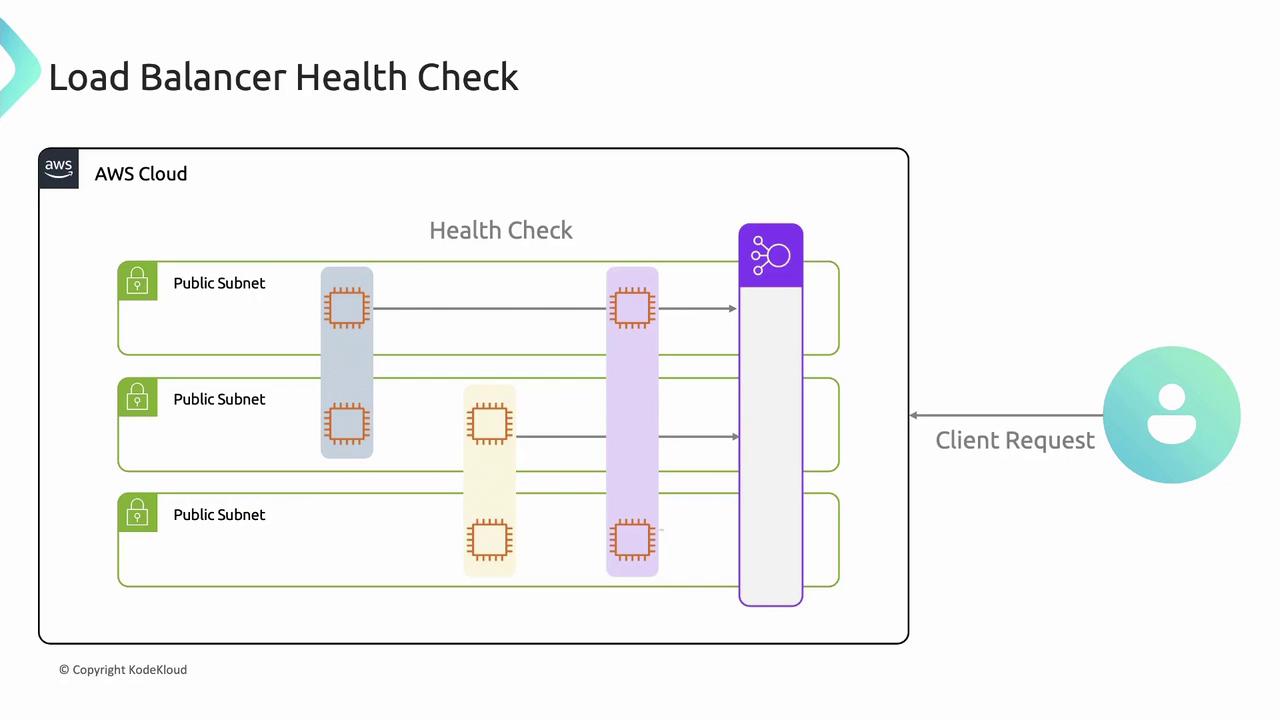
Load balancer nodes perform periodic health checks on each target. Unhealthy targets are removed from rotation until they recover.

<Callout icon="lightbulb" color="#1CB2FE">
  Configure health check intervals and thresholds to balance rapid failover with avoiding false positives.
</Callout>

<Frame>
  ![The image illustrates a load balancer health check process within an AWS cloud environment, showing client requests being directed through public subnets.](https://kodekloud.com/kk-media/image/upload/v1752869025/notes-assets/images/Amazon-Elastic-Compute-Cloud-EC2-EC2-and-Load-Balancer-amp-Target-Groups/aws-load-balancer-health-check-diagram.jpg)
</Frame>

***

## Public vs. Private Load Balancers

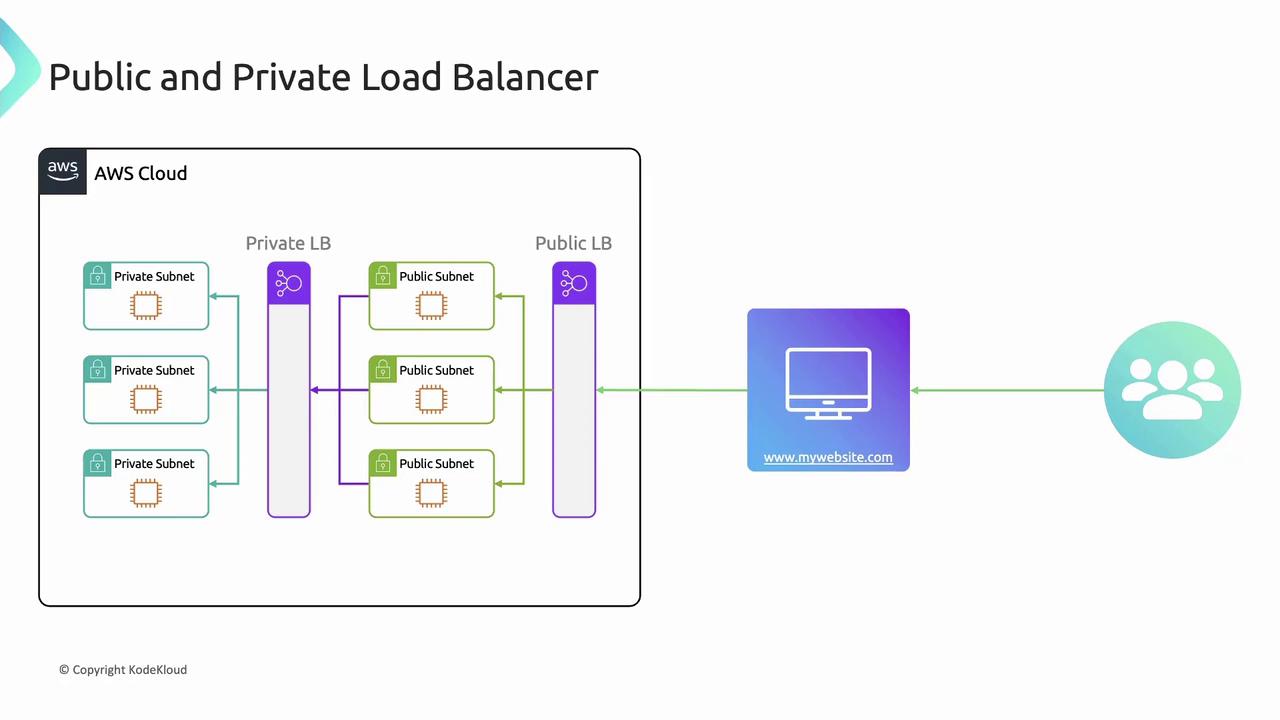
| Type                  | Internet-Facing | Within VPC |
| --------------------- | --------------- | ---------- |
| Public Load Balancer  | Yes             | No         |
| Private Load Balancer | No              | Yes        |

Both improve fault tolerance and allow seamless scaling.
<Frame>
  ![The image illustrates a network architecture with public and private load balancers in an AWS cloud environment, showing connections between private and public subnets, a website, and users.](https://kodekloud.com/kk-media/image/upload/v1752869026/notes-assets/images/Amazon-Elastic-Compute-Cloud-EC2-EC2-and-Load-Balancer-amp-Target-Groups/aws-network-architecture-load-balancers.jpg)
</Frame>

***

## Cross-Zone Load Balancing

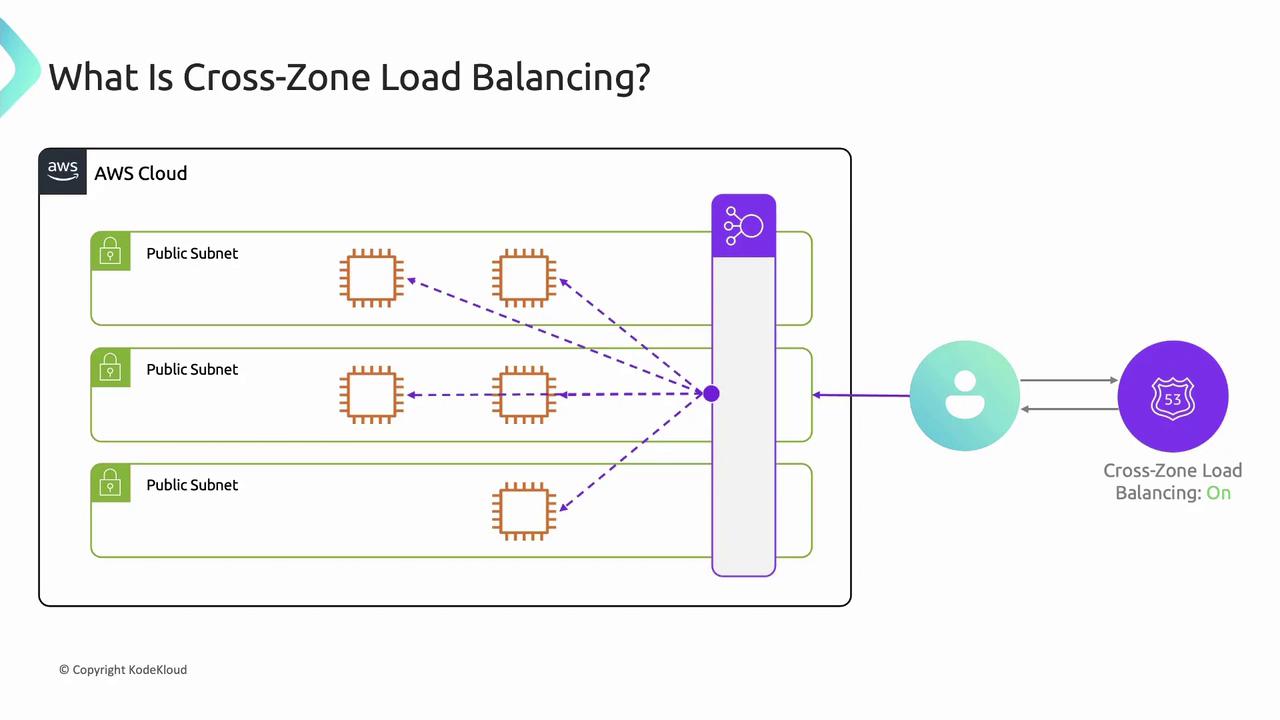
With cross-zone load balancing enabled, each ELB node evenly distributes traffic across all registered targets in every AZ. This prevents hotspots and idle instances.
<Frame>
  ![The image illustrates the concept of cross-zone load balancing in AWS, showing multiple public subnets with instances connected to a load balancer, which distributes traffic across zones.](https://kodekloud.com/kk-media/image/upload/v1752869027/notes-assets/images/Amazon-Elastic-Compute-Cloud-EC2-EC2-and-Load-Balancer-amp-Target-Groups/cross-zone-load-balancing-aws-diagram.jpg)
</Frame>

<Callout icon="triangle-alert" color="#FF6B6B">
  Disable cross-zone load balancing only for very specific network requirements. Most deployments should keep it enabled.
</Callout>

***

## Types of AWS Load Balancers

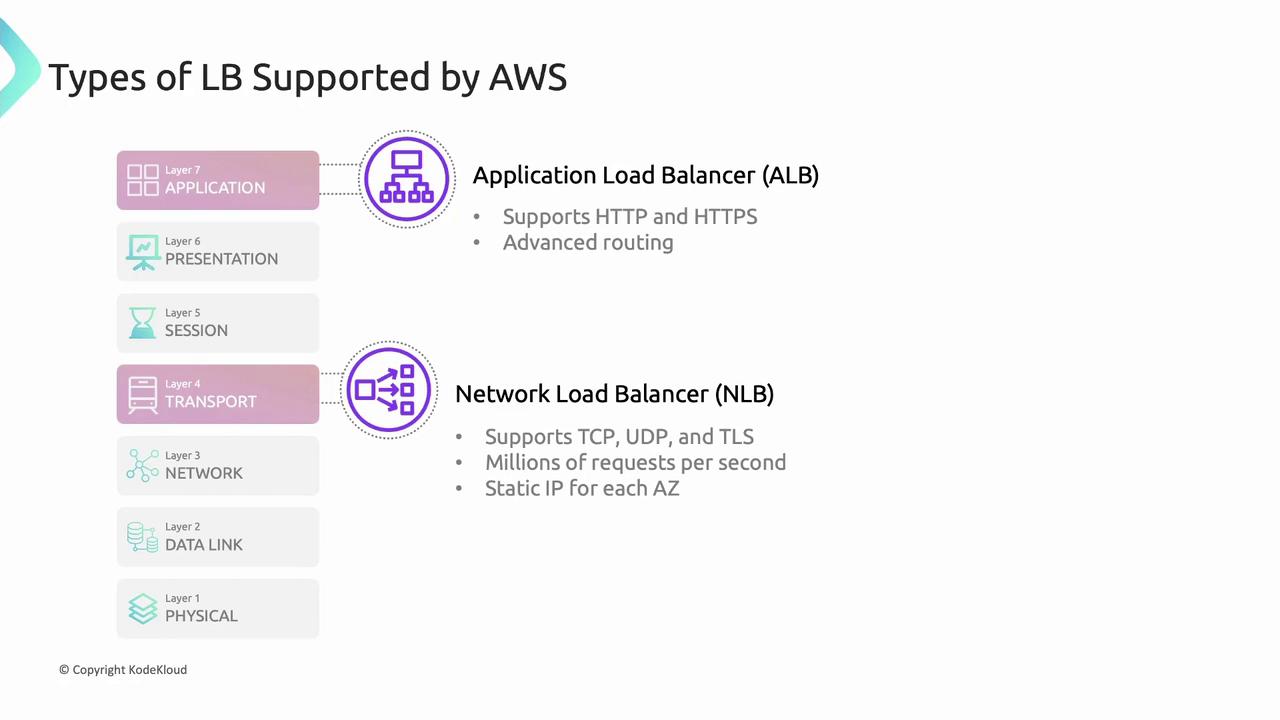
| Load Balancer Type              | OSI Layer | Use Case                                 |
| ------------------------------- | --------- | ---------------------------------------- |
| Application Load Balancer (ALB) | Layer 7   | Advanced HTTP/HTTPS routing and features |
| Network Load Balancer (NLB)     | Layer 4   | High performance TCP/UDP load balancing  |
<Frame>
  ![The image describes two types of load balancers supported by AWS: Application Load Balancer (ALB) and Network Load Balancer (NLB), highlighting their features and the OSI layers they operate on.](https://kodekloud.com/kk-media/image/upload/v1752869028/notes-assets/images/Amazon-Elastic-Compute-Cloud-EC2-EC2-and-Load-Balancer-amp-Target-Groups/aws-load-balancers-alb-nlb-diagram.jpg)
</Frame>

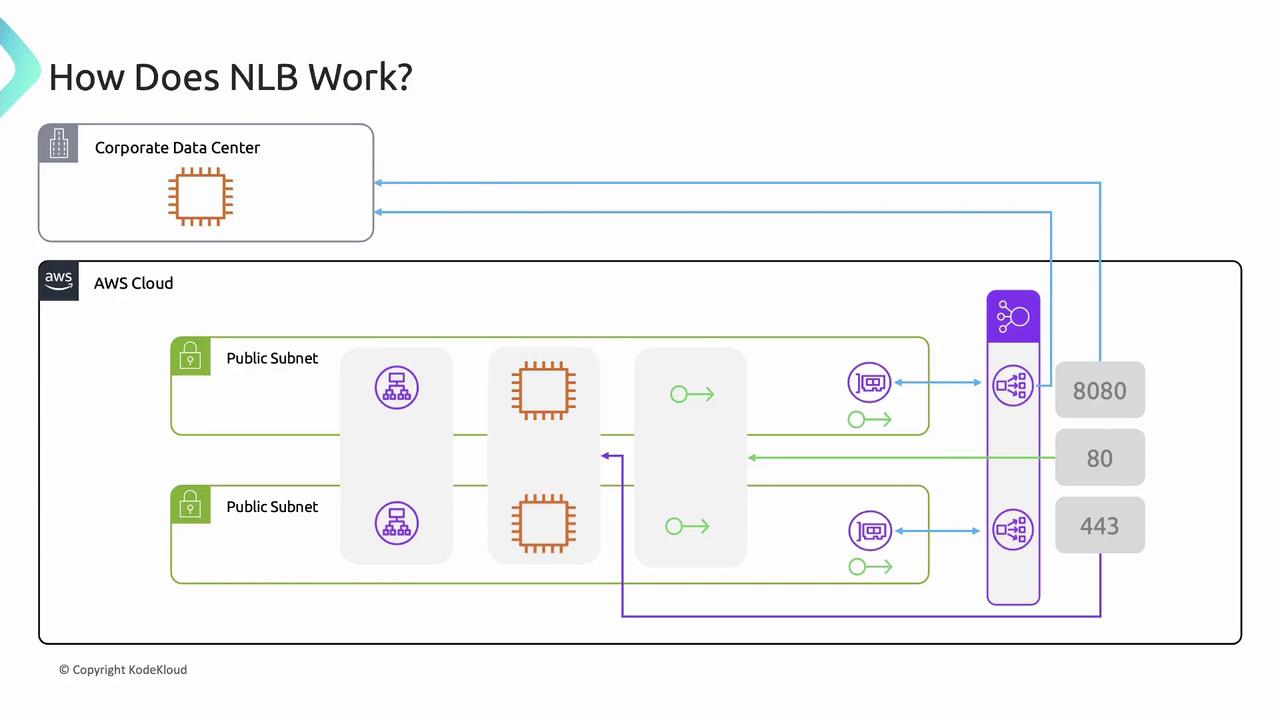
### Network Load Balancer (NLB)

* Targets: instance IDs, IP addresses, or ALBs
* One network interface per AZ for a static IP
* Optionally assign Elastic IPs to each subnet
* Routes TCP/UDP/TLS to target groups by port
* Can route to resources outside the VPC (VPN or Direct Connect)
<Frame>
  ![The image illustrates how a Network Load Balancer (NLB) works, showing the flow of data between a corporate data center and AWS Cloud through public subnets, with connections to various ports (8080, 80, 443).](https://kodekloud.com/kk-media/image/upload/v1752869029/notes-assets/images/Amazon-Elastic-Compute-Cloud-EC2-EC2-and-Load-Balancer-amp-Target-Groups/network-load-balancer-data-flow-diagram.jpg)
</Frame>

### Application Load Balancer (ALB)

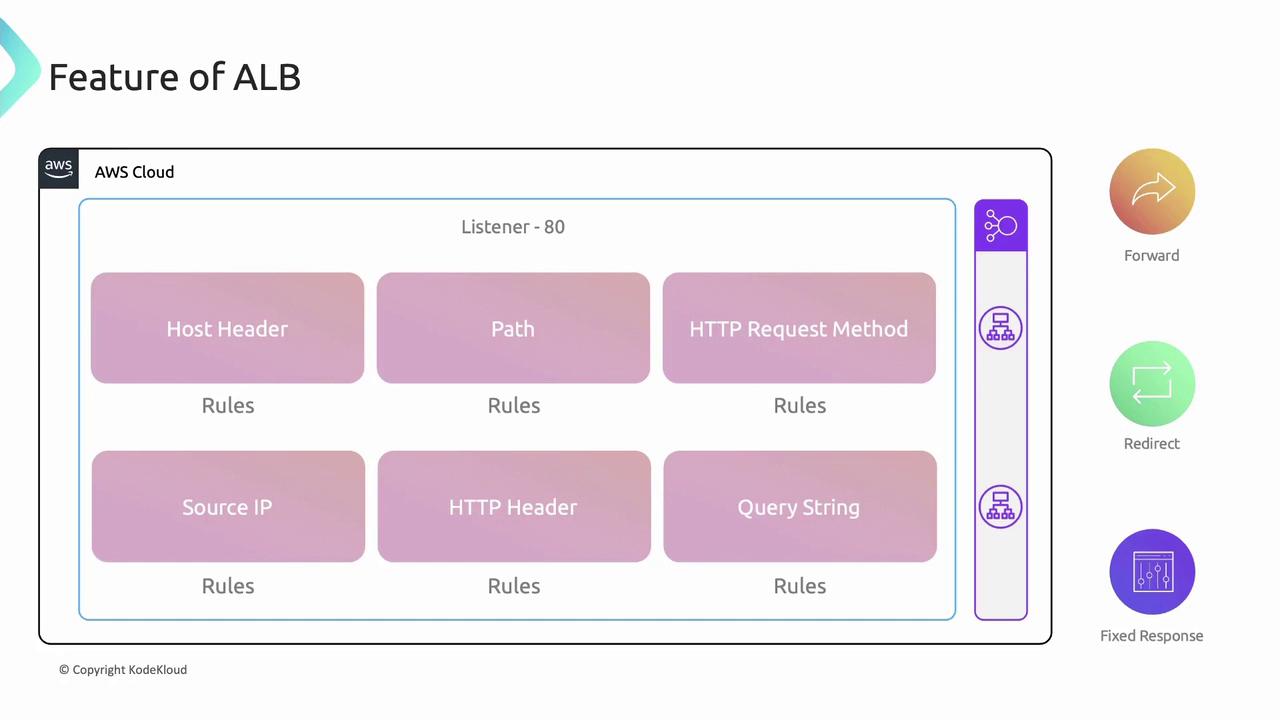
ALB rules consist of **conditions** and a single **action** (`forward`, `redirect`, or `fixed-response`). Supported conditions:

* Host header
* Path
* HTTP method
* Source IP
* HTTP header
* Query string
<Frame>
  ![The image illustrates the features of an AWS Application Load Balancer (ALB), showing various rules like Host Header, Path, and HTTP Request Method, with options for forwarding, redirecting, and fixed responses.](https://kodekloud.com/kk-media/image/upload/v1752869030/notes-assets/images/Amazon-Elastic-Compute-Cloud-EC2-EC2-and-Load-Balancer-amp-Target-Groups/aws-alb-features-rules-diagram.jpg)
</Frame>

#### Host Header Routing

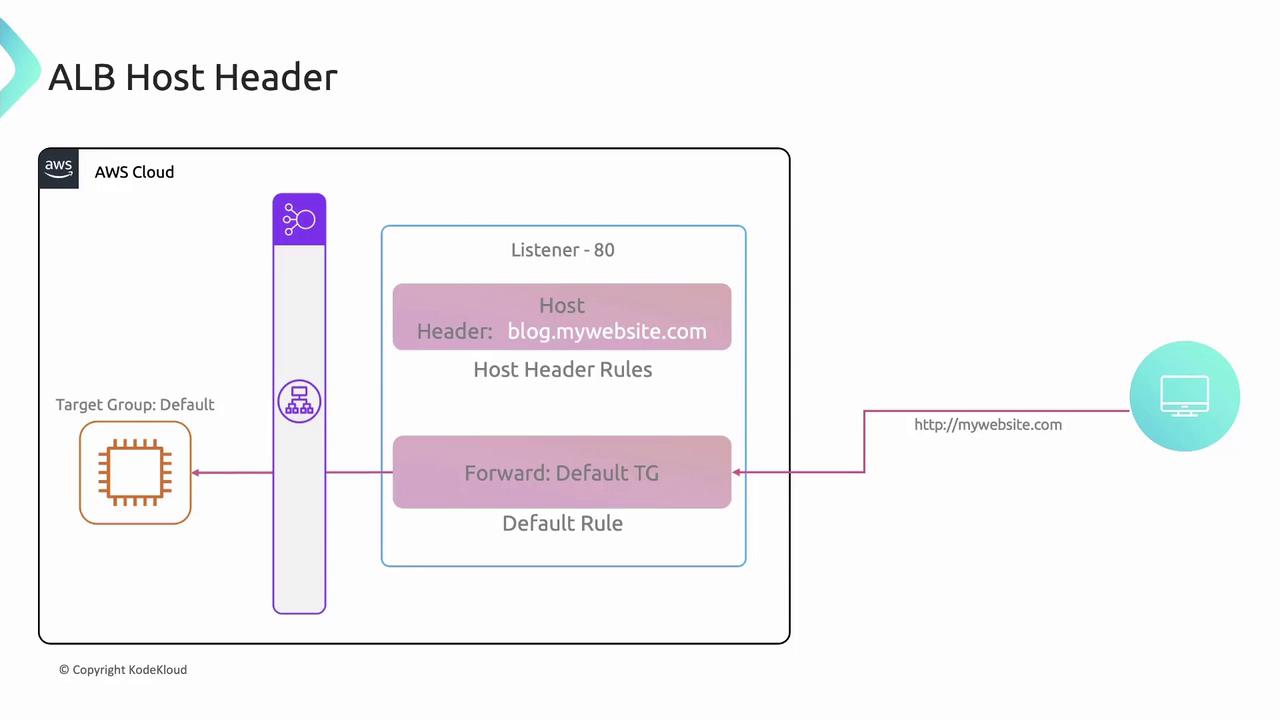
Forward requests based on the `Host` header.\
Example:

* If `Host: blog.mywebsite.com`, route to `blog` target group.
* Default: route all other traffic to `default`.
<Frame>
  ![The image is a diagram illustrating an AWS Application Load Balancer (ALB) configuration with a host header rule for "blog.mywebsite.com" and a default target group.](https://kodekloud.com/kk-media/image/upload/v1752869031/notes-assets/images/Amazon-Elastic-Compute-Cloud-EC2-EC2-and-Load-Balancer-amp-Target-Groups/aws-alb-configuration-diagram-blog.jpg)
</Frame>

#### Path-Based Routing

Match URL paths (e.g., `/blog`) and forward to the corresponding target group.

#### HTTP Method Routing

Match HTTP methods (e.g., `POST`) and forward to an API target group.

#### Source IP Routing

Allow requests from specific IP addresses to a designated group.

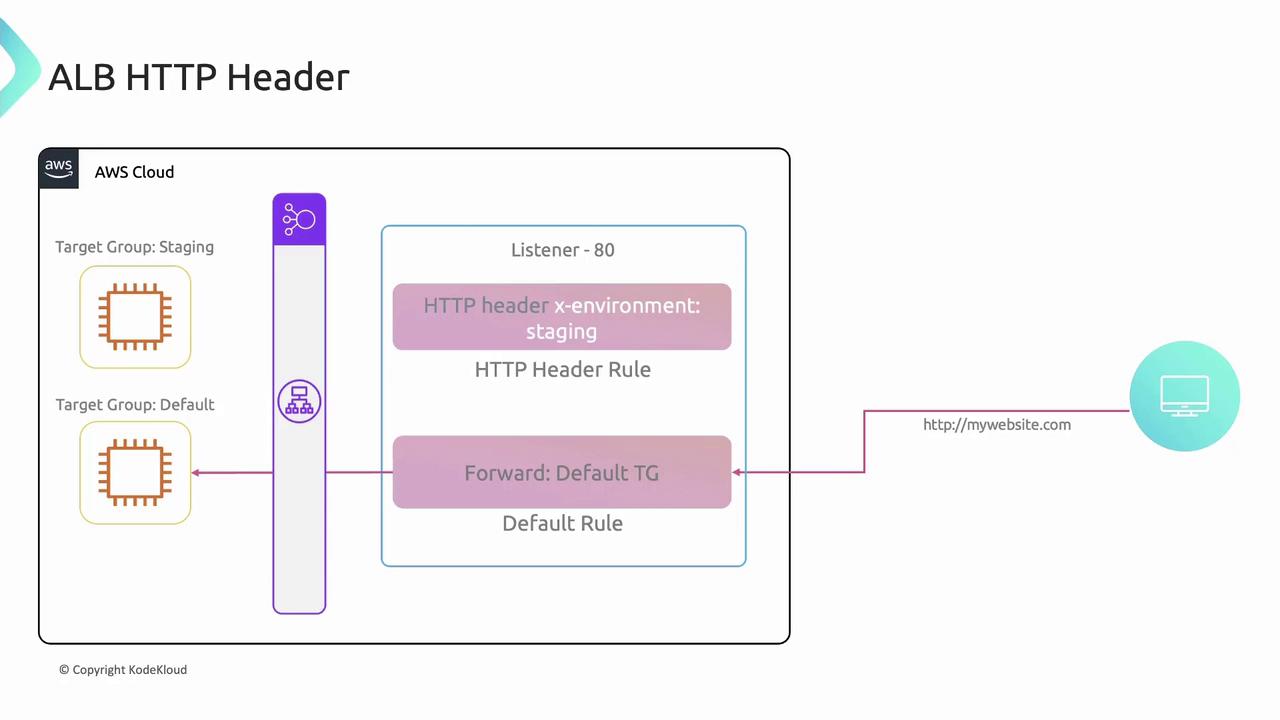
#### HTTP Header Routing

Match custom headers (e.g., `x-environment: staging`) to route to a staging environment:
<Frame>
  ![The image is a diagram illustrating an AWS Application Load Balancer (ALB) HTTP header configuration, showing how requests are routed based on header rules to different target groups.](https://kodekloud.com/kk-media/image/upload/v1752869032/notes-assets/images/Amazon-Elastic-Compute-Cloud-EC2-EC2-and-Load-Balancer-amp-Target-Groups/aws-alb-http-header-configuration-diagram.jpg)
</Frame>

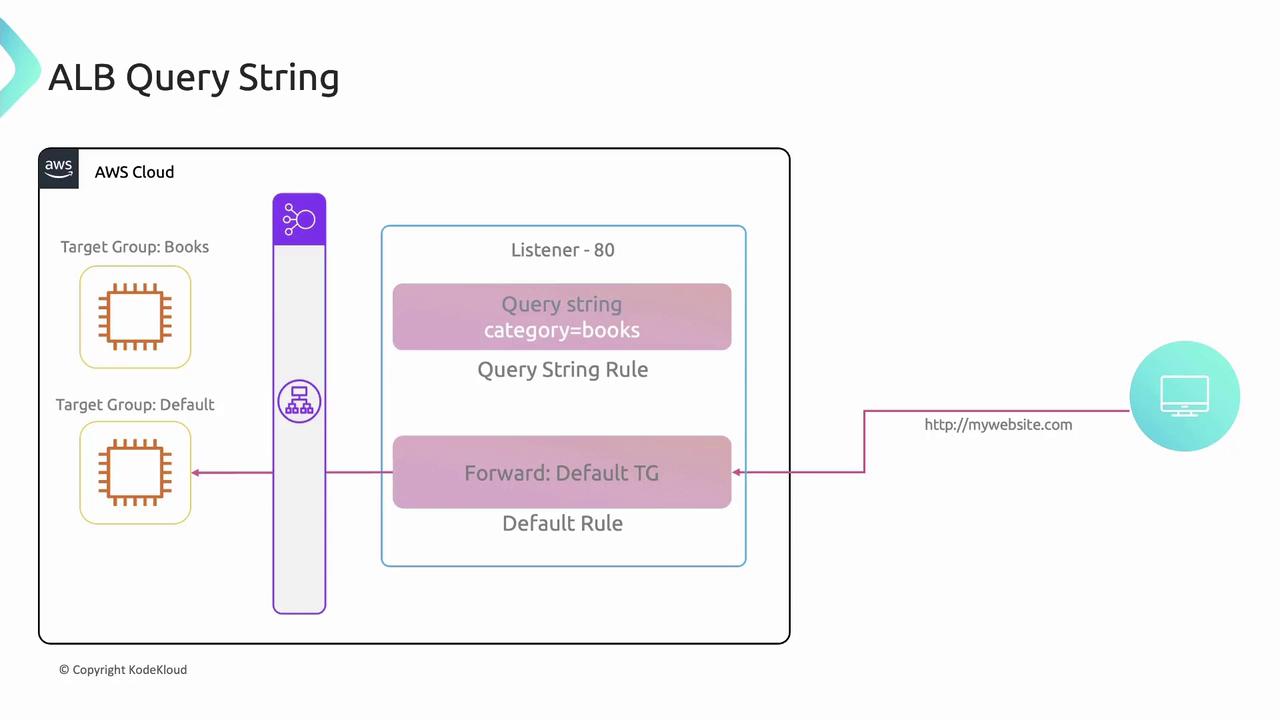
#### Query String Routing

Inspect query parameters (e.g., `?category=books`) and forward accordingly:
<Frame>
  ![The image illustrates an AWS Application Load Balancer (ALB) configuration with query string rules, showing how requests with the query string "category=books" are directed to a specific target group, while others follow a default rule.](https://kodekloud.com/kk-media/image/upload/v1752869033/notes-assets/images/Amazon-Elastic-Compute-Cloud-EC2-EC2-and-Load-Balancer-amp-Target-Groups/aws-alb-configuration-query-string-rules.jpg)
</Frame>

***

### Rule Priority Example

```bash theme={null}
curl -H "x-client: premium" http://mywebsite.com/api
curl -H "x-client: medium"  http://mywebsite.com/api
curl                        http://mywebsite.com/api
```

1. Priority 1: Path `/api` + header `x-client: premium` → `large`
2. Priority 2: Path `/api` + header `x-client: medium` → `medium`
3. Default: All other `/api` → `default-api`

***

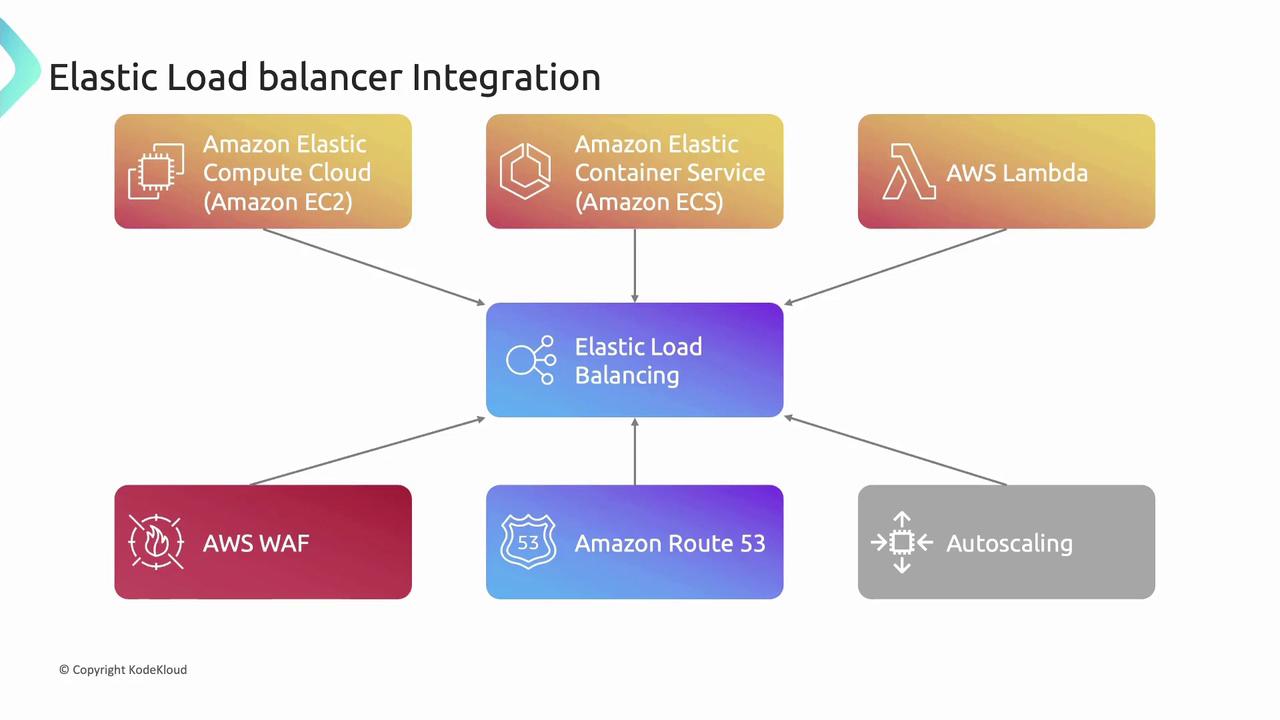
## Elastic Load Balancer Integrations

ELBs integrate with many AWS services to deliver end-to-end, scalable architectures:
<Frame>
  ![The image is a diagram showing the integration of Elastic Load Balancing with various AWS services, including Amazon EC2, Amazon ECS, AWS Lambda, AWS WAF, Amazon Route 53, and Autoscaling.](https://kodekloud.com/kk-media/image/upload/v1752869035/notes-assets/images/Amazon-Elastic-Compute-Cloud-EC2-EC2-and-Load-Balancer-amp-Target-Groups/elastic-load-balancing-aws-integration-diagram.jpg)
</Frame>

* **EC2**: Distribute incoming traffic across instances
* **ECS**: Balance containerized workloads
* **Lambda**: Route requests to serverless functions
* **WAF**: Apply security rules to incoming traffic
* **Route 53**: Use DNS to map domains to load balancers
* **Auto Scaling**: Automatically adjust capacity and register/deregister targets

***

## Links and References

* [AWS Elastic Load Balancing User Guide](https://docs.aws.amazon.com/elasticloadbalancing/latest/userguide/)
* [Amazon EC2 Documentation](https://docs.aws.amazon.com/ec2/)
* [Amazon VPC Documentation](https://docs.aws.amazon.com/vpc/)
* [AWS Lambda Developer Guide](https://docs.aws.amazon.com/lambda/latest/dg/)

<CardGroup>
  <Card title="Watch Video" icon="video" cta="Learn more" href="https://learn.kodekloud.com/user/courses/amazon-elastic-compute-cloud-ec2/module/fe995ae2-a50f-4c70-9d50-3f2e017bd207/lesson/c24ffe8a-c2be-447e-bfaf-033632261ec0" />

  <Card title="Practice Lab" icon="installation" cta="Learn more" href="https://learn.kodekloud.com/user/courses/amazon-elastic-compute-cloud-ec2/module/fe995ae2-a50f-4c70-9d50-3f2e017bd207/lesson/780fc1e1-0469-443e-942f-297702fbc9dd" />
</CardGroup>
