> ## Documentation Index
> Fetch the complete documentation index at: https://notes.kodekloud.com/llms.txt
> Use this file to discover all available pages before exploring further.
# Mandatory best practice Part 2
> This article discusses best practices for designing stateless applications on Amazon EC2 to ensure availability, scalability, and seamless user experiences.
When running applications on Amazon EC2, remember that instances can be terminated, replaced, or fail at any time. Designing your service to be **stateless** ensures continuous availability, scalable performance, and seamless user experiences, even when individual instances come and go.
## What Is a Stateless Application?
A stateless application does not store session or user-specific data on the local filesystem or memory of an EC2 instance. Instead, all stateful information (sessions, user preferences, shopping carts, etc.) is stored externally. This decoupling enables:
* **Fault tolerance**: Instances can fail or be cycled without losing critical data.
* **Seamless scaling**: New instances join the fleet instantly without migration overhead.
* **Simplified deployments**: Rolling updates and instance replacement become trivial.
Offloading session data to a centralized store (like Redis or DynamoDB) is a key pillar of stateless design. This setup allows any instance to handle any user request at any time.
## Externalizing Session State with Redis
One common pattern is using an in-memory database such as Redis for session storage:
1. Deploy a **highly available Redis cluster** (e.g., Amazon ElastiCache for Redis) across multiple Availability Zones (AZs).
2. Configure each EC2 instance to read/write session data from Redis instead of local memory.
3. Handle failover: if one Redis node goes down, the cluster automatically promotes a replica.
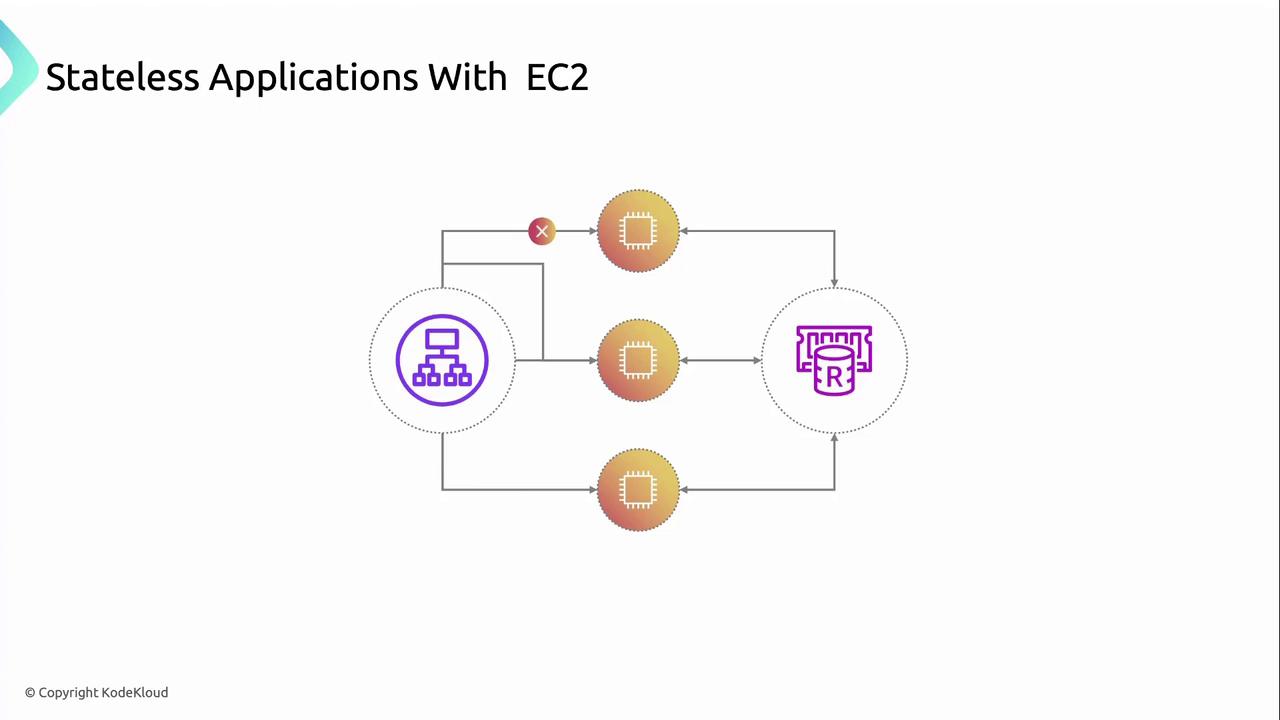
With this architecture in place, instances remain interchangeable, and session continuity is preserved even during auto scaling or instance replacements.
## Key Advantages
| Benefit | Description | Example |
| -------------------------- | ------------------------------------------------------------------------------------------------------------------------------------------------------------ | ------------------------------------------------------------------------------------ |
| Seamless Auto Scaling | New EC2 instances handle traffic immediately without forcing users to re-authenticate. | Auto Scaling Group adds 2 instances during peak hours. |
| Multi-AZ Fault Tolerance | Distribute instances and external stores across AZs to survive zone failures. | Deploy 3 instances in us-east-1a and 3 in us-east-1b, plus a cross-AZ Redis cluster. |
| Simplified Maintenance | Externalized session data allows you to update or replace instances without migration scripts or data replication. | Blue/Green deployment with no downtime and consistent user sessions. |
| Consistent User Experience | Central session storage ensures users remain logged in, maintain shopping carts, or continue long-running processes even if their original instance is gone. | Redis cluster snapshots and backups for disaster recovery. |
## Best Practices for High Availability
* Distribute your EC2 instances and Redis nodes across **at least two AZs**.
* Enable **Multi-AZ auto-failover** on your Redis or ElastiCache cluster.
* Use **Elastic Load Balancers (ALB/NLB)** to route traffic evenly and health-check instances.
* Implement **session timeouts** and data eviction policies to manage Redis memory usage.
Storing sensitive data in Redis without encryption can expose user information. Always enable **encryption in transit** and **at rest**, and restrict access via **Security Groups** and **ACLs**.
## Links and References
* [Amazon EC2 Auto Scaling](https://docs.aws.amazon.com/autoscaling/ec2/userguide/what-is-amazon-ec2-auto-scaling.html)
* [Amazon ElastiCache for Redis](https://docs.aws.amazon.com/elasticache/latest/red-ug/WhatIs.html)
* [AWS Well-Architected Framework – Fault Tolerance](https://aws.amazon.com/architecture/well-architected/fault-tolerance/)
* [Redis Official Documentation](https://redis.io/documentation)