> ## Documentation Index
> Fetch the complete documentation index at: https://notes.kodekloud.com/llms.txt
> Use this file to discover all available pages before exploring further.
# Background what and why of EC2
> This article introduces Amazon EC2, discussing its evolution, features, and advantages over traditional data centers.
Welcome to this introductory lesson on Amazon Elastic Compute Cloud (EC2). In this guide, we’ll explore the evolution of compute, the limitations of traditional data centers, and how EC2 transforms the way you deploy and manage applications in the cloud.
## Challenges of Traditional Data Centers
In the 1980s and 1990s, organizations depended on on-premises data centers, facing:
* **Lengthy Provisioning**\
Ordering, racking, and configuring hardware could take weeks or months.
* **High Upfront Costs**\
Capital expenditures for servers, networking, and storage were significant.
* **Maintenance Overhead**\
Hardware failures, patch management, and firmware upgrades required dedicated teams.
* **Limited Agility**\
Scaling up or down on demand was virtually impossible without overprovisioning.
To accommodate peak loads, companies often overestimated capacity, tying up capital and reducing operational flexibility.
## Emergence of Virtualization
The early 2000s saw the rise of virtualization, which enabled multiple virtual machines (VMs) to run on a single physical server. Key benefits included:
* **Improved Resource Utilization**
* **Faster Recovery** and simplified maintenance
* **On-Demand Flexibility** for deploying new workloads
Virtualization set the stage for cloud computing by decoupling hardware from software.
## Introducing Amazon EC2
Amazon EC2 (launched in 2006) provides secure, resizable compute capacity in the AWS Cloud. Instead of procuring physical servers, you launch virtual instances with the CPU, memory, storage, and networking capacity you need.
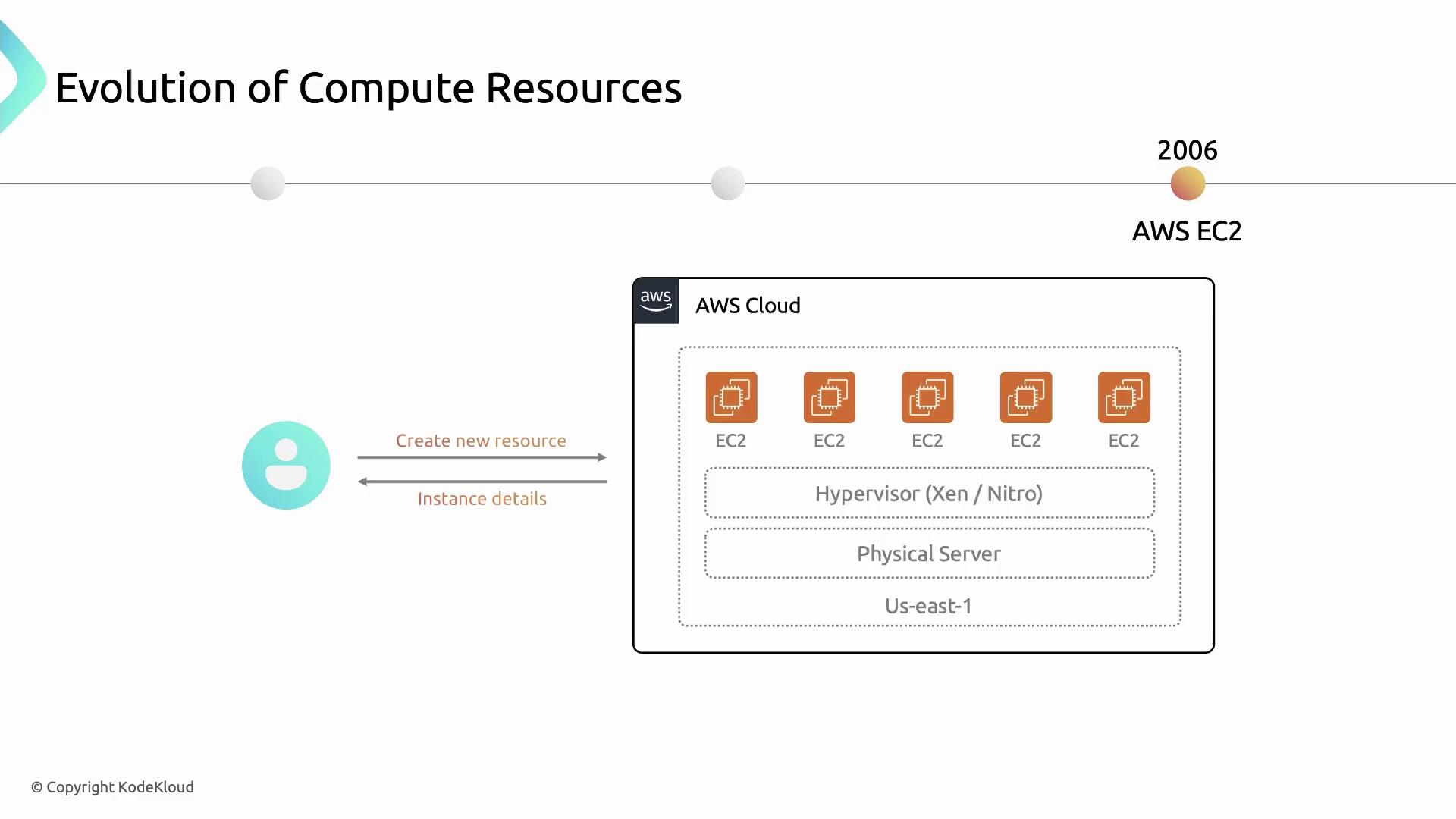
With EC2, provisioning a new server takes minutes instead of months—accelerating development cycles and innovation.
## Key Features of Amazon EC2
Amazon EC2 offers a rich set of features to support diverse workloads:
### 1. Instance Families
Choose from multiple instance families optimized for different use cases:
| Instance Family | Use Case | Example Types |
| --------------------- | ---------------------------------- | -------------------------- |
| General Purpose | Balanced CPU & memory | `t3.micro`, `m5.large` |
| Compute Optimized | Compute-intensive applications | `c5.large`, `c6g.medium` |
| Memory Optimized | Memory-bound workloads | `r5.xlarge`, `x1e.2xlarge` |
| Storage Optimized | High I/O performance | `i3.large`, `d3en.4xlarge` |
| Accelerated Computing | GPU/FPGA-based parallel processing | `p3.2xlarge`, `f1.4xlarge` |
### 2. Flexible Pricing Models
Optimize costs with multiple pricing options:
| Pricing Model | Description | Best For |
| ------------------ | ------------------------------------------------- | ------------------------------------- |
| On-Demand | Pay per second for compute resources | Short-term, unpredictable workloads |
| Reserved Instances | Commit to 1–3 year term for discounts | Steady-state, long-running workloads |
| Spot Instances | Bid on spare capacity for up to 90% off On-Demand | Fault-tolerant, flexible applications |
| Savings Plans | Flexible discount model across compute usage | Predictable usage across AWS services |
Provisioning the wrong instance type or pricing model can lead to unexpected costs. Always analyze your workload patterns first.
### 3. High Availability & Reliability
* **Regions & Availability Zones**\
Distribute instances across multiple AZs for fault tolerance.
* **Automated Hardware Replacement**\
AWS monitors and remediates failed hardware.
Learn more: [AWS Regions and Availability Zones](https://docs.aws.amazon.com/AWSEC2/latest/UserGuide/using-regions-availability-zones.html)
### 4. Elastic Scaling
* **Auto Scaling**\
Automatically adjust capacity in response to demand.
* **Elastic Load Balancing**\
Distribute incoming traffic across healthy instances.
Learn more: [Amazon EC2 Auto Scaling](https://aws.amazon.com/autoscaling/), [Elastic Load Balancing](https://aws.amazon.com/elasticloadbalancing/)
### 5. Customization & Control
* **Amazon Machine Images (AMIs)**\
Preconfigure OS, application server, and applications.
* **User Data & CloudInit**\
Automate instance initialization scripts.
Learn more: [AMI Overview](https://docs.aws.amazon.com/AWSEC2/latest/UserGuide/AMIs.html)
### 6. Integration with AWS Services
EC2 works seamlessly with the broader AWS ecosystem:
| Service | Purpose |
| -------------- | ---------------------------- |
| Amazon S3 | Object storage |
| Amazon RDS | Managed relational databases |
| AWS VPC | Virtual networking |
| AWS IAM | Secure access control |
| AWS CloudWatch | Monitoring and observability |
## Links and References
* [Amazon EC2 Documentation](https://docs.aws.amazon.com/ec2/)
* [AWS Pricing](https://aws.amazon.com/pricing/)
* [Kubernetes on AWS](https://aws.amazon.com/containers/kubernetes/)
* [Terraform AWS Provider](https://registry.terraform.io/providers/hashicorp/aws)