> ## Documentation Index
> Fetch the complete documentation index at: https://notes.kodekloud.com/llms.txt
> Use this file to discover all available pages before exploring further.
# Introduction to NACL
> This article explains AWS Network ACLs, their functionality, rules, and best practices for securing network traffic in Amazon VPCs.
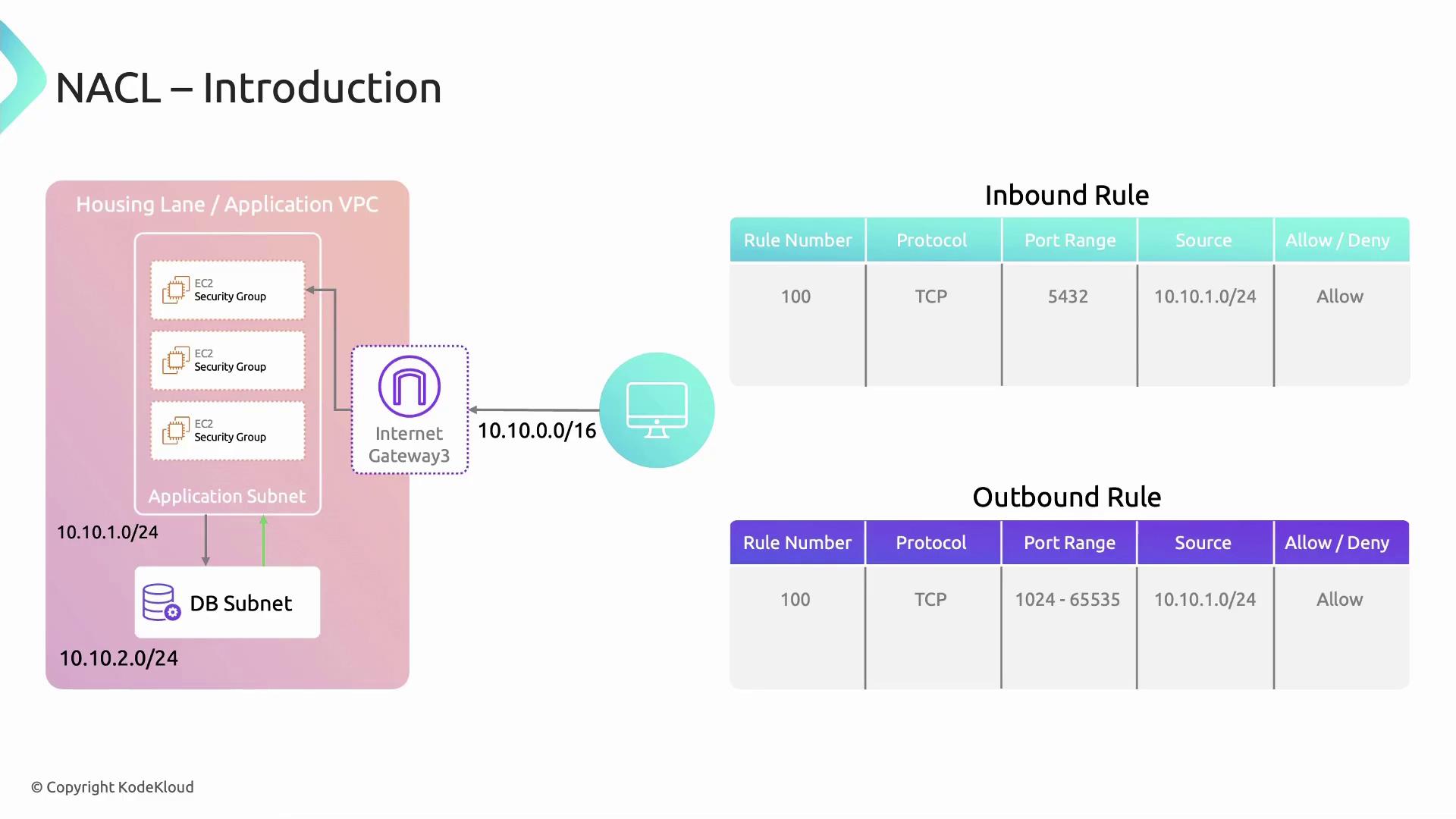
Network Access Control Lists (Network ACLs or NACLs) are an essential network-layer security feature in Amazon VPCs. While Security Groups enforce host-level traffic rules, NACLs apply stateless, subnet-level filters. This makes them ideal for isolating resources—such as placing databases in a separate subnet and only allowing traffic from your application subnet.
Network ACLs are **stateless**: you must explicitly configure both inbound and outbound rules to allow return traffic. In contrast, Security Groups are stateful and automatically permit responses.
Network ACLs consist of ordered rule entries that either **allow** or **deny** specific traffic. Rules are evaluated by ascending rule number, and processing stops when a match is found.
| Field | Description |
| ----------- | ---------------------------------------------------------------- |
| Rule Number | Integer from 1–32,766, determining evaluation order |
| Protocol | `TCP`, `UDP`, `ICMP` or `ALL` |
| Port Range | Single port or range (e.g., `80` or `1024–65535`) |
| CIDR Block | IPv4/IPv6 network (source for inbound, destination for outbound) |
| Action | `ALLOW` or `DENY` |
## Inbound vs. Outbound Rules
* **Inbound rules** filter traffic entering the subnet.
* **Outbound rules** filter traffic leaving the subnet.
## Example: Allowing Ephemeral Port Traffic
In this scenario, an application subnet (`10.10.1.0/24`) must communicate with a database subnet. We allow TCP traffic on ephemeral ports (1024–65535) and deny all other traffic.
### Inbound Rules
```text theme={null}
Rule # Protocol Port Range Source CIDR Action
100 TCP 1024–65535 10.10.1.0/24 ALLOW
* ALL ALL 0.0.0.0/0 DENY
```
### Outbound Rules
```text theme={null}
Rule # Protocol Port Range Destination CIDR Action
100 TCP 1024–65535 10.10.1.0/24 ALLOW
* ALL ALL 0.0.0.0/0 DENY
```
Always include a catch-all `DENY` rule (`*`) to block unwanted traffic. Omitting it can leave your subnet exposed.
* Combine **Security Groups** (stateful) and **Network ACLs** (stateless) for layered defense.
* Use specific rule numbers to group similar rules.
* Regularly audit NACL logs via [VPC Flow Logs](https://docs.aws.amazon.com/vpc/latest/userguide/flow-logs.html).
* [AWS Network ACLs Documentation](https://docs.aws.amazon.com/vpc/latest/userguide/vpc-network-acls.html)
* [AWS Security Groups vs. NACLs](https://docs.aws.amazon.com/vpc/latest/userguide/VPC_Security.html)
* [VPC Flow Logs](https://docs.aws.amazon.com/vpc/latest/userguide/flow-logs.html)