> ## Documentation Index
> Fetch the complete documentation index at: https://notes.kodekloud.com/llms.txt
> Use this file to discover all available pages before exploring further.
# Lifecycle Policies
> Amazon S3 lifecycle policies automate storage class transitions and object expiration to optimize storage costs without manual intervention.
Amazon S3 lifecycle policies help you optimize storage costs by automatically transitioning objects between storage classes or expiring them after a specified time. Define your rules once, and S3 handles the rest—no manual cleanup required.
## How Lifecycle Policies Work
When you upload an object (for example, `file1.txt`) using **S3 Standard**, its access pattern may change over time. You can configure a lifecycle policy such as:
* After **30 days**: transition to **S3 Standard-IA** (Infrequent Access).
* After **90 days**: archive to **S3 Glacier Deep Archive**.
* After **365 days**: delete the object.
Lifecycle policies can target:
* An **entire bucket**.
* A **subset of objects** defined by prefix or tag.
* **Specific versions** (if you have versioning enabled).
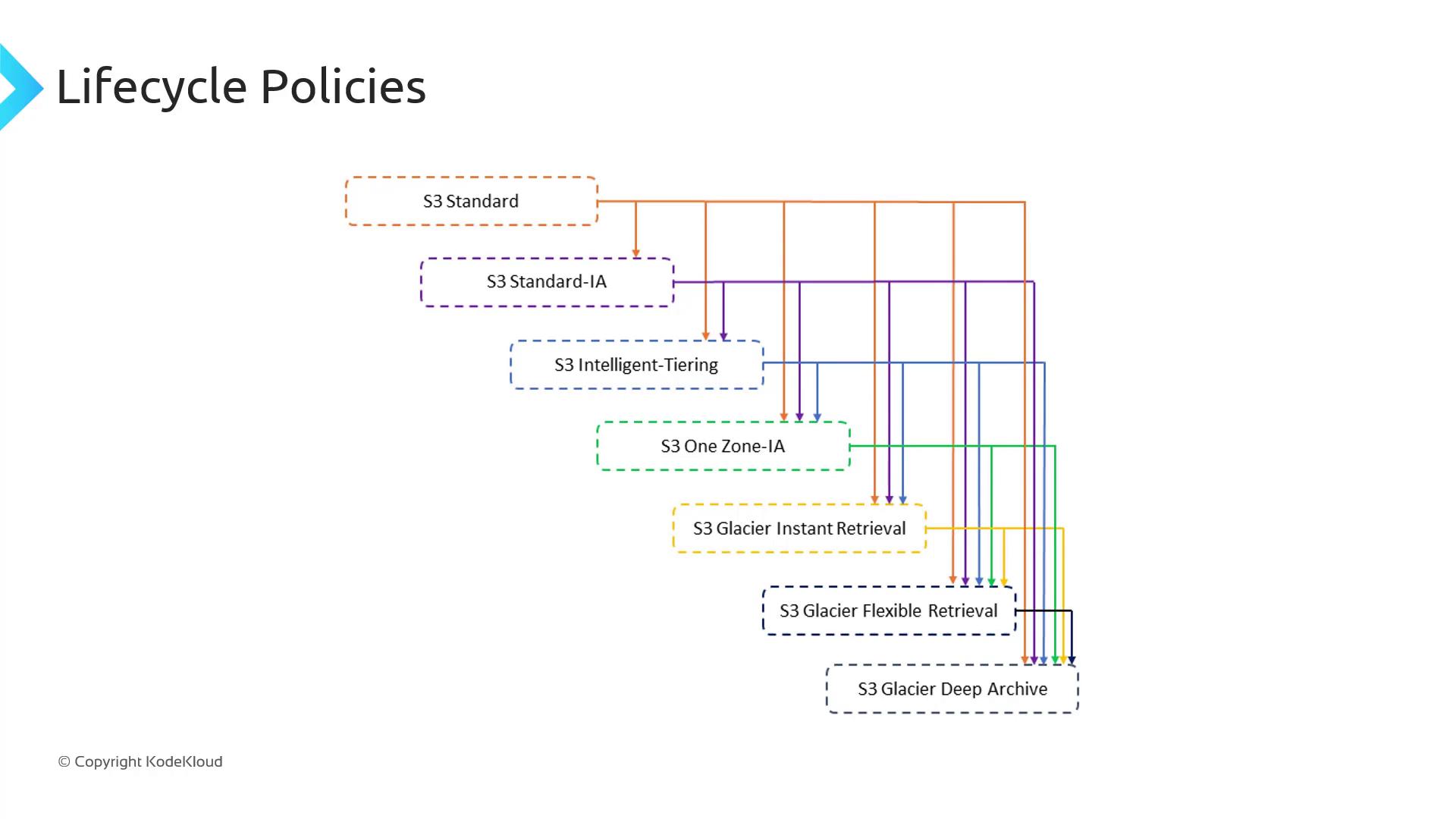
Lifecycle rules only move objects “downhill,” from a higher-cost class to a lower-cost class.
## Storage Class Transition Rules
Not every storage class can transition directly to every other. The following table summarizes permitted transitions:
| Source Class | Allowed Transitions |
| -------------------------- | -------------------------------------------------------------------------------------------------------------------------- |
| **S3 Standard** | Standard-IA, Intelligent-Tiering, One Zone-IA, Glacier Instant Retrieval, Glacier Flexible Retrieval, Glacier Deep Archive |
| **S3 Intelligent-Tiering** | Glacier Instant Retrieval, Glacier Flexible Retrieval, Glacier Deep Archive |
| **S3 One Zone-IA** | Glacier Flexible Retrieval, Glacier Deep Archive |
## Additional Constraints
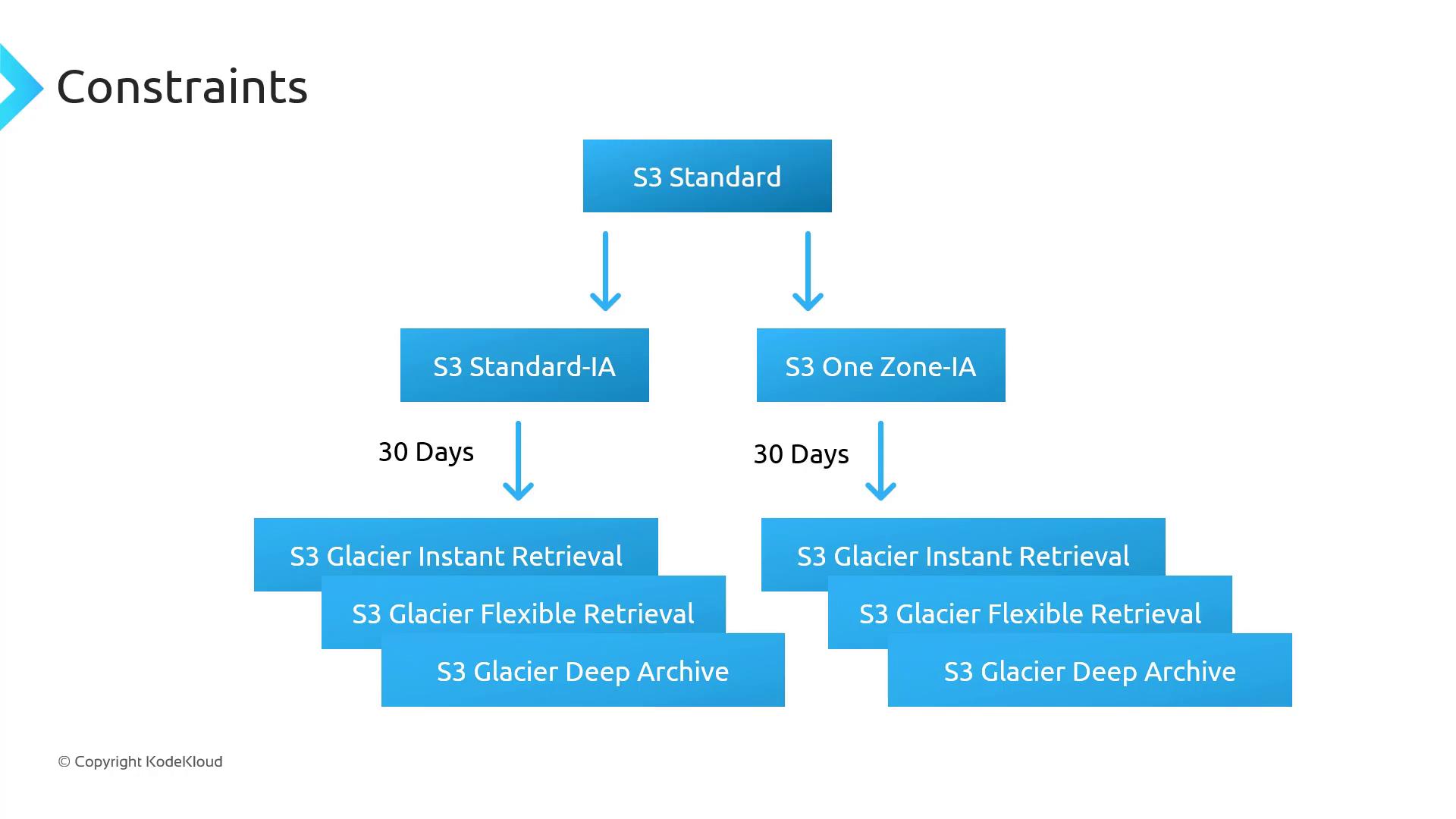
When defining lifecycle rules, observe these key constraints:
* **Minimum object size**\
Objects must be ≥ 128 KB to transition from Standard or Standard-IA to Intelligent-Tiering or Glacier Instant Retrieval.
* **Minimum storage duration**
* Standard → Standard-IA or One Zone-IA: **30 days** in the source class.
* After moving to Standard-IA or One Zone-IA, wait another **30 days** before transitioning to any Glacier class.
Violating minimum size or duration requirements will cause your lifecycle rule to skip transitions. Always verify object metadata before applying a rule.
For a full list of constraints and examples, see the [official AWS documentation](https://docs.aws.amazon.com/AmazonS3/latest/userguide/object-lifecycle-mgmt.html).
## Next Steps
In the next lesson, we’ll perform a hands-on demo in the S3 console. You’ll learn how to:
1. Create a lifecycle rule step-by-step.
2. Apply filters by prefix or tag.
3. Review the rule summary and activate it in minutes.
***
## Links and References
* [AWS S3 Lifecycle Configuration](https://docs.aws.amazon.com/AmazonS3/latest/userguide/object-lifecycle-mgmt.html)
* [Amazon S3 Storage Classes](https://aws.amazon.com/s3/storage-classes/)
* [Managing S3 Versioning and Lifecycle](https://aws.amazon.com/blogs/storage/managing-versions-and-lifecycle-with-amazon-s3/)