> ## Documentation Index
> Fetch the complete documentation index at: https://notes.kodekloud.com/llms.txt
> Use this file to discover all available pages before exploring further.
# Jinja2 Basics
> Introduction to Jinja2 templating basics, syntax, filters, and practical examples for generating HTML, configuration files, and Ansible templates
Templating lets you separate fixed structure (the template) from changing content (the variables). For example, a company's CEO may want to send a personalized invitation to every employee: the letter layout remains the same (the template) while names and family members vary (the variables). A templating engine takes a template plus a set of variables and renders one or many final outputs (one email or hundreds).
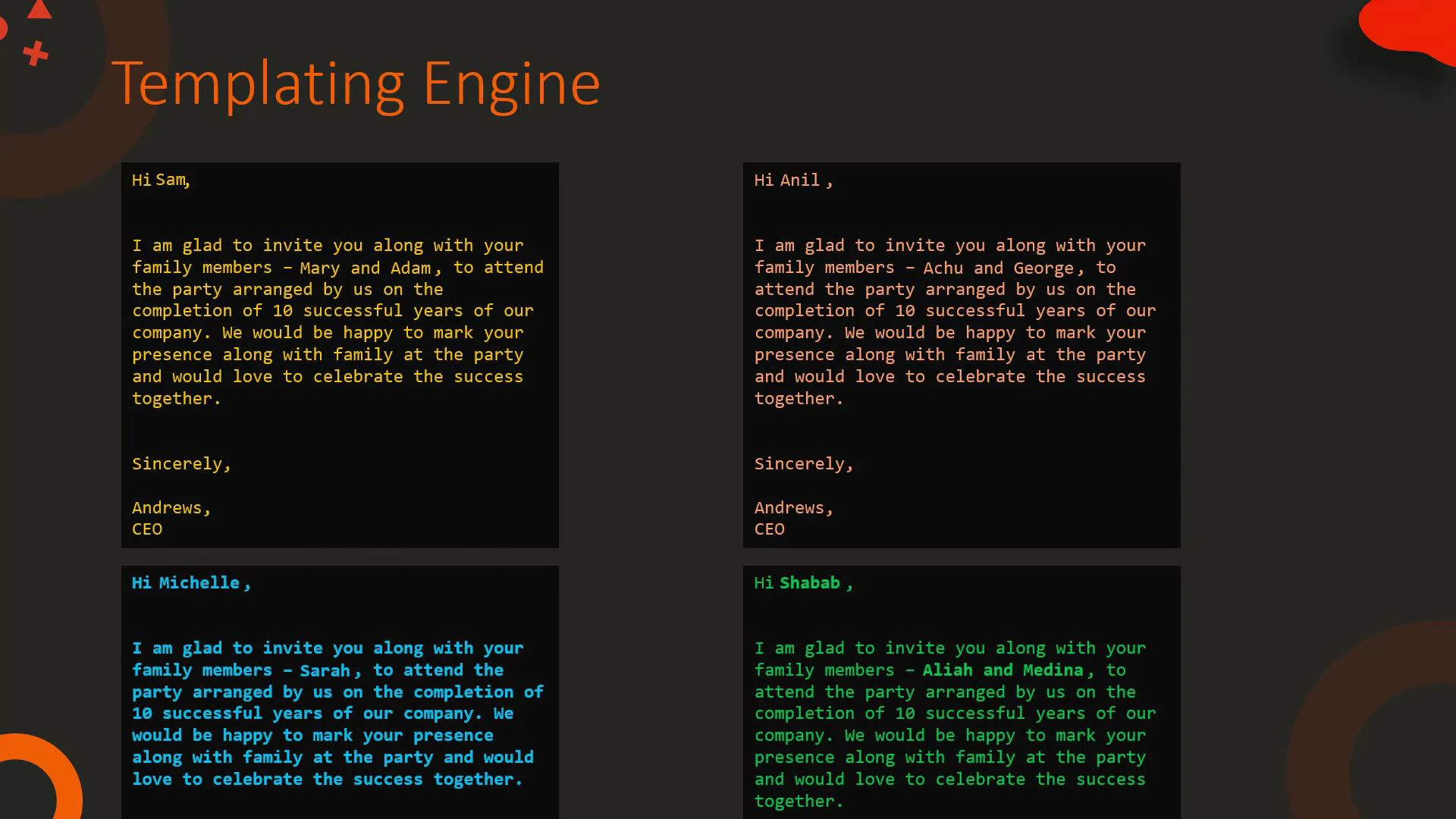 In IT, templating is widely used to generate HTML pages, configuration files, or inputs for automation tools such as Ansible. Keep a template file and feed variables to produce valid output automatically.
## Simple HTML templating example
Template:
```html theme={null}
{{ title }}
{{ msg }}
```
Variables:
```yaml theme={null}
# variables.yml
title: Our Site
msg: Welcome!
```
Rendered HTML:
```html theme={null}
Our Site
Welcome!
```
## Using Jinja2 in Ansible
Ansible uses Jinja2 templating everywhere: playbooks, task parameters, templates, and inventory. Example: using a variable for a file path in a task.
Template playbook:
```yaml theme={null}
# playbook.yml (template)
- hosts: web1
tasks:
- name: Create a file at a path from a variable
file:
path: "{{ file }}"
state: touch
```
Variables:
```yaml theme={null}
# vars.yml
file: /tmp/1.txt
```
Rendered task after substitution:
```yaml theme={null}
- hosts: web1
tasks:
- name: Create a file at a path from a variable
file:
path: /tmp/1.txt
state: touch
```
You can template configuration files too. Example MySQL configuration template and result.
Template:
```ini theme={null}
# my.cnf.j2 (template)
[mysqld]
innodb-buffer-pool-size={{ pool_size }}
datadir={{ datadir }}
user={{ mysql_user }}
```
Variables:
```yaml theme={null}
# vars.yml
pool_size: 128M
datadir: /var/lib/mysql
mysql_user: mysql
```
Rendered configuration:
```ini theme={null}
[mysqld]
innodb-buffer-pool-size=128M
datadir=/var/lib/mysql
user=mysql
```
## What is Jinja2?
Jinja2 is a full-featured, powerful templating engine for Python. It provides a compact syntax for:
* Expressions that output values
* Control structures (loops, conditionals)
* Template inheritance (blocks)
* Filters to transform values
* Tests to check values (defined, none, etc.)
Use Jinja2 to create reusable templates for web pages, configuration files, cloud templates, and automation playbooks.
## Common Jinja2 constructs
* Expressions: `{{ ... }}` — evaluate and output a value.
* Statements: `{% ... %}` — control structures like for/if or block definitions.
* Comments: `{# ... #}` — template comments not rendered in output.
### Blocks and template inheritance
Blocks let a base template define placeholders that child templates can override.
Example:
```html theme={null}
{% block title %}{% endblock %}
```
### Filters: transform values inline
Filters use the pipe (|) syntax and let you transform a variable before rendering.
* Strings: upper, lower, title, replace, default
* Sequences: min, max, unique, union, intersect, random, join
Examples:
```jinja theme={null}
The name is {{ my_name }} => The name is Bond
The name is {{ my_name | upper }} => The name is BOND
The name is {{ my_name | lower }} => The name is bond
The name is {{ my_name | title }} => The name is Bond
The name is {{ my_name | replace("Bond","Bourne") }} => The name is Bourne
{{ first_name | default("James") }} {{ my_name }} => James Bond # if first_name undefined
```
Use filters to transform values inline. The default filter prevents
undefined-variable errors by providing a fallback.
Table: selected filters, use cases, and examples
\| Filter | Use case | Example |
\| ------------------- | --------------------------------- | ---------------- | ----------------------------------- |
\| upper, lower, title | Normalize string case | `{{ name | upper }}` -> "BOND" |
\| replace | Replace substrings | `{{ text | replace("a","b") }}` |
\| default | Fallback when undefined | `{{ value | default("N/A") }}` |
\| join | Join list elements into a string | `{{ words | join(" ") }}` -> "The name is Bond" |
\| unique | Remove duplicates from a sequence | `{{ [1,2,2] | unique }}` -> \[1,2] |
\| union, intersect | Combine or intersect sequences | `{{ [1,2] | union([2,3]) }}` -> \[1,2,3] |
\| random | Pick a random element | `{{ range(1,201) | random }}` -> random 1–200 |
Selected examples (sequence filters):
```jinja theme={null}
{{ [1, 2, 3] | min }} => 1
{{ [1, 2, 3] | max }} => 3
{{ [1, 2, 3, 2] | unique }} => [1, 2, 3]
{{ [1, 2, 3, 4] | union([4, 5]) }} => [1, 2, 3, 4, 5]
{{ [1, 2, 3, 4] | intersect([4, 5]) }} => [4]
{{ range(1, 201) | random }} => Random number between 1 and 200
{{ ["The", "name", "is", "Bond"] | join(" ") }} => The name is Bond
```
### Blocks vs expressions
* Use `{{ ... }}` when you want to output a value or the result of an expression.
* Use `{% ... %}` for control flow, including loops, conditionals, and block definitions.
### Loops and conditionals
Example template that prints a message for numbers 0–4 and highlights when the number equals 2:
```jinja theme={null}
{% for number in [0, 1, 2, 3, 4] %}
{% if number == 2 %}
Number is two
{% else %}
Number is not two
{% endif %}
{% endfor %}
```
Rendered output:
```text theme={null}
Number is not two
Number is not two
Number is two
Number is not two
Number is not two
```
## When to use Jinja2 templates
| Resource Type | Use Case |
| ------------------------------------------------- | ------------------------------------------------ |
| HTML pages | Render dynamic web pages with consistent layouts |
| Configuration files | Generate valid configs for services and daemons |
| Automation scripts (Ansible, Terraform templates) | Inject variables into tasks and manifests |
| Email or document generation | Produce personalized documents at scale |
## Next steps and references
Jinja2 provides many more filters, tests, and extension points. Combine filters, tests, template inheritance, and macros to build clean, maintainable templates for web apps, automation, and infrastructure.
Links and references:
* Jinja2 documentation: [https://jinja.palletsprojects.com/](https://jinja.palletsprojects.com/)
* Ansible templating: [https://docs.ansible.com/ansible/latest/user\_guide/playbooks\_templating.html](https://docs.ansible.com/ansible/latest/user_guide/playbooks_templating.html)
* Ansible Advanced Course: [https://learn.kodekloud.com/user/courses/ansible-advanced-course](https://learn.kodekloud.com/user/courses/ansible-advanced-course)
In IT, templating is widely used to generate HTML pages, configuration files, or inputs for automation tools such as Ansible. Keep a template file and feed variables to produce valid output automatically.
## Simple HTML templating example
Template:
```html theme={null}
{{ title }}
{{ msg }}
```
Variables:
```yaml theme={null}
# variables.yml
title: Our Site
msg: Welcome!
```
Rendered HTML:
```html theme={null}
Our Site
Welcome!
```
## Using Jinja2 in Ansible
Ansible uses Jinja2 templating everywhere: playbooks, task parameters, templates, and inventory. Example: using a variable for a file path in a task.
Template playbook:
```yaml theme={null}
# playbook.yml (template)
- hosts: web1
tasks:
- name: Create a file at a path from a variable
file:
path: "{{ file }}"
state: touch
```
Variables:
```yaml theme={null}
# vars.yml
file: /tmp/1.txt
```
Rendered task after substitution:
```yaml theme={null}
- hosts: web1
tasks:
- name: Create a file at a path from a variable
file:
path: /tmp/1.txt
state: touch
```
You can template configuration files too. Example MySQL configuration template and result.
Template:
```ini theme={null}
# my.cnf.j2 (template)
[mysqld]
innodb-buffer-pool-size={{ pool_size }}
datadir={{ datadir }}
user={{ mysql_user }}
```
Variables:
```yaml theme={null}
# vars.yml
pool_size: 128M
datadir: /var/lib/mysql
mysql_user: mysql
```
Rendered configuration:
```ini theme={null}
[mysqld]
innodb-buffer-pool-size=128M
datadir=/var/lib/mysql
user=mysql
```
## What is Jinja2?
Jinja2 is a full-featured, powerful templating engine for Python. It provides a compact syntax for:
* Expressions that output values
* Control structures (loops, conditionals)
* Template inheritance (blocks)
* Filters to transform values
* Tests to check values (defined, none, etc.)
Use Jinja2 to create reusable templates for web pages, configuration files, cloud templates, and automation playbooks.
## Common Jinja2 constructs
* Expressions: `{{ ... }}` — evaluate and output a value.
* Statements: `{% ... %}` — control structures like for/if or block definitions.
* Comments: `{# ... #}` — template comments not rendered in output.
### Blocks and template inheritance
Blocks let a base template define placeholders that child templates can override.
Example:
```html theme={null}
{% block title %}{% endblock %}
```
### Filters: transform values inline
Filters use the pipe (|) syntax and let you transform a variable before rendering.
* Strings: upper, lower, title, replace, default
* Sequences: min, max, unique, union, intersect, random, join
Examples:
```jinja theme={null}
The name is {{ my_name }} => The name is Bond
The name is {{ my_name | upper }} => The name is BOND
The name is {{ my_name | lower }} => The name is bond
The name is {{ my_name | title }} => The name is Bond
The name is {{ my_name | replace("Bond","Bourne") }} => The name is Bourne
{{ first_name | default("James") }} {{ my_name }} => James Bond # if first_name undefined
```
Use filters to transform values inline. The default filter prevents
undefined-variable errors by providing a fallback.
Table: selected filters, use cases, and examples
\| Filter | Use case | Example |
\| ------------------- | --------------------------------- | ---------------- | ----------------------------------- |
\| upper, lower, title | Normalize string case | `{{ name | upper }}` -> "BOND" |
\| replace | Replace substrings | `{{ text | replace("a","b") }}` |
\| default | Fallback when undefined | `{{ value | default("N/A") }}` |
\| join | Join list elements into a string | `{{ words | join(" ") }}` -> "The name is Bond" |
\| unique | Remove duplicates from a sequence | `{{ [1,2,2] | unique }}` -> \[1,2] |
\| union, intersect | Combine or intersect sequences | `{{ [1,2] | union([2,3]) }}` -> \[1,2,3] |
\| random | Pick a random element | `{{ range(1,201) | random }}` -> random 1–200 |
Selected examples (sequence filters):
```jinja theme={null}
{{ [1, 2, 3] | min }} => 1
{{ [1, 2, 3] | max }} => 3
{{ [1, 2, 3, 2] | unique }} => [1, 2, 3]
{{ [1, 2, 3, 4] | union([4, 5]) }} => [1, 2, 3, 4, 5]
{{ [1, 2, 3, 4] | intersect([4, 5]) }} => [4]
{{ range(1, 201) | random }} => Random number between 1 and 200
{{ ["The", "name", "is", "Bond"] | join(" ") }} => The name is Bond
```
### Blocks vs expressions
* Use `{{ ... }}` when you want to output a value or the result of an expression.
* Use `{% ... %}` for control flow, including loops, conditionals, and block definitions.
### Loops and conditionals
Example template that prints a message for numbers 0–4 and highlights when the number equals 2:
```jinja theme={null}
{% for number in [0, 1, 2, 3, 4] %}
{% if number == 2 %}
Number is two
{% else %}
Number is not two
{% endif %}
{% endfor %}
```
Rendered output:
```text theme={null}
Number is not two
Number is not two
Number is two
Number is not two
Number is not two
```
## When to use Jinja2 templates
| Resource Type | Use Case |
| ------------------------------------------------- | ------------------------------------------------ |
| HTML pages | Render dynamic web pages with consistent layouts |
| Configuration files | Generate valid configs for services and daemons |
| Automation scripts (Ansible, Terraform templates) | Inject variables into tasks and manifests |
| Email or document generation | Produce personalized documents at scale |
## Next steps and references
Jinja2 provides many more filters, tests, and extension points. Combine filters, tests, template inheritance, and macros to build clean, maintainable templates for web apps, automation, and infrastructure.
Links and references:
* Jinja2 documentation: [https://jinja.palletsprojects.com/](https://jinja.palletsprojects.com/)
* Ansible templating: [https://docs.ansible.com/ansible/latest/user\_guide/playbooks\_templating.html](https://docs.ansible.com/ansible/latest/user_guide/playbooks_templating.html)
* Ansible Advanced Course: [https://learn.kodekloud.com/user/courses/ansible-advanced-course](https://learn.kodekloud.com/user/courses/ansible-advanced-course)