Welcome
Learn about building Web apps with ASP.NET Core.
@Model.Message
```
Run and verify locally
* Start the app from your IDE (or `dotnet run` from the project folder).
* The page should show the `Message` from `appsettings.json`.
* Change the value in `appsettings.json` (for example, to `"Hello World changed"`) and restart the app to see the new text.
Example updated appsettings:
```json theme={null}
{
"Logging": {
"LogLevel": {
"Default": "Information",
"Microsoft.AspNetCore": "Warning"
}
},
"AllowedHosts": "*",
"Message": "Hello World changed"
}
```
Building a Docker image (multi-stage Dockerfile)
The IDE-generated Dockerfile typically uses a multi-stage build:
* Build stage uses the .NET SDK to compile and publish.
* Final stage uses a smaller ASP.NET runtime image to reduce final image size.
Example multi-stage Dockerfile:
```dockerfile theme={null}
FROM mcr.microsoft.com/dotnet/aspnet:6.0 AS base
WORKDIR /app
EXPOSE 80
EXPOSE 443
FROM mcr.microsoft.com/dotnet/sdk:6.0 AS build
WORKDIR /src
COPY ["KodeKloudApp.csproj", "./"]
RUN dotnet restore "KodeKloudApp.csproj"
COPY . .
WORKDIR "/src/"
RUN dotnet build "KodeKloudApp.csproj" -c Release -o /app/build
FROM build AS publish
RUN dotnet publish "KodeKloudApp.csproj" -c Release -o /app/publish
FROM base AS final
WORKDIR /app
COPY --from=publish /app/publish .
ENTRYPOINT ["dotnet", "KodeKloudApp.dll"]
```
Build the Docker image
From the project root (where the Dockerfile is present):
```bash theme={null}
docker build -t kodekloudapp:v1 .
```
Example build output (truncated):
```bash theme={null}
[+] Building 17.9s (7/17)
=> [build 1/7] FROM mcr.microsoft.com/dotnet/sdk:6.0@sha256:... 16.1s
...
=> naming to docker.io/library/kodekloudapp:v1
```
Verify the image exists locally:
```bash theme={null}
docker images
# Example output includes:
# REPOSITORY TAG IMAGE ID CREATED SIZE
# kodekloudapp v1 8177c6374c5c 2 minutes ago 200MB
```
If you prefer not to build locally, a pre-built image used in this lesson may be available on [Docker Hub](https://hub.docker.com/) so you can follow the Kubernetes deployment steps without rebuilding.
Quick reference: changed files and commands
| Item | Purpose | Example / Command |
| - | - | - |
| Project file | Main project | `KodeKloudApp.csproj` |
| Page model | Read configuration | `Pages/Index.cshtml.cs` (see code above) |
| Razor page | Display message | `Pages/Index.cshtml` (see code above) |
| Config | Default message value | `appsettings.json` |
| Build image | Create container image | `docker build -t kodekloudapp:v1 .` |
| Verify SDK | Check .NET SDK | `dotnet --list-sdks` |
Links and references
* Docker Desktop: [https://www.docker.com/products/docker-desktop](https://www.docker.com/products/docker-desktop)
* .NET 6 SDK downloads: [https://dotnet.microsoft.com/en-us/download/dotnet/6.0](https://dotnet.microsoft.com/en-us/download/dotnet/6.0)
* JetBrains Rider: [https://www.jetbrains.com/rider/](https://www.jetbrains.com/rider/)
* Learn about AKS: [https://learn.kodekloud.com/user/courses/azure-kubernetes-service](https://learn.kodekloud.com/user/courses/azure-kubernetes-service)
* ASP.NET Core documentation: [https://docs.microsoft.com/aspnet/core](https://docs.microsoft.com/aspnet/core)
This app is now ready to be deployed to your local Kubernetes cluster or pushed to a container registry for AKS or other environments.
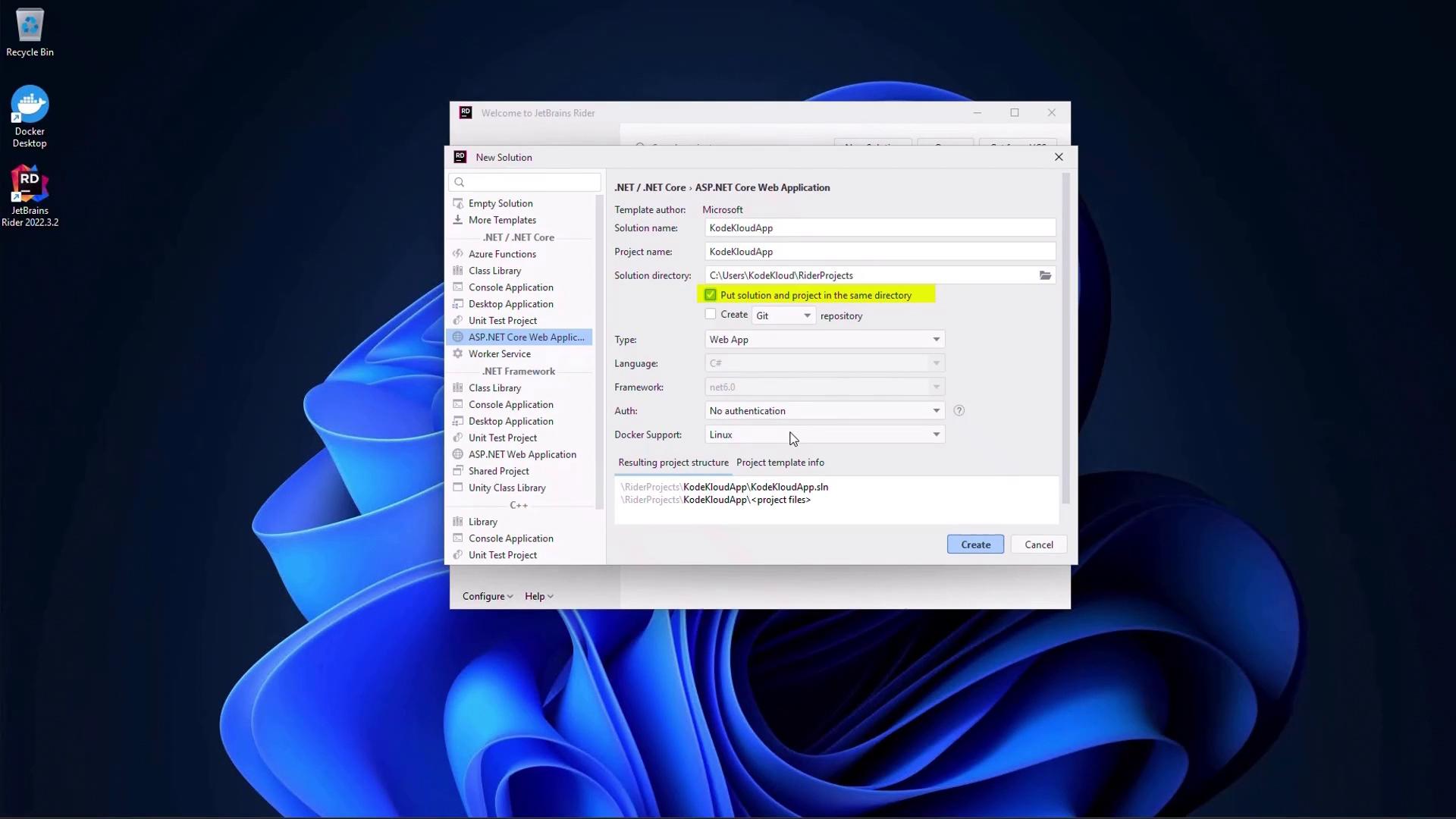 Modify the app to read configuration
We’ll modify the Index page model to read a `Message` value from configuration sources (appsettings.json or environment variables). This keeps configuration flexible when running locally or in containers.
Update Pages/Index.cshtml.cs:
```csharp theme={null}
// Pages/Index.cshtml.cs
using Microsoft.AspNetCore.Mvc.RazorPages;
using Microsoft.Extensions.Configuration;
using Microsoft.Extensions.Logging;
namespace KodeKloudApp.Pages
{
public class IndexModel : PageModel
{
private readonly ILogger
Modify the app to read configuration
We’ll modify the Index page model to read a `Message` value from configuration sources (appsettings.json or environment variables). This keeps configuration flexible when running locally or in containers.
Update Pages/Index.cshtml.cs:
```csharp theme={null}
// Pages/Index.cshtml.cs
using Microsoft.AspNetCore.Mvc.RazorPages;
using Microsoft.Extensions.Configuration;
using Microsoft.Extensions.Logging;
namespace KodeKloudApp.Pages
{
public class IndexModel : PageModel
{
private readonly ILogger