> ## Documentation Index
> Fetch the complete documentation index at: https://notes.kodekloud.com/llms.txt
> Use this file to discover all available pages before exploring further.

# Pull Based Workflow GitOps

> This article explains implementing GitOps with Azure Kubernetes Service for automated CI/CD workflows.

## Introduction to GitOps

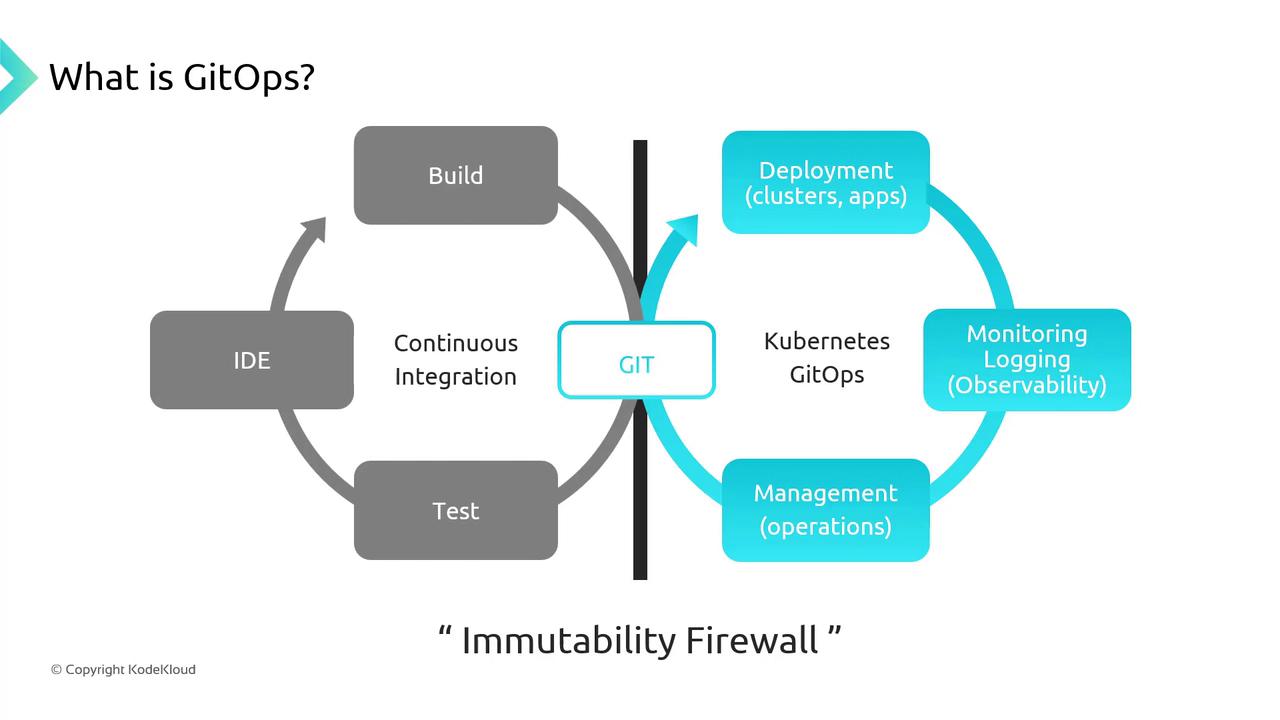
GitOps is a pull-based methodology for Continuous Integration and Continuous Deployment (CI/CD), where both application and infrastructure configurations are stored as code in a Git repository. Any desired state changes are made via Git commits, ensuring version-controlled deployments, easy auditing, and reliable rollbacks.
<Frame>
  ![The image is a diagram explaining GitOps, showing a cycle of continuous integration and deployment processes involving GIT, Kubernetes, and GitOps, with an "Immutability Firewall" separating the build and deployment stages.](https://kodekloud.com/kk-media/image/upload/v1752869455/notes-assets/images/Azure-Kubernetes-Service-Pull-Based-Workflow-GitOps/gitops-continuous-integration-deployment-diagram.jpg)
</Frame>

<Callout icon="lightbulb" color="#1CB2FE">
  The “Immutability Firewall” enforces separation between build artifacts and deployment manifests, guaranteeing consistent, reproducible releases.
</Callout>

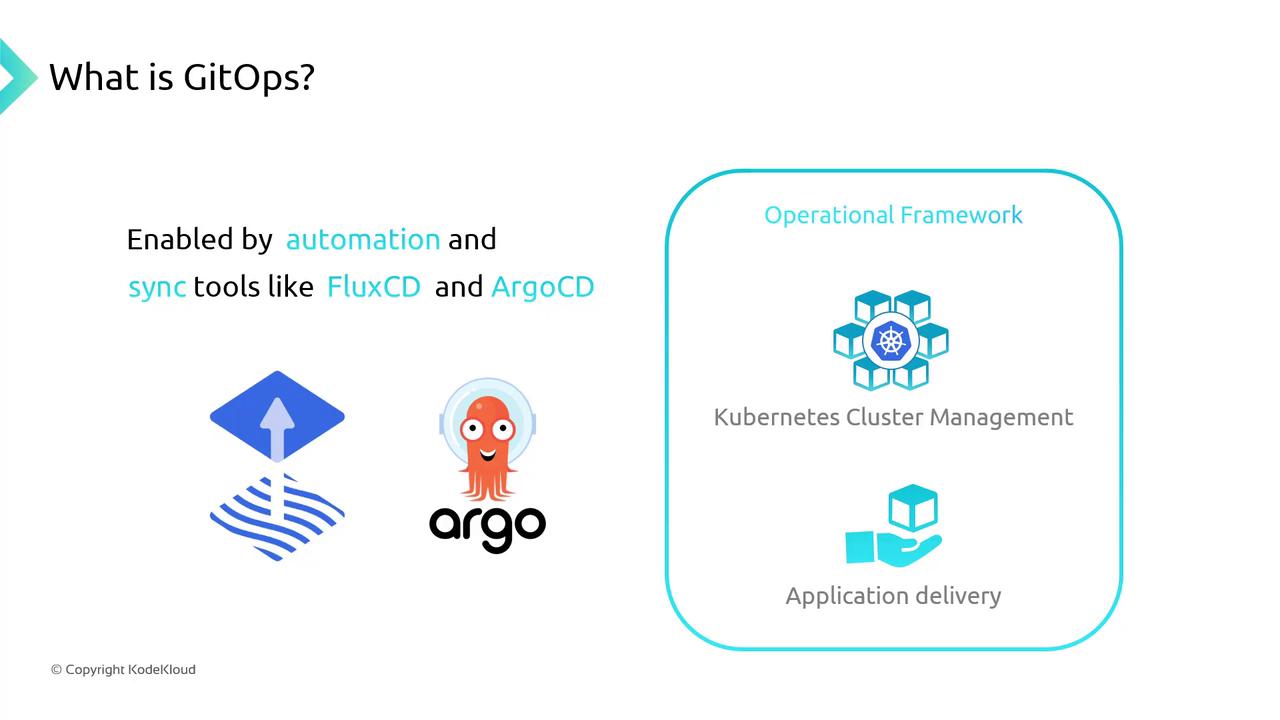
When you push commits to your Git repo, a GitOps operator—such as [Flux](https://fluxcd.io/) or [Argo CD](https://argo-cd.readthedocs.io/)—detects updates and reconciles your AKS cluster to match the declared state automatically.

## Push-Based vs. Pull-Based Workflows

In CI/CD, you can choose between push-based or pull-based (GitOps) models.

| Workflow   | Trigger                   | Operator      | Advantages                              | Considerations                       |
| ---------- | ------------------------- | ------------- | --------------------------------------- | ------------------------------------ |
| Push-Based | CI pipeline pushes to AKS | N/A           | Immediate deployments, fast feedback    | Harder to track drift, limited audit |
| Pull-Based | GitOps operator polls Git | Flux, Argo CD | Full audit trail, self-healing clusters | Sync interval adds slight delay      |
<Frame>
  ![The image explains GitOps, highlighting automation and synchronization tools like FluxCD and ArgoCD, and their role in Kubernetes cluster management and application delivery.](https://kodekloud.com/kk-media/image/upload/v1752869456/notes-assets/images/Azure-Kubernetes-Service-Pull-Based-Workflow-GitOps/gitops-automation-fluxcd-argocd-kubernetes.jpg)
</Frame>

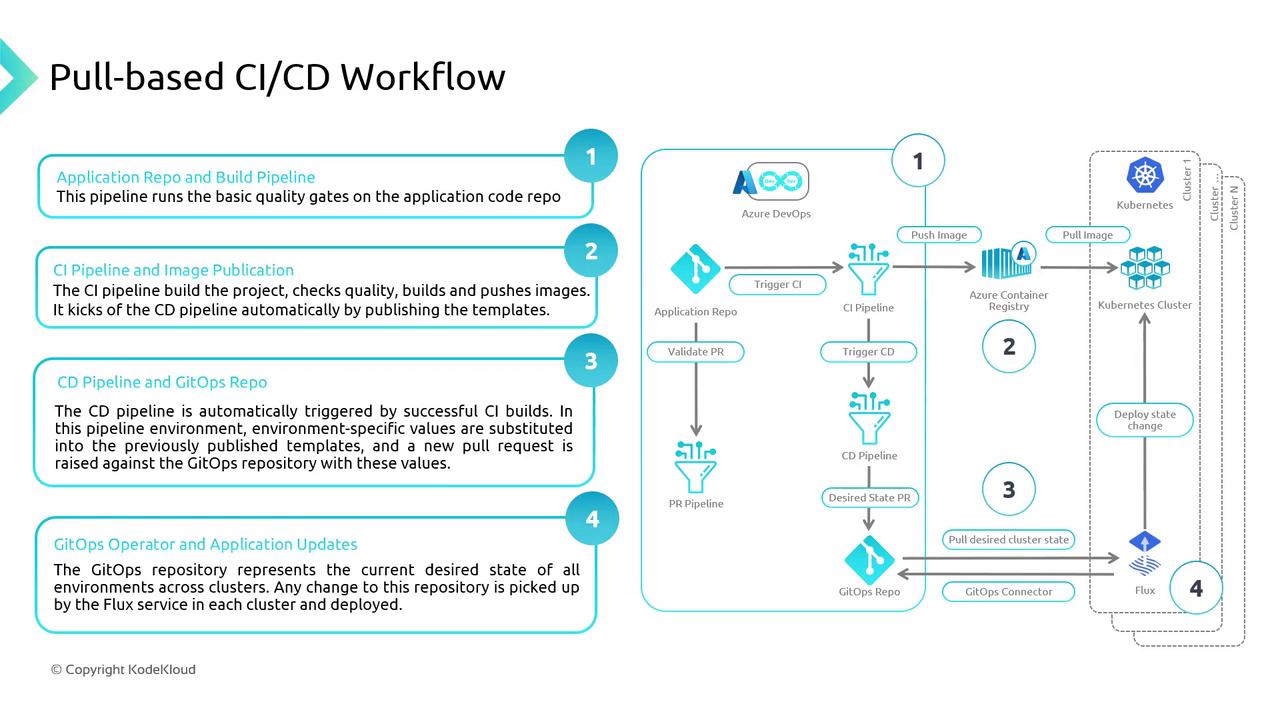
## Pull-Based CI/CD Workflow for AKS

A typical GitOps pipeline for Azure Kubernetes Service involves:

1. **Source Control**\
   Store application code and Kubernetes manifests in a Git repo.
2. **CI Pipeline**\
   Build, test, and push container images to Azure Container Registry (ACR).
3. **CD Pipeline**\
   Generate environment-specific YAMLs (e.g., via Kustomize) and commit them to Git.
4. **GitOps Operator**\
   Flux or Argo CD polls Git, detects changes, and applies the new state to AKS.

| Step             | Azure Service          | Artifact                      |
| ---------------- | ---------------------- | ----------------------------- |
| Build & CI       | Azure DevOps Pipelines | Docker images (ACR)           |
| Configuration CD | Azure DevOps Releases  | Kustomize overlays            |
| Continuous Sync  | Flux / Argo CD on AKS  | Deployed Kubernetes resources |
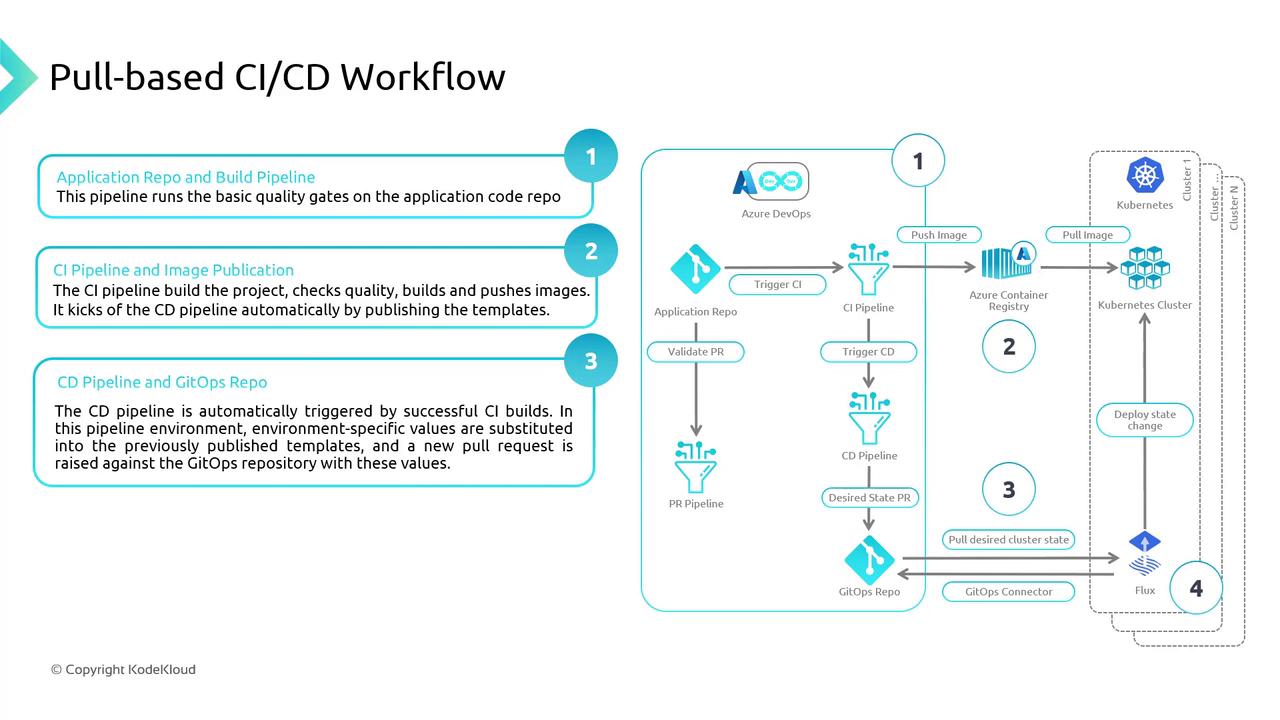
<Frame>
  ![The image illustrates a pull-based CI/CD workflow, detailing the process from application repository and build pipeline to CI/CD pipelines, image publication, and deployment in Kubernetes clusters. It includes steps involving Azure DevOps, Azure Container Registry, and GitOps integration.](https://kodekloud.com/kk-media/image/upload/v1752869457/notes-assets/images/Azure-Kubernetes-Service-Pull-Based-Workflow-GitOps/ci-cd-workflow-azure-kubernetes.jpg)
</Frame>

<Frame>
  ![The image illustrates a pull-based CI/CD workflow, detailing the process from application repository and build pipeline to deployment in Kubernetes clusters using GitOps. It includes steps for CI pipeline, image publication, CD pipeline, and application updates.](https://kodekloud.com/kk-media/image/upload/v1752869458/notes-assets/images/Azure-Kubernetes-Service-Pull-Based-Workflow-GitOps/ci-cd-workflow-gitops-kubernetes.jpg)
</Frame>

## Demonstration: Deploying a New AKS Cluster with GitOps

Follow these steps to provision an AKS cluster and configure GitOps using Azure Portal:

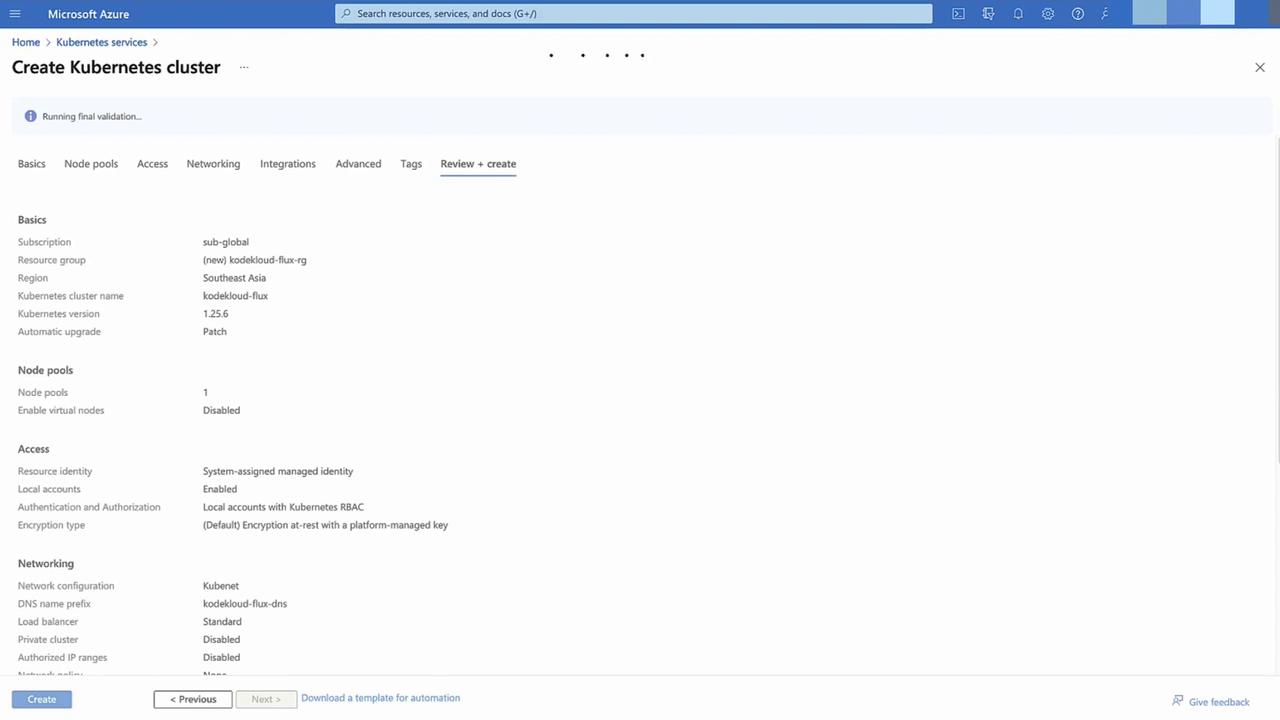
1. **Create AKS Cluster**\
   In the Azure Portal, select **Kubernetes services** → **+ Add**.\
   Choose a new resource group, use default settings, then **Review + Create** → **Create**.
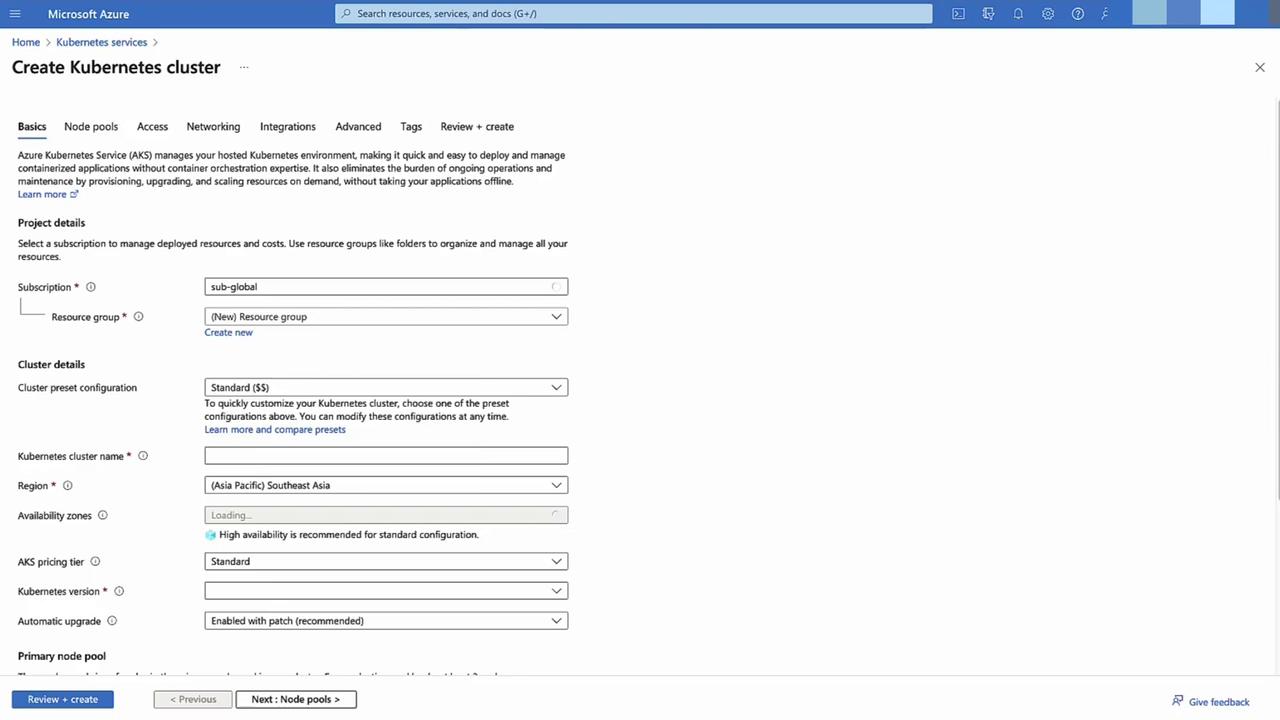
<Frame>
  ![The image shows a Microsoft Azure interface for creating a Kubernetes cluster, with options for project details, cluster configuration, and primary node pool settings.](https://kodekloud.com/kk-media/image/upload/v1752869459/notes-assets/images/Azure-Kubernetes-Service-Pull-Based-Workflow-GitOps/azure-kubernetes-cluster-creation-interface.jpg)
</Frame>

<Frame>
  ![The image shows a Microsoft Azure interface for creating a Kubernetes cluster, displaying configuration details such as subscription, resource group, region, and networking settings.](https://kodekloud.com/kk-media/image/upload/v1752869460/notes-assets/images/Azure-Kubernetes-Service-Pull-Based-Workflow-GitOps/azure-kubernetes-cluster-configuration-interface.jpg)
</Frame>

2. **Fork and Prepare Your Git Repository**\
   Open your forked repo (e.g., `aksflux`) containing Flux YAMLs. In the `infrastructure` folder, inspect `kustomization.yaml`:

   ```yaml theme={null}
   apiVersion: kustomize.config.k8s.io/v1beta1
   kind: Kustomization
   resources:
     - sources
     - nginx
   ```

   You’ll later add `redis` to demonstrate dynamic updates. Under `apps/staging`, maintain environment-specific overlays.
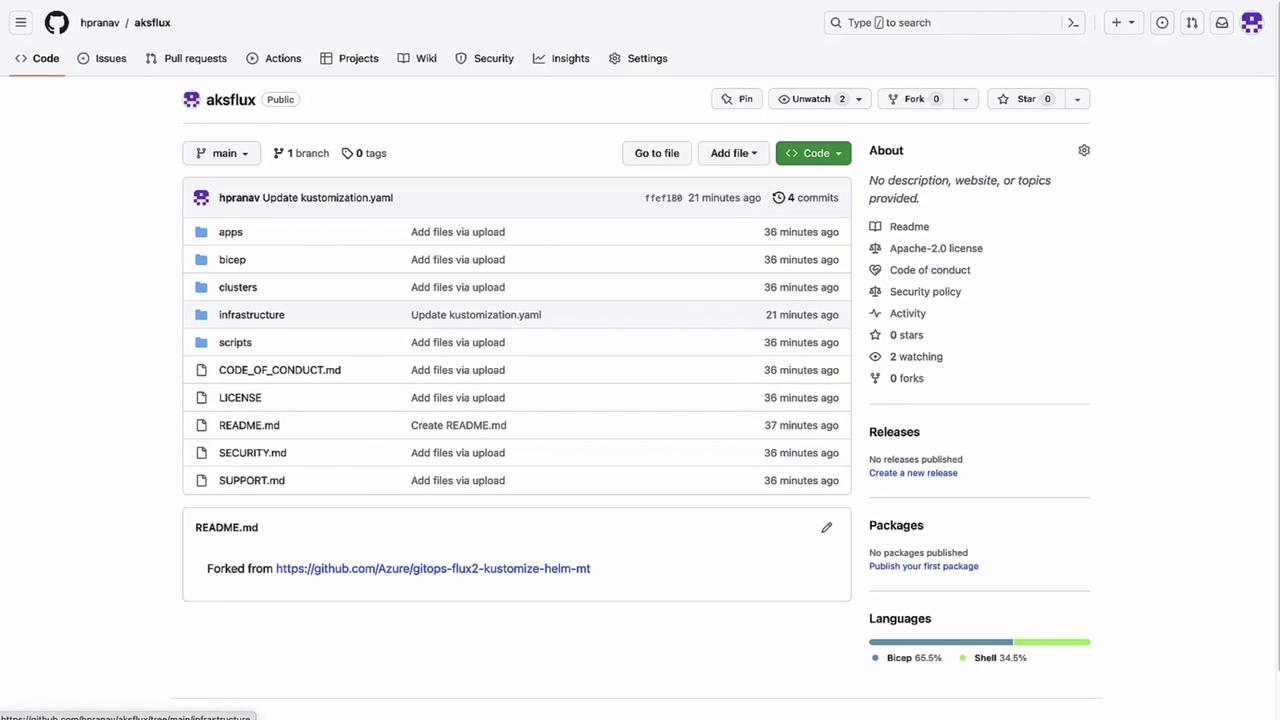
<Frame>
  ![The image shows a GitHub repository page named "aksflux" with various folders and files, including "apps," "bicep," and "README.md." The repository is public and has no stars or forks.](https://kodekloud.com/kk-media/image/upload/v1752869461/notes-assets/images/Azure-Kubernetes-Service-Pull-Based-Workflow-GitOps/aksflux-github-repo-folders-files.jpg)
</Frame>

3. **Verify Cluster Deployment**\
   Once provisioning finishes, confirm status in **Deployments**.
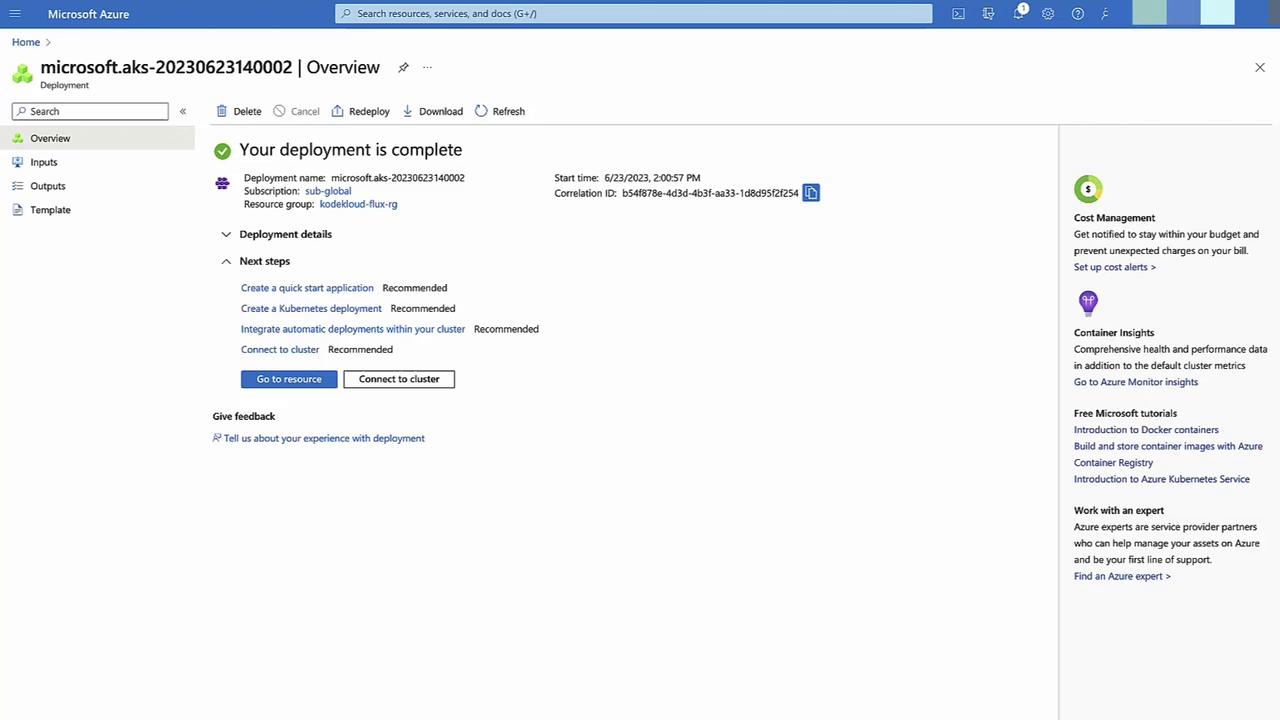
<Frame>
  ![The image shows a Microsoft Azure deployment overview page indicating that a deployment is complete, with options for next steps and additional resources on the right.](https://kodekloud.com/kk-media/image/upload/v1752869462/notes-assets/images/Azure-Kubernetes-Service-Pull-Based-Workflow-GitOps/azure-deployment-overview-complete.jpg)
</Frame>

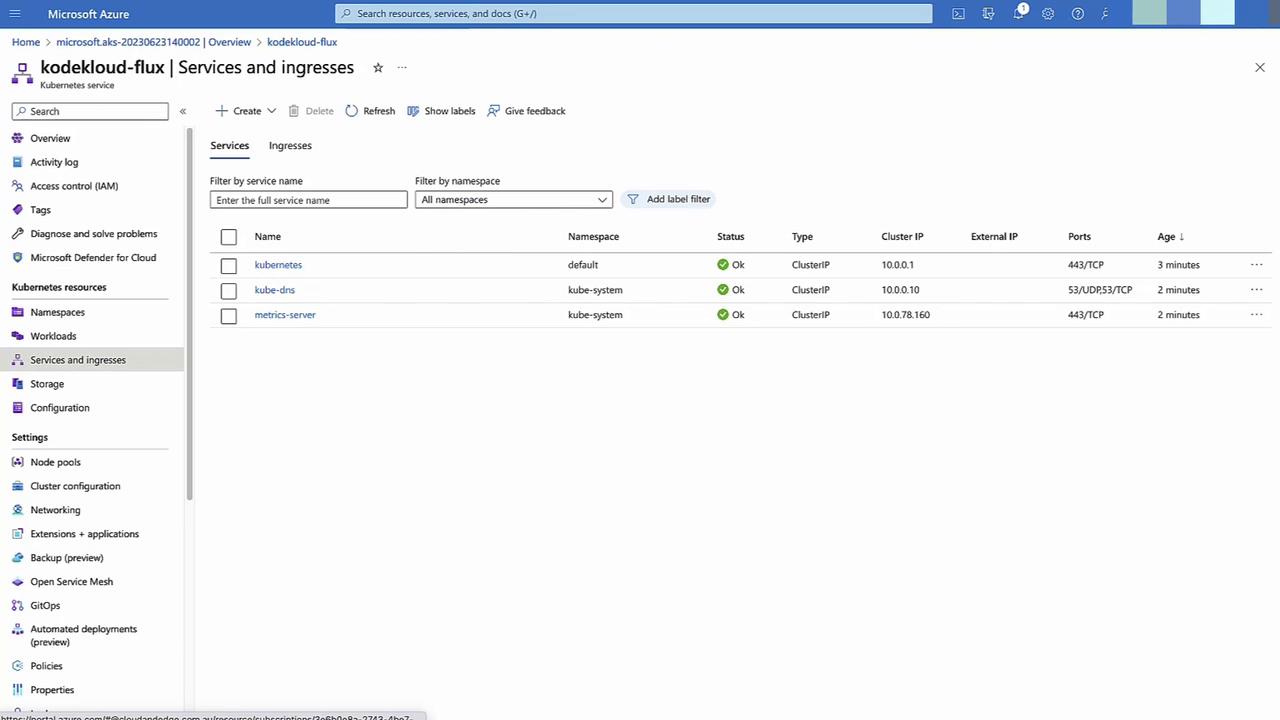
4. **Inspect Default Namespaces & Services**\
   In **Namespace and services**, view the default AKS resources.

5. **Configure GitOps in Azure Portal**\
   Go to **GitOps** → **+ Configuration**.
   * **Name**: `cluster-config`
   * **Scope**: Cluster
   * **Namespace**: `cluster-config`\
     → **Next**
<Frame>
  ![The image shows a Microsoft Azure portal interface displaying the "Services and ingresses" section for a Kubernetes service named "kodekloud-flux," listing three services with their details such as namespace, status, type, and IP addresses.](https://kodekloud.com/kk-media/image/upload/v1752869464/notes-assets/images/Azure-Kubernetes-Service-Pull-Based-Workflow-GitOps/azure-portal-kubernetes-kodekloud-flux.jpg)
</Frame>

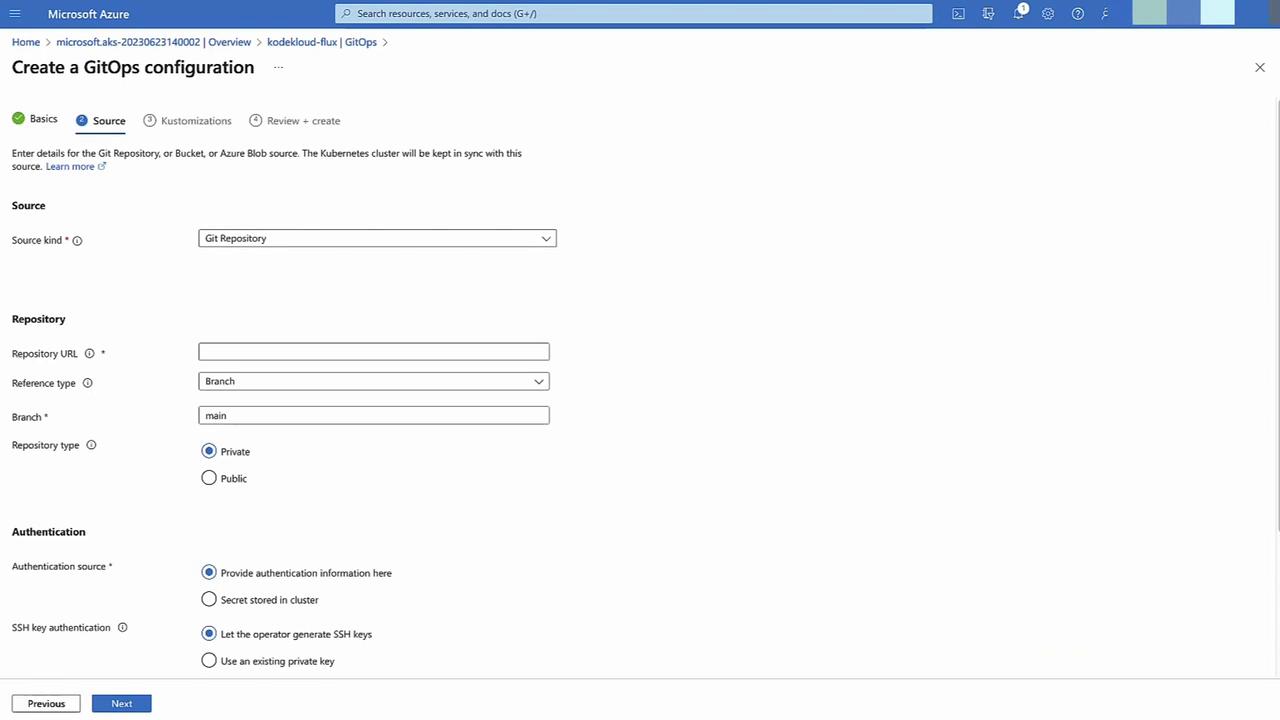
Enter your public Git repo URL, branch `main`, no auth required.
<Frame>
  ![The image shows a Microsoft Azure interface for creating a GitOps configuration, with options to specify the source, repository details, and authentication settings.](https://kodekloud.com/kk-media/image/upload/v1752869465/notes-assets/images/Azure-Kubernetes-Service-Pull-Based-Workflow-GitOps/azure-gitops-configuration-interface.jpg)
</Frame>

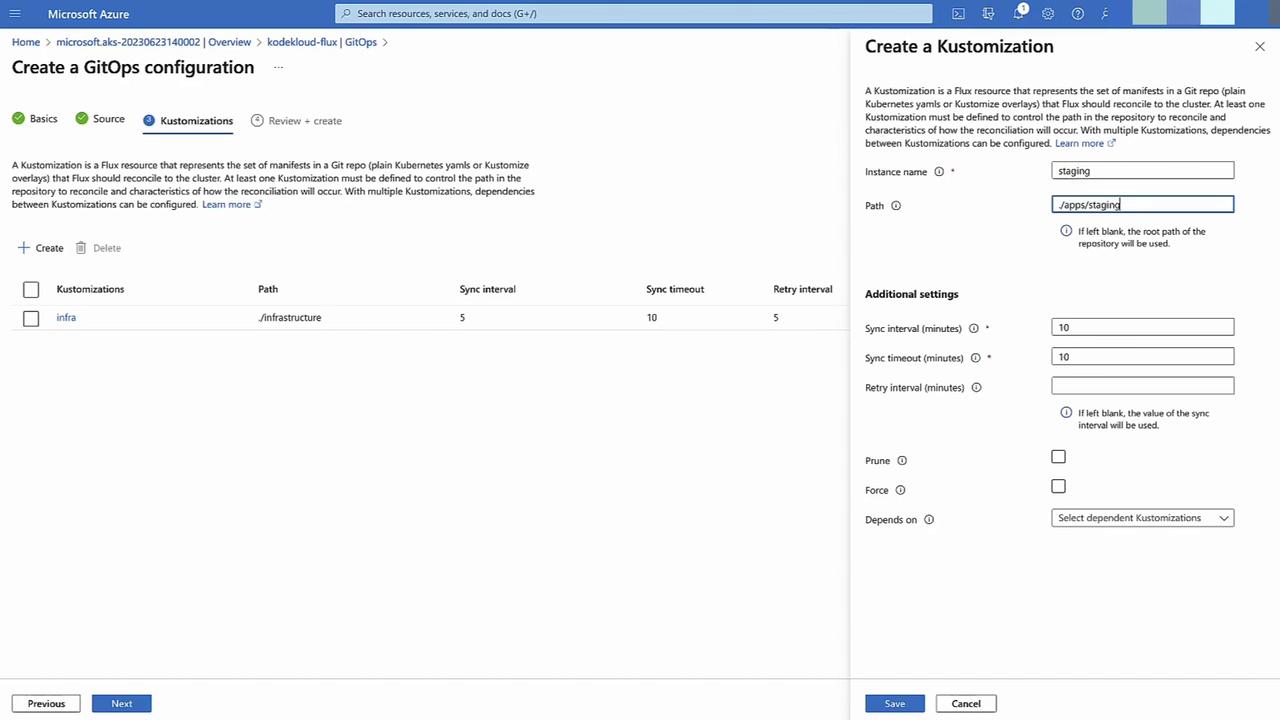
6. **Define Kustomizations**
   * Sync interval: **5 minutes**
   * **Infrastructure**: path `infrastructure`
   * **Staging**: path `apps/staging`, depends on `infrastructure`
<Frame>
  ![The image shows a Microsoft Azure interface for creating a GitOps configuration, specifically focusing on setting up a "Kustomization" with fields for instance name, path, and additional settings like sync interval and timeout.](https://kodekloud.com/kk-media/image/upload/v1752869466/notes-assets/images/Azure-Kubernetes-Service-Pull-Based-Workflow-GitOps/azure-gitops-kustomization-setup.jpg)
</Frame>

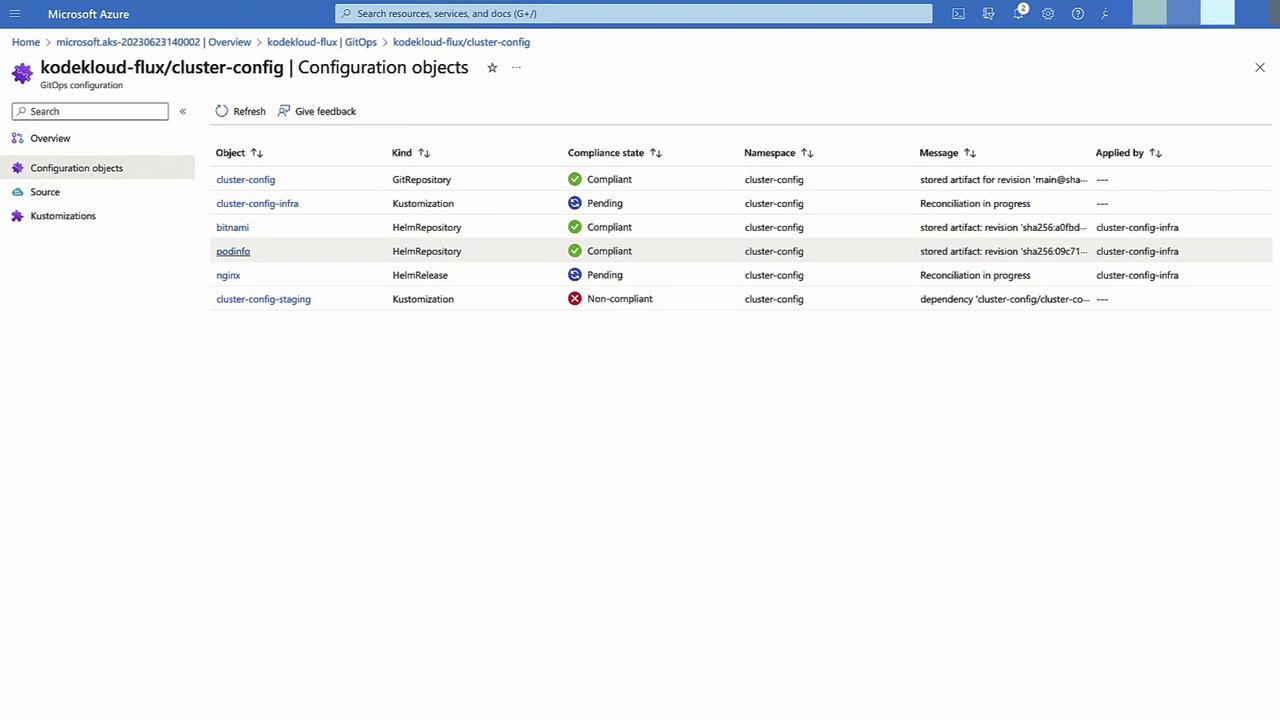
7. **Apply and Monitor**\
   Click **Create**. Flux begins syncing—`infrastructure` will reconcile first, then `staging`. Monitor compliance status in the GitOps pane.
<Frame>
  ![The image shows a Microsoft Azure interface displaying a list of configuration objects for "kodekloud-flux/cluster-config," including their types, compliance states, namespaces, and messages.](https://kodekloud.com/kk-media/image/upload/v1752869467/notes-assets/images/Azure-Kubernetes-Service-Pull-Based-Workflow-GitOps/azure-interface-kodekloud-flux-config.jpg)
</Frame>

8. **Validate Deployment**\
   Return to **Namespaces and Services** to confirm `nginx` (and its namespace) is running.

9. **Demonstrate Drift Correction**\
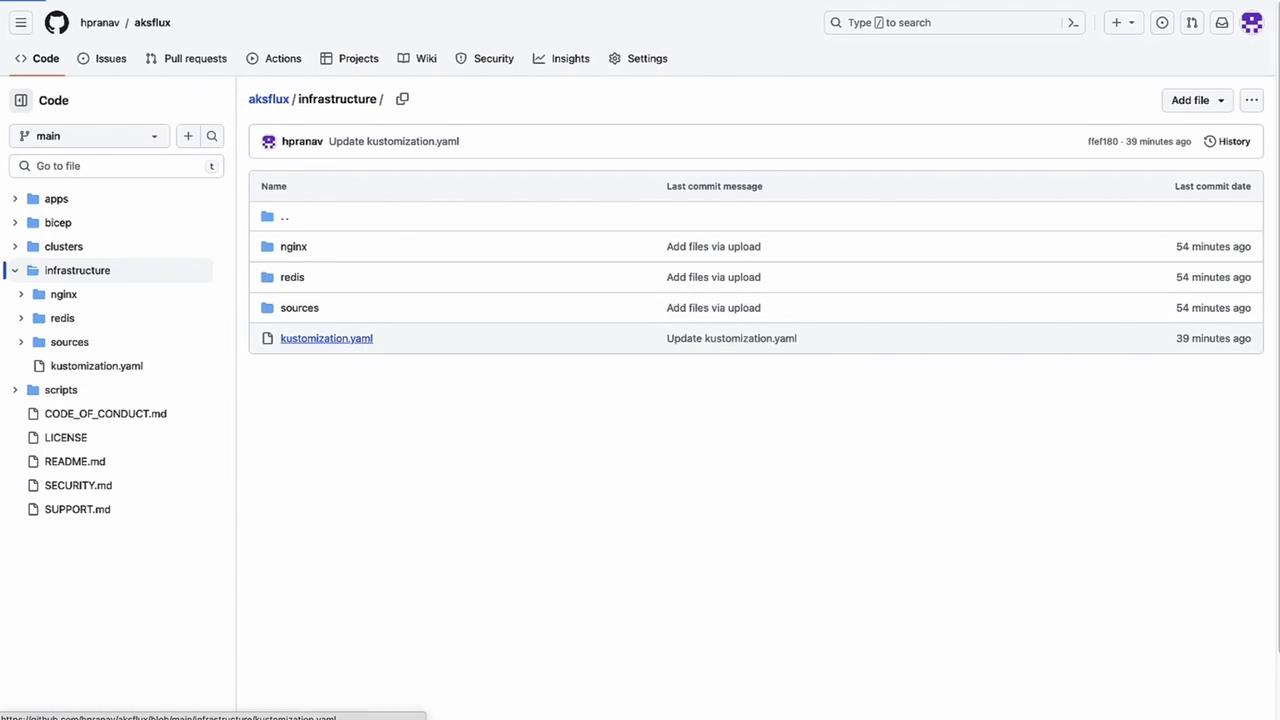
   In your repo, update `infrastructure/kustomization.yaml`:

   ```yaml theme={null}
   resources:
     - sources
     - nginx
     - redis
   ```

   Commit and push. Within 5 minutes, Flux deploys the Redis namespace and service.
<Frame>
  ![The image shows a GitHub repository interface with a directory structure, including folders like "nginx," "redis," and "sources," and a file named "kustomization.yaml."](https://kodekloud.com/kk-media/image/upload/v1752869468/notes-assets/images/Azure-Kubernetes-Service-Pull-Based-Workflow-GitOps/github-repo-directory-structure-kustomization.jpg)
</Frame>

With GitOps on AKS, you gain declarative, version-controlled deployments, self-healing infrastructure, and clear audit trails for every change.

<CardGroup>
  <Card title="Watch Video" icon="video" cta="Learn more" href="https://learn.kodekloud.com/user/courses/azure-kubernetes-service/module/60e74513-d231-493d-90a3-71787380ae79/lesson/9c8c165e-3603-4f7a-ac3b-eb1c52128faf" />
</CardGroup>