> ## Documentation Index
> Fetch the complete documentation index at: https://notes.kodekloud.com/llms.txt
> Use this file to discover all available pages before exploring further.
# Network Policies
> This article explains the use of Kubernetes Network Policies in Azure Kubernetes Service for controlling pod traffic and addressing limitations of Azure Network Security Groups.
Modern container networking demands more than subnet-level filtering. While Azure Network Security Groups (NSGs) can secure inbound and outbound traffic—including Azure CNI–provisioned pods—their reliance on static IPs makes them ill-suited for dynamic Kubernetes pods. NSG rules tied to pod IPs break when pods restart, and NSGs can’t filter by Kubernetes labels (for example, blocking traffic from `secure` pods to `unsecure` pods). Kubernetes Network Policies fill this gap by enabling label-based, pod-to-pod traffic controls.
## Limitations of Azure NSGs in AKS
* Pod IPs are ephemeral; NSG rules must be constantly updated.
* NSGs cannot reference Kubernetes constructs like namespaces or labels.
* Fine-grained policy (e.g., “allow traffic only from pods with label `app=frontend`”) requires a native Kubernetes mechanism.
## Kubernetes Network Policies
A `NetworkPolicy` is a native Kubernetes API object for controlling pod traffic. You define policies in YAML, selecting pods by labels and specifying allowed ingress and egress flows.
```yaml theme={null}
apiVersion: networking.k8s.io/v1
kind: NetworkPolicy
metadata:
name: demo-policy
namespace: demo
spec:
podSelector:
matchLabels:
role: server
policyTypes:
- Ingress
- Egress
ingress:
- from:
- podSelector:
matchLabels:
app: frontend
egress:
- to:
- ipBlock:
cidr: 10.2.0.0/22
ports:
- port: 80
```
| Policy Type | Description |
| ----------- | -------------------------------------------- |
| Ingress | Controls incoming traffic to selected pods |
| Egress | Controls outgoing traffic from selected pods |
When at least one `NetworkPolicy` selects a pod, all other traffic is denied by default. Be sure to explicitly allow the flows your application requires.
For more details, see [NetworkPolicy | Kubernetes Concepts](https://kubernetes.io/docs/concepts/services-networking/network-policies/).
## Azure Network Policy Engine
Azure’s built-in network policy engine runs as a DaemonSet on every node. It watches `NetworkPolicy` objects and enforces rules using:
* **Linux nodes**: iptables + Linux bridge
* **Windows nodes** (preview): Host Networking Service (HNS) ACLs
This engine integrates with Azure CNI and the Azure Policy Manager.
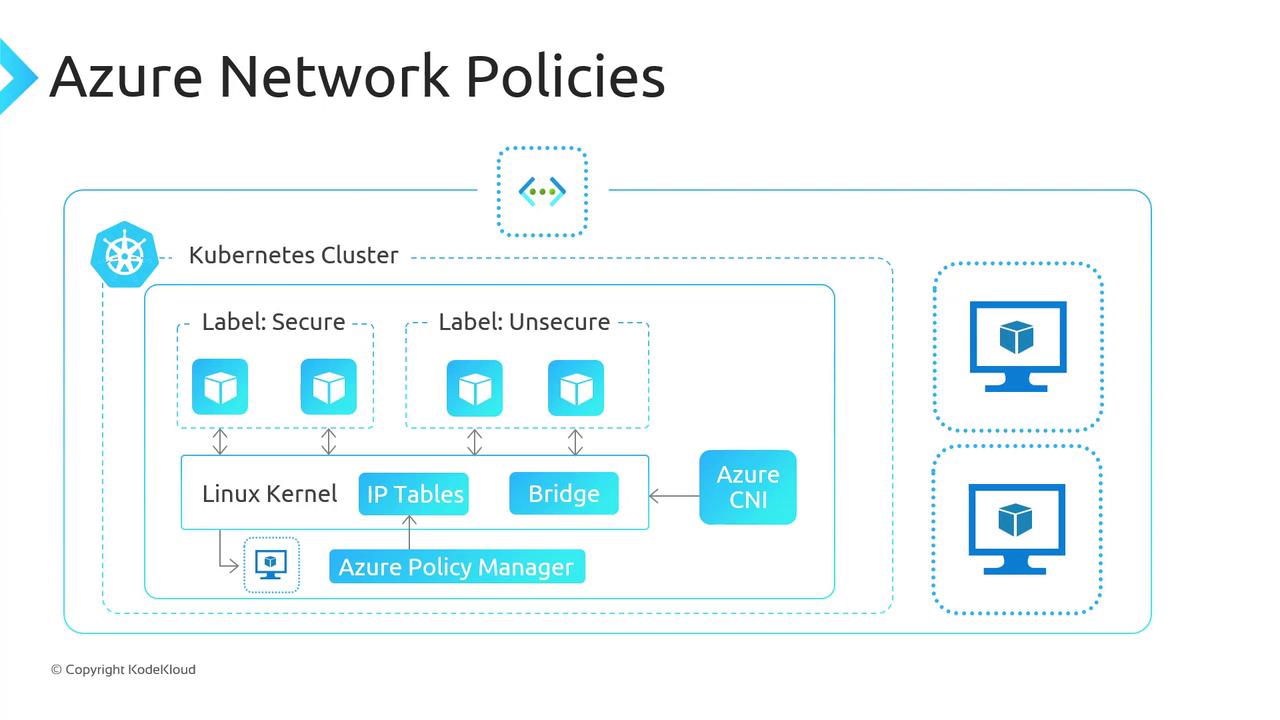
Azure Network Policies are the default in AKS for both Linux and Windows (Windows support is preview). You can also install the Azure policy engine on self-managed AKS clusters running on Azure VMs.
## Calico Network Policies
Calico by Tigera is an open-source networking and network security solution. It implements the Kubernetes `NetworkPolicy` API and extends it with additional features:
* GlobalNetworkPolicy for cross-namespace rules
* NetworkSets and ServiceSets for object grouping
* Integrated logging and compliance profiles
You can deploy Calico on AKS as a first-party add-on. Key differences between Azure and Calico network policies include supported platforms, networking modes, compliance features, and observability.
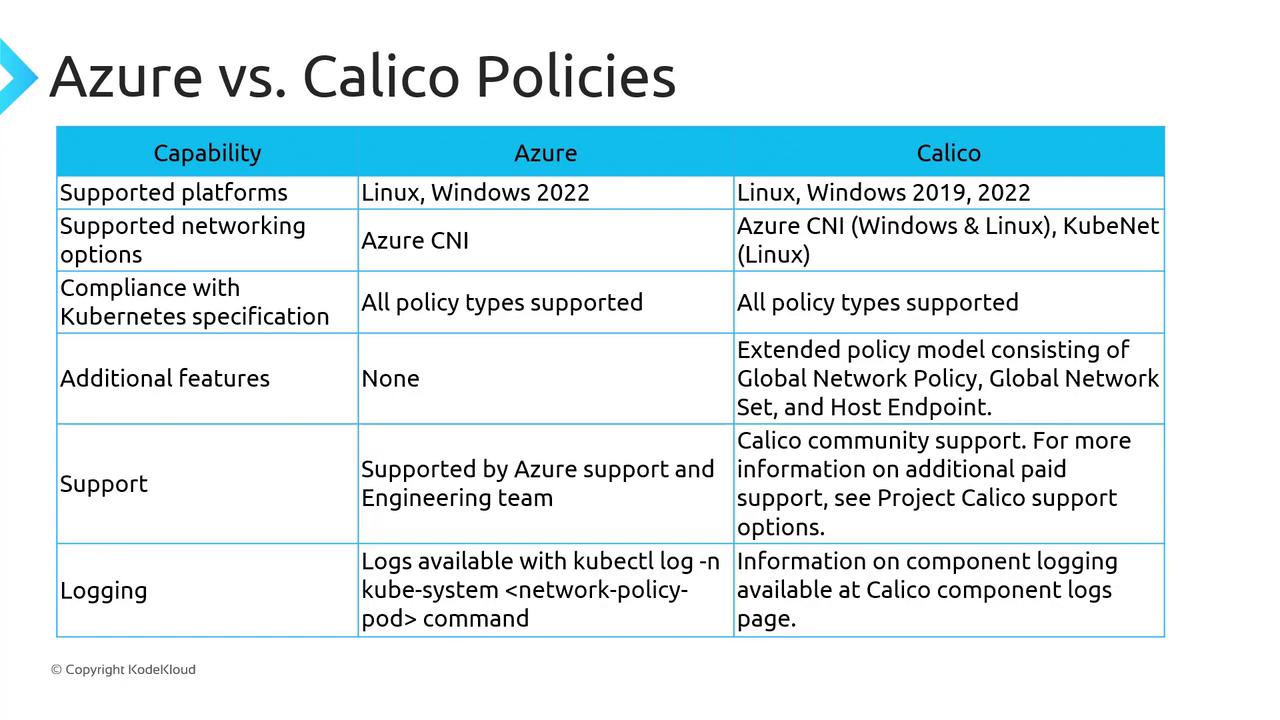
If you choose Calico, Microsoft support engineers may not diagnose issues stemming from Calico components. For troubleshooting, refer to the [Calico documentation](https://docs.projectcalico.org/).
## Troubleshooting Network Policies
To view policy enforcement logs for either engine:
```bash theme={null}
kubectl logs -n kube-system
```
Replace `` with the DaemonSet pod name (e.g., `azure-npm-daemonset` or `calico-node-xxxxx`).
## Links and References
* [Kubernetes Network Policies](https://kubernetes.io/docs/concepts/services-networking/network-policies/)
* [Azure CNI Networking](https://docs.microsoft.com/azure/aks/configure-azure-cni)
* [Calico Documentation](https://docs.projectcalico.org/)
* [Azure NSG Overview](https://learn.microsoft.com/azure/virtual-network/network-security-groups-overview)