> ## Documentation Index
> Fetch the complete documentation index at: https://notes.kodekloud.com/llms.txt
> Use this file to discover all available pages before exploring further.
# Kubernetes Overview
> This lesson introduces the core building blocks of Kubernetes for deploying and managing containerized applications.
This lesson introduces the core building blocks of Kubernetes so you can follow along with hands-on labs and real-world scenarios. While it won’t make you a Kubernetes expert overnight, you’ll gain the foundational knowledge needed to deploy and manage containerized applications. For a deep dive, explore our [KodeKloud Kubernetes courses](https://kodekloud.com/courses).
***
## Kubernetes Architecture
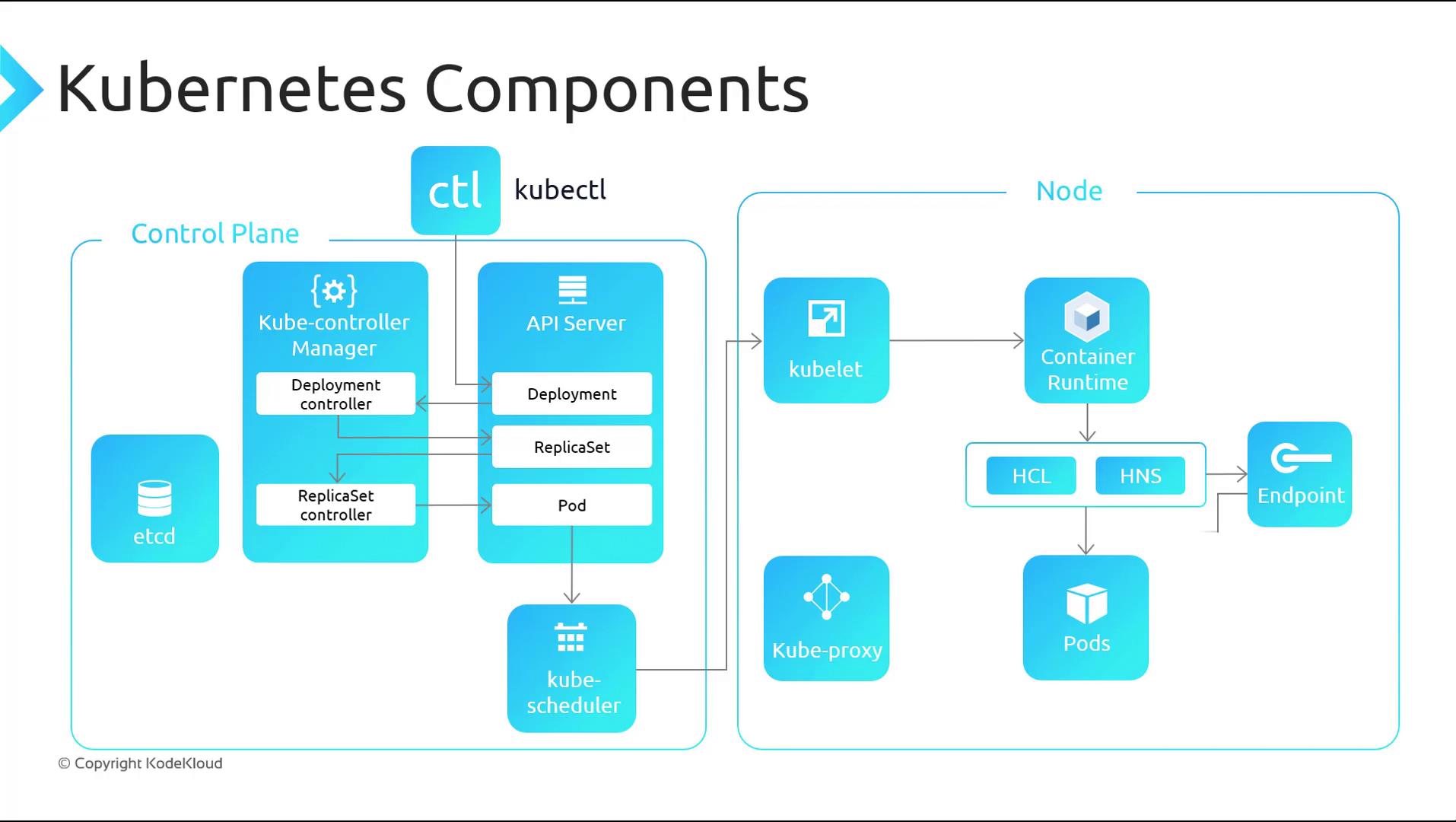
Kubernetes is composed of two primary component groups:
| Component Group | Key Components | Responsibility |
| ---------------------- | --------------------------------------------------------------------------------------------------------------------------------------------------- | ----------------------------------------------------- |
| **Control Plane** | - **API Server (kube-apiserver)**
- **etcd**
- **Controller Manager (kube-controller-manager)**
- **Scheduler (kube-scheduler)** | Orchestrates cluster state and schedules workloads. |
| **Node (Agent) Plane** | - **kubelet**
- **kube-proxy**
- **Container Runtime** (e.g., containerd, Docker)
- **Host Compute & Networking Services** (Windows) | Runs Pods and manages networking on each worker node. |
### Control Plane Components
* **API Server (kube-apiserver)**\
Exposes the Kubernetes REST API; processes `kubectl` and other client requests.
* **etcd**\
A distributed key-value store holding all cluster state, configuration, and metadata.
* **Controller Manager (kube-controller-manager)**\
Runs controllers for replication, node lifecycle, health checks, and more.
* **Scheduler (kube-scheduler)**\
Assigns new Pods to nodes based on resource requirements, affinity, and taints/tolerations.
### Node (Agent) Components
* **kubelet**\
Watches the API server for PodSpecs and ensures containers described in those specs are running.
* **kube-proxy**\
Implements Service abstraction by programming network rules and load-balancing traffic to Pods.
* **Container Runtime**\
The software responsible for pulling images and running containers. On Windows, the CRI integrates with Host Compute Service (HCS) and Host Networking Service (HNS).
In **Azure Kubernetes Service (AKS)**, Azure manages the entire control plane for you. You only need to provision and maintain the worker nodes (agents), streamlining cluster operations.
***
## Component Interaction: Creating a Deployment
When you run a command like:
```bash theme={null}
kubectl create deployment nginx --image=nginx
```
Kubernetes executes the following workflow:
1. **kubectl → API Server**\
Sends the Deployment manifest via the Kubernetes API.
2. **API Server → etcd**\
Validates and persists the Deployment object.
3. **Deployment Controller**\
Detects the new Deployment and creates a ReplicaSet.
4. **ReplicaSet Controller**\
Observes the ReplicaSet and launches the desired number of Pods.
5. **Scheduler**\
Assigns each unscheduled Pod to an appropriate node.
6. **kubelet**\
Retrieves PodSpecs, then invokes the Container Runtime Interface (CRI) to start containers and the Container Network Interface (CNI) to configure networking.
7. **Container Runtime → Host Services (Windows-specific)**
* Calls **HCS** to instantiate the container.
* Calls **HNS** to establish network endpoints.
8. **kube-proxy**\
Monitors new Services and Endpoints, programming load-balancing and network rules so traffic reaches the correct Pods.
Below is a diagram illustrating how the control plane and node components collaborate during a Deployment:
***
## Next Steps
With a solid grasp of Kubernetes core components and their interplay, you’re ready to:
* Deploy a Kubernetes cluster in Azure using AKS
* Explore workload objects (Deployments, StatefulSets, DaemonSets)
* Configure Services, Ingress, and network policies
* Implement scaling, self-healing, and rollouts
***
## Links and References
* [Kubernetes Documentation](https://kubernetes.io/docs/)
* [Azure Kubernetes Service (AKS) Overview](https://docs.microsoft.com/azure/aks/)
* [KodeKloud Kubernetes Courses](https://kodekloud.com/courses)