> ## Documentation Index
> Fetch the complete documentation index at: https://notes.kodekloud.com/llms.txt
> Use this file to discover all available pages before exploring further.
# Backend Strategies in CDKTF
> Best practices for managing Terraform state with CDKTF, migrating from local to remote S3 backend with DynamoDB locking and using a two-app pattern to avoid circular dependencies
In this lesson you’ll learn best practices for managing Terraform state with CDK for Terraform (CDKTF), why local state doesn’t scale for teams, and a recommended pattern for moving to a remote S3 backend with DynamoDB state locking.
A quick recap: Terraform state is a file that records the resources managed by Terraform, their current configuration, and relationships. CDKTF synthesizes Terraform configuration and Terraform uses the state to compare actual infrastructure with the desired state declared in code — enabling accurate creates, updates, and deletes.
## Local state — example
Local state is convenient for single-developer experimentation. Here’s an excerpt of a local Terraform state file for the NamePicker app:
```json theme={null}
{
"serial": 12,
"lineage": "1853f402-815b-2006-68e8-6c12a043cebb",
"outputs": {
"namePickerApiUrl": {
"value": "https://exgnru9me6.execute-api.us-east-1.amazonaws.com/dev",
"type": "string"
}
},
"resources": [
{
"mode": "managed",
"type": "aws_api_gateway_deployment",
"name": "lambda-rest-api_deployment_FCE7AD5D",
"provider": "provider[\"registry.terraform.io/hashicorp/aws\"]",
"instances": []
}
]
}
```
When deployed locally, the CLI output might look like:
```bash theme={null}
cdktf-name-picker
Apply complete! Resources: 11 added, 0 changed, 0 destroyed.
Outputs:
namePickerApiUrl = "https://exgnru9me6.execute-api.us-east-1.amazonaws.com/dev"
> curl https://exgnru9me6.execute-api.us-east-1.amazonaws.com/dev
"Arthur"
```
While local state works for experiments, it becomes problematic in team environments: there is no single shared source of truth, which leads to conflicts, drift, and accidental overwrites when multiple people change infrastructure.
## Remote backend: S3 + DynamoDB (recommended for AWS)
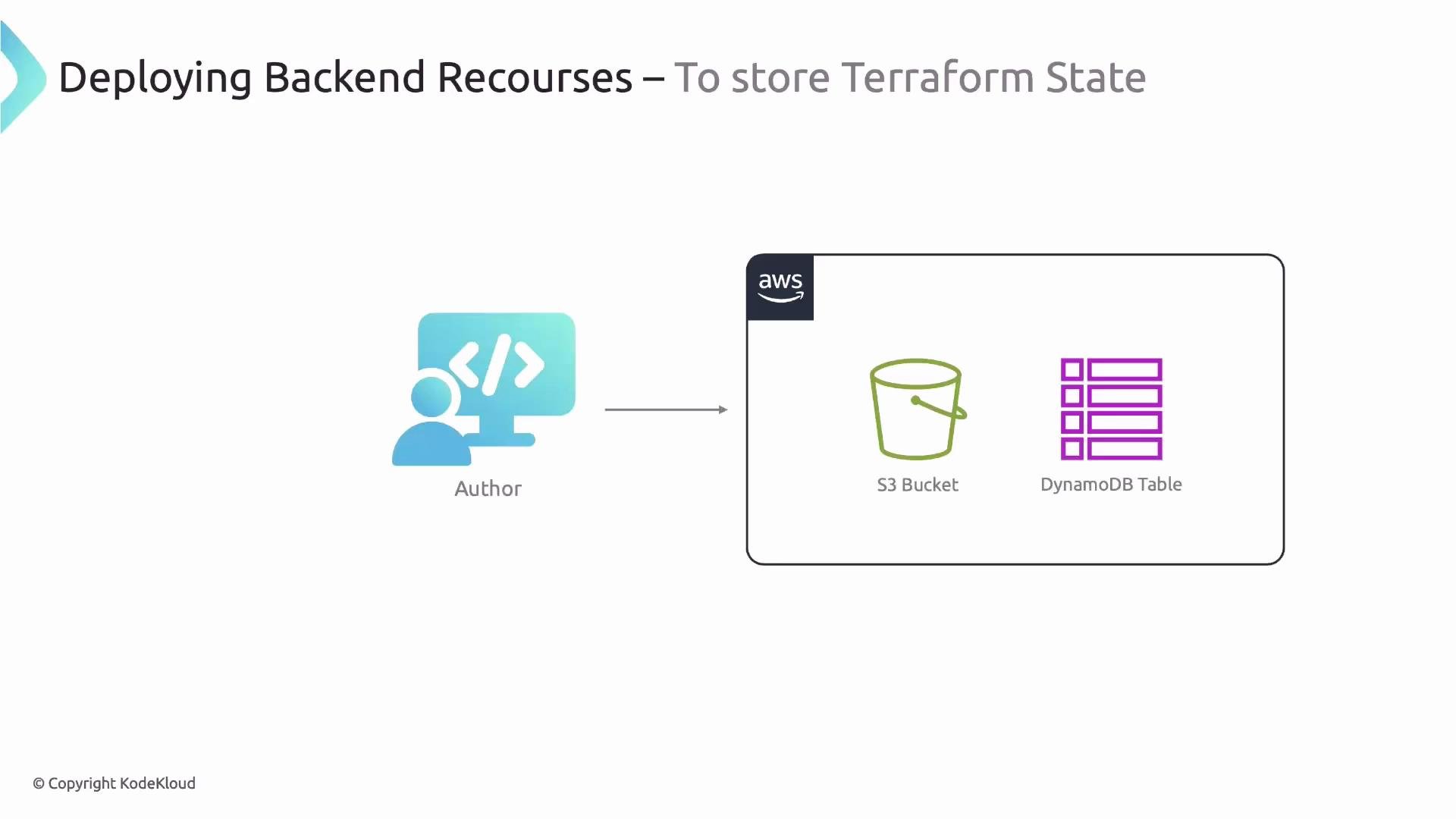
A common production-ready approach on AWS is to store state in an S3 bucket and use a DynamoDB table for state locking. Terraform supports many backends (including Terraform Cloud), but S3 + DynamoDB is a simple, widely-used pattern for teams using AWS.
Example: configure the S3 backend in a CDKTF stack so Terraform uses S3 for state and DynamoDB for locking:
```typescript theme={null}
class MyStack extends TerraformStack {
constructor(scope: Construct, id: string) {
super(scope, id);
new provider.AwsProvider(this, 'aws-provider', {
region: 'us-east-1',
});
new S3Backend(this, {
bucket: 'cdktf-name-picker-backend', // existing S3 bucket name
dynamodbTable: 'cdktf-name-picker-locks', // existing DynamoDB table name
region: 'us-east-1',
key: 'state-file',
});
// ...
}
}
```
S3Backend parameters:
| Parameter | Description |
| --------------: | ------------------------------------------------------ |
| `bucket` | S3 bucket name to store the state file |
| `dynamodbTable` | DynamoDB table name for state locking |
| `region` | AWS region for the backend resources |
| `key` | Object key (path) in the S3 bucket for this state file |
 ## Creating the S3 bucket and DynamoDB table
You have three main choices to create the backend resources:
* Manual: create the S3 bucket and DynamoDB table in the AWS Console (quick, but not automated or reproducible).
* CDKTF code: add resource definitions in your CDKTF app (automated, but may create circular dependency issues — see below).
* Terraform Registry module: import and reuse a community or org-maintained module (recommended for reproducibility and speed).
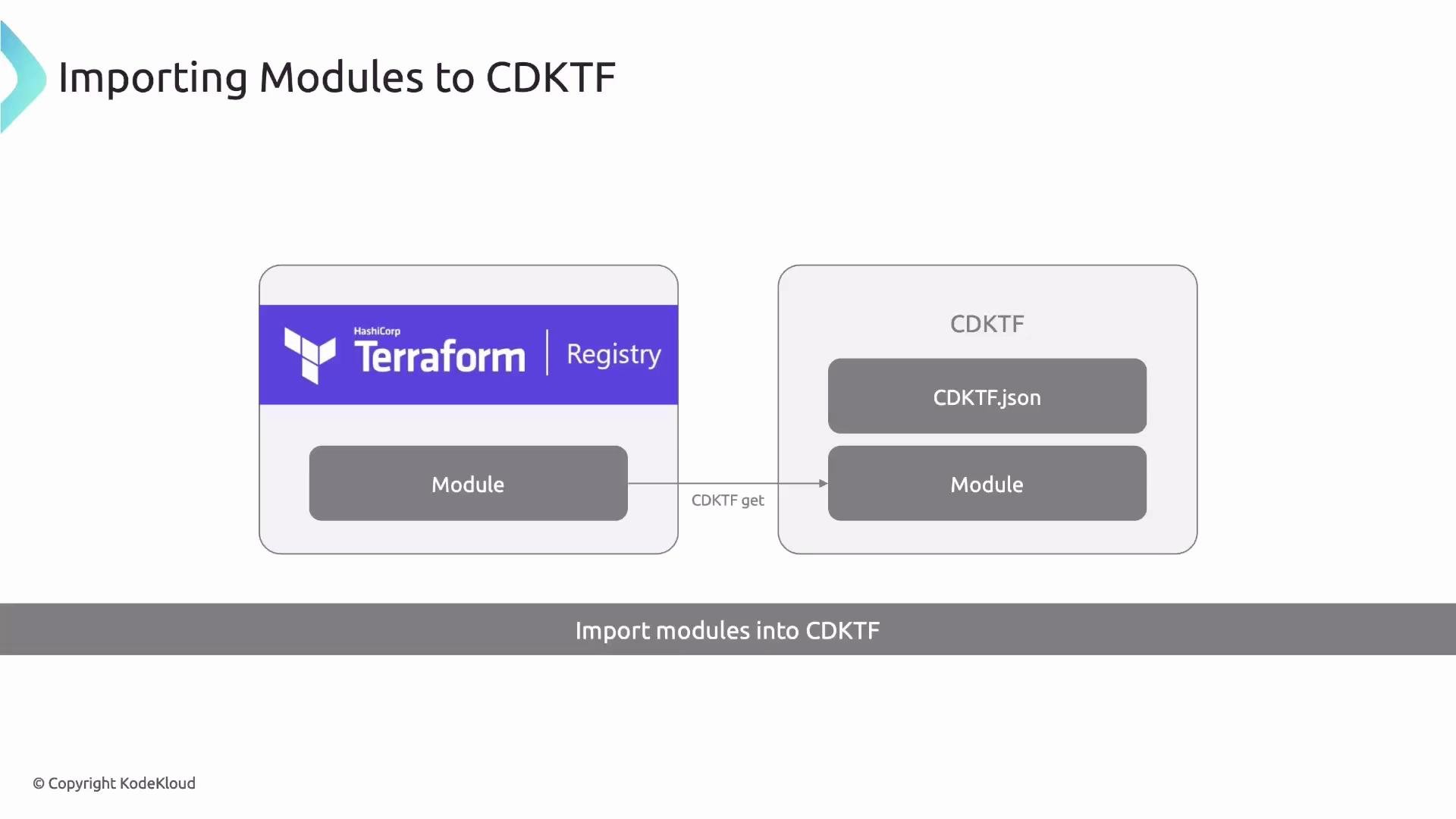
Using an existing Terraform module is common—creating backend resources is a well-known pattern and rarely needs custom code. CDKTF can import Terraform modules by adding them to `cdktf.json` and running `cdktf get`.
Example `cdktf.json` that references a module:
```json theme={null}
{
"language": "typescript",
"app": "npx ts-node main.ts",
"terraformModules": [
{
"name": "s3-dynamodb-remote-backend",
"source": "my-devops-way/s3-dynamodb-remote-backend/aws"
}
],
"context": {}
}
```
Then run:
```bash theme={null}
yarn cdktf get
```
Expected output (abbreviated):
```bash theme={null}
Generated typescript constructs in the output directory: .gen
```
cdktf generates TypeScript wrappers for modules under `.gen`. A trimmed example of a generated wrapper:
```typescript theme={null}
// generated by cdktf get
// my-devops-way/s3-dynamodb-remote-backend/aws
import { TerraformModule, TerraformModuleUserConfig } from 'cdktf';
import { Construct } from 'constructs';
export interface S3DynamodbRemoteBackendConfig extends TerraformModuleUserConfig {
readonly bucket?: string;
readonly bucketPrefix?: string;
readonly dynamodbTable: string;
readonly kmsMasterKeyId?: string;
}
export class S3DynamodbRemoteBackend extends TerraformModule {
constructor(scope: Construct, id: string, config: S3DynamodbRemoteBackendConfig) {
super(scope, id, {
...config,
source: 'my-devops-way/s3-dynamodb-remote-backend/aws',
});
this.bucket = config.bucket;
this.bucketPrefix = config.bucketPrefix;
this.dynamodbTable = config.dynamodbTable;
this.kmsMasterKeyId = config.kmsMasterKeyId;
}
// getters and setters...
}
```
You can instantiate the generated module and then configure the S3 backend:
```typescript theme={null}
import { S3DynamodbRemoteBackend } from './.gen/modules/s3-dynamodb-remote-backend';
class MyStack extends TerraformStack {
constructor(scope: Construct, id: string) {
super(scope, id);
new provider.AwsProvider(this, 'aws-provider', { region: 'us-east-1' });
const backend = new S3DynamodbRemoteBackend(this, 's3-dynamodb-remote-backend', {
bucket: 'cdktf-name-picker-backend',
dynamodbTable: 'cdktf-name-picker-locks',
});
new S3Backend(this, {
bucket: 'cdktf-name-picker-backend',
dynamodbTable: 'cdktf-name-picker-locks',
region: 'us-east-1',
key: 'state-file',
});
}
}
```
## Creating the S3 bucket and DynamoDB table
You have three main choices to create the backend resources:
* Manual: create the S3 bucket and DynamoDB table in the AWS Console (quick, but not automated or reproducible).
* CDKTF code: add resource definitions in your CDKTF app (automated, but may create circular dependency issues — see below).
* Terraform Registry module: import and reuse a community or org-maintained module (recommended for reproducibility and speed).
Using an existing Terraform module is common—creating backend resources is a well-known pattern and rarely needs custom code. CDKTF can import Terraform modules by adding them to `cdktf.json` and running `cdktf get`.
Example `cdktf.json` that references a module:
```json theme={null}
{
"language": "typescript",
"app": "npx ts-node main.ts",
"terraformModules": [
{
"name": "s3-dynamodb-remote-backend",
"source": "my-devops-way/s3-dynamodb-remote-backend/aws"
}
],
"context": {}
}
```
Then run:
```bash theme={null}
yarn cdktf get
```
Expected output (abbreviated):
```bash theme={null}
Generated typescript constructs in the output directory: .gen
```
cdktf generates TypeScript wrappers for modules under `.gen`. A trimmed example of a generated wrapper:
```typescript theme={null}
// generated by cdktf get
// my-devops-way/s3-dynamodb-remote-backend/aws
import { TerraformModule, TerraformModuleUserConfig } from 'cdktf';
import { Construct } from 'constructs';
export interface S3DynamodbRemoteBackendConfig extends TerraformModuleUserConfig {
readonly bucket?: string;
readonly bucketPrefix?: string;
readonly dynamodbTable: string;
readonly kmsMasterKeyId?: string;
}
export class S3DynamodbRemoteBackend extends TerraformModule {
constructor(scope: Construct, id: string, config: S3DynamodbRemoteBackendConfig) {
super(scope, id, {
...config,
source: 'my-devops-way/s3-dynamodb-remote-backend/aws',
});
this.bucket = config.bucket;
this.bucketPrefix = config.bucketPrefix;
this.dynamodbTable = config.dynamodbTable;
this.kmsMasterKeyId = config.kmsMasterKeyId;
}
// getters and setters...
}
```
You can instantiate the generated module and then configure the S3 backend:
```typescript theme={null}
import { S3DynamodbRemoteBackend } from './.gen/modules/s3-dynamodb-remote-backend';
class MyStack extends TerraformStack {
constructor(scope: Construct, id: string) {
super(scope, id);
new provider.AwsProvider(this, 'aws-provider', { region: 'us-east-1' });
const backend = new S3DynamodbRemoteBackend(this, 's3-dynamodb-remote-backend', {
bucket: 'cdktf-name-picker-backend',
dynamodbTable: 'cdktf-name-picker-locks',
});
new S3Backend(this, {
bucket: 'cdktf-name-picker-backend',
dynamodbTable: 'cdktf-name-picker-locks',
region: 'us-east-1',
key: 'state-file',
});
}
}
```
 ## The circular dependency problem (and a warning)
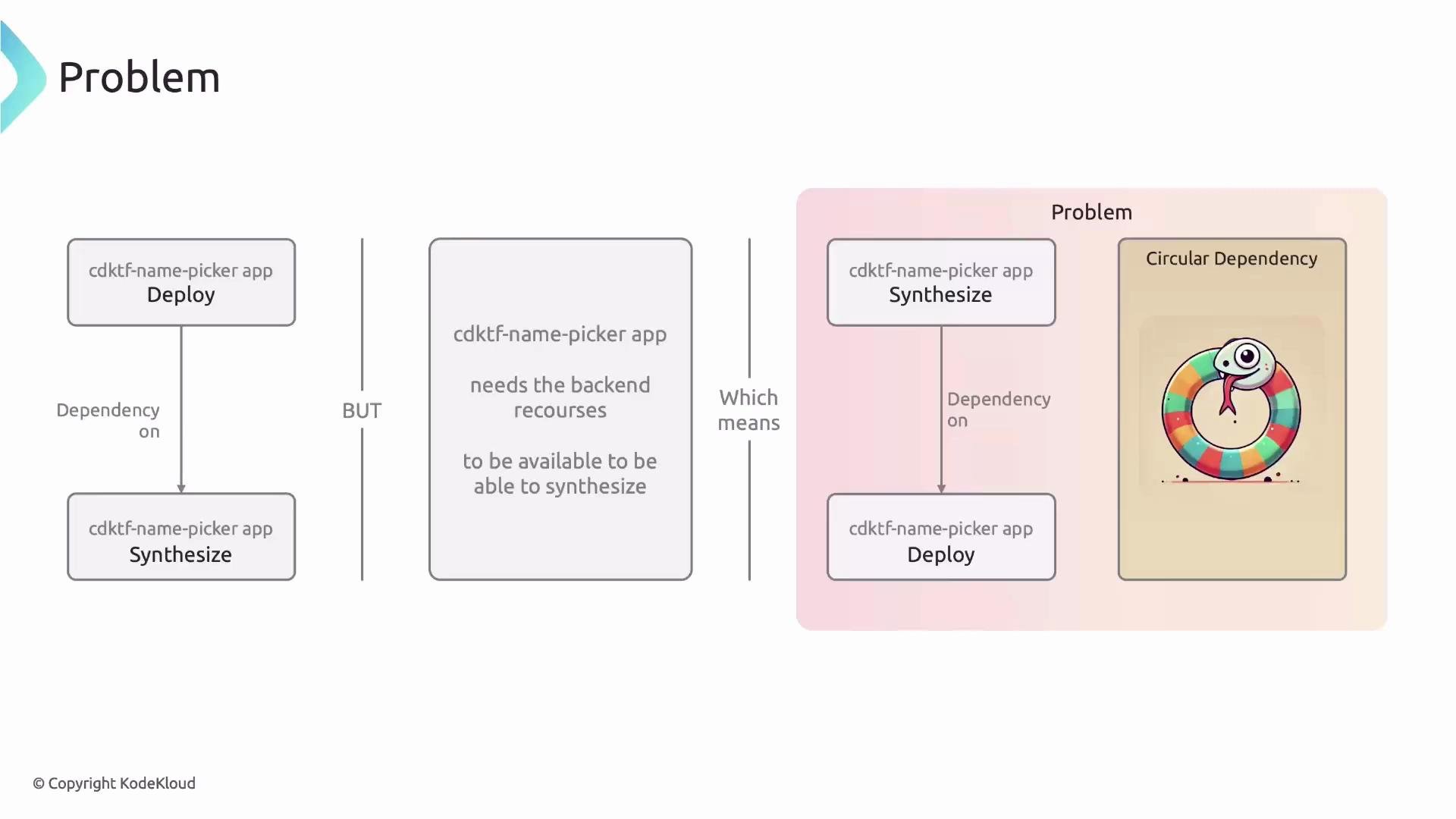
When the same CDKTF app both *creates* the backend and *uses* it in the S3Backend configuration, you can hit a circular dependency:
* Synthesizing the main app asks “does the remote backend exist?”
* If the backend is defined in the same app, Terraform/CDKTF needs the backend available to synthesize/deploy.
* That creates a circular synth/deploy dependency.
Do not create and use the same S3/DynamoDB backend from a single CDKTF app. Doing so introduces a synth/deploy circular dependency and prevents the app from being synthesized and deployed reliably.
This issue is illustrated here:
## The circular dependency problem (and a warning)
When the same CDKTF app both *creates* the backend and *uses* it in the S3Backend configuration, you can hit a circular dependency:
* Synthesizing the main app asks “does the remote backend exist?”
* If the backend is defined in the same app, Terraform/CDKTF needs the backend available to synthesize/deploy.
* That creates a circular synth/deploy dependency.
Do not create and use the same S3/DynamoDB backend from a single CDKTF app. Doing so introduces a synth/deploy circular dependency and prevents the app from being synthesized and deployed reliably.
This issue is illustrated here:
 ## Recommended pattern: split into two apps (prereq + main)
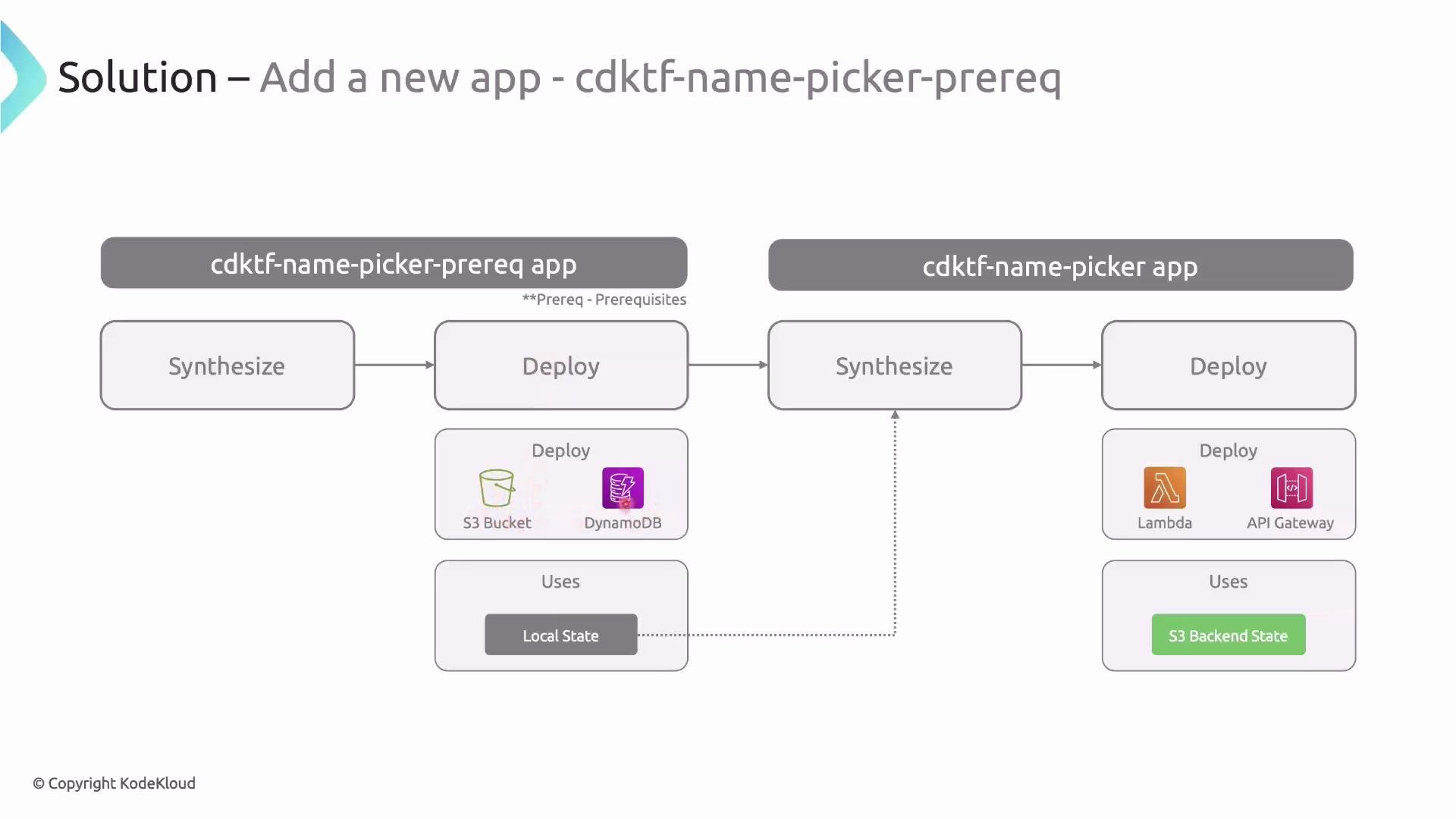
To avoid the circular dependency, split the workflow into two separate CDKTF apps:
1. A prereq app that creates the S3 bucket and DynamoDB table (local state).
2. The main app that uses the created backend (remote S3 state) — it reads the prereq outputs to configure the S3Backend.
Flow:
* synth & deploy prereq app → creates S3 bucket + DynamoDB table and writes outputs to a local tfstate file.
* synth main app (reads prereq tfstate locally to obtain bucket and table names) → configures S3Backend to point to the created resources.
* deploy main app (now using the remote S3 backend).
Diagram:
## Recommended pattern: split into two apps (prereq + main)
To avoid the circular dependency, split the workflow into two separate CDKTF apps:
1. A prereq app that creates the S3 bucket and DynamoDB table (local state).
2. The main app that uses the created backend (remote S3 state) — it reads the prereq outputs to configure the S3Backend.
Flow:
* synth & deploy prereq app → creates S3 bucket + DynamoDB table and writes outputs to a local tfstate file.
* synth main app (reads prereq tfstate locally to obtain bucket and table names) → configures S3Backend to point to the created resources.
* deploy main app (now using the remote S3 backend).
Diagram:
 ## Implementation overview
1. Create a prereq stack that deploys the S3 bucket and DynamoDB table using the imported module. The prereq stack can use the AWS account ID to create a globally unique bucket name.
Example (abridged):
```typescript theme={null}
// stacks/PreReqStack.ts (abridged)
import { Construct } from 'constructs';
import { TerraformStack, TerraformOutput } from 'cdktf';
import { data } from '@cdktf/provider-aws';
import { S3DynamodbRemoteBackend } from '../.gen/modules/s3-dynamodb-remote-backend';
export class PreReqStack extends TerraformStack {
constructor(scope: Construct, id: string, config: { backendName: string }) {
super(scope, id);
const currentAccount = new data.AwsCallerIdentity(this, 'current-account');
const backend = new S3DynamodbRemoteBackend(this, 's3-dynamodb-remote-backend', {
bucket: `${config.backendName}-${currentAccount.accountId}`,
dynamodbTable: config.backendName,
});
new TerraformOutput(this, 'bucket', { value: backend.bucket });
new TerraformOutput(this, 'dynamodbTable', { value: backend.dynamodbTable });
}
}
```
2. Add an npm script to deploy only the prereq app. Example `package.json` scripts:
```json theme={null}
"scripts": {
"get": "cdktf get",
"build": "tsc",
"synth": "cdktf synth",
"deploy": "cdktf deploy",
"deploy:prereq": "cdktf deploy --app='yarn ts-node prereq.ts'"
}
```
Deploy the prereq app:
```bash theme={null}
yarn deploy:prereq
```
You should see a Terraform plan/apply that creates the S3 bucket and DynamoDB table, and prints outputs such as the created bucket name and DynamoDB table name.
3. Use the prereq outputs to configure the main app's S3 backend. One practical approach is to create a base stack class (for example, `AwsBaseStack`) that reads the prereq tfstate file produced by the prereq deployment and configures `S3Backend` from those outputs.
Example (abridged):
```typescript theme={null}
// stacks/AwsBaseStack.ts (abridged)
import { Construct } from 'constructs';
import { TerraformStack, S3Backend } from 'cdktf';
import { provider } from '@cdktf/provider-aws';
import * as path from 'path';
import * as fs from 'fs';
import { BACKEND_NAME } from '../config';
export class AwsBaseStack extends TerraformStack {
constructor(scope: Construct, id: string) {
super(scope, id);
new provider.AwsProvider(this, 'aws-provider', { region: 'us-east-1' });
const prereqStateFile = path.join(process.env.INIT_CWD!, `./terraform.${BACKEND_NAME}.tfstate`);
let prereqState: any = null;
try {
prereqState = JSON.parse(fs.readFileSync(prereqStateFile, 'utf-8'));
} catch (error: any) {
if (error.code === 'ENOENT') {
throw new Error(`Could not find prerequisite state file: ${prereqStateFile}`);
}
throw error;
}
new S3Backend(this, {
bucket: prereqState.outputs.bucket.value,
dynamodbTable: prereqState.outputs.dynamodbTable.value,
region: 'us-east-1',
key: 'cdktf-name-picker',
});
}
}
```
Notes:
* `process.env.INIT_CWD` ensures the prereq state file is read from the directory where you executed the deploy command.
* The prereq stack must be deployed first so the state file containing `bucket` and `dynamodbTable` outputs is available locally.
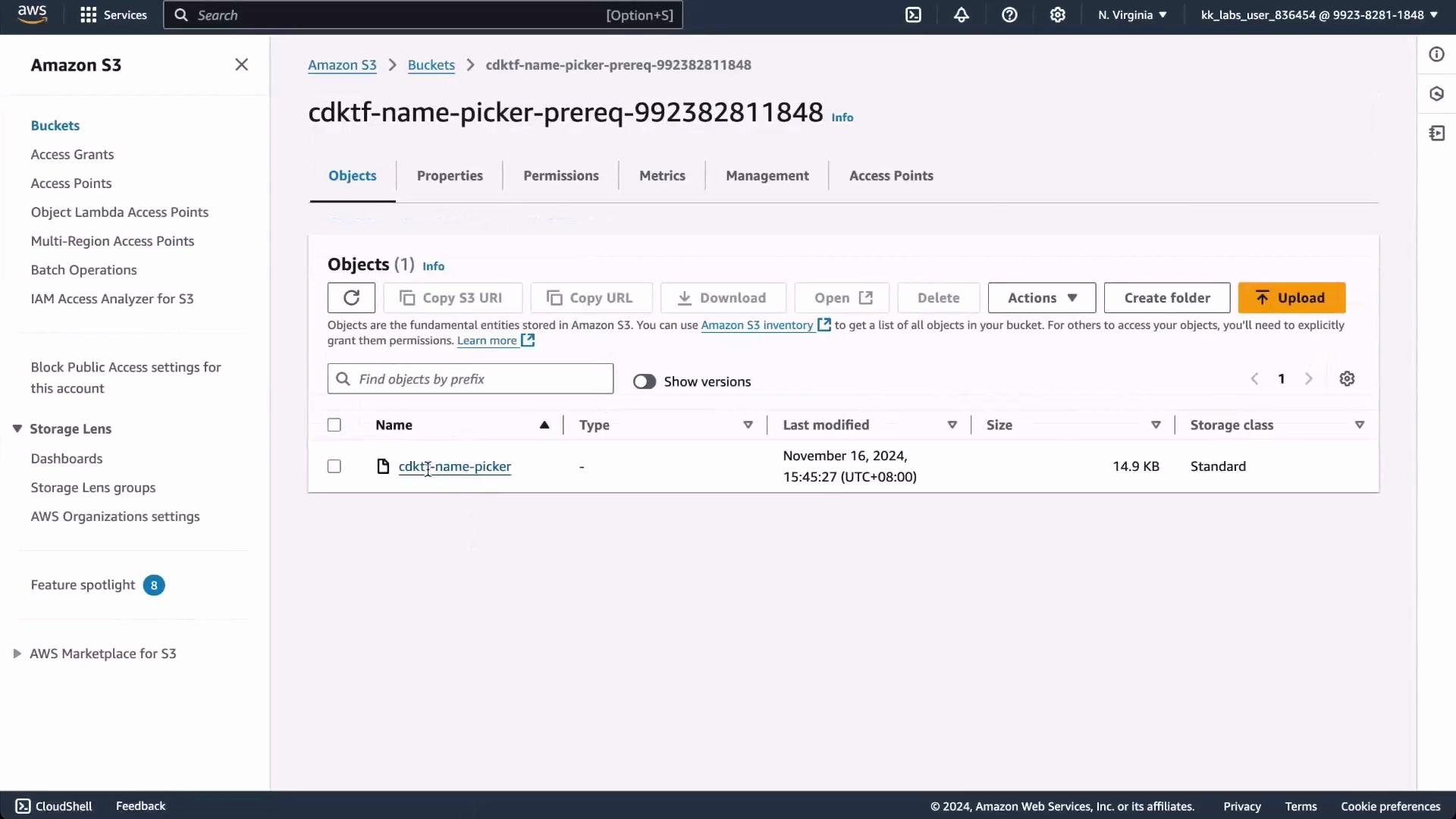
After deploying the prereq app, confirm in the AWS Console that:
* The S3 bucket exists and contains the state key for the main app.
* The DynamoDB table for state locking exists.
## Implementation overview
1. Create a prereq stack that deploys the S3 bucket and DynamoDB table using the imported module. The prereq stack can use the AWS account ID to create a globally unique bucket name.
Example (abridged):
```typescript theme={null}
// stacks/PreReqStack.ts (abridged)
import { Construct } from 'constructs';
import { TerraformStack, TerraformOutput } from 'cdktf';
import { data } from '@cdktf/provider-aws';
import { S3DynamodbRemoteBackend } from '../.gen/modules/s3-dynamodb-remote-backend';
export class PreReqStack extends TerraformStack {
constructor(scope: Construct, id: string, config: { backendName: string }) {
super(scope, id);
const currentAccount = new data.AwsCallerIdentity(this, 'current-account');
const backend = new S3DynamodbRemoteBackend(this, 's3-dynamodb-remote-backend', {
bucket: `${config.backendName}-${currentAccount.accountId}`,
dynamodbTable: config.backendName,
});
new TerraformOutput(this, 'bucket', { value: backend.bucket });
new TerraformOutput(this, 'dynamodbTable', { value: backend.dynamodbTable });
}
}
```
2. Add an npm script to deploy only the prereq app. Example `package.json` scripts:
```json theme={null}
"scripts": {
"get": "cdktf get",
"build": "tsc",
"synth": "cdktf synth",
"deploy": "cdktf deploy",
"deploy:prereq": "cdktf deploy --app='yarn ts-node prereq.ts'"
}
```
Deploy the prereq app:
```bash theme={null}
yarn deploy:prereq
```
You should see a Terraform plan/apply that creates the S3 bucket and DynamoDB table, and prints outputs such as the created bucket name and DynamoDB table name.
3. Use the prereq outputs to configure the main app's S3 backend. One practical approach is to create a base stack class (for example, `AwsBaseStack`) that reads the prereq tfstate file produced by the prereq deployment and configures `S3Backend` from those outputs.
Example (abridged):
```typescript theme={null}
// stacks/AwsBaseStack.ts (abridged)
import { Construct } from 'constructs';
import { TerraformStack, S3Backend } from 'cdktf';
import { provider } from '@cdktf/provider-aws';
import * as path from 'path';
import * as fs from 'fs';
import { BACKEND_NAME } from '../config';
export class AwsBaseStack extends TerraformStack {
constructor(scope: Construct, id: string) {
super(scope, id);
new provider.AwsProvider(this, 'aws-provider', { region: 'us-east-1' });
const prereqStateFile = path.join(process.env.INIT_CWD!, `./terraform.${BACKEND_NAME}.tfstate`);
let prereqState: any = null;
try {
prereqState = JSON.parse(fs.readFileSync(prereqStateFile, 'utf-8'));
} catch (error: any) {
if (error.code === 'ENOENT') {
throw new Error(`Could not find prerequisite state file: ${prereqStateFile}`);
}
throw error;
}
new S3Backend(this, {
bucket: prereqState.outputs.bucket.value,
dynamodbTable: prereqState.outputs.dynamodbTable.value,
region: 'us-east-1',
key: 'cdktf-name-picker',
});
}
}
```
Notes:
* `process.env.INIT_CWD` ensures the prereq state file is read from the directory where you executed the deploy command.
* The prereq stack must be deployed first so the state file containing `bucket` and `dynamodbTable` outputs is available locally.
After deploying the prereq app, confirm in the AWS Console that:
* The S3 bucket exists and contains the state key for the main app.
* The DynamoDB table for state locking exists.
 4. With the `AwsBaseStack` reading the prereq outputs, synthesize and deploy the main stack normally. When you run the main deploy (for example, `yarn deploy`), Terraform should detect no differences against the state stored in S3 if nothing else changed:
```bash theme={null}
Apply complete! Resources: 0 added, 0 changed, 0 destroyed.
Outputs:
namePickerApiUrl = "https://p67gu4qdc4.execute-api.us-east-1.amazonaws.com/dev"
```
You can then delete the main app’s local tfstate files (but keep the prereq tfstate file — it documents the S3/DynamoDB resources used for the backend).
Tips:
* CDKTF generates raw Terraform in the `cdktf.out` directory. If you need to run low-level Terraform commands, use `cdktf.out` as an escape hatch.
* When starting new projects, configure a remote backend from the start. Use the two-app prereq pattern primarily when migrating existing local-state projects.
* Consider using IAM permissions and encryption (KMS) for S3 buckets that hold sensitive state.
## Summary
* Local state is convenient for experiments but fragile in team environments. Use a remote backend for collaboration.
* On AWS, S3 + DynamoDB is a common remote backend that provides shared state and locking.
* Avoid creating and using the same backend in a single CDKTF app — this causes a synth/deploy circular dependency.
* Use a two-app pattern (prereq app + main app) to reliably create backend resources and then switch the main app to the remote backend.
* Use `cdktf get` to import Terraform Registry modules and `.gen` wrappers to instantiate module constructs in CDKTF.
4. With the `AwsBaseStack` reading the prereq outputs, synthesize and deploy the main stack normally. When you run the main deploy (for example, `yarn deploy`), Terraform should detect no differences against the state stored in S3 if nothing else changed:
```bash theme={null}
Apply complete! Resources: 0 added, 0 changed, 0 destroyed.
Outputs:
namePickerApiUrl = "https://p67gu4qdc4.execute-api.us-east-1.amazonaws.com/dev"
```
You can then delete the main app’s local tfstate files (but keep the prereq tfstate file — it documents the S3/DynamoDB resources used for the backend).
Tips:
* CDKTF generates raw Terraform in the `cdktf.out` directory. If you need to run low-level Terraform commands, use `cdktf.out` as an escape hatch.
* When starting new projects, configure a remote backend from the start. Use the two-app prereq pattern primarily when migrating existing local-state projects.
* Consider using IAM permissions and encryption (KMS) for S3 buckets that hold sensitive state.
## Summary
* Local state is convenient for experiments but fragile in team environments. Use a remote backend for collaboration.
* On AWS, S3 + DynamoDB is a common remote backend that provides shared state and locking.
* Avoid creating and using the same backend in a single CDKTF app — this causes a synth/deploy circular dependency.
* Use a two-app pattern (prereq app + main app) to reliably create backend resources and then switch the main app to the remote backend.
* Use `cdktf get` to import Terraform Registry modules and `.gen` wrappers to instantiate module constructs in CDKTF.
 ## Links and references
* [CDK for Terraform (CDKTF) documentation](https://developer.hashicorp.com/terraform/cdktf)
* [Terraform Cloud and backends](https://www.terraform.io/cloud)
* [Terraform Registry](https://registry.terraform.io)
* [AWS Console](https://console.aws.amazon.com/)
## Links and references
* [CDK for Terraform (CDKTF) documentation](https://developer.hashicorp.com/terraform/cdktf)
* [Terraform Cloud and backends](https://www.terraform.io/cloud)
* [Terraform Registry](https://registry.terraform.io)
* [AWS Console](https://console.aws.amazon.com/)