> ## Documentation Index
> Fetch the complete documentation index at: https://notes.kodekloud.com/llms.txt
> Use this file to discover all available pages before exploring further.
# Click Ops
> Compares manual cloud console ClickOps with Infrastructure as Code, highlighting risks of manual provisioning and benefits of IaC for reproducible, auditable, and automated deployments.
This article examines the traditional, manual approach to provisioning cloud infrastructure—commonly called ClickOps—highlights its limitations, and introduces why teams migrate to Infrastructure as Code (IaC) for safer, repeatable deployments.
A common ClickOps workflow uses a cloud provider's web console to create and configure resources by hand. For example, the AWS Management Console provides a graphical UI for defining and deploying AWS resources:
* AWS Management Console: [https://aws.amazon.com/console](https://aws.amazon.com/console)
Below is a short demonstration of creating a resource via the console. I launched an AWS Cloud9 environment, signed in to the AWS Console with the provided credentials, and created a simple resource during the session:
```text theme={null}
Console URL https://992382374737.signin.aws.amazon.com
region=us-east-1
Username kk_labs_user_948005
Password JrqQ8b@!WcGV
Start Time Sat Nov 16 13:53:32 UTC 2024
End Time Sat Nov 16 14:53:32 UTC 2024
root in ~/code on ▲ (us-east-1)
>
```
Never store real credentials or sensitive secrets in plaintext files, screenshots, or version control. Use secret management services (for example, AWS Secrets Manager, HashiCorp Vault) and environment-specific credential injection for automation.
A common example resource to create in the console is an S3 bucket.
* S3 (Simple Storage Service): [https://aws.amazon.com/s3](https://aws.amazon.com/s3)
S3 is AWS's object storage service used to store files, serve static assets, or host static websites (when configured or fronted by a CDN such as CloudFront). Objects in S3 are stored in buckets. Bucket names must be globally unique across all AWS accounts and regions, so teams typically append a random or account-specific suffix (for example, `-1234`) to ensure uniqueness.
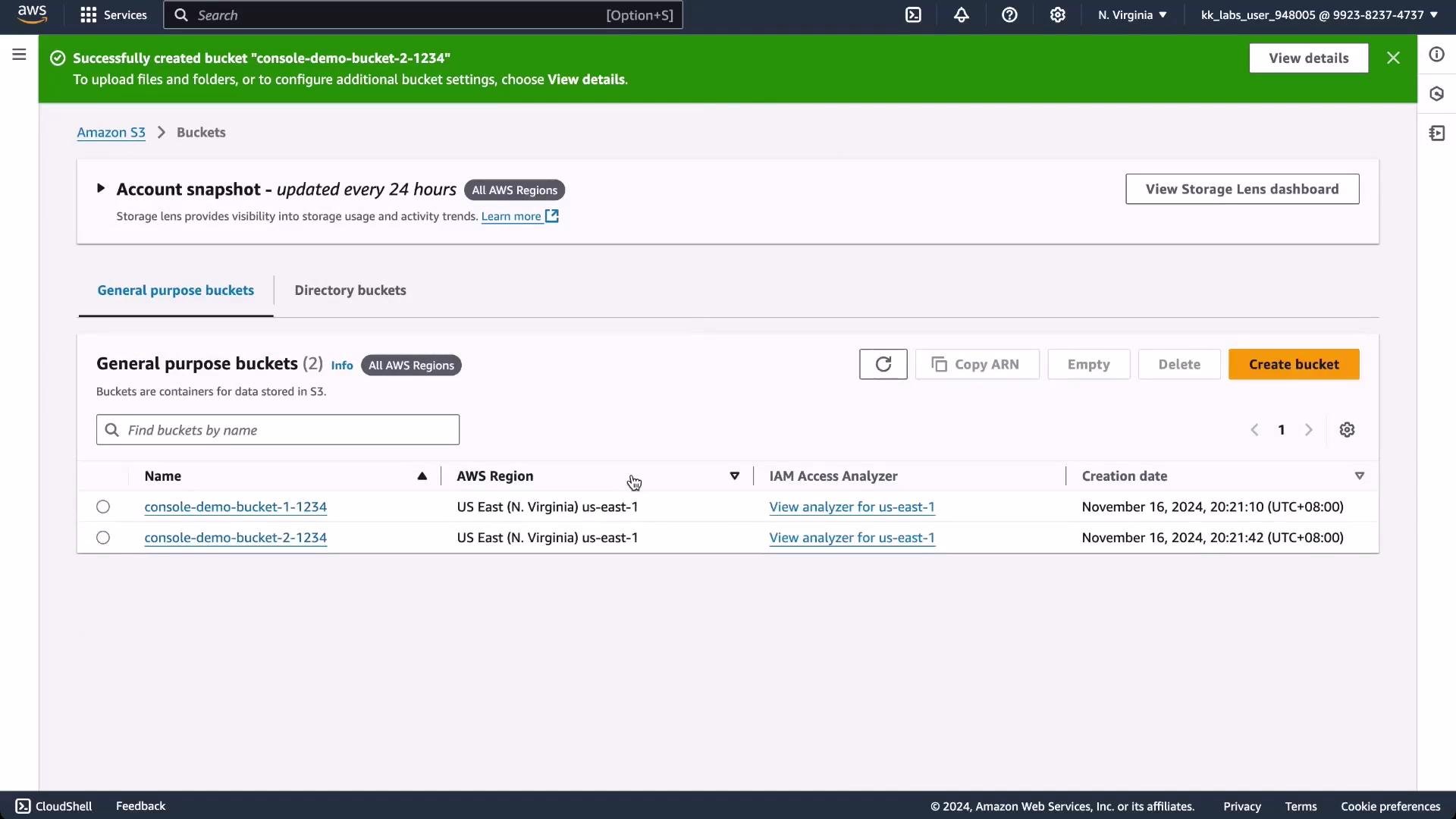
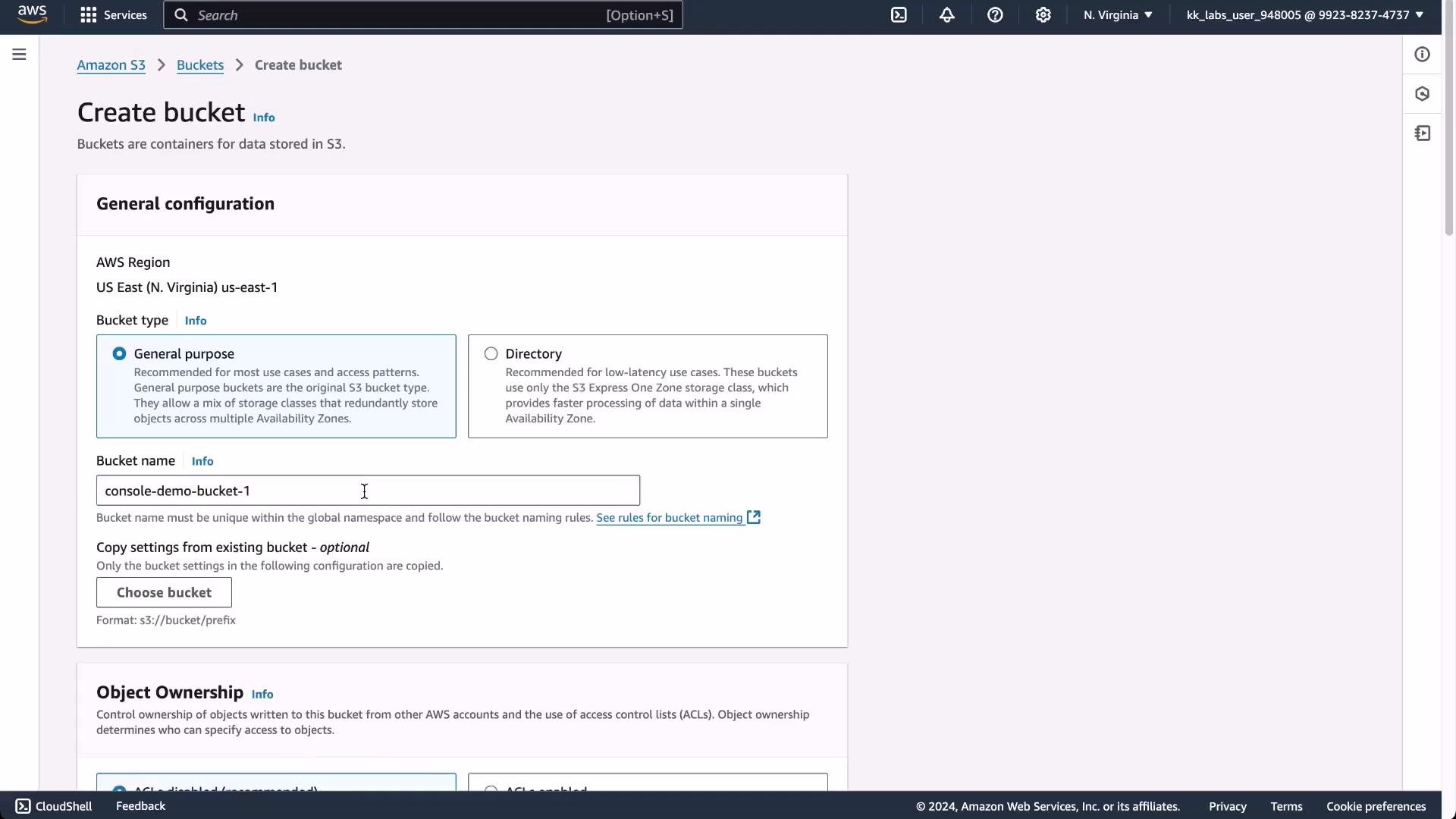 After creating a bucket such as `console-demo-bucket-1-1234`, you can upload objects (files) for a website or other uses. You might also create additional buckets (for example `console-demo-bucket-2-1234`) and add tags—key/value metadata pairs like `env=dev`—to help with cost allocation, organization, and access policies.
 Why ClickOps can be problematic
* Time-consuming and error-prone: GUIs require many manual steps (clicks and selections); small mistakes are easy to make and difficult to catch.
* Hard to reproduce: Recreating the same environment across dev/staging/production is manual and inconsistent without a repeatable definition.
* Limited visibility and auditing: While consoles provide some change history, tracking exact diffs, rollbacks, and approvals is more difficult than with version-controlled definitions.
* Scaling and automation barriers: Integrating manual console steps into CI/CD pipelines is complex or impossible.
Comparison: ClickOps vs Infrastructure as Code (IaC)
| Aspect | ClickOps (manual console) | Infrastructure as Code (IaC) |
| --------------- | ------------------------- | --------------------------------------------------------------------- |
| Reproducibility | Low — manual steps vary | High — declarative, repeatable (`Terraform`, `CloudFormation`, `CDK`) |
| Version control | Not inherently versioned | Versioned configuration and reviews (`git`) |
| Auditability | Partial; manual logs | Full history of changes via code and CI |
| Automation | Difficult to integrate | Designed for automation and pipelines |
| Error-proneness | High | Lower — drift detection and plan/apply workflows |
These limitations are the main reasons teams adopt Infrastructure as Code (IaC). IaC enables version-controlled, repeatable, and auditable provisioning of cloud resources—reducing manual errors and improving reproducibility.
Next steps and resources
* Explore IaC tools: Terraform, AWS CloudFormation, AWS CDK
* Learn about secret management and CI/CD integration to automate infrastructure safely
* Useful links:
* [Kubernetes Basics](https://kubernetes.io/docs/concepts/overview/what-is-kubernetes/)
* [AWS Cloud9](https://aws.amazon.com/cloud9/)
* [AWS CloudFront](https://aws.amazon.com/cloudfront/)
* [Terraform Registry](https://registry.terraform.io/)
References
* AWS Management Console: [https://aws.amazon.com/console](https://aws.amazon.com/console)
* AWS S3: [https://aws.amazon.com/s3](https://aws.amazon.com/s3)
* AWS Cloud9: [https://aws.amazon.com/cloud9/](https://aws.amazon.com/cloud9/)
Why ClickOps can be problematic
* Time-consuming and error-prone: GUIs require many manual steps (clicks and selections); small mistakes are easy to make and difficult to catch.
* Hard to reproduce: Recreating the same environment across dev/staging/production is manual and inconsistent without a repeatable definition.
* Limited visibility and auditing: While consoles provide some change history, tracking exact diffs, rollbacks, and approvals is more difficult than with version-controlled definitions.
* Scaling and automation barriers: Integrating manual console steps into CI/CD pipelines is complex or impossible.
Comparison: ClickOps vs Infrastructure as Code (IaC)
| Aspect | ClickOps (manual console) | Infrastructure as Code (IaC) |
| --------------- | ------------------------- | --------------------------------------------------------------------- |
| Reproducibility | Low — manual steps vary | High — declarative, repeatable (`Terraform`, `CloudFormation`, `CDK`) |
| Version control | Not inherently versioned | Versioned configuration and reviews (`git`) |
| Auditability | Partial; manual logs | Full history of changes via code and CI |
| Automation | Difficult to integrate | Designed for automation and pipelines |
| Error-proneness | High | Lower — drift detection and plan/apply workflows |
These limitations are the main reasons teams adopt Infrastructure as Code (IaC). IaC enables version-controlled, repeatable, and auditable provisioning of cloud resources—reducing manual errors and improving reproducibility.
Next steps and resources
* Explore IaC tools: Terraform, AWS CloudFormation, AWS CDK
* Learn about secret management and CI/CD integration to automate infrastructure safely
* Useful links:
* [Kubernetes Basics](https://kubernetes.io/docs/concepts/overview/what-is-kubernetes/)
* [AWS Cloud9](https://aws.amazon.com/cloud9/)
* [AWS CloudFront](https://aws.amazon.com/cloudfront/)
* [Terraform Registry](https://registry.terraform.io/)
References
* AWS Management Console: [https://aws.amazon.com/console](https://aws.amazon.com/console)
* AWS S3: [https://aws.amazon.com/s3](https://aws.amazon.com/s3)
* AWS Cloud9: [https://aws.amazon.com/cloud9/](https://aws.amazon.com/cloud9/)