> ## Documentation Index
> Fetch the complete documentation index at: https://notes.kodekloud.com/llms.txt
> Use this file to discover all available pages before exploring further.
# DemoPipeline Durability
> Pipeline durability in Jenkins controls how pipeline state is written to disk for build recovery after crashes or restarts.
## What Is Pipeline Durability?
Pipeline durability in Jenkins controls how pipeline state is written to disk so that builds can recover after a crash or restart. Choosing the right durability level helps you balance:
* **Resilience**: Ability to resume an in-progress build.
* **Performance**: Disk I/O overhead when recording pipeline checkpoints.
### Durability Levels
| Level | Description |
| ----------------------- | ------------------------------------------------------------------------------------- |
| MAX\_SURVIVABILITY | Writes state after every step. Safest but introduces the most disk I/O overhead. |
| PERFORMANCE\_OPTIMIZED | Minimizes disk writes for faster execution. Builds cannot resume on unclean shutdown. |
| SURVIVABLE\_NON\_ATOMIC | Compromise between state safety and performance. |
Use **MAX\_SURVIVABILITY** for critical pipelines that must resume after crashes, and **PERFORMANCE\_OPTIMIZED** when speed is more important than resumability.
## Configuring Durability Settings
You can override the default durability level at three scopes:
1. **Global** (all pipelines)
2. **Branch** (multibranch projects)
3. **Per-Pipeline** (individual job)
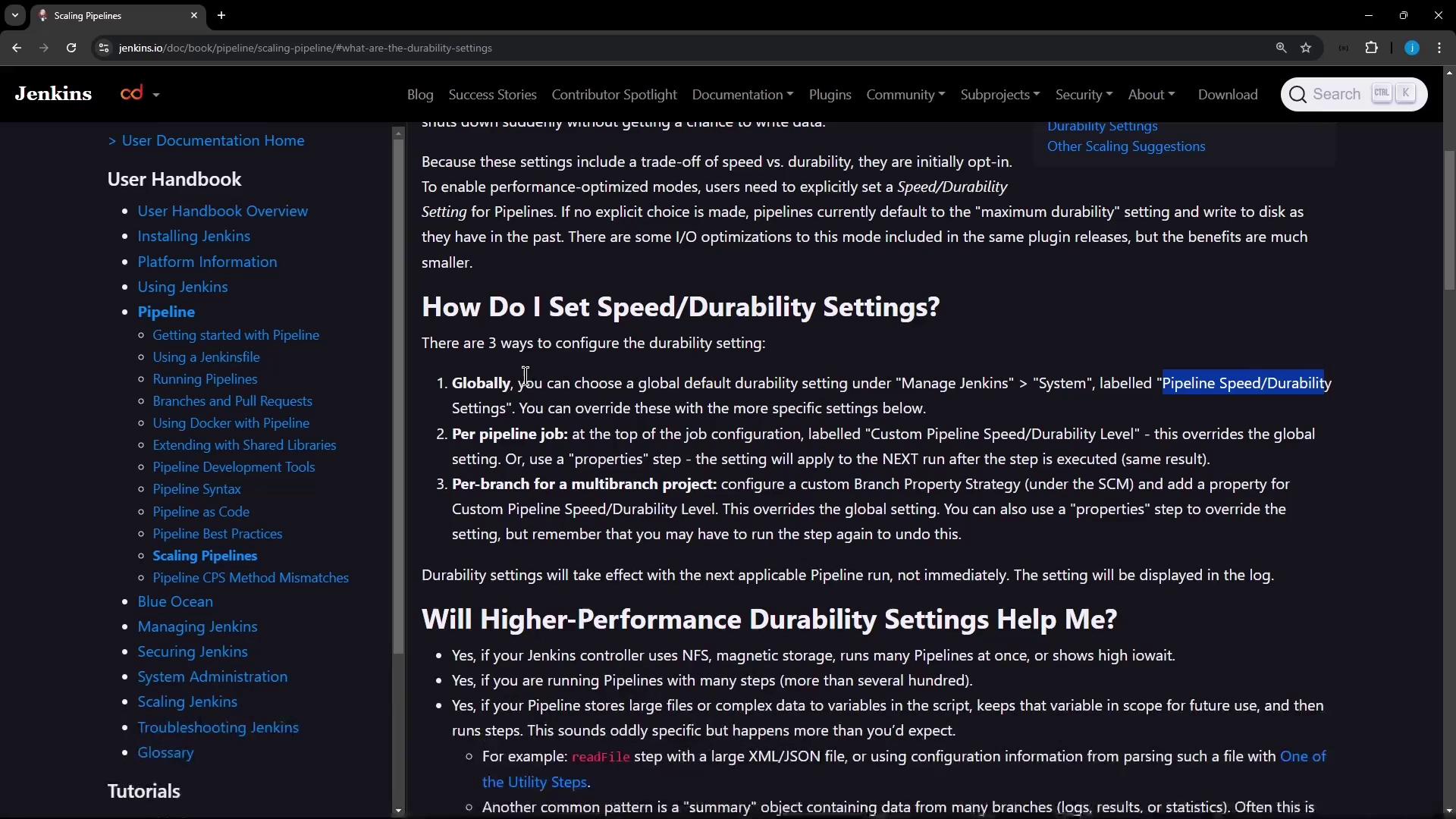
### 1. Global Configuration
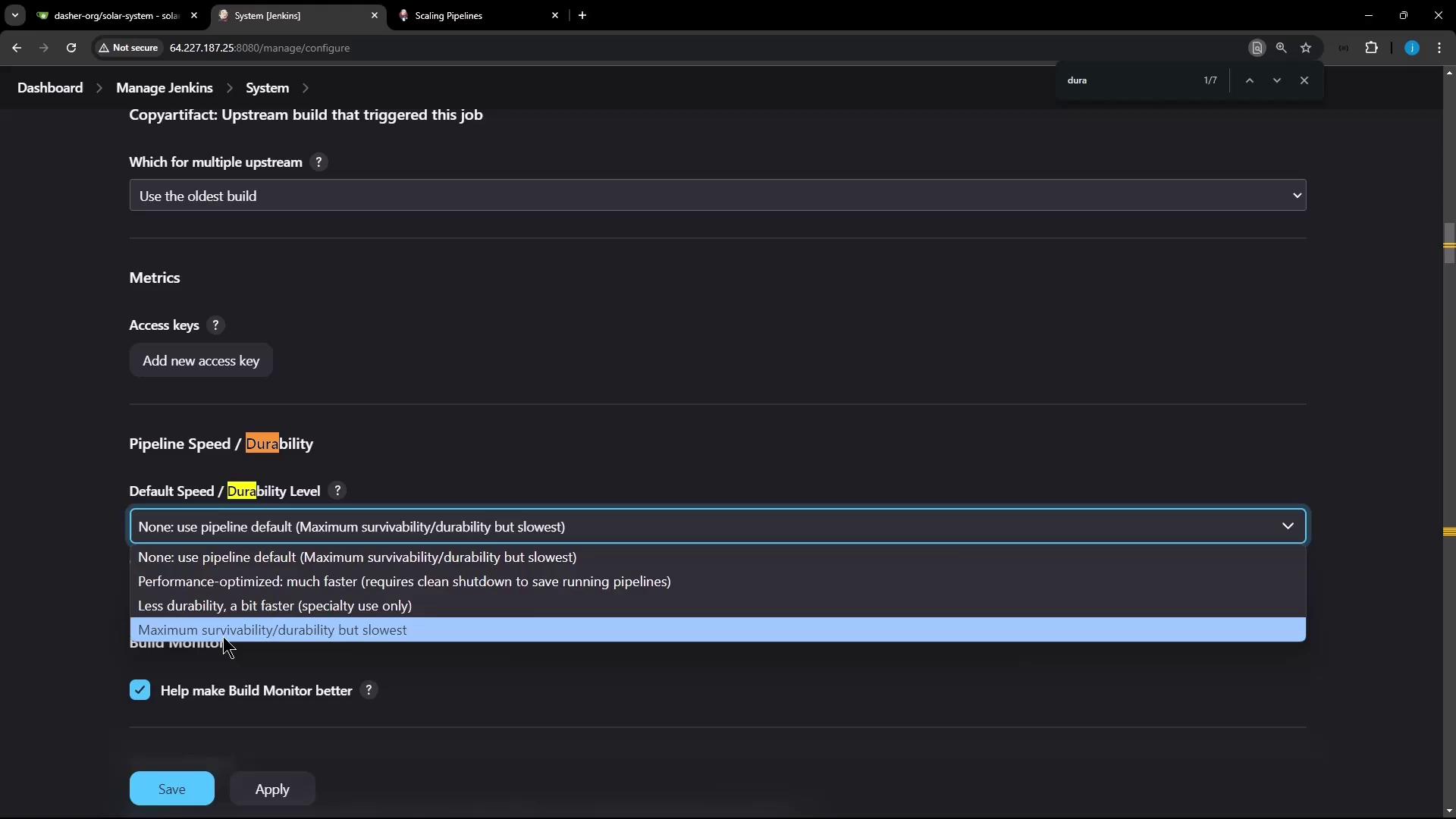
To set the default durability level for every pipeline:
1. Navigate to **Manage Jenkins → Configure System**.
2. Search for “Pipeline Speed/Durability.”
3. Choose your preferred default level.
In the same screen, use the dropdown to finalize your choice:
### 2. Branch-Level (Multibranch Projects)
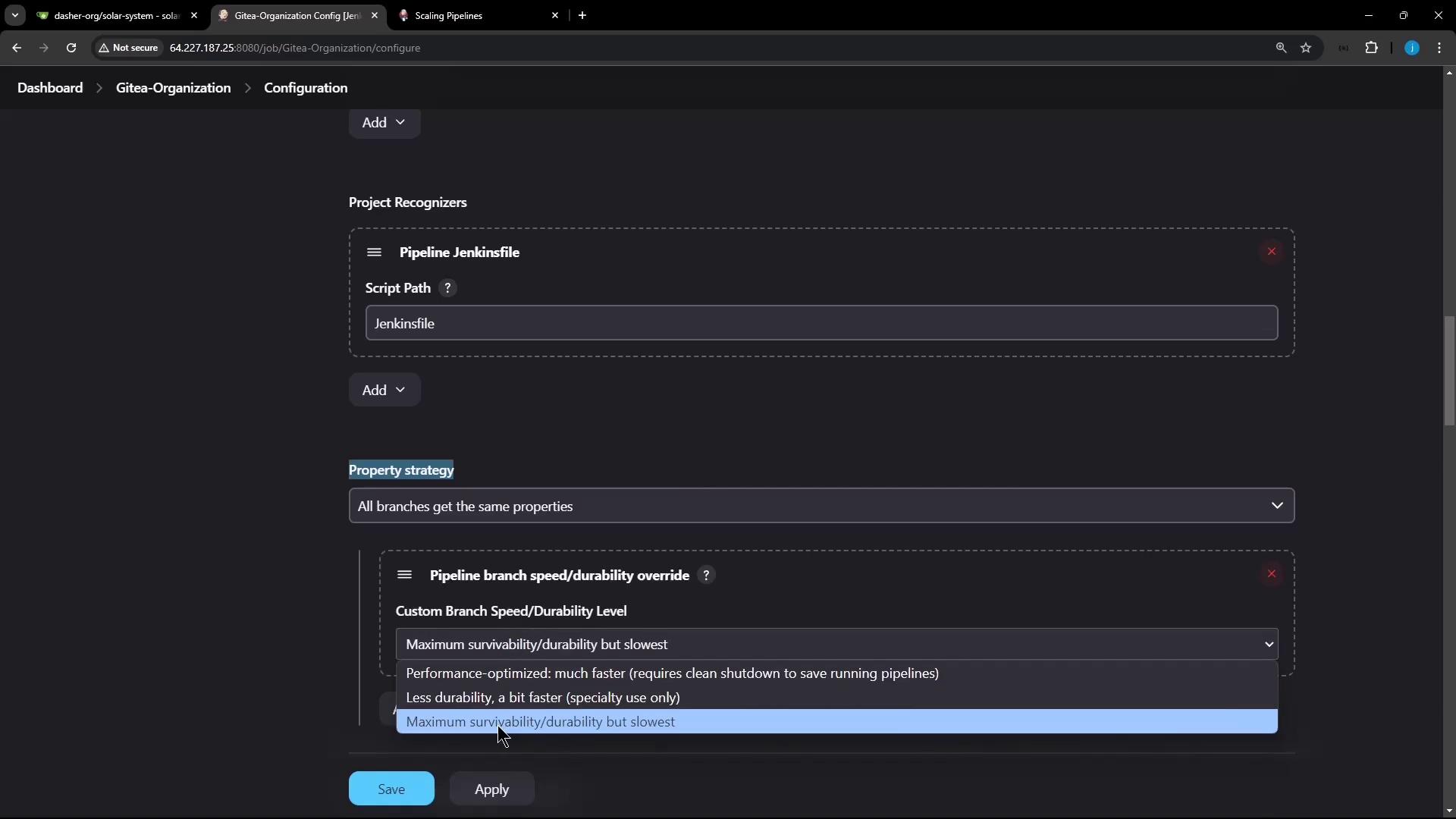
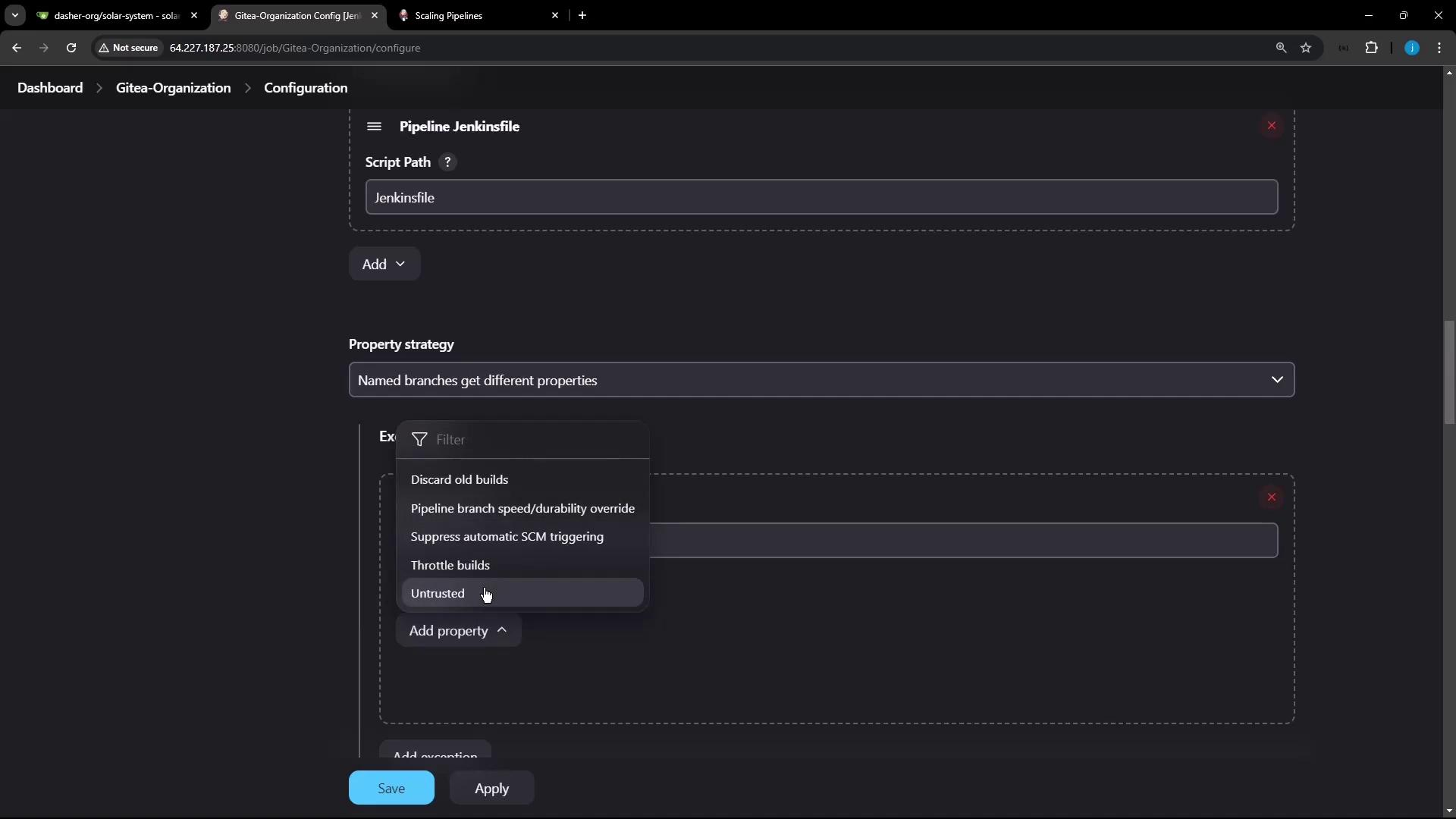
For [multibranch pipelines](https://www.jenkins.io/doc/book/pipeline/multibranch/), you can assign durability per branch:
1. Go to your project’s **Configure** page.
2. Under **Repository Sources → Property strategy**, choose **Named branches**.
3. Add a property for `main` (or `master`) with **MAX\_SURVIVABILITY**.
4. Set **PERFORMANCE\_OPTIMIZED** (or another level) for all other branches.
### 3. Per-Pipeline Job
To set durability for a single pipeline job:
1. Open the job and click **Configure**.
2. Scroll to **Pipeline Speed and Durability**.
3. Select the desired durability level from the dropdown.

## Live Demo
### Demo 1: MAX\_SURVIVABILITY
This demo writes numbers to a file once per second. With **MAX\_SURVIVABILITY**, the build will resume after a Jenkins restart.
```groovy theme={null}
pipeline {
agent any
stages {
stage('Durability Test Loop') {
steps {
script {
sh 'touch numbers.txt'
for (int i = 0; i < 100; i++) {
sh "echo ${i} >> numbers.txt"
sleep 1
}
}
}
}
}
}
```
1. Save and start the build.
2. On the controller host, kill Jenkins:
```bash theme={null}
ps aux | grep -i jenkins.war
kill -9
systemctl status jenkins
```
3. After Jenkins restarts, the console shows:
```bash theme={null}
[Pipeline] sleep
Sleeping for 1 sec
[Pipeline] sh
+ echo 39
[Pipeline] sleep
Sleeping for 1 sec
Resuming build at Sun Nov 10 17:22:47 UTC 2024 after Jenkins restart
No need to sleep any longer
Ready to run at Sun Nov 10 17:22:48 UTC 2024
[Pipeline] sh
+ echo 40
```
Build execution continues from where it left off.
### Demo 2: PERFORMANCE\_OPTIMIZED
Switch the same job to **PERFORMANCE\_OPTIMIZED**, rerun, and repeat the kill/restart:
```bash theme={null}
ps aux | grep -i jenkins.war
kill -9
systemctl status jenkins
```
After restart, you’ll see:
```bash theme={null}
ERROR: Cannot resume build because FlowNode 42 for FlowHead 1 could not be loaded. This is expected when using the PERFORMANCE_OPTIMIZED durability setting and Jenkins is not shut down cleanly. Consider switching to the MAX_SURVIVABILITY setting to prevent this.
Finished: FAILURE
```
Under **PERFORMANCE\_OPTIMIZED**, incomplete builds cannot resume after an unclean shutdown. Plan accordingly if you require resumability.
## Conclusion
* **MAX\_SURVIVABILITY**: Best for mission-critical pipelines that must survive crashes.
* **PERFORMANCE\_OPTIMIZED**: Ideal when speed is paramount and resumability is not required.
* **SURVIVABLE\_NON\_ATOMIC**: Use as a balanced choice between safety and performance.
## Links and References
* [Jenkins Pipeline Documentation](https://www.jenkins.io/doc/book/pipeline/)
* [Multibranch Pipeline](https://www.jenkins.io/doc/book/pipeline/multibranch/)
* [Managing Jenkins Configuration](https://www.jenkins.io/doc/book/managing/)