> ## Documentation Index
> Fetch the complete documentation index at: https://notes.kodekloud.com/llms.txt
> Use this file to discover all available pages before exploring further.
# Demo Refactoring Jenkinsfile
> This guide explains how to refactor a Jenkins pipeline for better credential handling and report management.
In this guide, we’ll walk through refactoring a Jenkins pipeline to:
* Simplify credential handling
* Remove duplicate `withCredentials` blocks
* Centralize test report and HTML publishing in a `post` section
This approach reduces boilerplate and improves maintainability of your Jenkinsfile.
***
## Original Jenkinsfile Snippet
Both the **Unit Testing** and **Code Coverage** stages currently use identical `withCredentials` wrappers:
```groovy theme={null}
pipeline {
agent any
environment {
MONGO_URI = "mongodb+srv://supercluster.d83jj.mongodb.net/superData"
}
options {
// ...
}
stages {
stage('Installing Dependencies') { /* ... */ }
stage('Dependency Scanning') { /* ... */ }
stage('Unit Testing') {
options { retry(2) }
steps {
withCredentials([usernamePassword(
credentialsId: 'mongo-db-credentials',
passwordVariable: 'MONGO_PASSWORD',
usernameVariable: 'MONGO_USERNAME'
)]) {
sh 'npm test'
}
}
junit allowEmptyResults: true, testResults: 'test-results.xml'
}
stage('Code Coverage') {
steps {
withCredentials([usernamePassword(
credentialsId: 'mongo-db-credentials',
passwordVariable: 'MONGO_PASSWORD',
usernameVariable: 'MONGO_USERNAME'
)]) {
sh 'npm run coverage'
}
publishHTML(
allowMissing: true,
alwaysLinkToLastBuild: true,
keepAll: true,
reportDir: 'coverage/lcov-report',
reportFiles: 'index.html',
reportName: 'Code Coverage HTML Report'
)
}
}
}
}
```
```bash theme={null}
root@jenkins-controller-1 in solar-system on ⬢ feature/enabling-cicd via 🐍 v20.16.0
>
```
***
## 1. Injecting Credentials via `environment`
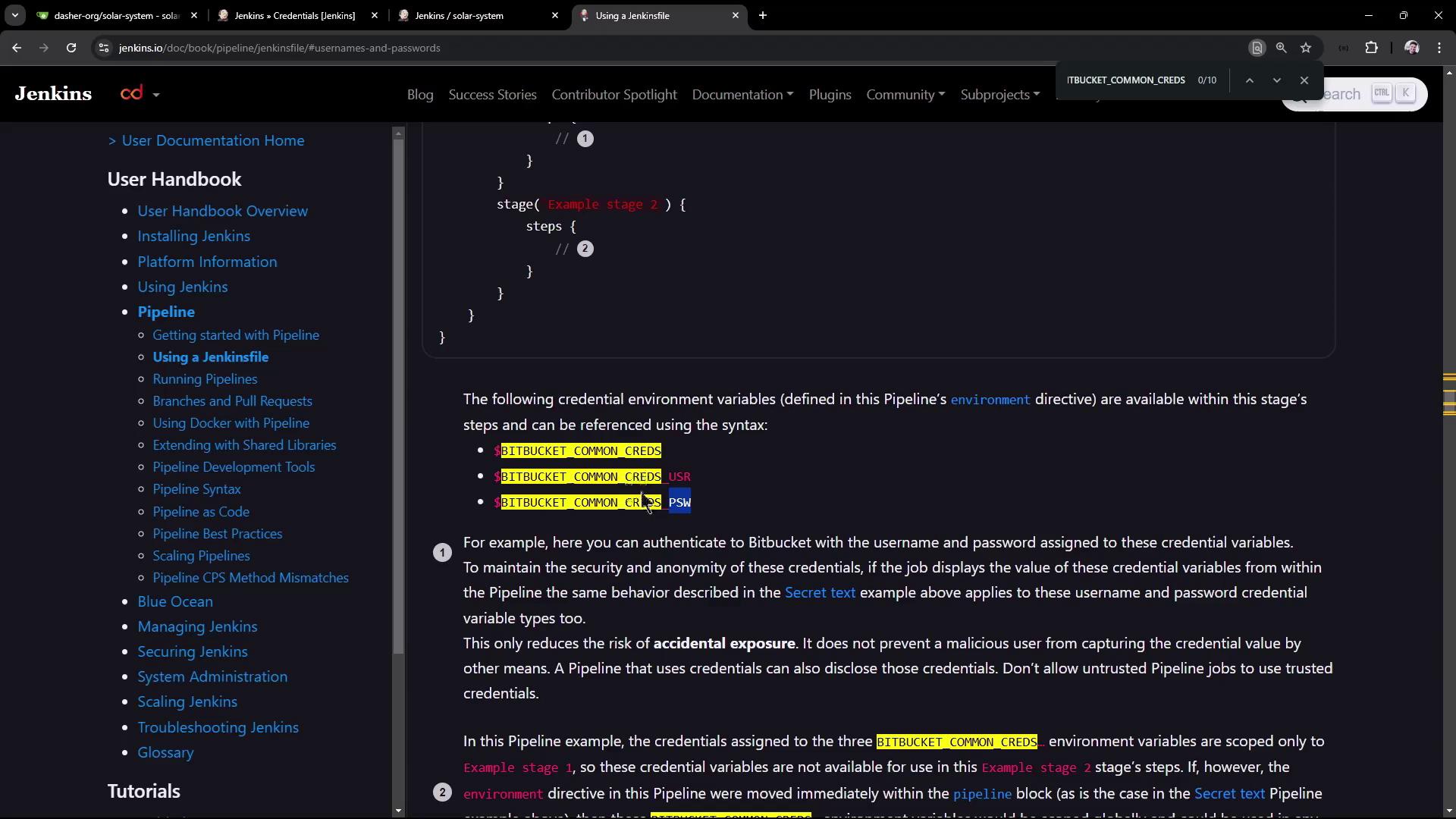
Instead of wrapping every stage in `withCredentials`, Jenkins can populate environment variables automatically:
| Environment Variable | Value |
| -------------------- | ------------------- |
| `MY_CREDS` | `username:password` |
| `MY_CREDS_USR` | `username` |
| `MY_CREDS_PSW` | `password` |
### Define a Single Credential
```groovy theme={null}
pipeline {
agent any
environment {
MONGO_DB_CREDS = credentials('mongo-db-credentials')
}
stages {
stage('Unit Testing') {
options { retry(2) }
steps {
// No explicit withCredentials needed
sh 'npm test'
}
junit allowEmptyResults: true, testResults: 'test-results.xml'
}
}
}
```
You can echo these variables to confirm that Jenkins injects them correctly, but remember that secrets remain masked in logs.
```groovy theme={null}
stage('Unit Testing') {
options { retry(2) }
steps {
sh 'echo Colon-Separated → $MONGO_DB_CREDS'
sh 'echo Username → $MONGO_DB_CREDS_USR'
sh 'echo Password → $MONGO_DB_CREDS_PSW'
sh 'npm test'
}
junit allowEmptyResults: true, testResults: 'test-results.xml'
}
```
```bash theme={null}
root@jenkins-controller-1 in solar-system on ⬢ feature/enabling-cid via ⬢ v20.16.0
```
***
## 2. Why the Stage Fails
After pushing, the build fails:
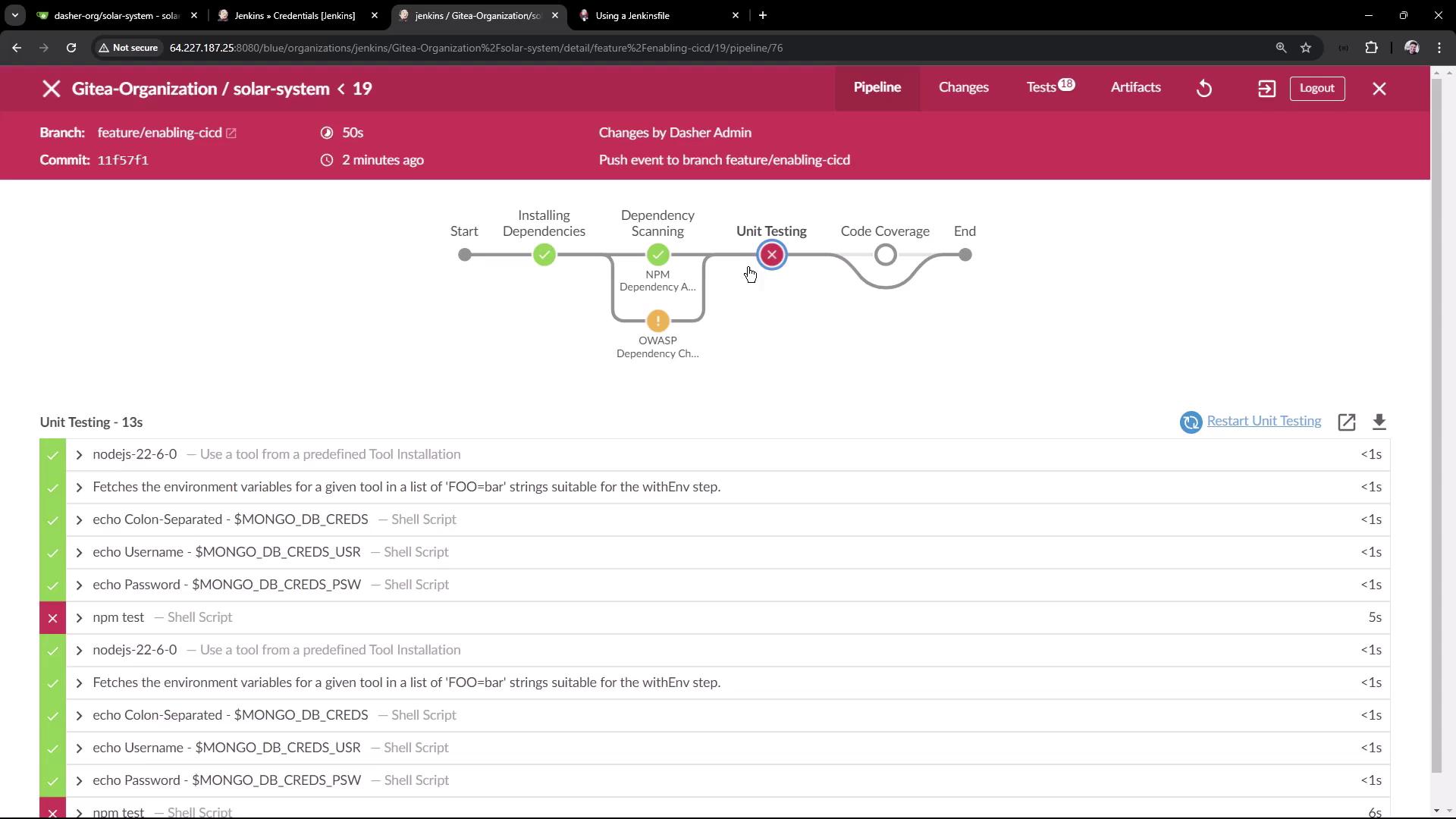
Although the variables are injected:
* `$MONGO_DB_CREDS` is masked
* `$MONGO_DB_CREDS_USR` is displayed
* `$MONGO_DB_CREDS_PSW` is masked
Your test suite still expects `MONGO_USERNAME` and `MONGO_PASSWORD`, so the stage cannot authenticate.
***
## 3. Defining Separate Secret-Text Credentials
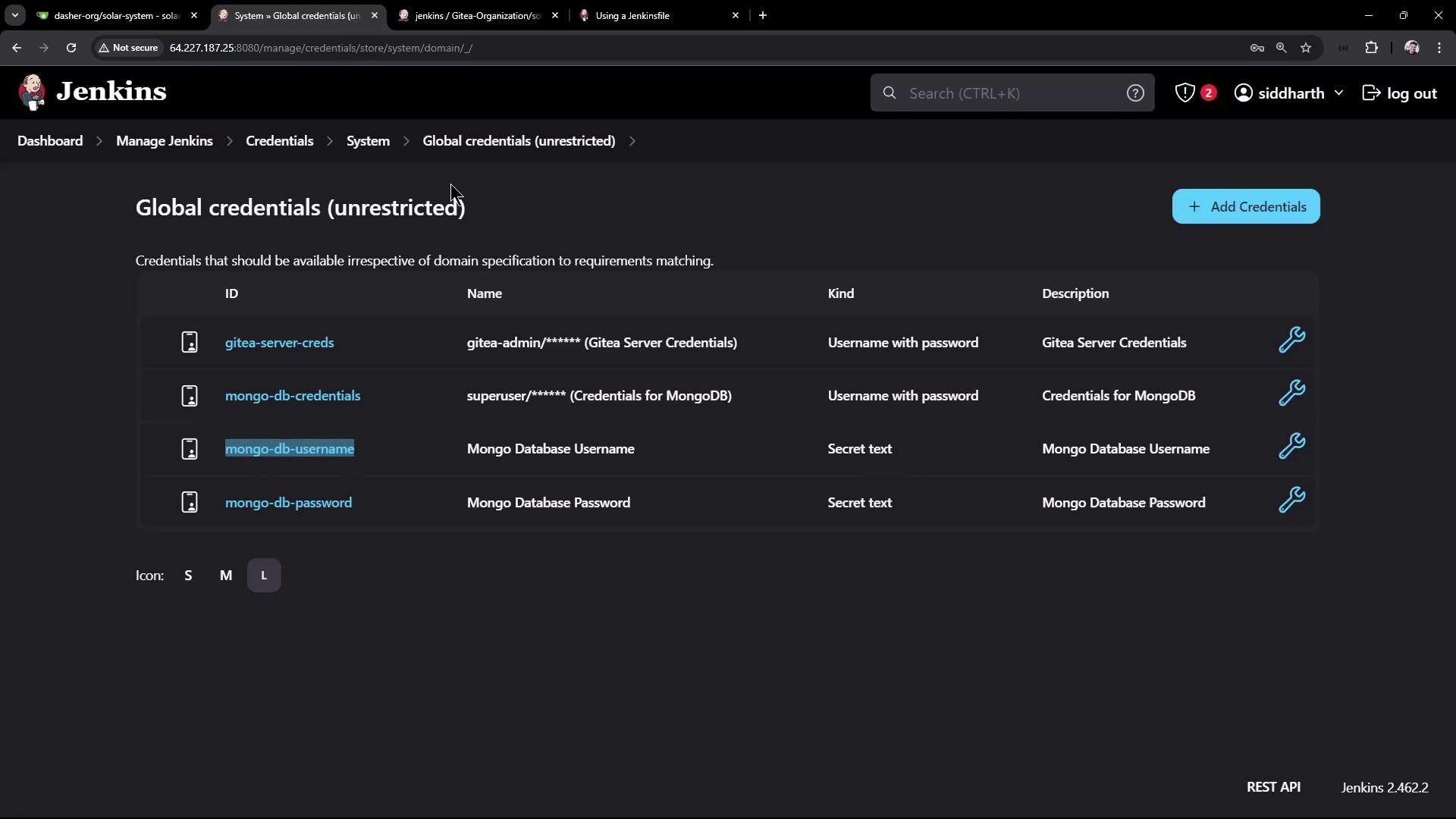
To match your test code, split the single credential into two **Secret text** entries:
1. In Jenkins UI, go to **Credentials > Global**.
2. Add **Secret text** credentials:
* **ID:** `mongo-db-username` → *MongoDB username*
* **ID:** `mongo-db-password` → *MongoDB password*
3. Update the `environment` block accordingly:
```groovy theme={null}
pipeline {
agent any
environment {
MONGO_URI = "mongodb+srv://supercluster.d83jj.mongodb.net/superData"
MONGO_DB_CREDS = credentials('mongo-db-credentials') // optional composite
MONGO_USERNAME = credentials('mongo-db-username')
MONGO_PASSWORD = credentials('mongo-db-password')
}
stages {
stage('Unit Testing') {
options { retry(2) }
steps {
sh 'echo DB Creds → $MONGO_DB_CREDS'
sh 'echo Username → $MONGO_USERNAME'
sh 'echo Password → $MONGO_PASSWORD'
sh 'npm test'
}
junit allowEmptyResults: true, testResults: 'test-results.xml'
}
stage('Code Coverage') {
steps {
catchError(buildResult: 'SUCCESS', stageResult: 'UNSTABLE') {
sh 'npm run coverage'
}
publishHTML(
allowMissing: true,
alwaysLinkToLastBuild: true,
keepAll: true,
reportDir: 'coverage/lcov-report',
reportFiles: 'index.html',
reportName: 'Code Coverage HTML Report'
)
}
}
}
}
```
***
## 4. Centralizing Reports in `post { always { ... } }`
Rather than repeating `junit` and `publishHTML` in each stage, use a `post` block to archive all reports after every build:
```groovy theme={null}
pipeline {
agent any
environment { /* ... */ }
options { /* ... */ }
stages {
stage('Installing Dependencies') { /* ... */ }
stage('Dependency Scanning') { /* ... */ }
stage('OWASP Dependency Check') { /* ... */ }
stage('Unit Testing') { /* ... */ }
stage('Code Coverage') { /* ... */ }
}
post {
always {
junit allowEmptyResults: true, testResults: 'test-results.xml'
junit allowEmptyResults: true, testResults: 'dependency-check-junit.xml'
publishHTML(
allowMissing: true,
alwaysLinkToLastBuild: true,
keepAll: true,
reportDir: 'coverage/lcov-report',
reportFiles: 'index.html',
reportName: 'Code Coverage HTML Report'
)
// Add additional publishHTML calls as needed
}
}
}
```
Don’t forget to adjust `testResults` patterns if you rename or relocate report files—otherwise Jenkins may skip them.
***
## 5. Run the Refactored Pipeline
With credentials injected at the top and reports centralized, the build should now succeed:
```bash theme={null}
> npm test
> mocha app-test.js --timeout 10000 --reporter mocha-junit-reporter --exit
Server successfully running on port - 3000
...
> npm run coverage
...
[htmlpublisher] Archiving HTML reports...
...
```
***
## Final Full Example
```groovy theme={null}
pipeline {
agent any
environment {
MONGO_URI = "mongodb+srv://supercluster.d83jj.mongodb.net/superData"
MONGO_DB_CREDS = credentials('mongo-db-credentials')
MONGO_USERNAME = credentials('mongo-db-username')
MONGO_PASSWORD = credentials('mongo-db-password')
}
options {
// ...
}
stages {
stage('Installing Dependencies') { /* ... */ }
stage('Dependency Scanning') { /* ... */ }
stage('Unit Testing') {
options { retry(2) }
steps {
sh 'echo DB Creds → $MONGO_DB_CREDS'
sh 'echo Username → $MONGO_USERNAME'
sh 'echo Password → $MONGO_PASSWORD'
sh 'npm test'
}
}
stage('Code Coverage') {
steps {
catchError(buildResult: 'SUCCESS', stageResult: 'UNSTABLE') {
sh 'npm run coverage'
}
}
}
}
post {
always {
junit allowEmptyResults: true, testResults: 'test-results.xml'
junit allowEmptyResults: true, testResults: 'dependency-check-junit.xml'
publishHTML(
allowMissing: true,
alwaysLinkToLastBuild: true,
keepAll: true,
reportDir: 'coverage/lcov-report',
reportFiles: 'index.html',
reportName: 'Code Coverage HTML Report'
)
// Add other publishHTML steps here
}
}
}
```
***
## Links and References
* [Jenkins Pipeline Syntax: Environment](https://www.jenkins.io/doc/book/pipeline/syntax/#environment)
* [Jenkins Credentials Binding Plugin](https://plugins.jenkins.io/credentials-binding/)
* [Mocha JUnit Reporter](https://github.com/michaelleeallen/mocha-junit-reporter)
* [Jenkins HTML Publisher Plugin](https://plugins.jenkins.io/htmlpublisher/)