> ## Documentation Index
> Fetch the complete documentation index at: https://notes.kodekloud.com/llms.txt
> Use this file to discover all available pages before exploring further.
# Demo Controller Failure Freestyle Project
> This tutorial demonstrates the impact of a Jenkins controller failure on a long-running Freestyle project and explores job termination behavior.
In this tutorial, we’ll demonstrate how a Jenkins controller failure affects a long-running **Freestyle** project. You will learn how to:
| Step | Action | Description |
| ---- | -------------------------------- | -------------------------------------------- |
| 1 | Prepare Deploy Job | Add a `sleep` command to simulate long tasks |
| 2 | Trigger Build & Test | Execute upstream jobs and inspect failures |
| 3 | Rerun & Deploy | Fix test failures, queue the deploy job |
| 4 | Simulate Controller Failure | Stop the controller during deployment |
| 5 | Analyze Outcome | Observe job termination behavior |
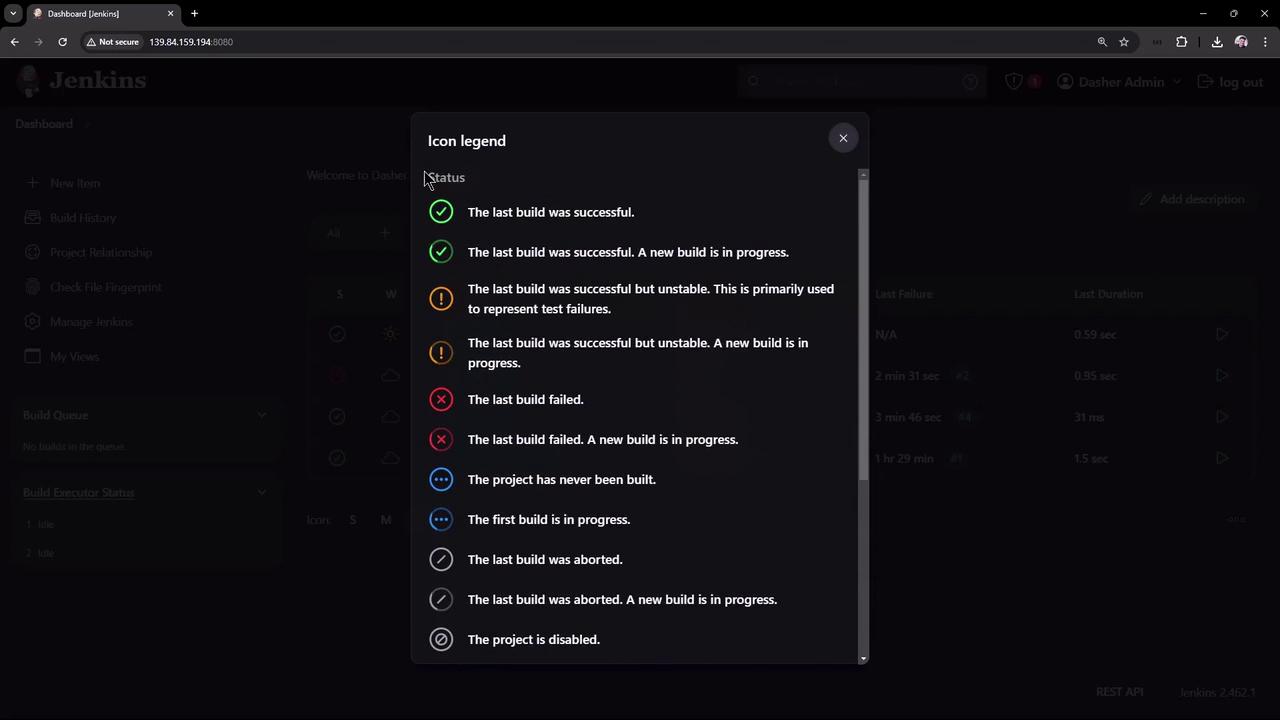
| 6 | Review Jenkins Dashboard & Icons | Explore build status icons and legend |
By the end, you’ll understand why **Freestyle** jobs do not survive controller restarts and what alternatives exist.
***
## 1. Prepare a Long-Running Deploy Job
Edit the **ascii-deploy-job** and insert a `sleep` before the actual deployment steps. This will simulate a long-running process.
```bash theme={null}
#!/bin/bash
# Simulate a long-running task
sleep 3600
# Deployment steps
sudo apt-get update
sudo apt-get install cowsay -y
export PATH="$PATH:/usr/games:/usr/local/games"
cat advice.message | cowsay -f "$(ls /usr/share/cowsay/cows | shuf -n 1)"
```
Adjust the `sleep` duration to suit your testing environment.
Save and apply the job configuration in Jenkins.
***
## 2. Trigger the Build and Test Jobs
1. In Jenkins, click **Build Now** for **ascii-build-job**.
2. **ascii-build-job** will automatically trigger **ascii-test-job**.
### Test Job Failure
Because our advice quote has five words or fewer, the test script will fail. Inspect **ascii-test-job**’s console output:
```bash theme={null}
Started by upstream project "ascii-build-job" build number 5
Running as SYSTEM
Building in workspace /var/lib/jenkins/workspace/ascii-test-job
Copied 1 artifact from "ascii-build-job" build number 5
[ascii-test-job] $ /bin/sh -xe /tmp/jenkins1567.sh
+ ls advice.json
advice.json
+ jq -r .slip.advice advice.json
+ wc -w
+ [ 4 -gt 5 ]
+ cat advice.message
Advice - Sing in the shower.
+ echo "Advice has 5 words or less"
Advice has 5 words or less
+ exit 1
Build step 'Execute shell' marked build as failure
Finished: FAILURE
```
Because the test failed, **ascii-deploy-job** will **not** run.
***
## 3. Rerun and Deploy
1. Update the advice text so it contains **more than five words**.
2. Trigger **ascii-build-job** again.
This time:
* **ascii-test-job** completes successfully.
* **ascii-deploy-job** enters the queue and then starts.
Check **ascii-deploy-job**’s console to confirm the `sleep` invocation:
```bash theme={null}
Started by upstream project "ascii-test-job" build number 6
Running as SYSTEM
Building in workspace /var/lib/jenkins/workspace/ascii-deploy-job
Copied 1 artifact from "ascii-test-job" build number 6
[ascii-deploy-job] $ /bin/sh -xe /tmp/jenkins9836.sh
+ sleep 3600
```
***
## 4. Simulate Controller Failure
While **ascii-deploy-job** is sleeping, simulate a controller outage.
Stopping the Jenkins controller will immediately terminate all running Freestyle jobs.
1. SSH into the Jenkins controller host.
2. Stop Jenkins:
```bash theme={null}
sudo systemctl stop jenkins
sudo systemctl status jenkins
```
The service should display **inactive**.
3. Refresh the Jenkins UI— it will be unreachable.
4. Start Jenkins again:
```bash theme={null}
sudo systemctl start jenkins
sudo systemctl status jenkins
```
You should see output similar to:
```bash theme={null}
● jenkins.service - Jenkins Continuous Integration Server
Loaded: loaded (/usr/lib/systemd/system/jenkins.service; enabled; preset: enabled)
Active: active (running) since Mon 2024-08-19 10:51:25 UTC; 3s ago
Main PID: 37656 (java)
Tasks: 49
Memory: 310.4M (peak: 310.9M)
CPU: 15.0s
CGroup: /system.slice/jenkins.service
└─37656 /usr/bin/java -jar /usr/share/java/jenkins.war --webroot=/var/cache/jenkins/war
```
5. Log back into the UI and open **ascii-deploy-job**. The build will have failed:
```bash theme={null}
[ascii-deploy-job] $ /bin/sh -xe /tmp/jenkins9836.sh
+ sleep 3600
Build step 'Execute shell' marked build as failure
Finished: FAILURE
```
***
## 5. Observations
When the Jenkins controller goes down:
* Any running Freestyle jobs are **terminated**.
* Builds do **not** resume after restart.
Freestyle projects cannot resume after a controller restart. Consider using [Pipeline projects](https://www.jenkins.io/doc/book/pipeline/) for better resilience and survivability.
***
## 6. Jenkins Dashboard and Icon Legend
On the Jenkins dashboard, monitor your jobs’ statuses:
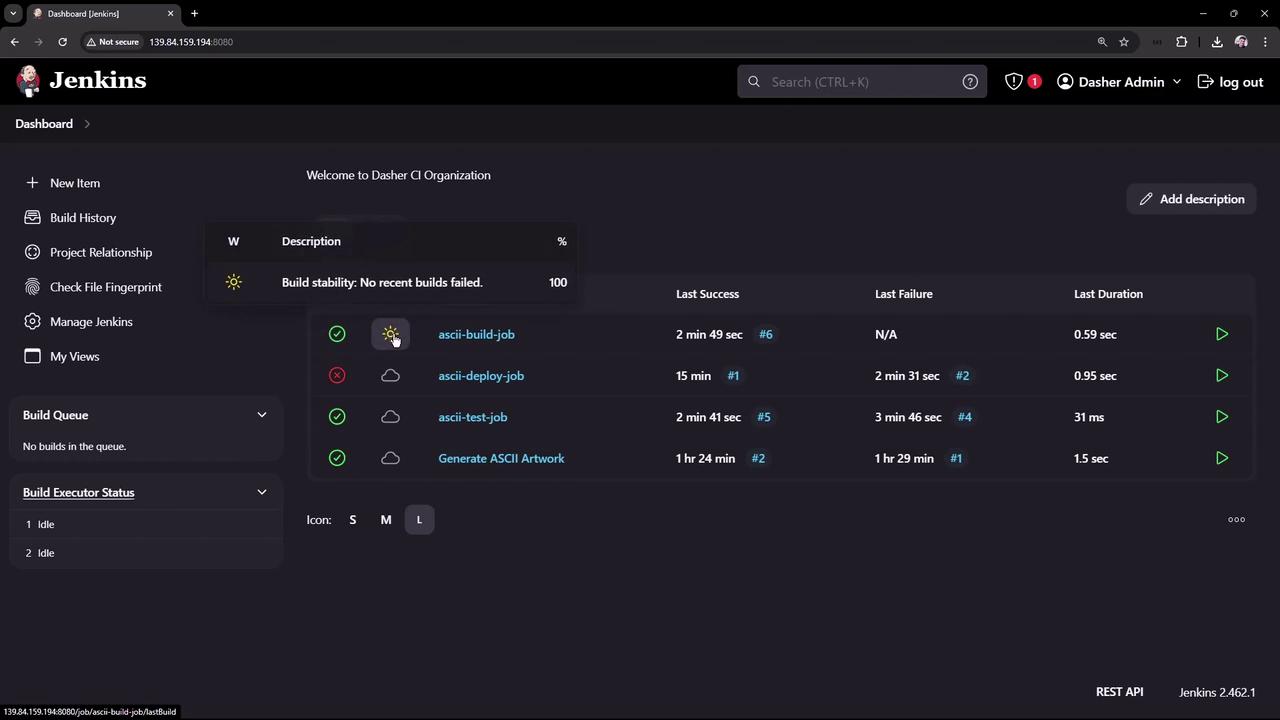
To interpret the status icons (sun, cloud, etc.), click **More Actions → Icon legend**:
***
## Next Steps
* Explore [Jenkins Pipeline](https://www.jenkins.io/doc/book/pipeline/) for durable, restart-safe workflows.
* Review the [Freestyle project documentation](https://www.jenkins.io/doc/book/pipeline/freestyle/) to understand its limitations.
## References
* [Jenkins Documentation](https://www.jenkins.io/doc/)
* [Jenkins Pipeline Syntax](https://www.jenkins.io/doc/book/pipeline/syntax/)