> ## Documentation Index
> Fetch the complete documentation index at: https://notes.kodekloud.com/llms.txt
> Use this file to discover all available pages before exploring further.
# ArgoCD Concepts Terminology
> This article explains the core concepts and terminology essential for understanding Argo CDs GitOps workflows.
Before exploring Argo CD’s architecture, it’s essential to understand the core concepts and terminology that power its GitOps workflows.
You should already be familiar with [GitOps Principles](https://www.gitops.tech/), \[Git], \[Docker], \[Kubernetes], and CI/CD basics to get the most out of Argo CD.
## Application
An **Application** is a Kubernetes Custom Resource Definition (CRD) that represents a deployable unit in Argo CD. When you install Argo CD, the Application CRD is automatically registered in your cluster.
## Application Source Types
Argo CD uses **source types** to render Kubernetes manifests before applying them to your cluster. Supported source types include:
| Source Type | Description | Examples |
| ----------- | ------------------------------ | ------------------------------------------------ |
| Helm | Package manager for Kubernetes | Official charts from \[Helm] |
| Kustomize | Declarative overlays | `kustomization.yaml` |
| YAML | Plain manifests | Any `.yaml` or `.yml` file |
| Plugin | Custom rendering tools | \[Jsonnet], Kapitan, and community-built plugins |
## Project
An **Argo CD Project** provides namespace and repository isolation. Projects enable multi-tenancy by restricting which Git repositories, clusters, and namespaces grouped Applications can access.
## Target State
Also called the *desired state*, the **Target State** is the set of Kubernetes manifests stored in a Git repository (or other supported source). This defines how your environment *should* look at any point in time.
## Live State
The **Live State** represents the actual, running state of your Kubernetes resources (Pods, Services, ConfigMaps, Secrets, etc.) in your cluster.
## Synchronization (Sync)
A **Sync** is the process of reconciling the Live State with the Target State. When you create or update an Argo CD Application, Argo CD applies the changes from Git to your cluster.
## Sync Status
**Sync Status** indicates whether your cluster matches the desired manifests:
* **Synced**: Cluster state matches the Git repository.
* **OutOfSync**: Differences exist between the cluster and the repository.
## Operation Status
**Operation Status** reflects the result of the last sync operation:
* **Succeeded**: Sync completed without errors.
* **Failed**: Sync encountered one or more errors.
## Refresh
A **Refresh** re-evaluates the Live State against the Target State:
* If **auto-sync** is enabled, detected differences will trigger an automatic sync.
* Otherwise, administrators receive a notification to initiate a manual sync.
Enabling `auto-sync` can lead to unexpected rollbacks if manual changes are made directly to the cluster.
## Health Assessment
Argo CD performs built-in health checks for standard Kubernetes resources and reports overall status categories:
* **Healthy**
* **Degraded**
* **Progressing**
* **Missing**
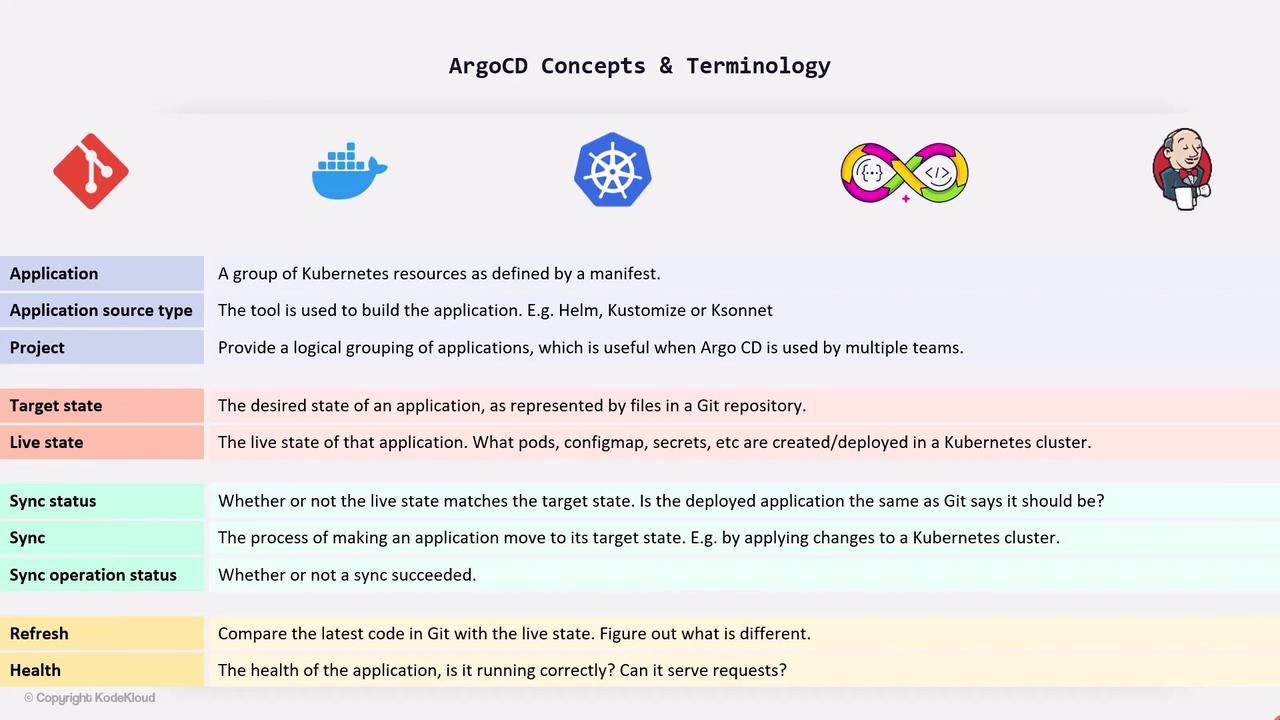
If you can’t view the chart, review the definitions above for a complete overview of Argo CD concepts and terminology.
By mastering these terms, you’ll navigate the Argo CD \[dashboard], CLI, and API with confidence and manage your GitOps pipelines more effectively.
## References
* [Argo CD Documentation](https://argo-cd.readthedocs.io/)
* [Kubernetes Basics](https://kubernetes.io/docs/concepts/overview/what-is-kubernetes/)
* [Helm](https://helm.sh/)
* [Kustomize](https://kustomize.io/)
* [Jsonnet](https://jsonnet.org/)
* [Git](https://git-scm.com/)
* [Docker](https://www.docker.com/)
* [GitOps Principles](https://www.gitops.tech/)