> ## Documentation Index
> Fetch the complete documentation index at: https://notes.kodekloud.com/llms.txt
> Use this file to discover all available pages before exploring further.
# CICD with GitOps
> This article explains how to implement CI/CD with GitOps using ArgoCD for Kubernetes deployments.
GitOps streamlines Kubernetes deployments by keeping your cluster’s desired state in Git and automating synchronization. In this guide, you’ll learn how to structure your repositories, set up a CI/CD pipeline, and leverage ArgoCD for continuous delivery and rollbacks.
## GitOps Repository Architecture
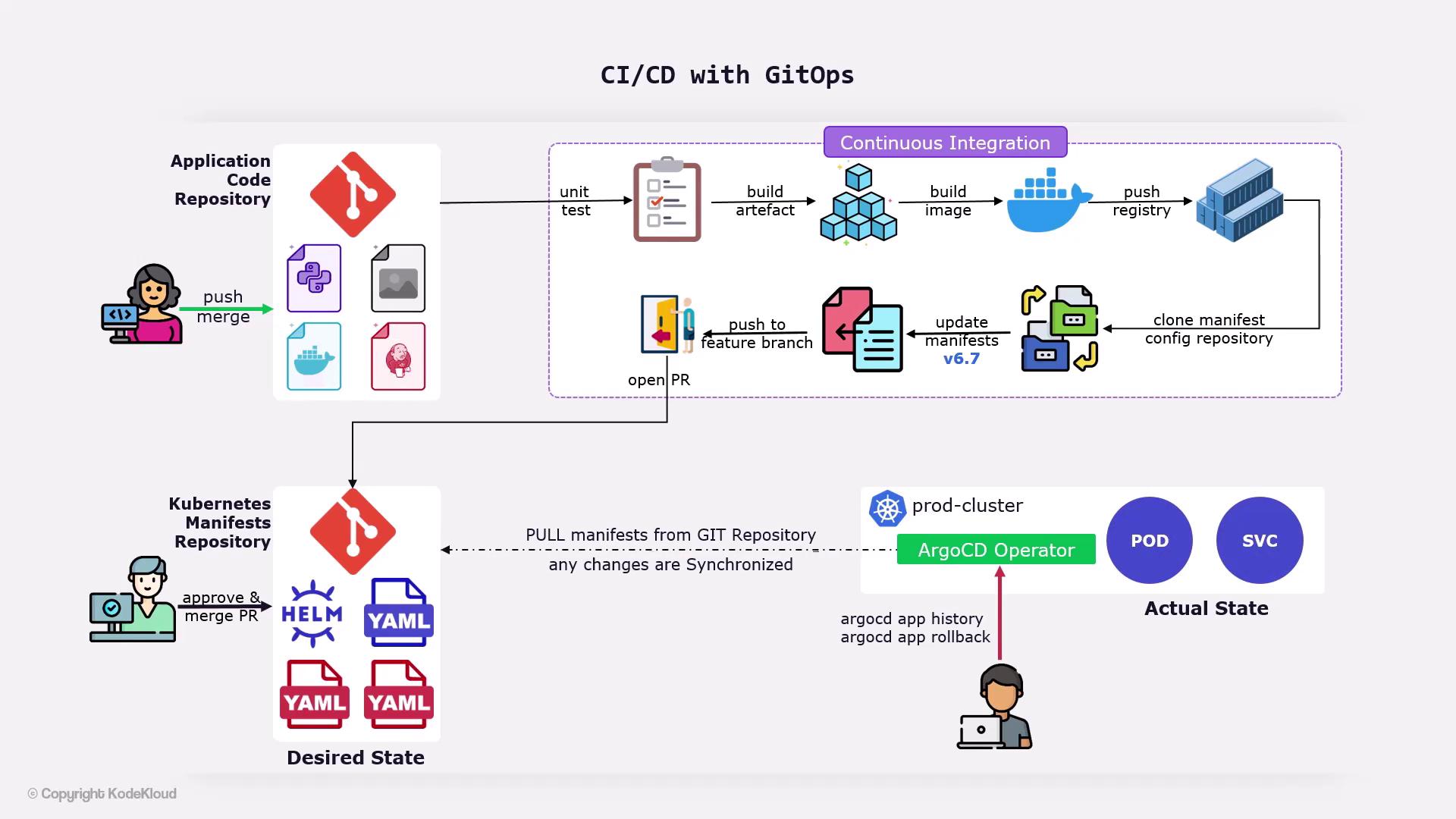
A typical GitOps workflow relies on two separate Git repositories:
| Repository Type | Contents | Purpose |
| ------------------------------ | -------------------------------------------------------------------------------- | ------------------------------------------------ |
| Application Repository | Source code, configuration files, certificates, optional container images in Git | Triggers CI builds and houses application assets |
| Configuration (Manifests) Repo | Kubernetes YAML manifests for Deployments, Services, ConfigMaps, Secrets | Single source of truth for cluster state |
Keep secrets out of Git or use an external secrets manager. Never store plain-text credentials in your manifests.
## ArgoCD: The GitOps Operator
[ArgoCD](https://argo-cd.readthedocs.io/) runs inside your Kubernetes cluster and continuously:
1. Monitors the configuration repository for changes
2. Pulls updated manifests
3. Applies those manifests to synchronize cluster state with Git
This pull-based model ensures safe and auditable deployments.
## CI/CD Pipeline Workflow
When a developer pushes changes to the **application repository** (for example, updating code or adding a [Jenkinsfile](https://www.jenkins.io/doc/book/pipeline/jenkinsfile/)), a CI/CD pipeline—often implemented in Jenkins—executes the following stages:
| Stage | Description |
| ----------------------- | --------------------------------------- |
| Unit Tests | Run `npm test`, `pytest`, or equivalent |
| Build Docker Image | `docker build -t myapp:${VERSION} .` |
| Push to Docker Registry | `docker push myapp:${VERSION}` |
Once the new image is published, the pipeline must update the deployment manifests and trigger a GitOps deployment:
1. **Clone** the configuration repository
2. **Modify** the image tag in `deployment.yaml`
3. **Commit** changes to a feature branch
4. **Open a Pull Request** against `main`
A reviewer validates the change, then merges it. ArgoCD detects the merge and deploys the updated application.
Avoid force-pushing to the default branch. Always use pull requests to maintain an auditable history.
## Rolling Back
ArgoCD’s history and rollback features enable you to revert to a stable release in minutes:
```bash theme={null}
# View revision history for your application
argocd app history
# Roll back to a specific revision
argocd app rollback
```
This reapplies the manifest from the chosen revision, restoring your cluster to that state.
## Demo Preview
In the upcoming demos, you will:
* Create a **[Jenkinsfile](https://www.jenkins.io/doc/book/pipeline/jenkinsfile/)** defining all pipeline stages
* Open a pull request to update the Kubernetes manifests repository
* Watch ArgoCD synchronize changes and perform rollbacks if necessary
***
## Links and References
* [Kubernetes Objects](https://kubernetes.io/docs/concepts/overview/working-with-objects/kubernetes-objects/)
* [ArgoCD Documentation](https://argo-cd.readthedocs.io/)
* [Jenkins Pipeline Syntax](https://www.jenkins.io/doc/book/pipeline/)
* [Docker CLI Reference](https://docs.docker.com/engine/reference/commandline/)