> ## Documentation Index
> Fetch the complete documentation index at: https://notes.kodekloud.com/llms.txt
> Use this file to discover all available pages before exploring further.
# Introduction to GitOps
> GitOps uses Git as the single source of truth for managing delivery lifecycles, ensuring environments match repository declarations through automation and version control.
GitOps leverages Git as the single source of truth to manage your entire delivery lifecycle—spanning infrastructure definitions, application manifests, automated deployments, and rollbacks. Building on the principles of [Infrastructure as Code](https://en.wikipedia.org/wiki/Infrastructure_as_code), GitOps uses Git’s versioning, branching, and pull-request workflows to ensure your production environment always matches what’s declared in your repository.
## Why GitOps?
* **Git-Centric Control**\
Every change is performed via Git commits and pull requests.
* **Declarative Desired State**\
Infrastructure and applications are described in code, making the system reproducible.
* **Automated Reconciliation**\
A GitOps operator constantly syncs the live cluster state with the Git repository.
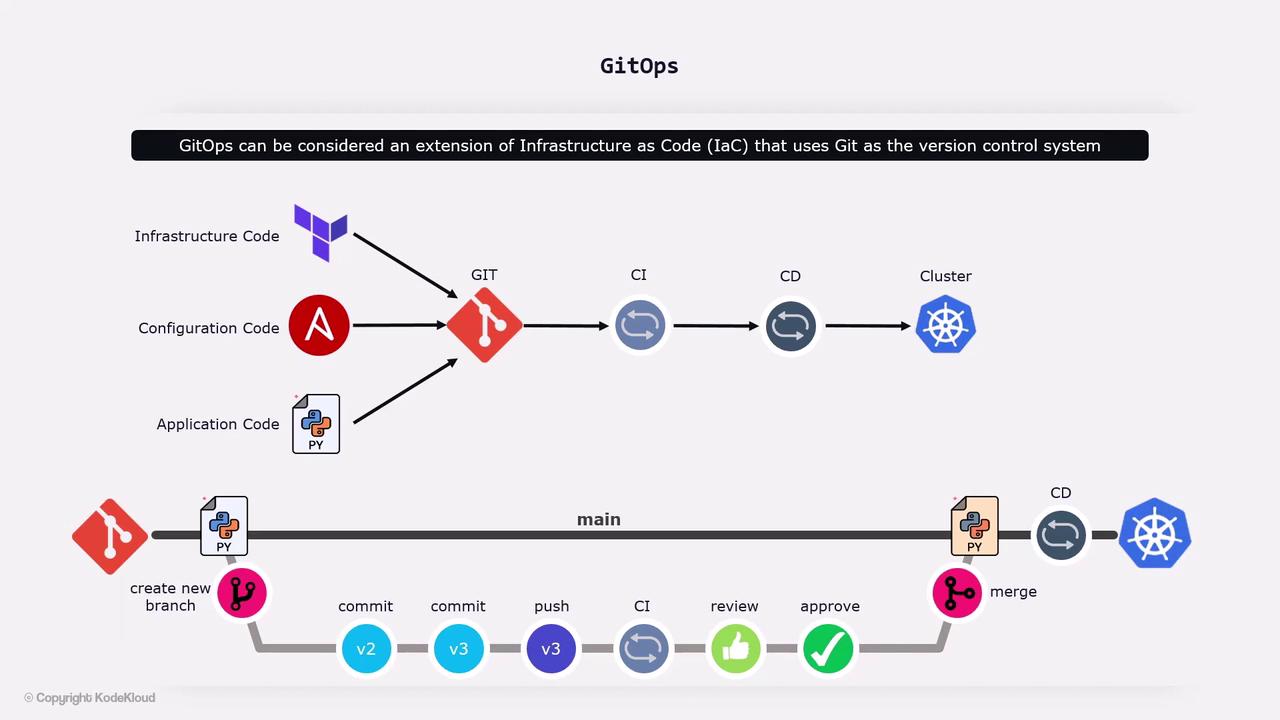
1. **Declarative Configuration**\
Store all infrastructure, application manifests, and configuration files in Git.
2. **Versioned and Immutable**\
Every change is tracked. Roll back by reverting to a previous commit.
3. **Automated Delivery Pipeline**\
A GitOps operator inside your Kubernetes cluster watches Git for updates.
4. **Continuous Reconciliation**\
Drift detection ensures the live environment matches the desired state.
## Developer Workflow
1. Create a feature branch from `main`.
2. Update application code or Kubernetes manifests.
3. Open a pull request for review.
4. After approval, merge back into the central repository.
## CI/CD Integration
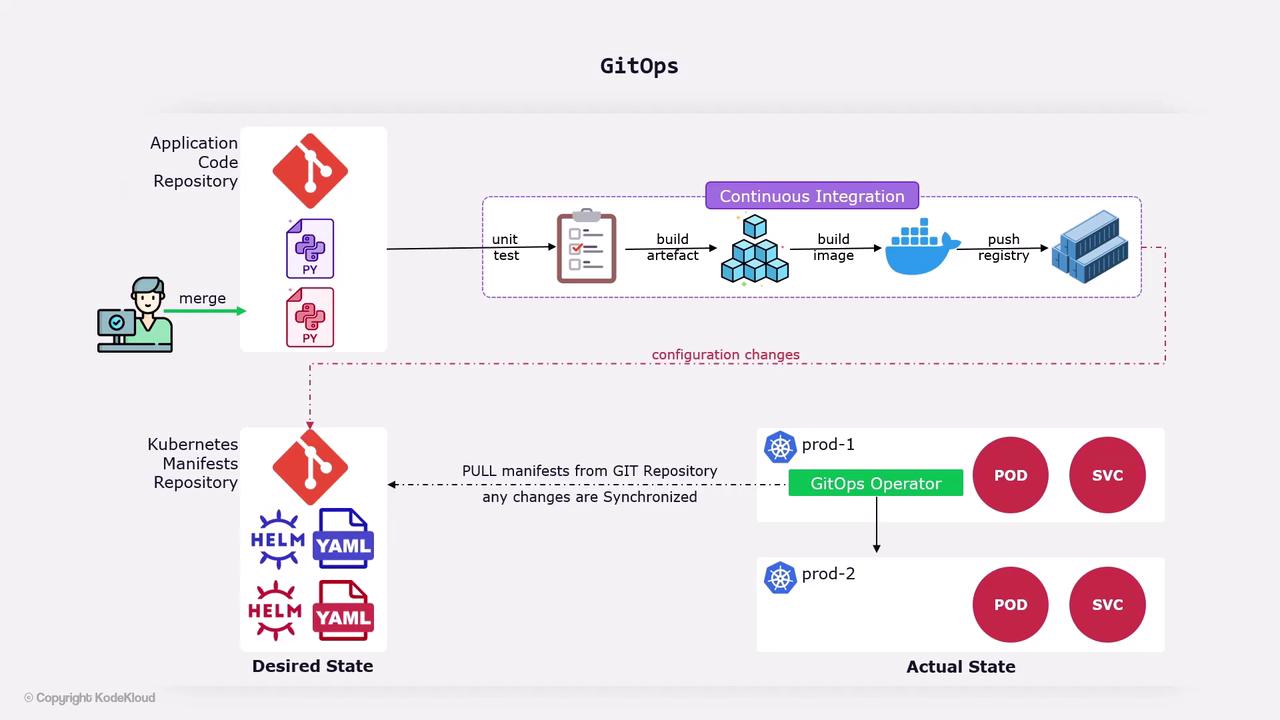
A CI system automatically:
* Runs unit and integration tests.
* Builds a Docker image and pushes it to a container registry.
* Updates the Kubernetes manifests in your Git repository.
## GitOps Operator Workflow
1. The operator polls (or listens for webhooks) on your Git repository.
2. Detects changes in manifests or configs.
3. Applies updates to your Kubernetes cluster (or clusters).
4. Continuously monitors live state and reconciles any drift.
| Component | Purpose | Example Tool |
| ------------------ | ------------------------------------------- | ----------------------- |
| Git Repository | Single source of truth for code and configs | GitHub, GitLab |
| GitOps Operator | Syncs Git state to the cluster | Argo CD, Flux |
| CI System | Builds, tests, and packages applications | Jenkins, GitHub Actions |
| Container Registry | Stores Docker images | Docker Hub, ECR |
| Kubernetes Cluster | Runs and orchestrates workloads | EKS, GKE, AKS |
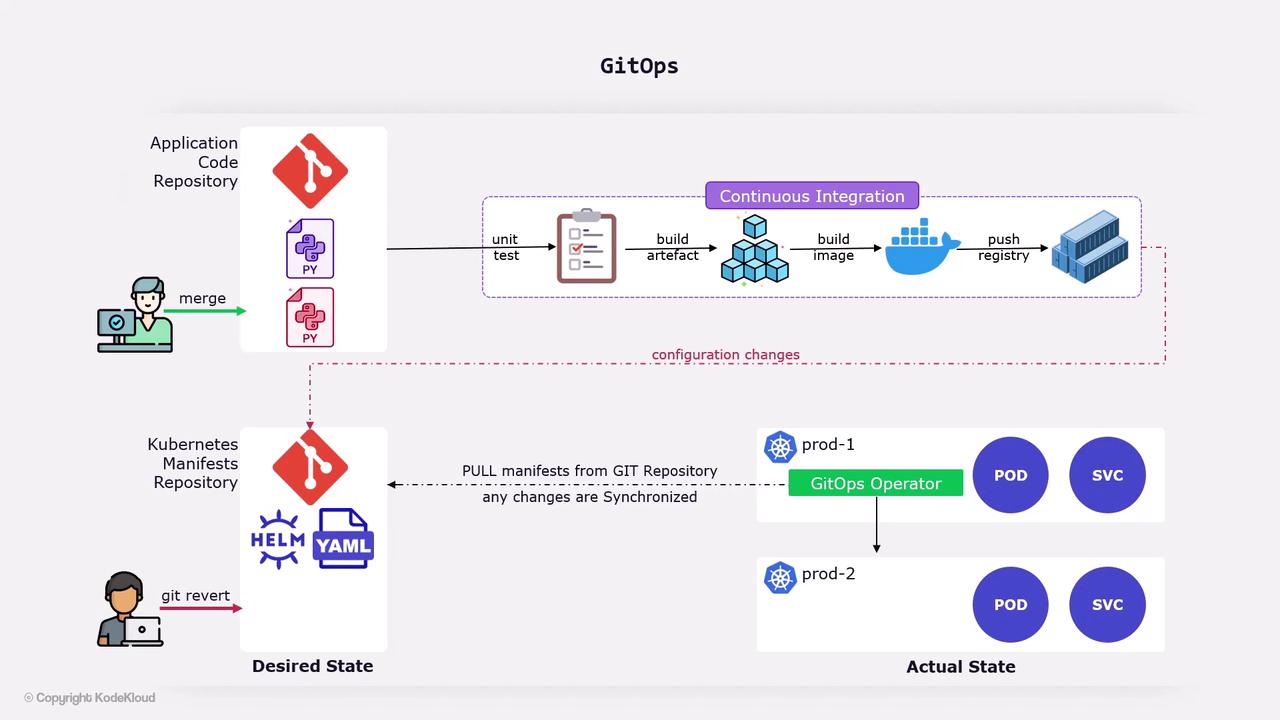
Since all changes are versioned, reverting is as simple as:
```bash theme={null}
git revert
```
The GitOps operator will detect the revert, pull the previous desired state, and roll back your cluster.
GitOps operators typically reconcile every few seconds. If you manually change resources in your cluster, the operator will revert them to match the Git state.
* [Infrastructure as Code](https://en.wikipedia.org/wiki/Infrastructure_as_code)
* [Continuous Integration](https://en.wikipedia.org/wiki/Continuous_integration)
* [Continuous Deployment](https://en.wikipedia.org/wiki/Continuous_deployment)
* [GitOps with Argo CD](https://argo-cd.readthedocs.io/)
* [Flux GitOps](https://fluxcd.io/)