> ## Documentation Index
> Fetch the complete documentation index at: https://notes.kodekloud.com/llms.txt
> Use this file to discover all available pages before exploring further.

# Demo Setup and Run Dependency Scanning

> This tutorial explains how to configure Jenkins for scanning project dependencies using NPM Audit and OWASP Dependency-Check to identify vulnerabilities.

In this tutorial, you’ll configure Jenkins to scan project dependencies using two methods:

1. **NPM Audit** (critical-level checks)
2. **OWASP Dependency-Check** (via Jenkins plugin)

These scans help you catch vulnerabilities early and enforce quality gates in your CI pipeline.

## Table of Contents

* [1. NPM Dependency Audit](#1-npm-dependency-audit)
* [2. OWASP Dependency-Check Plugin](#2-owasp-dependency-check-plugin)
  * [2.1 Install the Plugin](#21-install-the-plugin)
  * [2.2 Global Tool Configuration](#22-global-tool-configuration)
  * [2.3 Generate Pipeline Snippet](#23-generate-pipeline-snippet)
* [3. Running the Pipeline](#3-running-the-pipeline)
* [4. Enforcing Quality Gates](#4-enforcing-quality-gates)
* [Conclusion](#conclusion)

***

## 1. NPM Dependency Audit

Add an NPM audit stage to your `Jenkinsfile`:

```groovy theme={null}
pipeline {
  tools {
    nodejs 'nodejs-22-6-0'
  }
  stages {
    stage('Install Dependencies') {
      steps {
        sh 'npm install --no-audit'
      }
    }
    stage('NPM Dependency Audit') {
      steps {
        sh '''
          npm audit --audit-level=critical
          echo $?
        '''
      }
    }
  }
}
```

What happens:

* `npm install --no-audit` installs dependencies without auditing.
* `npm audit --audit-level=critical` checks for critical vulnerabilities and exits `1` if found.

### Sample package.json

```json theme={null}
{
  "scripts": {
    "start": "node app.js",
    "test": "mocha app-test.js --timeout 10000 --reporter mocha-junit-reporter --exit",
    "coverage": "nyc --reporter cobertura --reporter lcov --reporter text --reporter json-summary mocha app-test.js"
  },
  "nyc": {
    "check-coverage": true,
    "lines": 90
  },
  "dependencies": {
    "cors": "^2.8.5",
    "express": "^4.18.2",
    "mocha-junit-reporter": "^2.2.1",
    "mongoose": "^5.13.20",
    "nyc": "^15.1.0",
    "serverless-http": "^3.2.0"
  },
  "devDependencies": {
    "chai": "*",
    "chai-http": "*"
  }
}
```

### CLI Output Example

```bash theme={null}
# npm audit --audit-level=critical
@babel/traverse <7.23.2
Severity: critical
...
```

<Callout icon="lightbulb" color="#1CB2FE">
  NPM Audit supports four severity levels: `low`, `moderate`, `high`, and `critical`.\
  Adjust `--audit-level` based on your policy.
</Callout>

***

## 2. OWASP Dependency-Check Plugin

The OWASP Dependency-Check plugin scans multiple formats (HTML, XML, JSON, CSV) and supports quality gates.

### 2.1 Install the Plugin

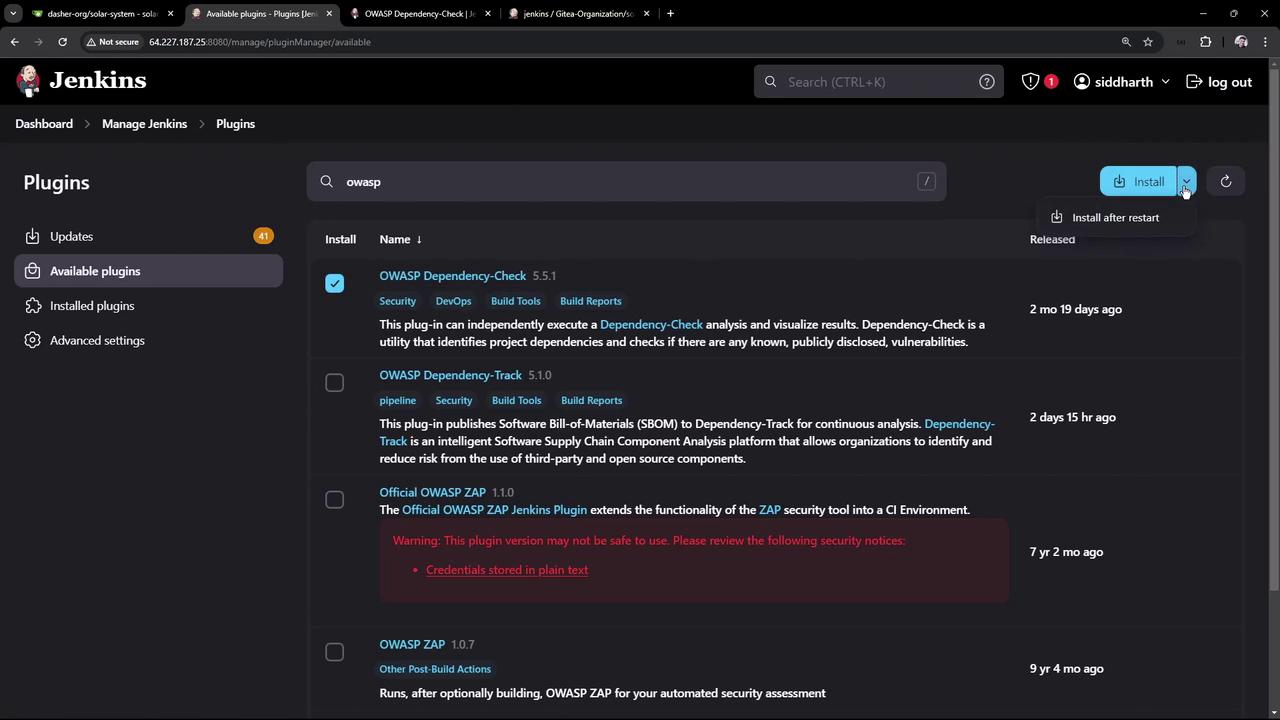
1. **Manage Jenkins > Manage Plugins > Available**
2. Search **OWASP Dependency-Check**, install, and restart.
<Frame>
  ![The image shows a Jenkins interface displaying a list of available plugins related to OWASP, with options to install them. The interface includes details about each plugin, such as name, version, and description.](https://kodekloud.com/kk-media/image/upload/v1752871069/notes-assets/images/Certified-Jenkins-Engineer-Demo-Setup-and-Run-Dependency-Scanning/jenkins-owasp-plugins-interface.jpg)
</Frame>

### 2.2 Global Tool Configuration

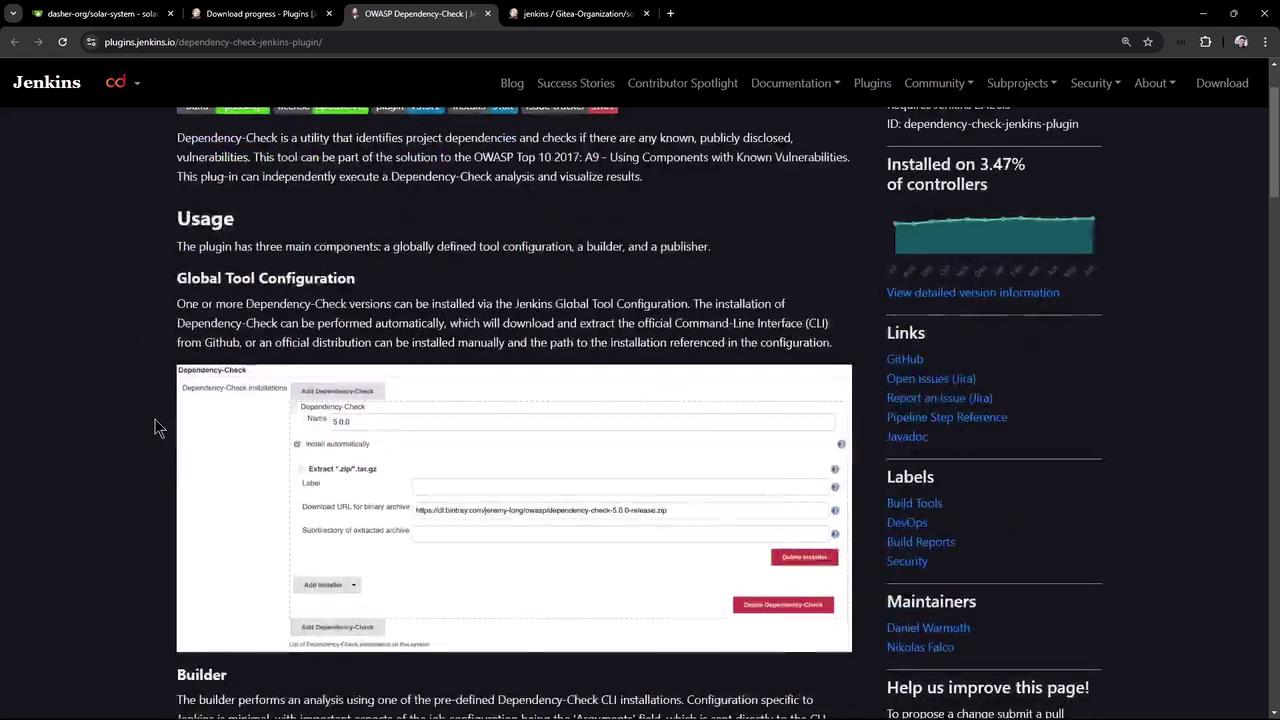
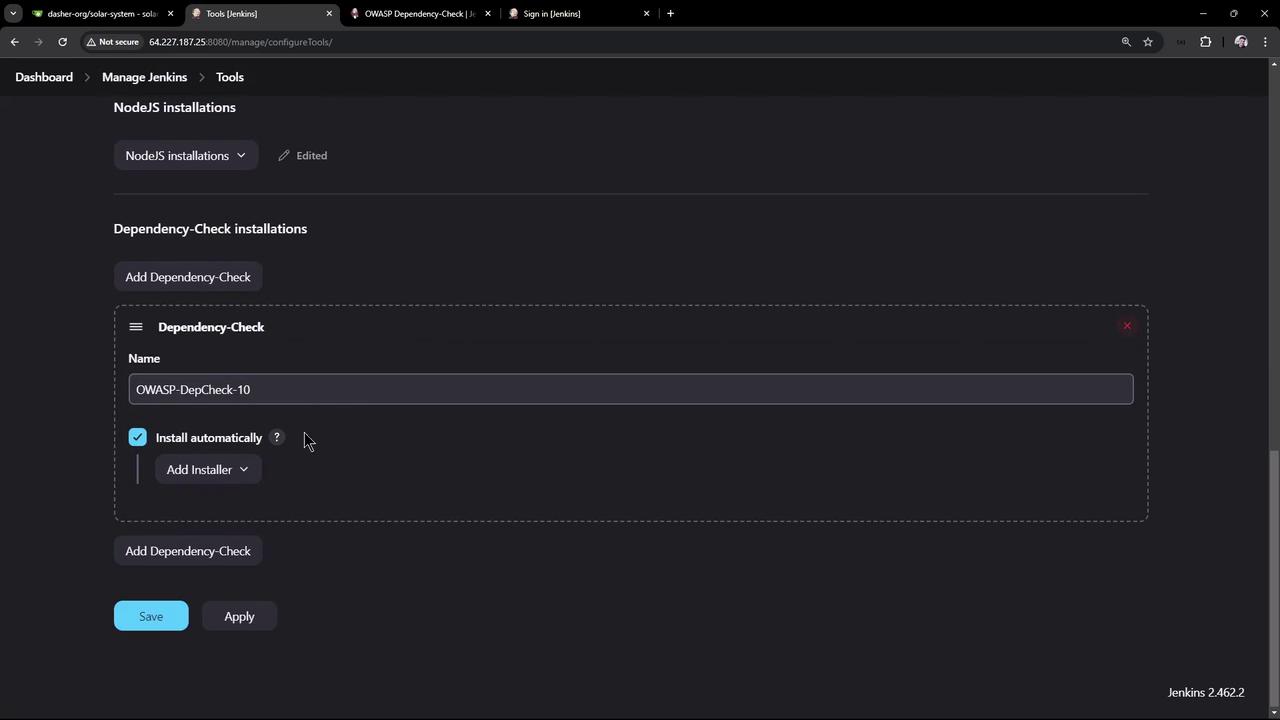
After restarting, go to **Manage Jenkins > Global Tool Configuration**.\
Add a **Dependency-Check** installation (e.g., version 10.0.3) and enable auto-install from GitHub.
<Frame>
  ![The image shows a webpage from the Jenkins website detailing the usage and configuration of the OWASP Dependency-Check plugin, including a section on global tool configuration with a form interface.](https://kodekloud.com/kk-media/image/upload/v1752871070/notes-assets/images/Certified-Jenkins-Engineer-Demo-Setup-and-Run-Dependency-Scanning/jenkins-owasp-dependency-check-plugin.jpg)
</Frame>

<Frame>
  ![The image shows a Jenkins configuration page for managing tools, specifically focusing on NodeJS and OWASP Dependency-Check installations. The OWASP Dependency-Check is set to install automatically.](https://kodekloud.com/kk-media/image/upload/v1752871071/notes-assets/images/Certified-Jenkins-Engineer-Demo-Setup-and-Run-Dependency-Scanning/jenkins-configuration-nodejs-owasp.jpg)
</Frame>

### 2.3 Generate Pipeline Snippet

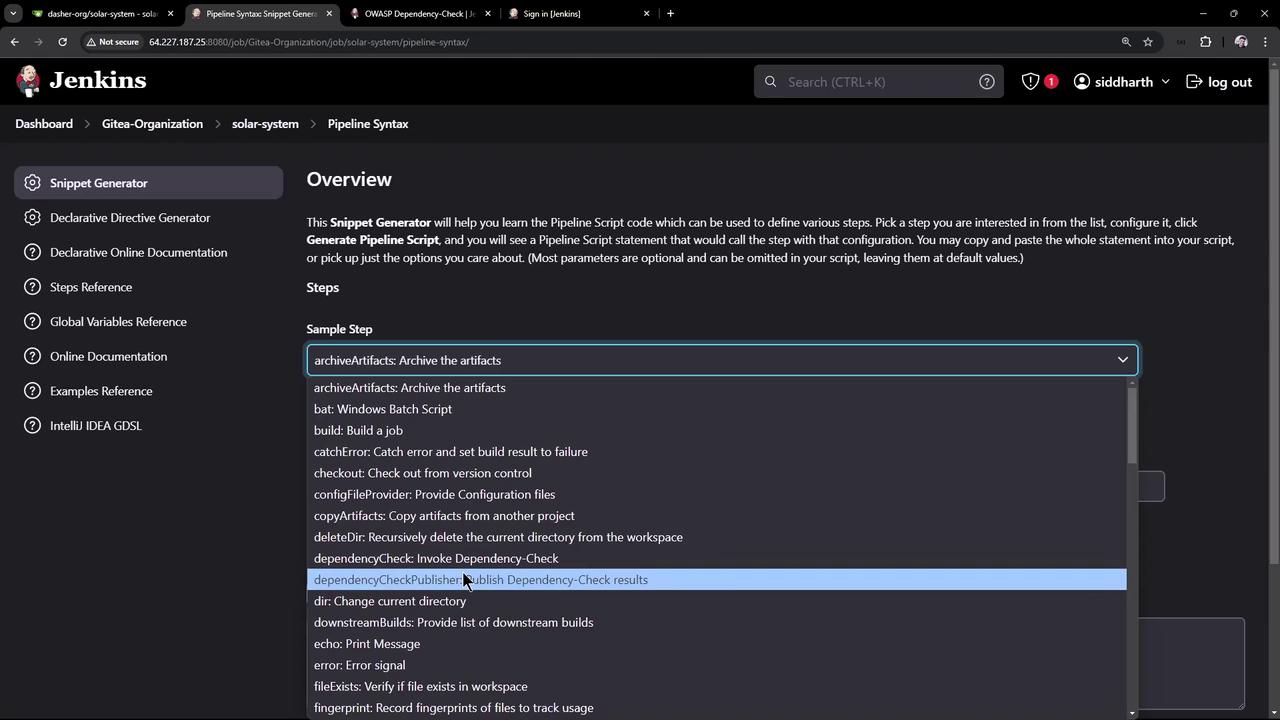
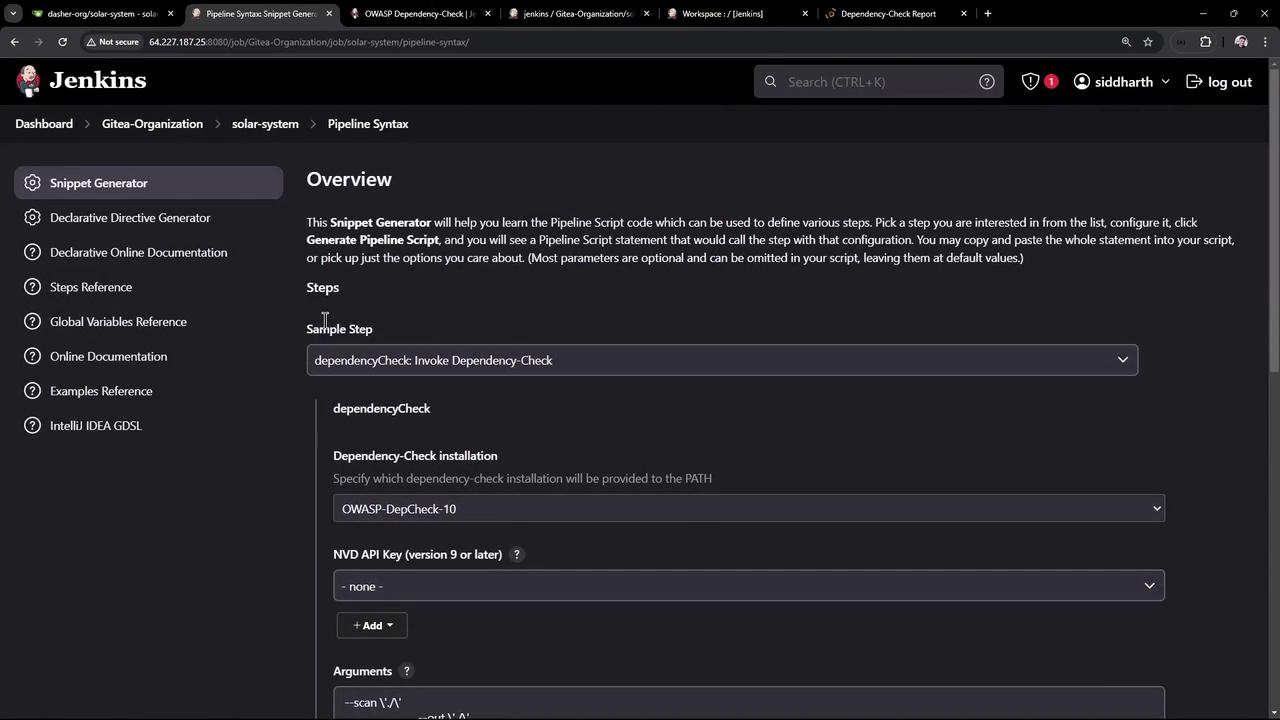
In **Pipeline Syntax > Snippet Generator**:

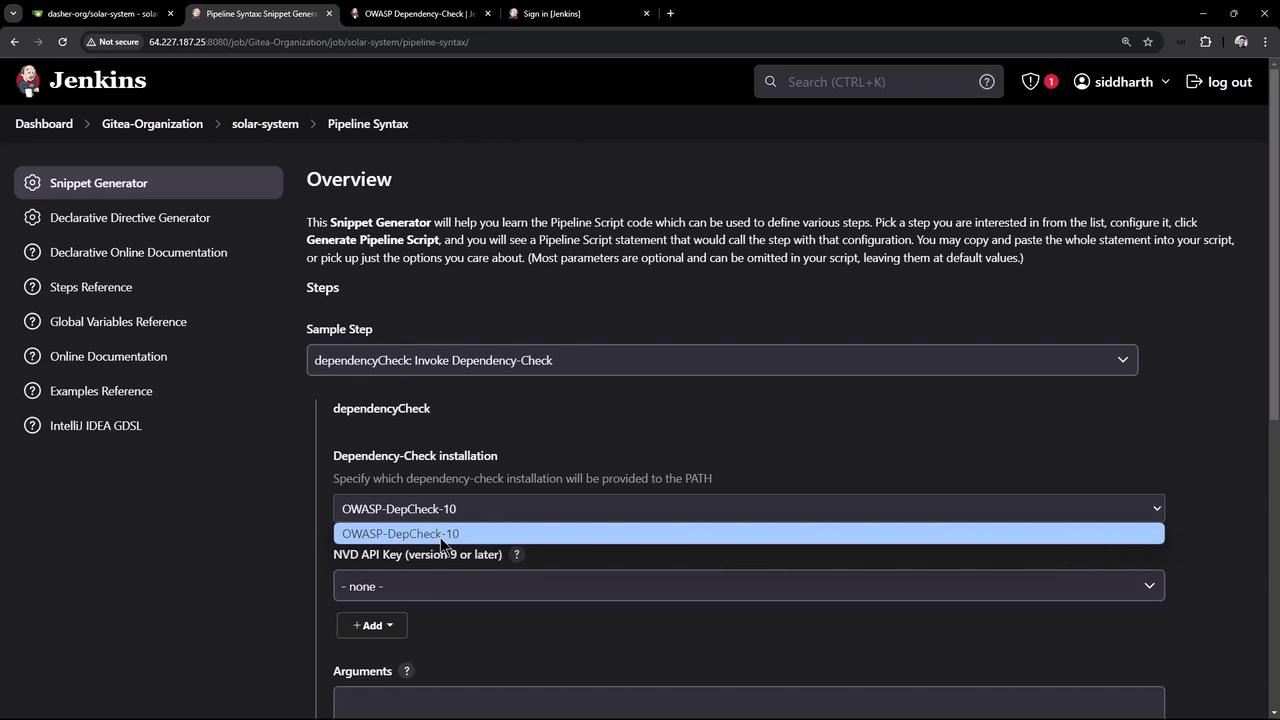
* Step: **Invoke Dependency-Check**
* Installation: `OWASP-DepCheck-10`
* Arguments:
  ```bash theme={null}
  --scan ./
  --out ./
  --format 'ALL'
  --prettyPrint
  ```
<Frame>
  ![The image shows a Jenkins interface with a "Snippet Generator" for creating pipeline scripts. It includes a dropdown menu with various sample steps like "archiveArtifacts" and "dependencyCheckPublisher."](https://kodekloud.com/kk-media/image/upload/v1752871073/notes-assets/images/Certified-Jenkins-Engineer-Demo-Setup-and-Run-Dependency-Scanning/jenkins-snippet-generator-pipeline-scripts.jpg)
</Frame>

<Frame>
  ![The image shows a Jenkins interface with a "Snippet Generator" for creating pipeline scripts, specifically focusing on invoking a dependency check using OWASP-DepCheck-10. The interface includes options for selecting dependency-check installations and adding arguments.](https://kodekloud.com/kk-media/image/upload/v1752871074/notes-assets/images/Certified-Jenkins-Engineer-Demo-Setup-and-Run-Dependency-Scanning/jenkins-snippet-generator-dependency-check.jpg)
</Frame>

Insert into your `Jenkinsfile`:

```groovy theme={null}
stage('OWASP Dependency Check') {
  steps {
    dependencyCheck additionalArguments: '''
      --scan ./
      --out ./
      --format 'ALL'
      --prettyPrint
    ''', odcInstallation: 'OWASP-DepCheck-10'
  }
}
```

***

## 3. Running the Pipeline

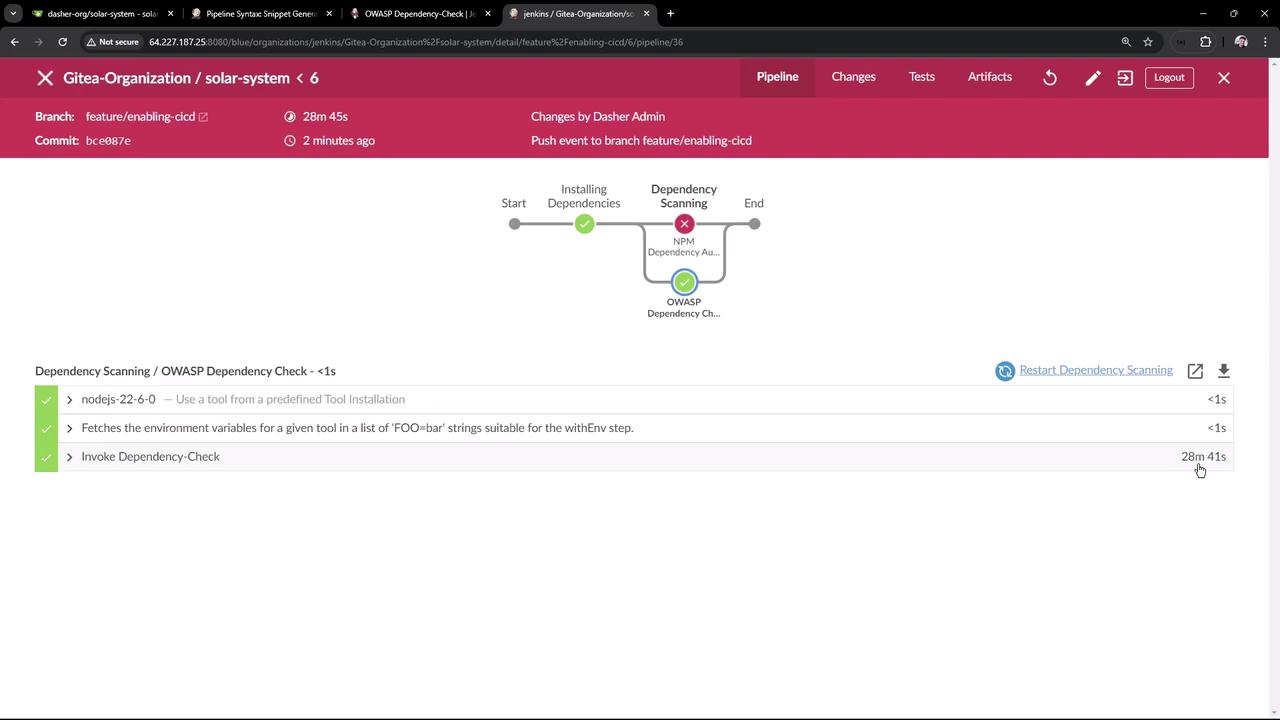
Commit and push your `Jenkinsfile`. The first run downloads the NVD database (\~263 000 records), taking about 20–30 minutes. Look for logs like:

```text theme={null}
[INFO] Checking for updates
[WARNING] An NVD API Key has not been provided ...
[INFO] NVD API has 263,560 records in this update
...
[INFO] Writing report to /workspace/.../dependency-check-report.html
```
<Frame>
  ![The image shows a Jenkins pipeline interface for a project named "solar-system" under "Gitea-Organization." It displays the progress of a build process, highlighting a failed NPM dependency audit and a successful OWASP dependency check.](https://kodekloud.com/kk-media/image/upload/v1752871075/notes-assets/images/Certified-Jenkins-Engineer-Demo-Setup-and-Run-Dependency-Scanning/jenkins-pipeline-solar-system-build.jpg)
</Frame>

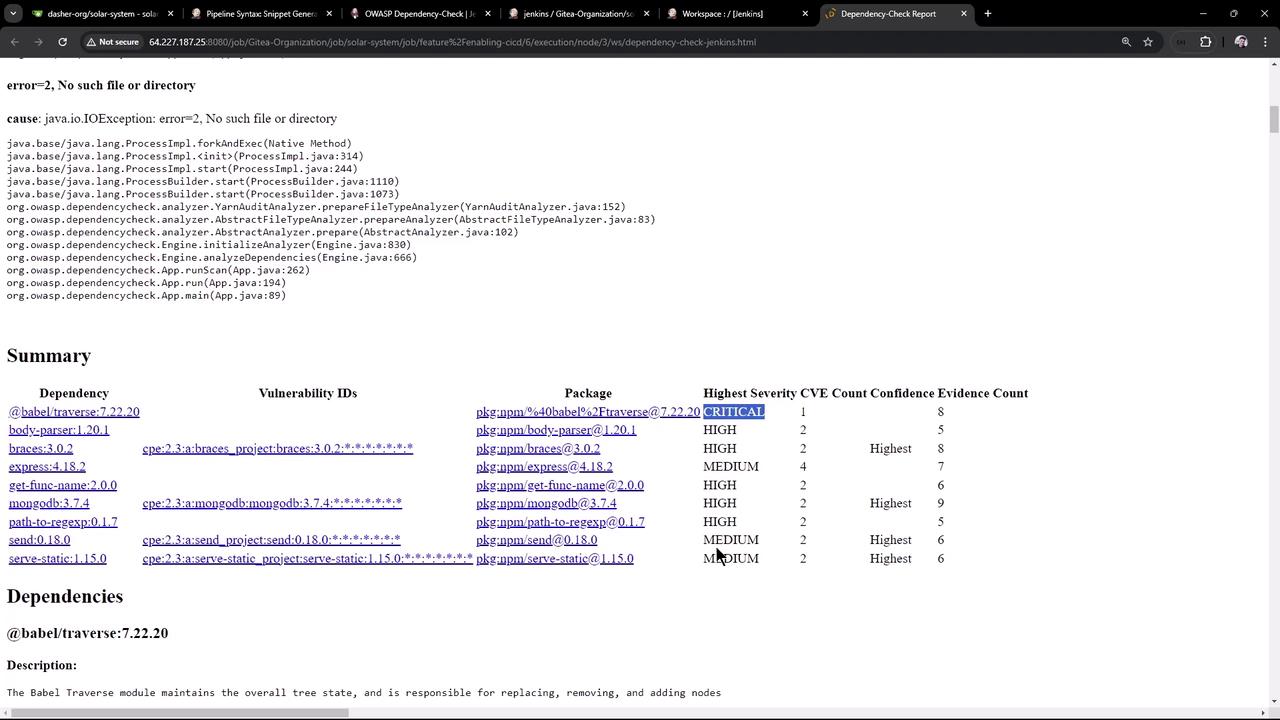
Reports generated in the workspace:

| Format | File Name                      |
| ------ | ------------------------------ |
| HTML   | `dependency-check-report.html` |
| XML    | `dependency-check-report.xml`  |
| JSON   | `dependency-check-report.json` |
| CSV    | `dependency-check-report.csv`  |
<Frame>
  ![The image shows a dependency-check report with a summary of vulnerabilities in various packages, listing their highest severity levels and other details.](https://kodekloud.com/kk-media/image/upload/v1752871076/notes-assets/images/Certified-Jenkins-Engineer-Demo-Setup-and-Run-Dependency-Scanning/dependency-check-report-vulnerabilities-summary.jpg)
</Frame>

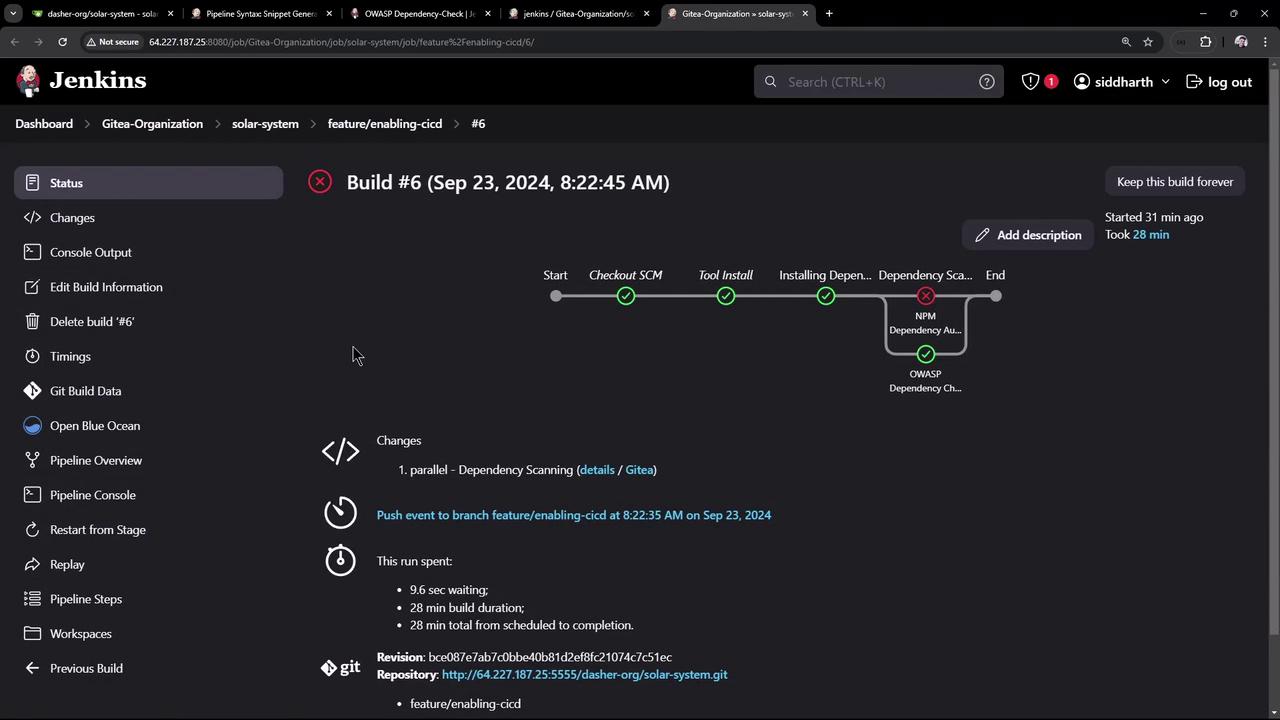
By default, findings don’t fail the build:
<Frame>
  ![The image shows a Jenkins build status page for "Build #6" with a pipeline view, indicating stages like "Checkout SCM" and "Tool Install," and a failed "NPM Dependency Audit" step. It includes details about the build duration and changes.](https://kodekloud.com/kk-media/image/upload/v1752871077/notes-assets/images/Certified-Jenkins-Engineer-Demo-Setup-and-Run-Dependency-Scanning/jenkins-build-status-pipeline-failed.jpg)
</Frame>

***

## 4. Enforcing Quality Gates

Fail builds if thresholds are exceeded:

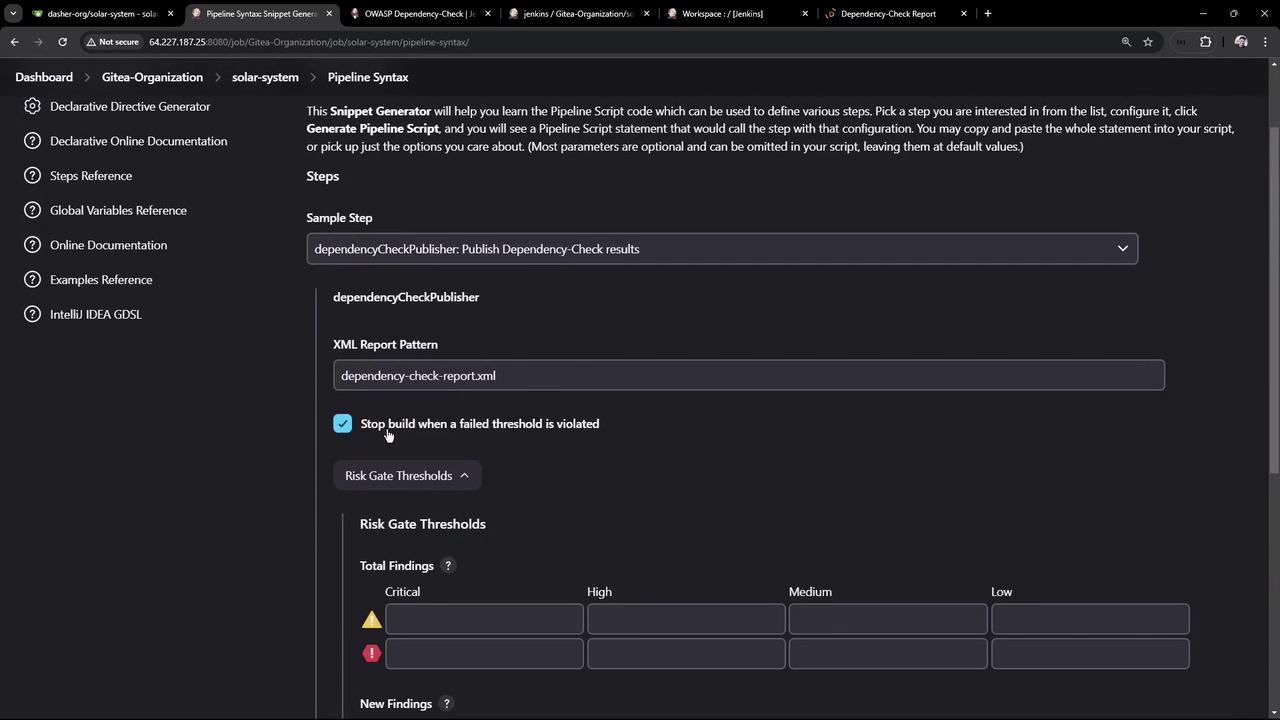
1. In **Snippet Generator**, select **Publish Dependency-Check results**
2. Configure:
   * **XML report pattern**: `dependency-check-report.xml`
   * **Stop build** on threshold violation
   * **Failed total critical**: `1`
<Frame>
  ![The image shows a Jenkins interface with a "Snippet Generator" for creating pipeline scripts, specifically focusing on invoking a dependency check. Various configuration options are visible, such as selecting a dependency-check installation and adding arguments.](https://kodekloud.com/kk-media/image/upload/v1752871079/notes-assets/images/Certified-Jenkins-Engineer-Demo-Setup-and-Run-Dependency-Scanning/jenkins-snippet-generator-dependency-check-2.jpg)
</Frame>

<Frame>
  ![The image shows a Jenkins Pipeline Syntax configuration page for publishing Dependency-Check results, with options for setting XML report patterns and risk gate thresholds.](https://kodekloud.com/kk-media/image/upload/v1752871080/notes-assets/images/Certified-Jenkins-Engineer-Demo-Setup-and-Run-Dependency-Scanning/jenkins-pipeline-dependency-check-config.jpg)
</Frame>

Generated snippet:

```groovy theme={null}
dependencyCheckPublisher failedTotalCritical: 1,
                       pattern: 'dependency-check-report.xml',
                       stopBuild: true
```

Combine both scans in parallel:

```groovy theme={null}
pipeline {
  stages {
    stage('Dependency Scanning') {
      parallel {
        stage('NPM Dependency Audit') {
          steps {
            sh '''
              npm audit --audit-level=critical
              echo $?
            '''
          }
        }
        stage('OWASP Dependency Check') {
          steps {
            dependencyCheck additionalArguments: '''
              --scan ./
              --out ./
              --format 'ALL'
              --prettyPrint
            ''', odcInstallation: 'OWASP-DepCheck-10'
            dependencyCheckPublisher failedTotalCritical: 1,
                                  pattern: 'dependency-check-report.xml',
                                  stopBuild: true
          }
        }
      }
    }
  }
}
```

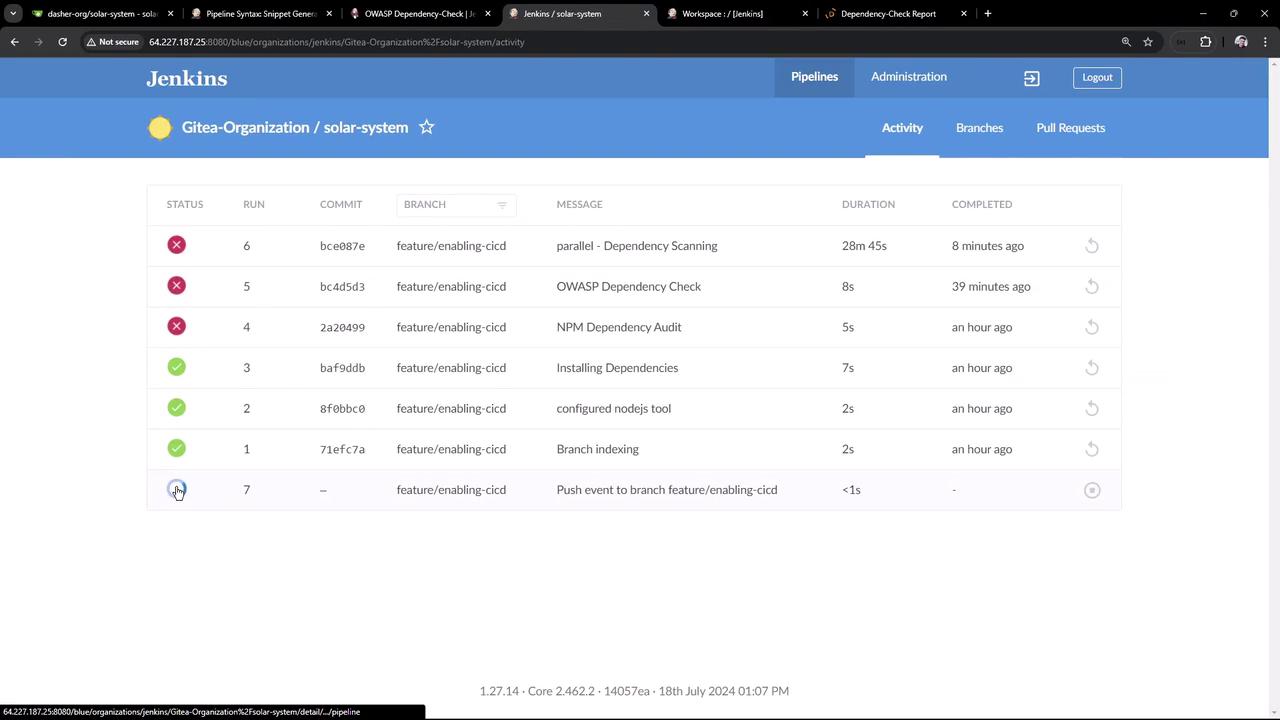
On the next build you’ll see:

```text theme={null}
[INFO] Skipping the NVD API Update as it was completed within the last 240 minutes
...
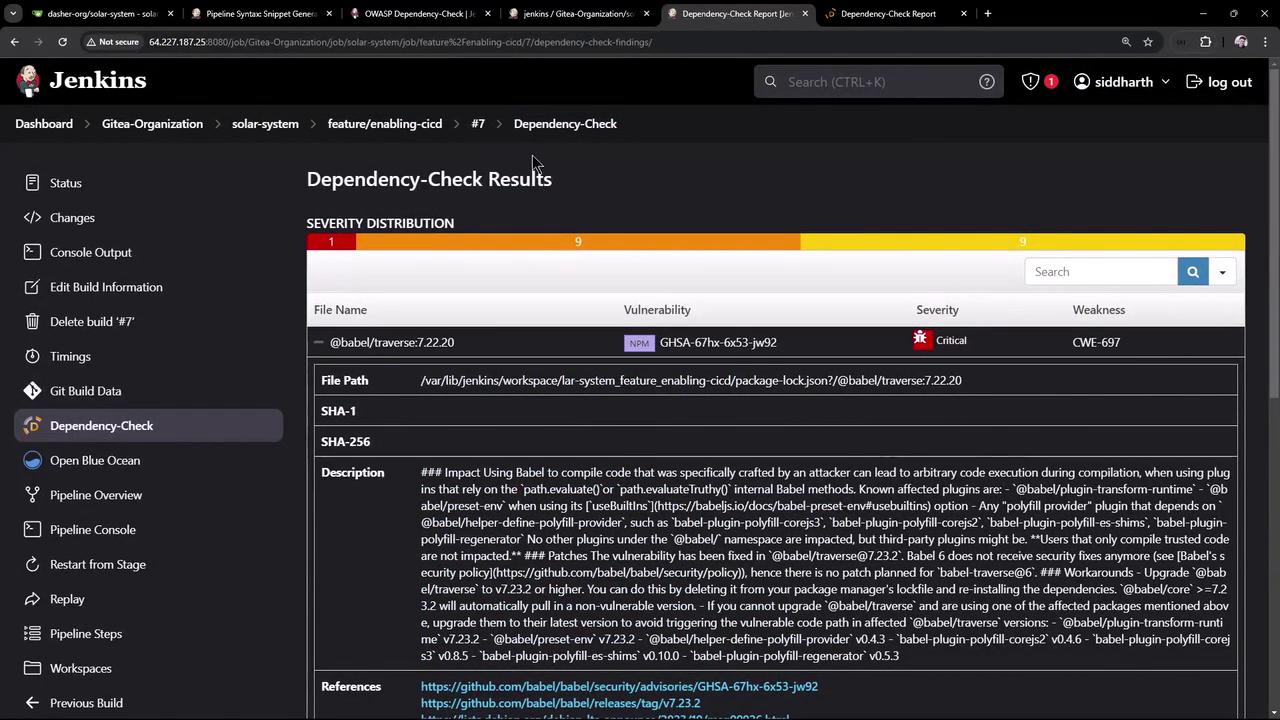
Findings exceed configured thresholds
```
<Frame>
  ![The image shows a Jenkins dashboard displaying the build status of various commits in a project named "solar-system" under the "Gitea-Organization." It lists the status, commit ID, branch, message, duration, and completion time for each build.](https://kodekloud.com/kk-media/image/upload/v1752871081/notes-assets/images/Certified-Jenkins-Engineer-Demo-Setup-and-Run-Dependency-Scanning/jenkins-dashboard-solar-system-builds.jpg)
</Frame>

<Frame>
  ![The image shows a Jenkins interface displaying Dependency-Check results, highlighting a critical vulnerability in a specific file with details such as severity, file path, and description.](https://kodekloud.com/kk-media/image/upload/v1752871082/notes-assets/images/Certified-Jenkins-Engineer-Demo-Setup-and-Run-Dependency-Scanning/jenkins-dependency-check-results-vulnerability.jpg)
</Frame>

<Callout icon="triangle-alert" color="#FF6B6B">
  Builds will now fail if `critical` vulnerabilities exceed your defined threshold.\
  Review detailed results in the Jenkins UI to remediate issues.
</Callout>

***

## Conclusion

In this guide, we have:

* Integrated **NPM Audit** to catch critical Node.js vulnerabilities.
* Configured **OWASP Dependency-Check** for comprehensive scanning.
* Parallelized both stages to reduce build time.
* Enforced quality gates to automatically fail on critical findings.

Address the flagged vulnerabilities to keep your application secure.

<CardGroup>
  <Card title="Watch Video" icon="video" cta="Learn more" href="https://learn.kodekloud.com/user/courses/certified-jenkins-engineer/module/73d0066f-a01f-4d13-a00c-c9baf9aae603/lesson/f3ae0d17-31fb-40be-ad10-0a3056474a61" />
</CardGroup>