> ## Documentation Index
> Fetch the complete documentation index at: https://notes.kodekloud.com/llms.txt
> Use this file to discover all available pages before exploring further.
# Understanding DevOps Pipeline
> This article explains a feature-branch DevOps pipeline using Jenkins, AWS, Docker, and Kubernetes, detailing stages from continuous integration to post-build processes.
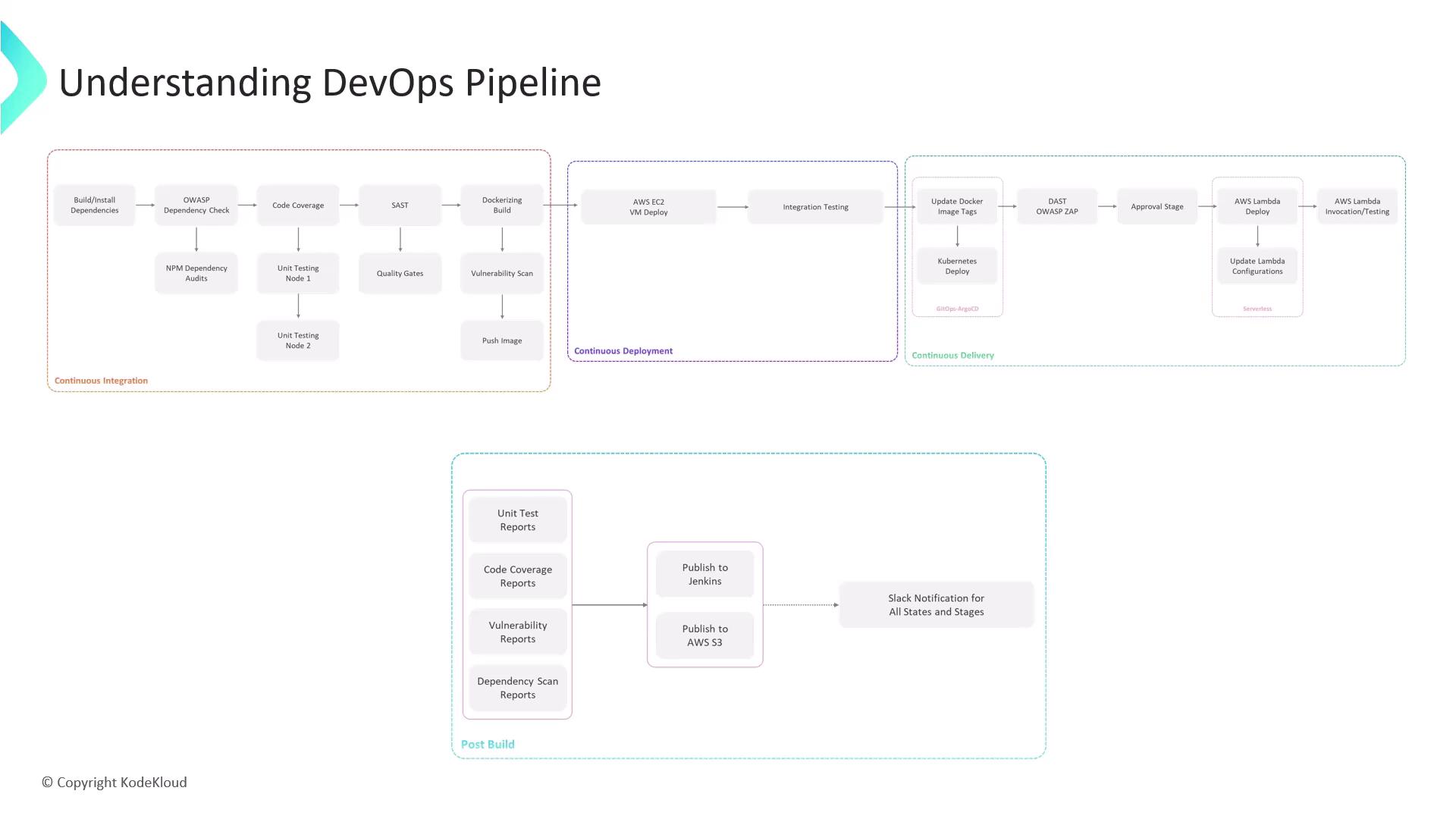
In this lesson, we break down a feature-branch DevOps pipeline built with Jenkins, AWS, Docker, Kubernetes, and serverless targets. You’ll see each stage—continuous integration (CI), continuous deployment (CD), continuous delivery, and post-build—and learn how they connect.
## DevOps Pipeline at a Glance
| Stage | Objective | Key Tools | Trigger |
| ---------------------- | ---------------------------------------------- | ---------------------------------------- | ----------------------------- |
| Continuous Integration | Build, test, and secure code | npm, Jest, SonarCloud, Docker, Snyk | Push to feature branch |
| Continuous Deployment | Deploy container to AWS EC2 | SSH, Docker CLI | Image pushed to registry |
| Continuous Delivery | GitOps-driven rollout to Kubernetes and Lambda | Argo CD, OWASP ZAP, AWS CLI | Pull request creation & merge |
| Post-Build | Collect reports and notify stakeholders | Jenkins archiving, AWS S3, Slack webhook | Completion of all stages |
## 1. Continuous Integration (CI)
When Jenkins detects a push to a feature branch, it executes the following pipeline. Any failure halts progress early, ensuring only high-quality code advances.
### 1.1 Install Dependencies
Install Node.js project packages:
```bash theme={null}
npm install
```
### 1.2 Dependency Vulnerability Checks
Scan for known vulnerabilities:
```bash theme={null}
npm audit
dependency-check .
```
### 1.3 Unit Tests & Coverage
Run unit tests and generate coverage reports:
```bash theme={null}
npm test
npm run coverage
```
### 1.4 Static Code Analysis
Analyze code quality with [SonarCloud](https://sonarcloud.io/) and enforce a quality gate.
If the SonarCloud quality gate fails, the Jenkins build is marked as failed. Address all blockers before proceeding.
### 1.5 Containerization
Package the application into a Docker image:
```bash theme={null}
docker build -t myapp:${BUILD_NUMBER} .
```
### 1.6 Image Vulnerability Scan
Use [Snyk](https://snyk.io/) to scan the container:
```bash theme={null}
snyk container test myapp:${BUILD_NUMBER}
```
### 1.7 Push to Container Registry
On success, push the image to your registry (e.g., Docker Hub or AWS ECR):
```bash theme={null}
docker push myregistry/myapp:${BUILD_NUMBER}
```
## 2. Continuous Deployment (CD)
Once the image is available in the registry, deploy and test on AWS EC2.
1. Deploy the Docker container on an EC2 instance:
```bash theme={null}
ssh ec2-user@ec2-instance \
"docker pull myregistry/myapp:${BUILD_NUMBER} && \
docker run -d -p 80:3000 myregistry/myapp:${BUILD_NUMBER}"
```
2. Execute integration tests to validate endpoints.
3. Create a pull request (PR) from your feature branch to `main`—this triggers the continuous delivery pipeline.
## 3. Continuous Delivery
A GitOps-driven rollout ensures your changes propagate safely to production-like environments.
1. Update Kubernetes manifests with the new image tag.
2. Let [Argo CD](https://argo-cd.readthedocs.io/) sync the cluster automatically.
3. Run Dynamic Application Security Testing (DAST) using [OWASP ZAP](https://owasp.org/www-project-zap/).
4. Peer review and merge the PR.
5. A manual approval step in Jenkins authorizes the final deployment.
A designated approver must review security and compliance reports before deploying to production.
6. Deploy updated Lambda functions:
```bash theme={null}
aws lambda update-function-code \
--function-name my-function \
--zip-file fileb://function.zip
aws lambda update-function-configuration \
--function-name my-function \
--environment Variables="{KEY=value}"
```
7. Verify the Lambda endpoints:
```bash theme={null}
aws lambda invoke --function-name my-function out.json
```
## 4. Post-Build
After deployments complete, gather and publish artifacts:
1. Archive test results, coverage, and vulnerability reports in Jenkins.
2. Upload to Amazon S3 for audit and compliance:
```bash theme={null}
aws s3 cp reports/ s3://my-bucket/reports/ --recursive
```
3. Notify your team via Slack webhook.
***
This pipeline showcases Jenkins’ flexibility across EC2, Kubernetes, and Lambda environments, integrating security, testing, and delivery best practices from code commit to production.
## Links and References
* [Jenkins Documentation](https://www.jenkins.io/doc/)
* [Docker Official](https://www.docker.com/)
* [AWS CLI Reference](https://docs.aws.amazon.com/cli/latest/reference/)
* [OWASP Dependency-Check](https://owasp.org/www-project-dependency-check/)
* [SonarCloud](https://sonarcloud.io/)
* [Snyk](https://snyk.io/)
* [Argo CD](https://argo-cd.readthedocs.io/)
* [OWASP ZAP](https://owasp.org/www-project-zap/)