> ## Documentation Index
> Fetch the complete documentation index at: https://notes.kodekloud.com/llms.txt
> Use this file to discover all available pages before exploring further.
# Lab Solution Rolling update
> Demonstrates Kubernetes Deployment strategies RollingUpdate versus Recreate, showing how each handles pod upgrades, downtime risks, and mixed-version behavior during image rollouts
In this lesson we demonstrate Kubernetes deployment strategies and their behavior during application upgrades. You’ll see how the default RollingUpdate strategy replaces pods incrementally (minimizing downtime) and how the Recreate strategy brings down all old pods before starting new ones (causing downtime). We also run live tests to observe mixed-version responses during a rolling upgrade.
## Environment: aliases and verification
I use the alias `k` for `kubectl`. Confirm the aliases:
```bash theme={null}
# shell
controlplane ~ » alias
alias k='kubectl'
alias kubectl='k3s kubectl'
alias vi='vim'
```
The `k` alias points to `kubectl` which is further aliased to `k3s kubectl` on this control plane. Use `k` for the commands in this guide.
## Inspect the deployed application
List pods and the Deployment to confirm the current state:
```bash theme={null}
# shell
controlplane ~ ➜ k get pod
NAME READY STATUS RESTARTS AGE
frontend-5c74c57d95-nkgjh 1/1 Running 0 48s
frontend-5c74c57d95-dkbbj 1/1 Running 0 48s
frontend-5c74c57d95-gk6xp 1/1 Running 0 48s
frontend-5c74c57d95-xpwbt 1/1 Running 0 48s
controlplane ~ ➜ k get deploy
NAME READY UP-TO-DATE AVAILABLE AGE
frontend 4/4 4 4 55s
```
The application is reachable via the KodeKloud portal. The page shows the running pod name and the application version.
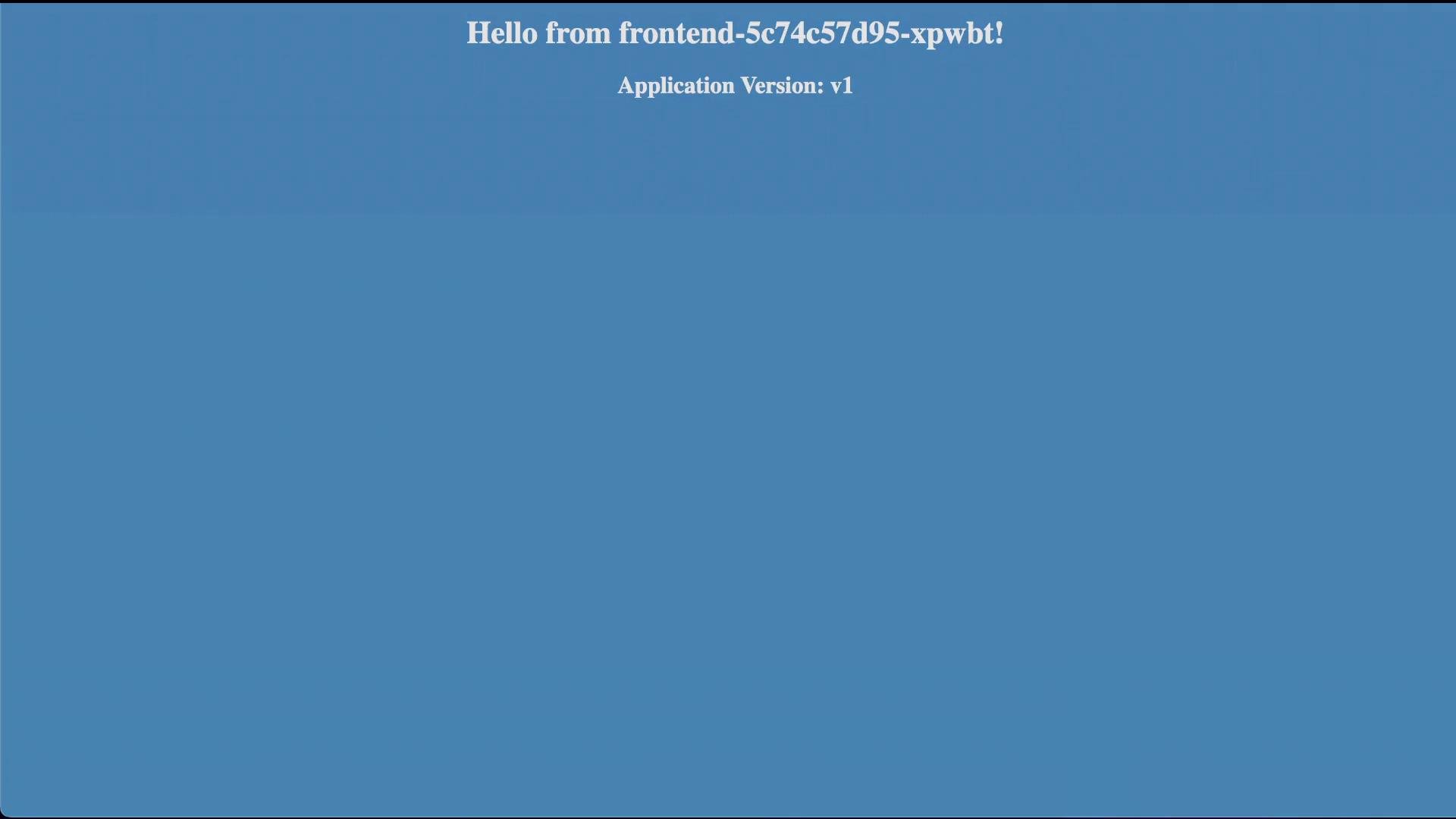 Question: What is the current color of the web application?
* The page is blue — the running pods serve version `v1` (blue).
Run the provided test script (`curl-test.sh`) to repeatedly hit the application and confirm responses:
```bash theme={null}
# shell
controlplane ~ ➜ ./curl-test.sh
Hello, Application Version: v1 ; Color: blue OK
Hello, Application Version: v1 ; Color: blue OK
Hello, Application Version: v1 ; Color: blue OK
...
```
## Which container image is used?
Describe the Deployment to inspect the image and rollout strategy:
```bash theme={null}
# shell
controlplane ~ » k describe deploy frontend
Name: frontend
Namespace: default
Annotations: deployment.kubernetes.io/revision: 1
Selector: name=webapp
Replicas: 4 desired | 4 updated | 4 total | 4 available | 0 unavailable
StrategyType: RollingUpdate
MinReadySeconds: 20
RollingUpdateStrategy: 25% max unavailable, 25% max surge
Pod Template:
Labels: name=webapp
Containers:
simple-webapp:
Image: kodekloud/webapp-color:v1
Port: 8080/TCP
```
* Image in use: `kodekloud/webapp-color:v1`
* Current strategy: `RollingUpdate` with `maxUnavailable: 25%` and `maxSurge: 25%`.
What does that mean?
* With 4 replicas, `25%` maxUnavailable allows at most 1 pod to be unavailable during the update. RollingUpdate replaces pods gradually to avoid full downtime.
## Perform a rolling upgrade to v2
Update the Deployment image to v2:
```bash theme={null}
# shell
controlplane ~ ➜ k set image deploy frontend simple-webapp=kodekloud/webapp-color:v2
deployment.apps/frontend image updated
```
Verify the Deployment now references v2 and watch the rollout progress:
```bash theme={null}
# shell
controlplane ~ » k describe deploy frontend
Name: frontend
Namespace: default
Annotations: deployment.kubernetes.io/revision: 2
Selector: name=webapp
Replicas: 4 desired | 2 updated | 5 total | 3 available | 2 unavailable
StrategyType: RollingUpdate
MinReadySeconds: 20
RollingUpdateStrategy: 25% max unavailable, 25% max surge
Pod Template:
Containers:
simple-webapp:
Image: kodekloud/webapp-color:v2
```
While the rolling update is in progress, run the test script again to observe mixed responses:
```bash theme={null}
# shell
controlplane ~ ➜ ./curl-test.sh
Hello, Application Version: v1 ; Color: blue OK
Hello, Application Version: v1 ; Color: blue OK
Hello, Application Version: v2 ; Color: green OK
Hello, Application Version: v1 ; Color: blue OK
...
Hello, Application Version: v2 ; Color: green OK
```
* During a RollingUpdate you will see a mix of `v1` (blue) and `v2` (green) responses as pods are replaced incrementally. The update is performed with minimal disruption.
## Switch strategy to Recreate
To observe a different behavior, change the Deployment strategy to `Recreate` (this will terminate all old pods before creating new ones). Example Deployment snippet:
```yaml theme={null}
# yaml
apiVersion: apps/v1
kind: Deployment
metadata:
name: frontend
namespace: default
spec:
replicas: 4
strategy:
type: Recreate
template:
metadata:
labels:
name: webapp
spec:
containers:
- name: simple-webapp
image: kodekloud/webapp-color:v2
imagePullPolicy: IfNotPresent
```
Verify the strategy change:
```bash theme={null}
# shell
controlplane ~ ➜ k describe deploy frontend
Name: frontend
Namespace: default
Replicas: 4 desired | 4 updated | 4 total | 4 available | 0 unavailable
StrategyType: Recreate
MinReadySeconds: 20
Pod Template:
Containers:
simple-webapp:
Image: kodekloud/webapp-color:v2
```
Recreate will terminate all existing pods before creating new ones. Expect downtime during an upgrade with this strategy, especially if you have a single replica or limited capacity.
## Upgrade to v3 using Recreate and observe behavior
Change the image to v3 while the strategy is `Recreate`:
```bash theme={null}
# shell
controlplane ~ ➜ k set image deploy frontend simple-webapp=kodekloud/webapp-color:v3
deployment.apps/frontend image updated
```
Run the test script while `Recreate` is in effect:
* Early during the upgrade, requests may fail (e.g., load balancer or proxy returns "Bad Gateway") while all old pods are terminated and the new pods are not yet ready.
* After new pods are up, responses will come from `v3` (red):
```bash theme={null}
# shell
# (early during upgrade) some requests may fail (e.g., Bad Gateway)
# later, after new pods are ready:
Hello, Application Version: v3 ; Color: red OK
Hello, Application Version: v3 ; Color: red OK
Hello, Application Version: v3 ; Color: red OK
...
```
* Under `Recreate` you will see downtime during the transition; once the new pods are ready, the application serves `v3` (red).
## Quick comparison: RollingUpdate vs Recreate
| Strategy | Behavior during upgrade | Downtime risk | Typical use case |
| - | - | - | - |
| RollingUpdate | Replace pods incrementally, honoring `maxUnavailable` and `maxSurge` | Low (if configured correctly) | Production updates where availability matters |
| Recreate | Terminate all old pods first, then create new pods | High — may be full downtime | Simple migrations where in-flight compatibility or DB migrations require no mixed versions |
## Useful commands
* Update image: `k set image deploy frontend simple-webapp=kodekloud/webapp-color:`
* Inspect rollout and strategy: `k describe deployment frontend`
* Watch rollout status: `k rollout status deployment/frontend`
* Roll back to previous revision: `k rollout undo deployment/frontend`
## Summary
* RollingUpdate (default) replaces pods incrementally; with `maxUnavailable: 25%` on 4 replicas, at most 1 pod is unavailable at a time.
* Recreate stops all old pods before starting new ones — this can cause downtime.
* Use `kubectl set image` to update the image and `kubectl describe deployment` or `kubectl rollout status` to monitor progress.
## Links and references
* [Kubernetes Deployments](https://kubernetes.io/docs/concepts/workloads/controllers/deployment/)
* [Updating a Deployment](https://kubernetes.io/docs/concepts/workloads/controllers/deployment/#updating-a-deployment)
This documentation is built and hosted on [Mintlify](https://mintlify.com), a developer documentation platform.
Question: What is the current color of the web application?
* The page is blue — the running pods serve version `v1` (blue).
Run the provided test script (`curl-test.sh`) to repeatedly hit the application and confirm responses:
```bash theme={null}
# shell
controlplane ~ ➜ ./curl-test.sh
Hello, Application Version: v1 ; Color: blue OK
Hello, Application Version: v1 ; Color: blue OK
Hello, Application Version: v1 ; Color: blue OK
...
```
## Which container image is used?
Describe the Deployment to inspect the image and rollout strategy:
```bash theme={null}
# shell
controlplane ~ » k describe deploy frontend
Name: frontend
Namespace: default
Annotations: deployment.kubernetes.io/revision: 1
Selector: name=webapp
Replicas: 4 desired | 4 updated | 4 total | 4 available | 0 unavailable
StrategyType: RollingUpdate
MinReadySeconds: 20
RollingUpdateStrategy: 25% max unavailable, 25% max surge
Pod Template:
Labels: name=webapp
Containers:
simple-webapp:
Image: kodekloud/webapp-color:v1
Port: 8080/TCP
```
* Image in use: `kodekloud/webapp-color:v1`
* Current strategy: `RollingUpdate` with `maxUnavailable: 25%` and `maxSurge: 25%`.
What does that mean?
* With 4 replicas, `25%` maxUnavailable allows at most 1 pod to be unavailable during the update. RollingUpdate replaces pods gradually to avoid full downtime.
## Perform a rolling upgrade to v2
Update the Deployment image to v2:
```bash theme={null}
# shell
controlplane ~ ➜ k set image deploy frontend simple-webapp=kodekloud/webapp-color:v2
deployment.apps/frontend image updated
```
Verify the Deployment now references v2 and watch the rollout progress:
```bash theme={null}
# shell
controlplane ~ » k describe deploy frontend
Name: frontend
Namespace: default
Annotations: deployment.kubernetes.io/revision: 2
Selector: name=webapp
Replicas: 4 desired | 2 updated | 5 total | 3 available | 2 unavailable
StrategyType: RollingUpdate
MinReadySeconds: 20
RollingUpdateStrategy: 25% max unavailable, 25% max surge
Pod Template:
Containers:
simple-webapp:
Image: kodekloud/webapp-color:v2
```
While the rolling update is in progress, run the test script again to observe mixed responses:
```bash theme={null}
# shell
controlplane ~ ➜ ./curl-test.sh
Hello, Application Version: v1 ; Color: blue OK
Hello, Application Version: v1 ; Color: blue OK
Hello, Application Version: v2 ; Color: green OK
Hello, Application Version: v1 ; Color: blue OK
...
Hello, Application Version: v2 ; Color: green OK
```
* During a RollingUpdate you will see a mix of `v1` (blue) and `v2` (green) responses as pods are replaced incrementally. The update is performed with minimal disruption.
## Switch strategy to Recreate
To observe a different behavior, change the Deployment strategy to `Recreate` (this will terminate all old pods before creating new ones). Example Deployment snippet:
```yaml theme={null}
# yaml
apiVersion: apps/v1
kind: Deployment
metadata:
name: frontend
namespace: default
spec:
replicas: 4
strategy:
type: Recreate
template:
metadata:
labels:
name: webapp
spec:
containers:
- name: simple-webapp
image: kodekloud/webapp-color:v2
imagePullPolicy: IfNotPresent
```
Verify the strategy change:
```bash theme={null}
# shell
controlplane ~ ➜ k describe deploy frontend
Name: frontend
Namespace: default
Replicas: 4 desired | 4 updated | 4 total | 4 available | 0 unavailable
StrategyType: Recreate
MinReadySeconds: 20
Pod Template:
Containers:
simple-webapp:
Image: kodekloud/webapp-color:v2
```
Recreate will terminate all existing pods before creating new ones. Expect downtime during an upgrade with this strategy, especially if you have a single replica or limited capacity.
## Upgrade to v3 using Recreate and observe behavior
Change the image to v3 while the strategy is `Recreate`:
```bash theme={null}
# shell
controlplane ~ ➜ k set image deploy frontend simple-webapp=kodekloud/webapp-color:v3
deployment.apps/frontend image updated
```
Run the test script while `Recreate` is in effect:
* Early during the upgrade, requests may fail (e.g., load balancer or proxy returns "Bad Gateway") while all old pods are terminated and the new pods are not yet ready.
* After new pods are up, responses will come from `v3` (red):
```bash theme={null}
# shell
# (early during upgrade) some requests may fail (e.g., Bad Gateway)
# later, after new pods are ready:
Hello, Application Version: v3 ; Color: red OK
Hello, Application Version: v3 ; Color: red OK
Hello, Application Version: v3 ; Color: red OK
...
```
* Under `Recreate` you will see downtime during the transition; once the new pods are ready, the application serves `v3` (red).
## Quick comparison: RollingUpdate vs Recreate
| Strategy | Behavior during upgrade | Downtime risk | Typical use case |
| - | - | - | - |
| RollingUpdate | Replace pods incrementally, honoring `maxUnavailable` and `maxSurge` | Low (if configured correctly) | Production updates where availability matters |
| Recreate | Terminate all old pods first, then create new pods | High — may be full downtime | Simple migrations where in-flight compatibility or DB migrations require no mixed versions |
## Useful commands
* Update image: `k set image deploy frontend simple-webapp=kodekloud/webapp-color:`
* Inspect rollout and strategy: `k describe deployment frontend`
* Watch rollout status: `k rollout status deployment/frontend`
* Roll back to previous revision: `k rollout undo deployment/frontend`
## Summary
* RollingUpdate (default) replaces pods incrementally; with `maxUnavailable: 25%` on 4 replicas, at most 1 pod is unavailable at a time.
* Recreate stops all old pods before starting new ones — this can cause downtime.
* Use `kubectl set image` to update the image and `kubectl describe deployment` or `kubectl rollout status` to monitor progress.
## Links and references
* [Kubernetes Deployments](https://kubernetes.io/docs/concepts/workloads/controllers/deployment/)
* [Updating a Deployment](https://kubernetes.io/docs/concepts/workloads/controllers/deployment/#updating-a-deployment)
This documentation is built and hosted on [Mintlify](https://mintlify.com), a developer documentation platform.