> ## Documentation Index
> Fetch the complete documentation index at: https://notes.kodekloud.com/llms.txt
> Use this file to discover all available pages before exploring further.
# etcd for Beginners
> Introduction to etcd, a distributed, consistent key value store for configuration, service discovery, and coordination, with usage, clustering, Raft, CLI and best practices.
This is a concise introduction to etcd — a distributed, reliable key-value store used widely for configuration, service discovery, and distributed coordination. If you already know etcd, you can skip ahead to Kubernetes-specific etcd topics elsewhere.
In this lesson you'll learn:
* What etcd is and the fundamentals of a key-value store.
* How key-value stores differ from relational and document databases.
* How to run etcd locally and use the command-line client `etcdctl`.
* High-level notes about clustering, consensus (Raft), and production best practices.
## What is etcd?
etcd is a distributed, consistent key-value store designed to be simple, secure, and fast. It provides strongly consistent storage for small pieces of important metadata — for example, configuration, leader election, and service discovery data — and is commonly used by systems like Kubernetes as the source of truth.
## What is a key-value store?
A key-value store maps a unique key directly to a value. Values can be simple scalars or complex objects (for example, JSON documents). This design makes key-value stores extremely fast for lookups and flexible about what you store. To understand the trade-offs, compare key-value stores with relational and document databases.
### Relational databases
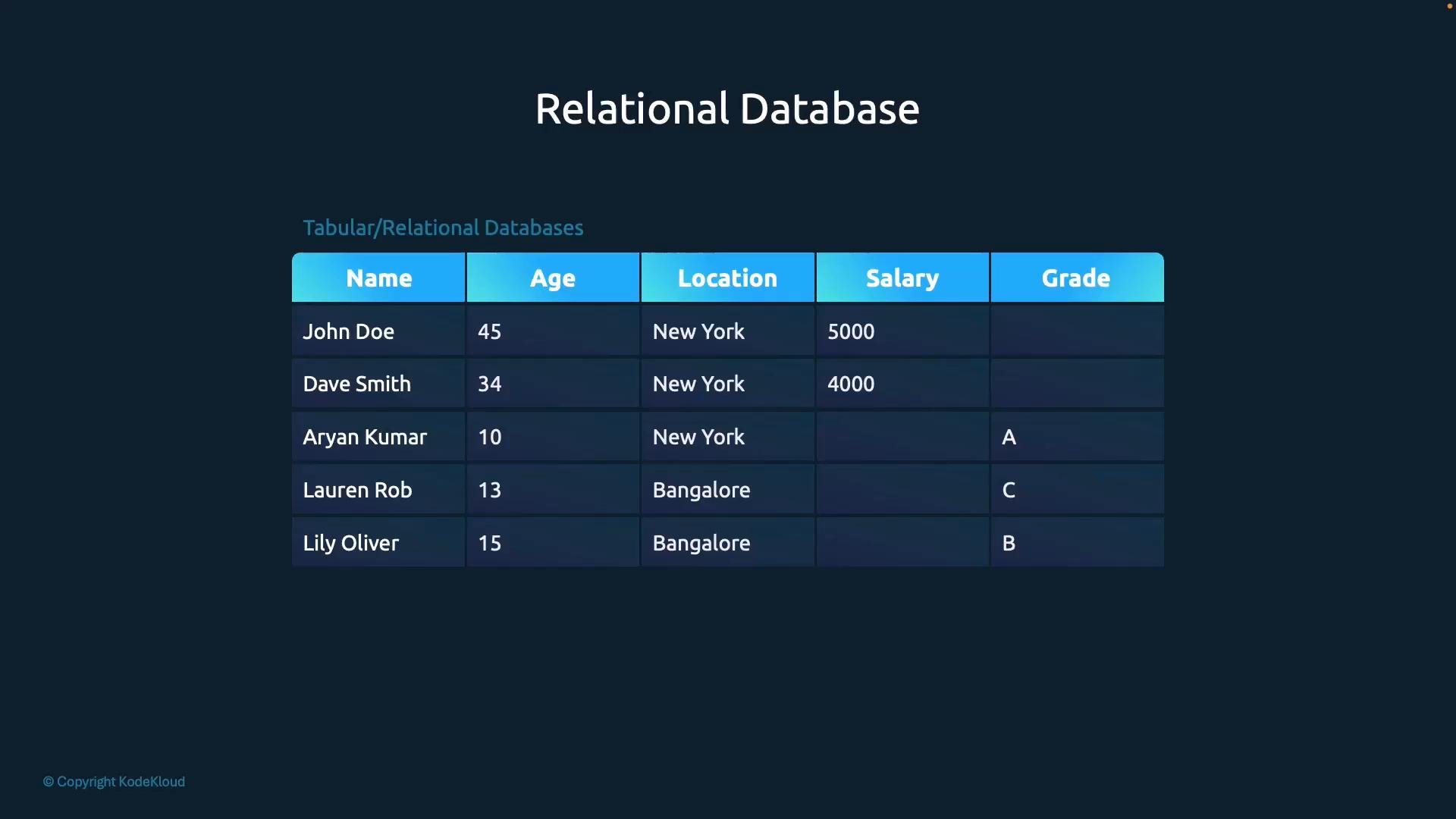
Relational databases store data in structured tables with a fixed schema (rows and columns). Each row is an entity and each column is a specific attribute. Adding a new attribute typically adds a column across the whole table; rows that do not use that attribute contain empty cells.
Relational databases are strong for structured data, support complex queries and joins using SQL, and are ideal when you need strict schema and complex queries.
 ### Document stores
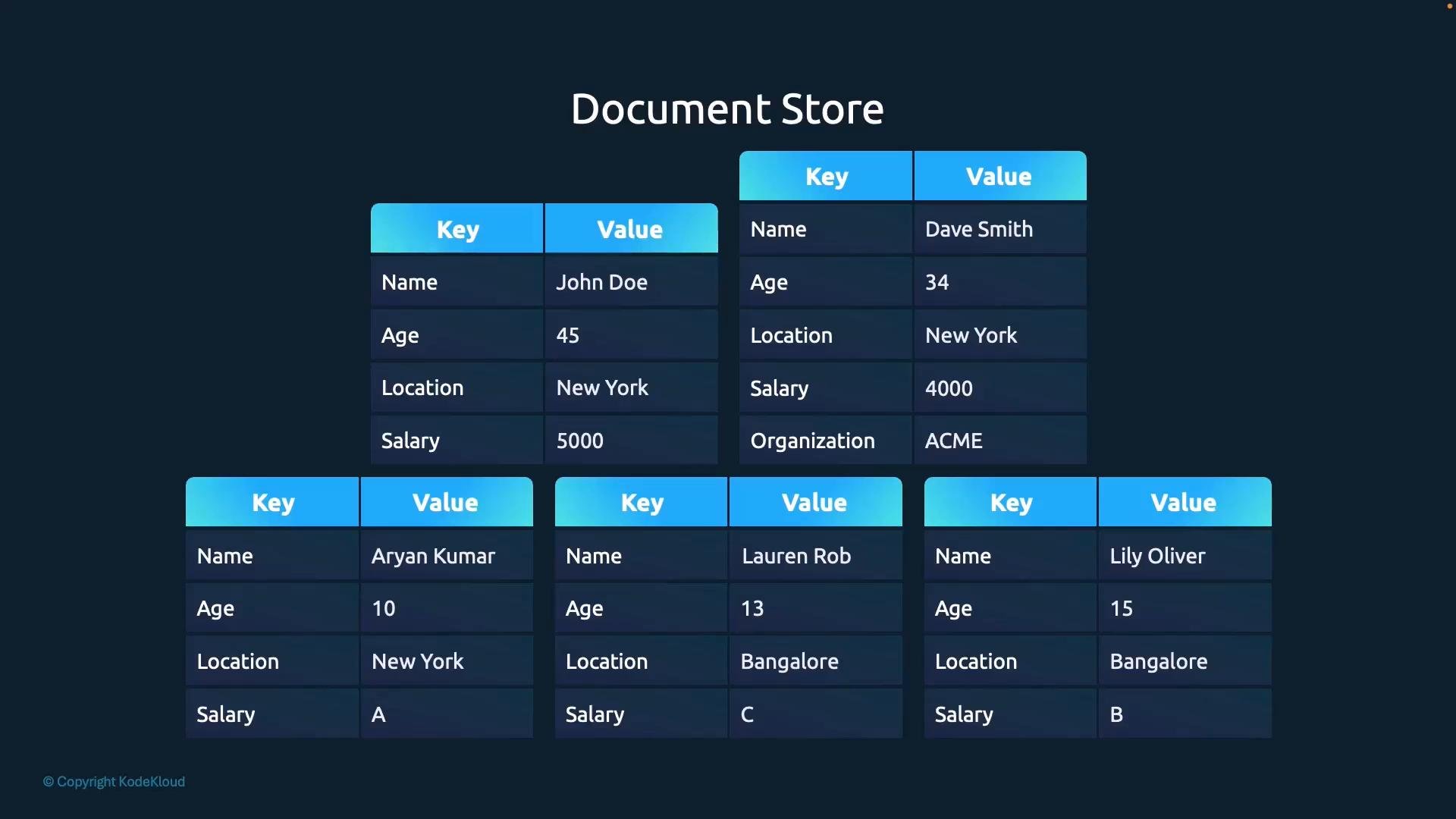
Document stores persist each entity as a document (commonly JSON). Each document can have its own structure and fields — adding a field to one document does not require updating others. This schema flexibility suits semi-structured data and iterative development, at the expense of some query and join capabilities.
### Document stores
Document stores persist each entity as a document (commonly JSON). Each document can have its own structure and fields — adding a field to one document does not require updating others. This schema flexibility suits semi-structured data and iterative development, at the expense of some query and join capabilities.
 ### Key-value stores
A key-value store is the simplest model: a key maps directly to a value. The value can be a scalar, or a structured object such as a JSON document. This simplicity enables very fast lookups and flexible data storage patterns.
Examples:
```text theme={null}
Key: name
Value: John Doe
Key: location
Value: New York
Key: age
Value: 45
Key: salary
Value: 5000
```
Hierarchical keys and compound values are common:
```text theme={null}
Key: user:JohnDoe
Value: {"name":"John Doe","age":45,"location":"New York","salary":5000}
```
Key-value stores typically have no enforced schema and do not natively provide complex joins or ad-hoc relational queries. They are optimized for simplicity, low-latency access, and as reliable stores for configuration and coordination data.
### Key-value stores
A key-value store is the simplest model: a key maps directly to a value. The value can be a scalar, or a structured object such as a JSON document. This simplicity enables very fast lookups and flexible data storage patterns.
Examples:
```text theme={null}
Key: name
Value: John Doe
Key: location
Value: New York
Key: age
Value: 45
Key: salary
Value: 5000
```
Hierarchical keys and compound values are common:
```text theme={null}
Key: user:JohnDoe
Value: {"name":"John Doe","age":45,"location":"New York","salary":5000}
```
Key-value stores typically have no enforced schema and do not natively provide complex joins or ad-hoc relational queries. They are optimized for simplicity, low-latency access, and as reliable stores for configuration and coordination data.
 ## Quick comparison (at a glance)
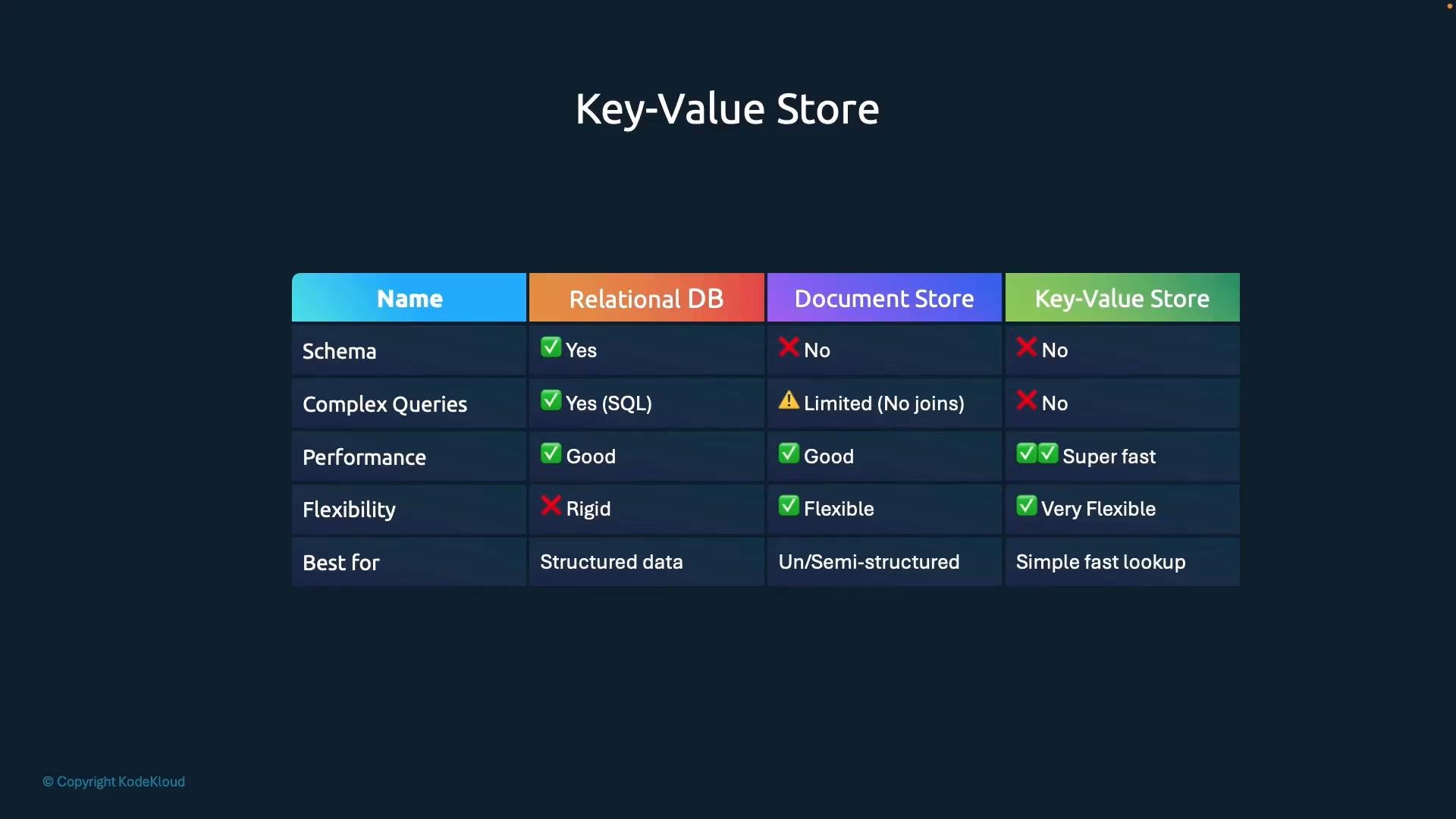
| Storage Model | Schema | Complex Queries / Joins | Best Use Cases |
| - | - | - | - |
| Relational (SQL) | Fixed schema | Excellent (joins, complex queries) | Financial systems, analytics, strict schemas |
| Document store | Flexible (`JSON`) | Moderate (indexing helps) | Apps with varied object shapes, content stores |
| Key-value store | Schema-less | Minimal (fast lookups) | Configuration, service discovery, metadata |
## Getting started with etcd (local, single-node)
For learning and testing, the simplest way to run etcd is to download the binary and run it locally.
Example (Linux AMD64) — download, extract, and run:
```bash theme={null}
# Download etcd (example uses v3.5.0)
curl -L https://github.com/etcd-io/etcd/releases/download/v3.5.0/etcd-v3.5.0-linux-amd64.tar.gz -o etcd-v3.5.0-linux-amd64.tar.gz
# Extract
tar xzvf etcd-v3.5.0-linux-amd64.tar.gz
# Change into extracted directory and run etcd (background or separate terminal)
cd etcd-v3.5.0-linux-amd64
./etcd &
```
By default etcd listens on port 2379 for client requests.
This local single-node run is intended for experimenting and learning. For production use, run etcd as a managed service or Kubernetes pod and deploy it in a clustered configuration for high availability and fault tolerance.
## Using the etcd CLI: etcdctl
etcd includes the `etcdctl` command-line client for interacting with a running cluster. Typical operations include putting, getting, and deleting keys.
Examples:
```bash theme={null}
# Put a key/value
./etcdctl put key1 value1
# Get a key
./etcdctl get key1
# Output:
# key1
# Check etcdctl and etcd client/server versions
./etcdctl version
```
Note: If your etcd server uses TLS or runs on a non-default endpoint, you must supply the appropriate environment variables or flags (for example, `--endpoints`, `--cacert`, `--cert`, `--key`).
## etcd API history: v2 vs v3
etcd's API and commands changed significantly between v2 and v3. When reading older guides you may encounter v2-style commands.
Key differences:
| etcdctl action | v2 command | v3 command |
| - | -: | -: |
| Set values | `set` | `put` |
| Get values | `get` | `get` |
| Delete values | `rm` | `del` |
| Transactions | not supported | `txn` |
Check your etcd/etcdctl version with `./etcdctl version`. The API version reported determines whether online examples apply to v2 or v3 syntax.
## High-level notes on clustering and availability
etcd is designed to be distributed and consistent. In production you should run etcd as a multi-node cluster so it can tolerate node failures and continue serving consistent data. etcd uses the Raft consensus algorithm to ensure a single source of truth across nodes.
Quick best-practice guidelines:
* Use an odd number of nodes (3 or 5 are common) to allow proper quorum formation.
* Prefer 3 nodes for small clusters; use 5 nodes for larger availability requirements.
* Avoid spanning clusters across unreliable network links that increase latency.
* Backup etcd data regularly and test restores.
## Brief timeline
* Aug 2013 — etcd v0.1 released.
* Feb 2015 — etcd v2 (Raft support and improved performance).
* Jan 2017 — etcd v3 (performance and API changes).
* Nov 2018 — etcd accepted into CNCF incubation.
* Nov 2020 — etcd reached CNCF graduation.
* Jun 2021 — etcd v3.5 released.
## Wrap-up
etcd is a simple and fast distributed key-value store tailored for strongly consistent storage of small, critical pieces of data. You learned:
* What etcd is and how key-value stores compare to relational and document databases.
* How to run etcd locally and use `etcdctl`.
* The key differences between v2 and v3, and some production considerations for clustering and backups.
## Links and references
* [etcd releases on GitHub](https://github.com/etcd-io/etcd/releases)
* [etcd documentation](https://etcd.io/docs/)
* [Kubernetes etcd considerations](https://kubernetes.io/docs/tasks/administer-cluster/configure-upgrade-etcd/)
* [Raft consensus algorithm](https://raft.github.io/)
This documentation is built and hosted on [Mintlify](https://mintlify.com), a developer documentation platform.
## Quick comparison (at a glance)
| Storage Model | Schema | Complex Queries / Joins | Best Use Cases |
| - | - | - | - |
| Relational (SQL) | Fixed schema | Excellent (joins, complex queries) | Financial systems, analytics, strict schemas |
| Document store | Flexible (`JSON`) | Moderate (indexing helps) | Apps with varied object shapes, content stores |
| Key-value store | Schema-less | Minimal (fast lookups) | Configuration, service discovery, metadata |
## Getting started with etcd (local, single-node)
For learning and testing, the simplest way to run etcd is to download the binary and run it locally.
Example (Linux AMD64) — download, extract, and run:
```bash theme={null}
# Download etcd (example uses v3.5.0)
curl -L https://github.com/etcd-io/etcd/releases/download/v3.5.0/etcd-v3.5.0-linux-amd64.tar.gz -o etcd-v3.5.0-linux-amd64.tar.gz
# Extract
tar xzvf etcd-v3.5.0-linux-amd64.tar.gz
# Change into extracted directory and run etcd (background or separate terminal)
cd etcd-v3.5.0-linux-amd64
./etcd &
```
By default etcd listens on port 2379 for client requests.
This local single-node run is intended for experimenting and learning. For production use, run etcd as a managed service or Kubernetes pod and deploy it in a clustered configuration for high availability and fault tolerance.
## Using the etcd CLI: etcdctl
etcd includes the `etcdctl` command-line client for interacting with a running cluster. Typical operations include putting, getting, and deleting keys.
Examples:
```bash theme={null}
# Put a key/value
./etcdctl put key1 value1
# Get a key
./etcdctl get key1
# Output:
# key1
# Check etcdctl and etcd client/server versions
./etcdctl version
```
Note: If your etcd server uses TLS or runs on a non-default endpoint, you must supply the appropriate environment variables or flags (for example, `--endpoints`, `--cacert`, `--cert`, `--key`).
## etcd API history: v2 vs v3
etcd's API and commands changed significantly between v2 and v3. When reading older guides you may encounter v2-style commands.
Key differences:
| etcdctl action | v2 command | v3 command |
| - | -: | -: |
| Set values | `set` | `put` |
| Get values | `get` | `get` |
| Delete values | `rm` | `del` |
| Transactions | not supported | `txn` |
Check your etcd/etcdctl version with `./etcdctl version`. The API version reported determines whether online examples apply to v2 or v3 syntax.
## High-level notes on clustering and availability
etcd is designed to be distributed and consistent. In production you should run etcd as a multi-node cluster so it can tolerate node failures and continue serving consistent data. etcd uses the Raft consensus algorithm to ensure a single source of truth across nodes.
Quick best-practice guidelines:
* Use an odd number of nodes (3 or 5 are common) to allow proper quorum formation.
* Prefer 3 nodes for small clusters; use 5 nodes for larger availability requirements.
* Avoid spanning clusters across unreliable network links that increase latency.
* Backup etcd data regularly and test restores.
## Brief timeline
* Aug 2013 — etcd v0.1 released.
* Feb 2015 — etcd v2 (Raft support and improved performance).
* Jan 2017 — etcd v3 (performance and API changes).
* Nov 2018 — etcd accepted into CNCF incubation.
* Nov 2020 — etcd reached CNCF graduation.
* Jun 2021 — etcd v3.5 released.
## Wrap-up
etcd is a simple and fast distributed key-value store tailored for strongly consistent storage of small, critical pieces of data. You learned:
* What etcd is and how key-value stores compare to relational and document databases.
* How to run etcd locally and use `etcdctl`.
* The key differences between v2 and v3, and some production considerations for clustering and backups.
## Links and references
* [etcd releases on GitHub](https://github.com/etcd-io/etcd/releases)
* [etcd documentation](https://etcd.io/docs/)
* [Kubernetes etcd considerations](https://kubernetes.io/docs/tasks/administer-cluster/configure-upgrade-etcd/)
* [Raft consensus algorithm](https://raft.github.io/)
This documentation is built and hosted on [Mintlify](https://mintlify.com), a developer documentation platform.