> ## Documentation Index
> Fetch the complete documentation index at: https://notes.kodekloud.com/llms.txt
> Use this file to discover all available pages before exploring further.
# Designing a Kubernetes Cluster
> Guidance for designing Kubernetes clusters covering use cases, topology, node sizing, storage, networking, availability, tooling, monitoring, and upgrade practices for learning through production deployments
This lesson explains how to design a Kubernetes cluster for different use cases (learning, development, testing, production). Start by answering the questions below — they directly affect decisions about node sizing, storage, networking, availability, and tooling.
* What is the purpose of the cluster — learning, development, testing, or production?
* Do you want a managed cloud service or a self-hosted solution?
* What workloads will run on the cluster (web apps, analytics, batch jobs)?
* How many applications will you host — few or many?
* What are the resource requirements of those applications (CPU, memory, disk I/O)?
* What kind of network traffic do the applications expect — steady, bursty, or spiky?
Answering these will guide choices such as node types, storage classes, CNI plugin selection, and how you plan for upgrades and monitoring.
## Cluster types and recommended tooling
Choose tooling and topology based on your use case. The table below summarizes recommended approaches for common deployment scenarios.
| Use Case | Topology | Recommended tooling / services | Notes |
| - | -: | - | - |
| Learning / single-node | Single-node or single VM | Minikube, kubeadm on a local VM | Fast, low-cost, great for learning and experimenting |
| Development / testing | Multi-node (single control plane + multiple workers) | kubeadm, k3s; or managed: GKE, EKS, AKS | Use for integration tests and developer sandboxes |
| Production / HA | Multi-control-plane (3+ control plane nodes) + multiple workers | kubeadm for self-managed; kops (AWS); or managed: GKE, EKS, AKS | Design for high availability and production-grade operations |
For cloud-managed clusters, providers often handle control plane HA, etcd, and upgrades for you. For self-managed clusters, kubeadm and kops give flexibility but require more operational effort.
## Capacity guidance
Kubernetes supports large clusters. Reference limits (subject to change by Kubernetes or cloud provider):
* Example maximums often cited: up to \~5,000 nodes, \~150,000 pods, and \~300,000 containers.
* Typical defaults include \~110 pods per node (can be tuned).
Always consult canonical sources — Kubernetes docs and your cloud provider — for current, exact limits. Use these numbers as a starting point for on-prem capacity planning.
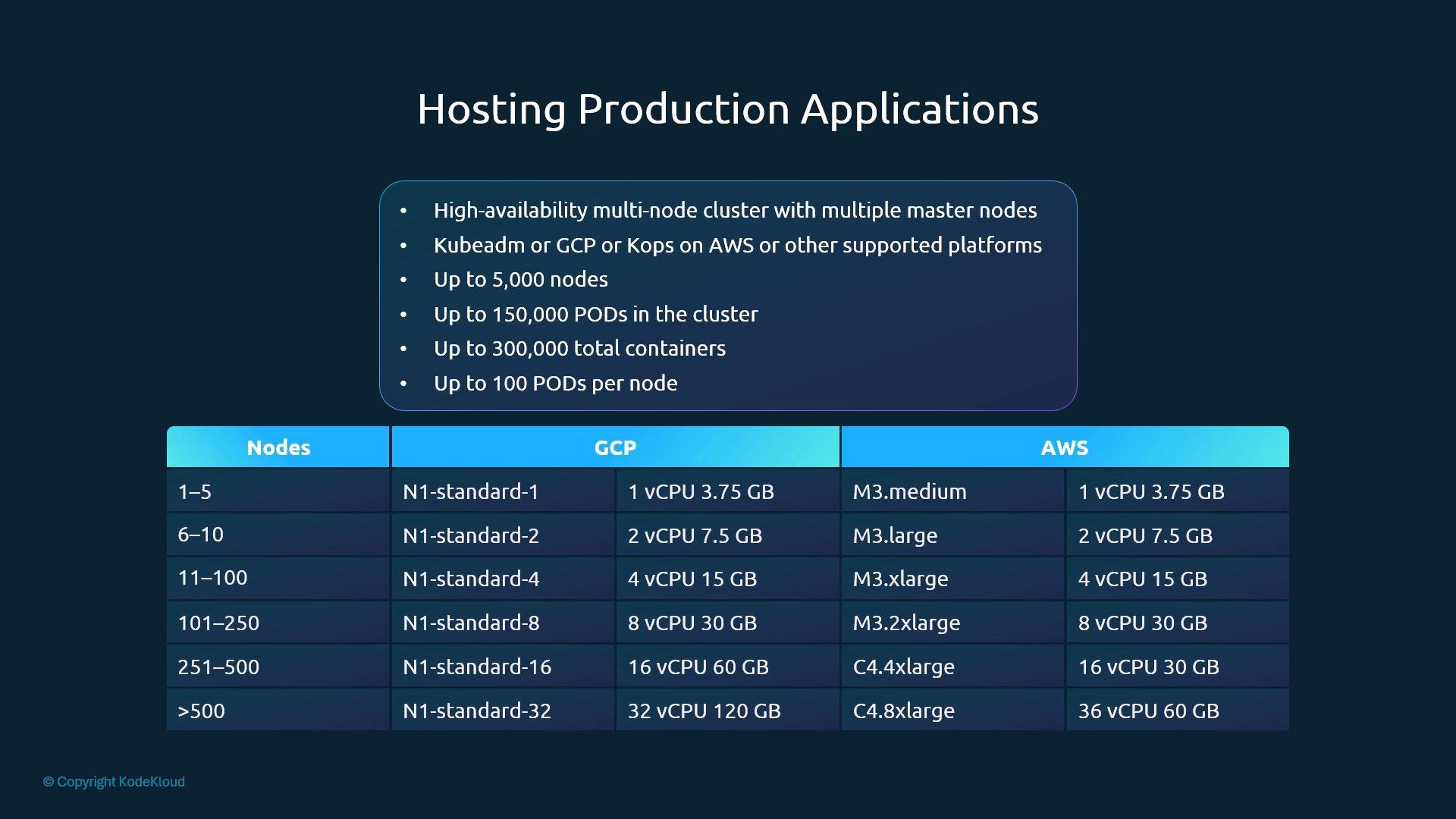 If you're on-prem, use the above as a baseline for hardware sizing. Cloud providers usually provide instance size recommendations and may auto-select instances for managed services.
## Storage considerations
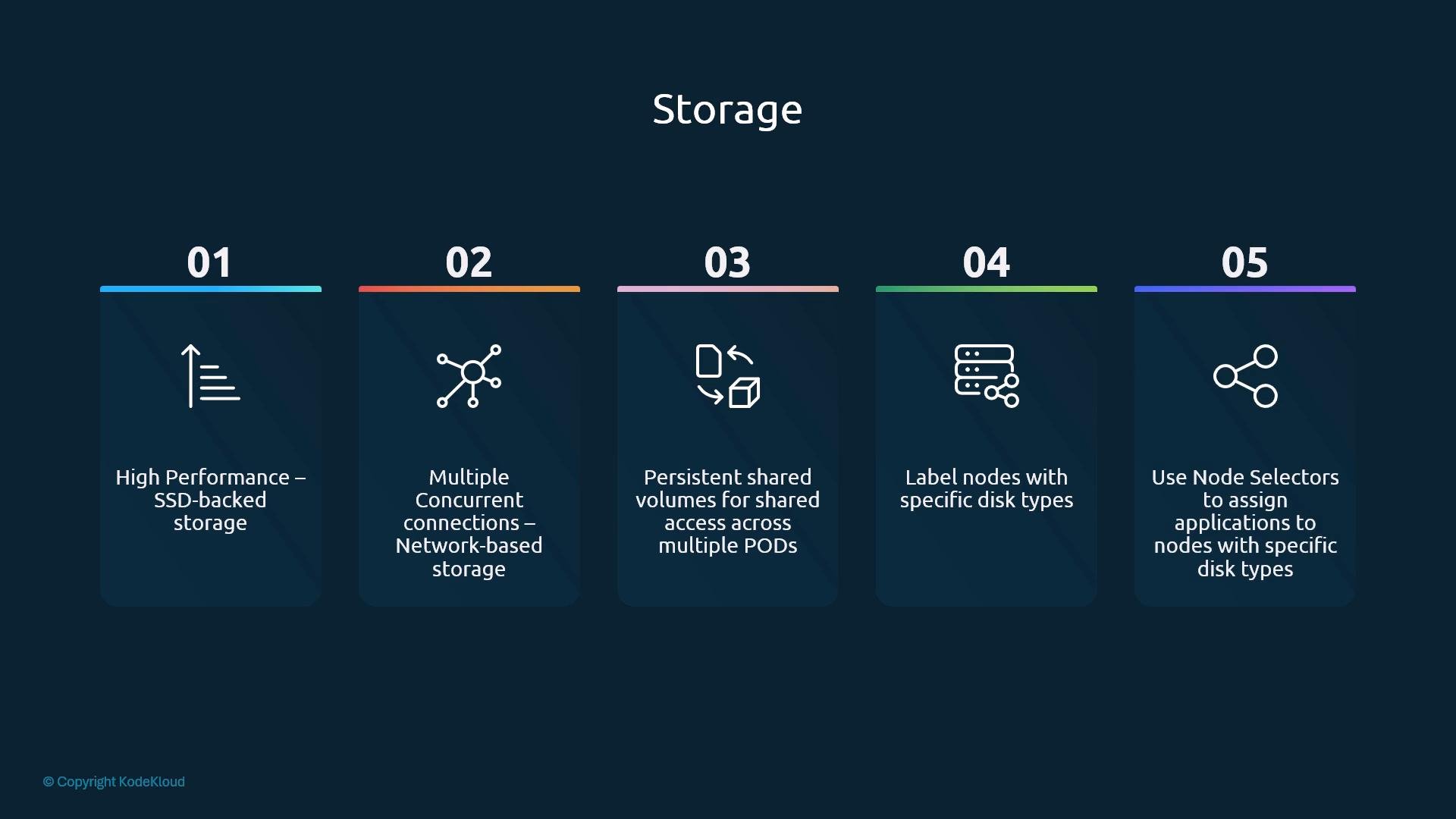
Pick storage based on workload I/O, durability, and sharing requirements:
* High-performance workloads: prefer SSD-backed storage for low latency and high IOPS.
* Concurrent access: use NAS or distributed block storage that supports multi-attach when many clients need simultaneous read/write.
* Shared volumes: use PersistentVolumes (PV) and PersistentVolumeClaims (PVC) and define StorageClasses for different performance tiers.
* Node labeling for disks: label nodes by disk capability (for example, `fast-ssd`) and use node selectors / node affinity to schedule workloads to those nodes.
* Use taints and tolerations to keep general workloads off specialized nodes unless explicitly allowed.
If you're on-prem, use the above as a baseline for hardware sizing. Cloud providers usually provide instance size recommendations and may auto-select instances for managed services.
## Storage considerations
Pick storage based on workload I/O, durability, and sharing requirements:
* High-performance workloads: prefer SSD-backed storage for low latency and high IOPS.
* Concurrent access: use NAS or distributed block storage that supports multi-attach when many clients need simultaneous read/write.
* Shared volumes: use PersistentVolumes (PV) and PersistentVolumeClaims (PVC) and define StorageClasses for different performance tiers.
* Node labeling for disks: label nodes by disk capability (for example, `fast-ssd`) and use node selectors / node affinity to schedule workloads to those nodes.
* Use taints and tolerations to keep general workloads off specialized nodes unless explicitly allowed.
 ## Nodes, control plane, and topology
Key topology and node design points:
* Nodes can be physical machines or VMs (cloud instances). For small setups, VirtualBox VMs or small cloud VMs are common.
* A minimal production-ready cluster typically has multiple control plane nodes (to provide HA) and multiple workers. A common small configuration is 3 control-plane nodes and 2+ worker nodes.
* Control plane components include: etcd, kube-apiserver, kube-controller-manager, and kube-scheduler.
* In larger clusters, consider isolating etcd on dedicated nodes to reduce contention for I/O and memory.
* kubeadm taints control-plane/master nodes by default to prevent scheduling regular workloads; keeping masters dedicated is best practice. Only use taints/tolerations to run workloads on masters if you understand the operational trade-offs.
For production, dedicate control plane nodes to control plane components only. Use taints and tolerations deliberately if you must run workloads on master nodes.
## Other practical considerations
* Operating system: use a supported 64-bit Linux distribution for control plane and most worker nodes. Windows worker nodes are supported for Windows containers (control plane remains Linux).
* Networking: choose a CNI plugin that matches your needs for performance, policy, and cloud integration (Calico, Cilium, Flannel, etc.).
* Monitoring and logging: include cluster-level monitoring (Prometheus, metrics-server), alerting, and centralized logging (e.g., Fluentd/Fluent Bit + ELK/EFK) from the start.
* Upgrades and lifecycle: plan and test upgrades in non-production first. Managed services reduce upgrade complexity; self-managed clusters require a documented upgrade process.
## References and certification notes
For authoritative details, consult:
* Kubernetes official documentation: [https://kubernetes.io/docs/](https://kubernetes.io/docs/)
* Google Kubernetes Engine (GKE): [https://cloud.google.com/kubernetes-engine](https://cloud.google.com/kubernetes-engine)
* Amazon EKS: [https://aws.amazon.com/eks](https://aws.amazon.com/eks)
* Azure Kubernetes Service (AKS): [https://azure.microsoft.com/en-us/services/kubernetes-service/](https://azure.microsoft.com/en-us/services/kubernetes-service/)
Exam tip: Know the concepts and trade-offs (HA control plane, storage classes, node sizing). Rely on official docs for exact capacity numbers rather than memorizing them.
## Control plane illustration
Below is a simple depiction of master nodes showing typical control plane components (etcd, API server, controller-manager, scheduler).
## Nodes, control plane, and topology
Key topology and node design points:
* Nodes can be physical machines or VMs (cloud instances). For small setups, VirtualBox VMs or small cloud VMs are common.
* A minimal production-ready cluster typically has multiple control plane nodes (to provide HA) and multiple workers. A common small configuration is 3 control-plane nodes and 2+ worker nodes.
* Control plane components include: etcd, kube-apiserver, kube-controller-manager, and kube-scheduler.
* In larger clusters, consider isolating etcd on dedicated nodes to reduce contention for I/O and memory.
* kubeadm taints control-plane/master nodes by default to prevent scheduling regular workloads; keeping masters dedicated is best practice. Only use taints/tolerations to run workloads on masters if you understand the operational trade-offs.
For production, dedicate control plane nodes to control plane components only. Use taints and tolerations deliberately if you must run workloads on master nodes.
## Other practical considerations
* Operating system: use a supported 64-bit Linux distribution for control plane and most worker nodes. Windows worker nodes are supported for Windows containers (control plane remains Linux).
* Networking: choose a CNI plugin that matches your needs for performance, policy, and cloud integration (Calico, Cilium, Flannel, etc.).
* Monitoring and logging: include cluster-level monitoring (Prometheus, metrics-server), alerting, and centralized logging (e.g., Fluentd/Fluent Bit + ELK/EFK) from the start.
* Upgrades and lifecycle: plan and test upgrades in non-production first. Managed services reduce upgrade complexity; self-managed clusters require a documented upgrade process.
## References and certification notes
For authoritative details, consult:
* Kubernetes official documentation: [https://kubernetes.io/docs/](https://kubernetes.io/docs/)
* Google Kubernetes Engine (GKE): [https://cloud.google.com/kubernetes-engine](https://cloud.google.com/kubernetes-engine)
* Amazon EKS: [https://aws.amazon.com/eks](https://aws.amazon.com/eks)
* Azure Kubernetes Service (AKS): [https://azure.microsoft.com/en-us/services/kubernetes-service/](https://azure.microsoft.com/en-us/services/kubernetes-service/)
Exam tip: Know the concepts and trade-offs (HA control plane, storage classes, node sizing). Rely on official docs for exact capacity numbers rather than memorizing them.
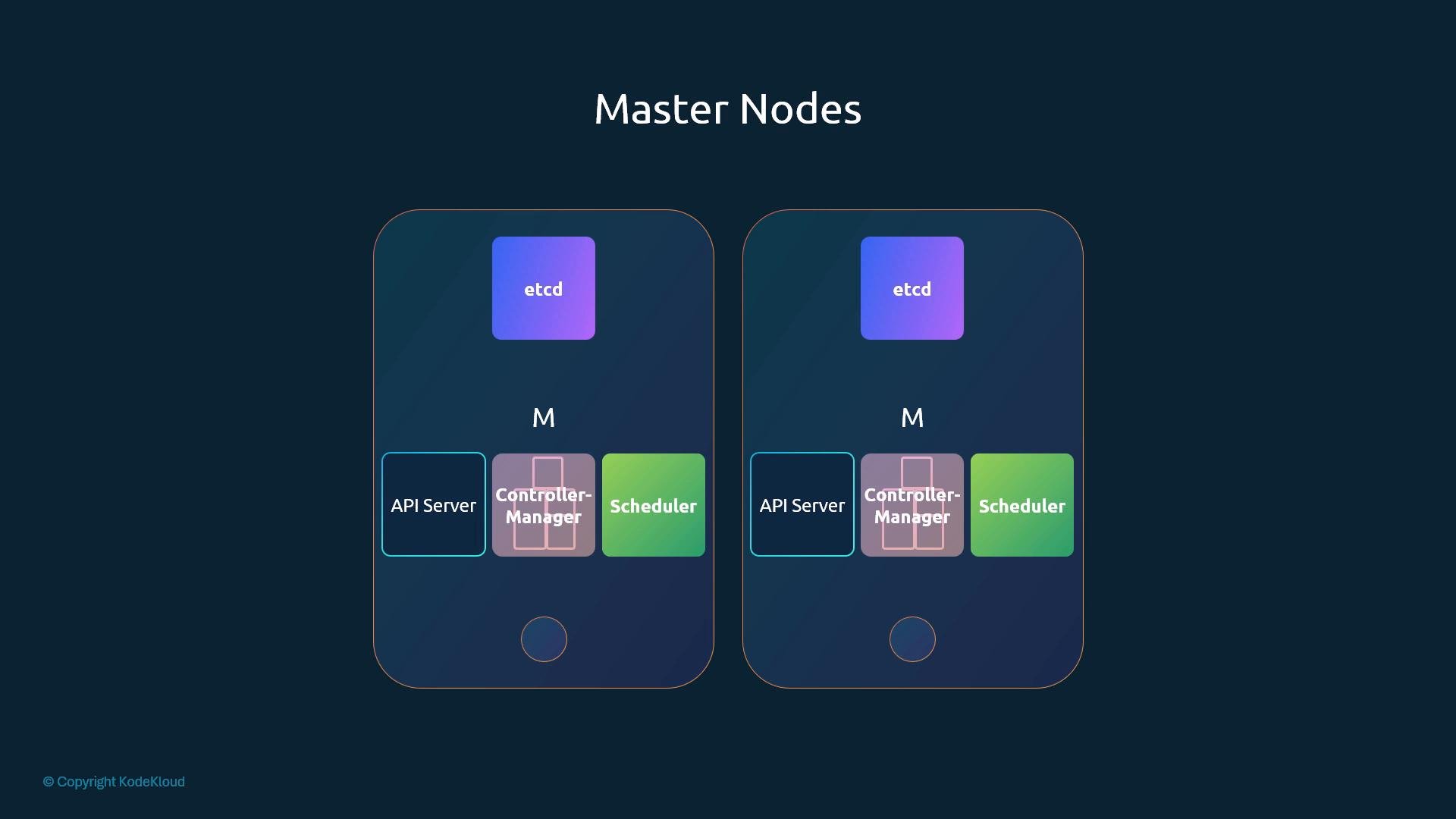
## Control plane illustration
Below is a simple depiction of master nodes showing typical control plane components (etcd, API server, controller-manager, scheduler).
 ## Next steps
Provision a small cluster (cloud or local) and apply these design ideas: choose appropriate storage classes, label nodes for workload placement, select a CNI, and instrument monitoring and logging. Practice upgrades and failure scenarios to validate your design.
This documentation is built and hosted on [Mintlify](https://mintlify.com), a developer documentation platform.
## Next steps
Provision a small cluster (cloud or local) and apply these design ideas: choose appropriate storage classes, label nodes for workload placement, select a CNI, and instrument monitoring and logging. Practice upgrades and failure scenarios to validate your design.
This documentation is built and hosted on [Mintlify](https://mintlify.com), a developer documentation platform.