> ## Documentation Index
> Fetch the complete documentation index at: https://notes.kodekloud.com/llms.txt
> Use this file to discover all available pages before exploring further.
# etcd in HA
> Explains running etcd in high availability for Kubernetes covering distributed Raft consensus, quorum sizing, installation, systemd configuration, TLS, ports, and basic etcdctl operations.
In this lesson we cover running etcd in a high‑availability (HA) configuration for Kubernetes. Topics include a quick recap of what etcd is, how a distributed etcd cluster works (Raft leader/follower model), quorum and fault tolerance, installation notes, a minimal systemd example, and basic etcdctl usage.
What is etcd?
etcd is a distributed, reliable key‑value store that is simple, secure, and fast. Instead of rows and columns, etcd stores documents (values) keyed by unique keys. Each document may contain structured data (JSON, YAML) and updates to one key do not affect others.
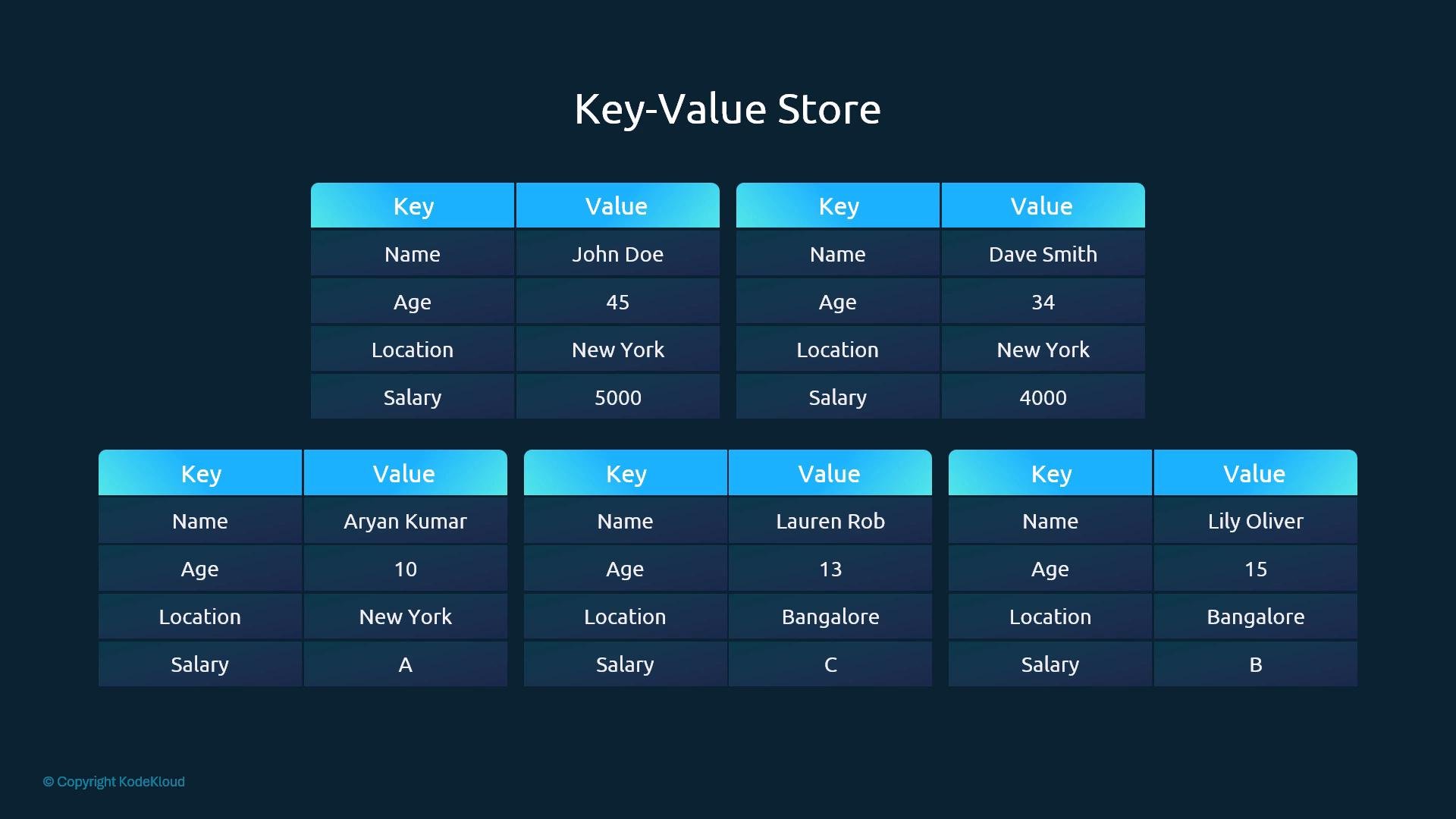 Example records (JSON documents):
```json theme={null}
{
"name": "John Doe",
"age": 45,
"location": "New York",
"salary": 5000
}
{
"name": "Dave Smith",
"age": 34,
"location": "New York",
"salary": 4000,
"organization": "ACME"
}
{
"name": "Aryan Kumar",
"age": 10,
"location": "New York",
"Grade": "A"
}
{
"name": "Lily Oliver",
"age": 15,
"location": "Bangalore",
"Grade": "B"
}
{
"name": "Lauren Rob",
"age": 13,
"location": "Bangalore",
"Grade": "C"
}
```
Because etcd stores critical cluster state for Kubernetes, it is built to run distributed across multiple servers so data remains available even when nodes fail.
Example records (JSON documents):
```json theme={null}
{
"name": "John Doe",
"age": 45,
"location": "New York",
"salary": 5000
}
{
"name": "Dave Smith",
"age": 34,
"location": "New York",
"salary": 4000,
"organization": "ACME"
}
{
"name": "Aryan Kumar",
"age": 10,
"location": "New York",
"Grade": "A"
}
{
"name": "Lily Oliver",
"age": 15,
"location": "Bangalore",
"Grade": "B"
}
{
"name": "Lauren Rob",
"age": 13,
"location": "Bangalore",
"Grade": "C"
}
```
Because etcd stores critical cluster state for Kubernetes, it is built to run distributed across multiple servers so data remains available even when nodes fail.
 How a distributed etcd cluster works
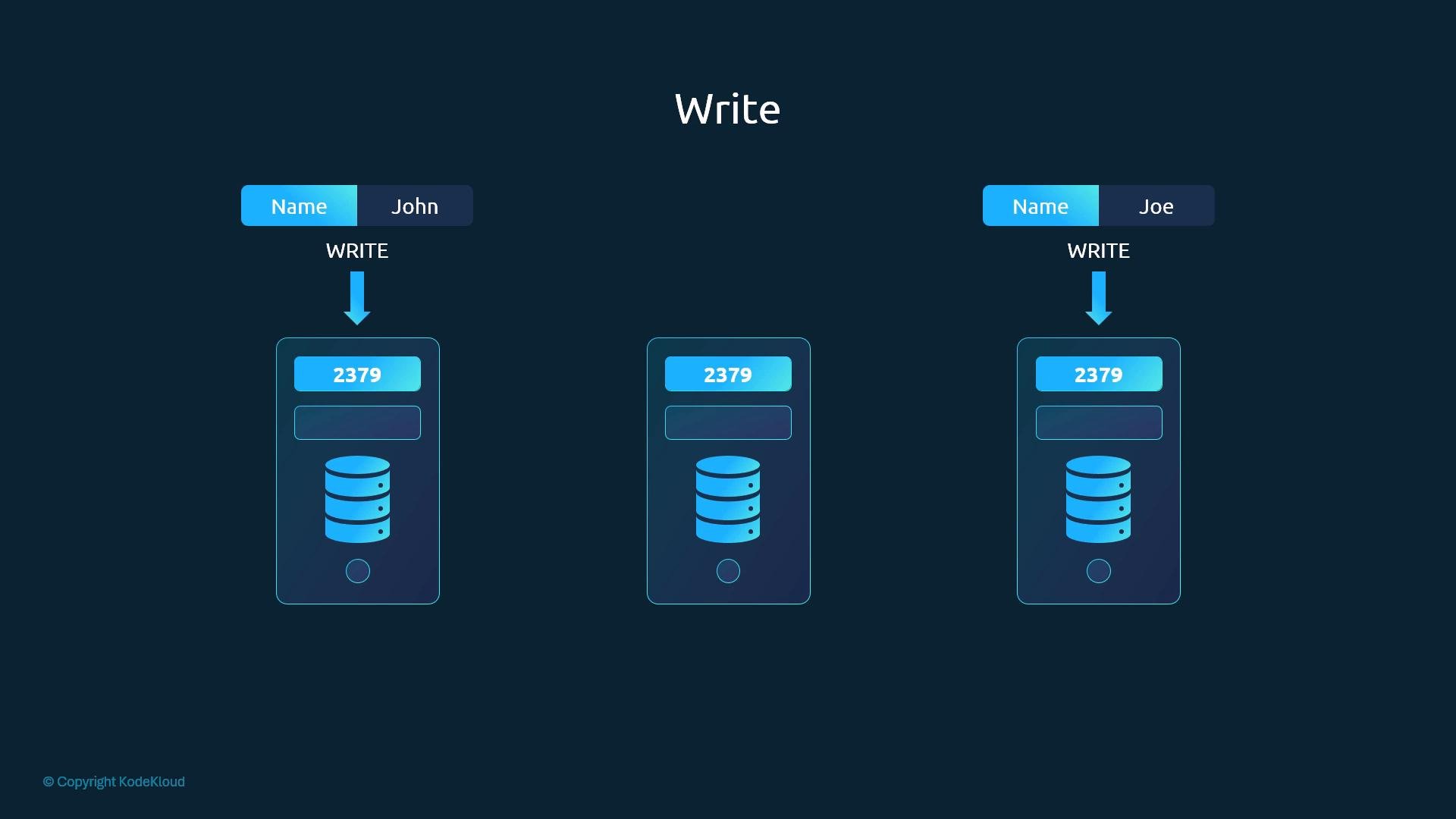
When etcd runs on multiple servers, each member keeps a copy of the data. Reads can be served from any member, but followers may lag behind the leader — so reads from followers can be stale. For the strongest consistency (linearizable reads) query the leader or use etcd's linearizable read mode.
Writes use the Raft consensus algorithm with a leader/follower model:
* A single leader is elected; all writes go through the leader.
* If a client writes to a follower, the follower forwards the request to the leader.
* The leader appends the write as a log entry and replicates it to followers.
* The leader considers the write committed only after a majority (quorum) acknowledges persistence.
* Once committed, the change is applied to the state machine on each member.
This design produces a single, consistent sequence of writes and prevents split‑brain scenarios.
How a distributed etcd cluster works
When etcd runs on multiple servers, each member keeps a copy of the data. Reads can be served from any member, but followers may lag behind the leader — so reads from followers can be stale. For the strongest consistency (linearizable reads) query the leader or use etcd's linearizable read mode.
Writes use the Raft consensus algorithm with a leader/follower model:
* A single leader is elected; all writes go through the leader.
* If a client writes to a follower, the follower forwards the request to the leader.
* The leader appends the write as a log entry and replicates it to followers.
* The leader considers the write committed only after a majority (quorum) acknowledges persistence.
* Once committed, the change is applied to the state machine on each member.
This design produces a single, consistent sequence of writes and prevents split‑brain scenarios.
 Leader election and Raft (3‑node example)
Raft handles leader election using randomized election timeouts:
* Each node starts with a randomized election timeout.
* The first node whose timeout expires becomes a candidate and requests votes.
* If it receives votes from a majority of members, it becomes leader.
* Leader sends periodic heartbeats (AppendEntries RPCs) to prevent new elections.
* If heartbeats stop (leader crash or partition), followers trigger a new election.
If the leader fails or is partitioned, the remaining quorum elects a new leader automatically.
Quorum and fault tolerance
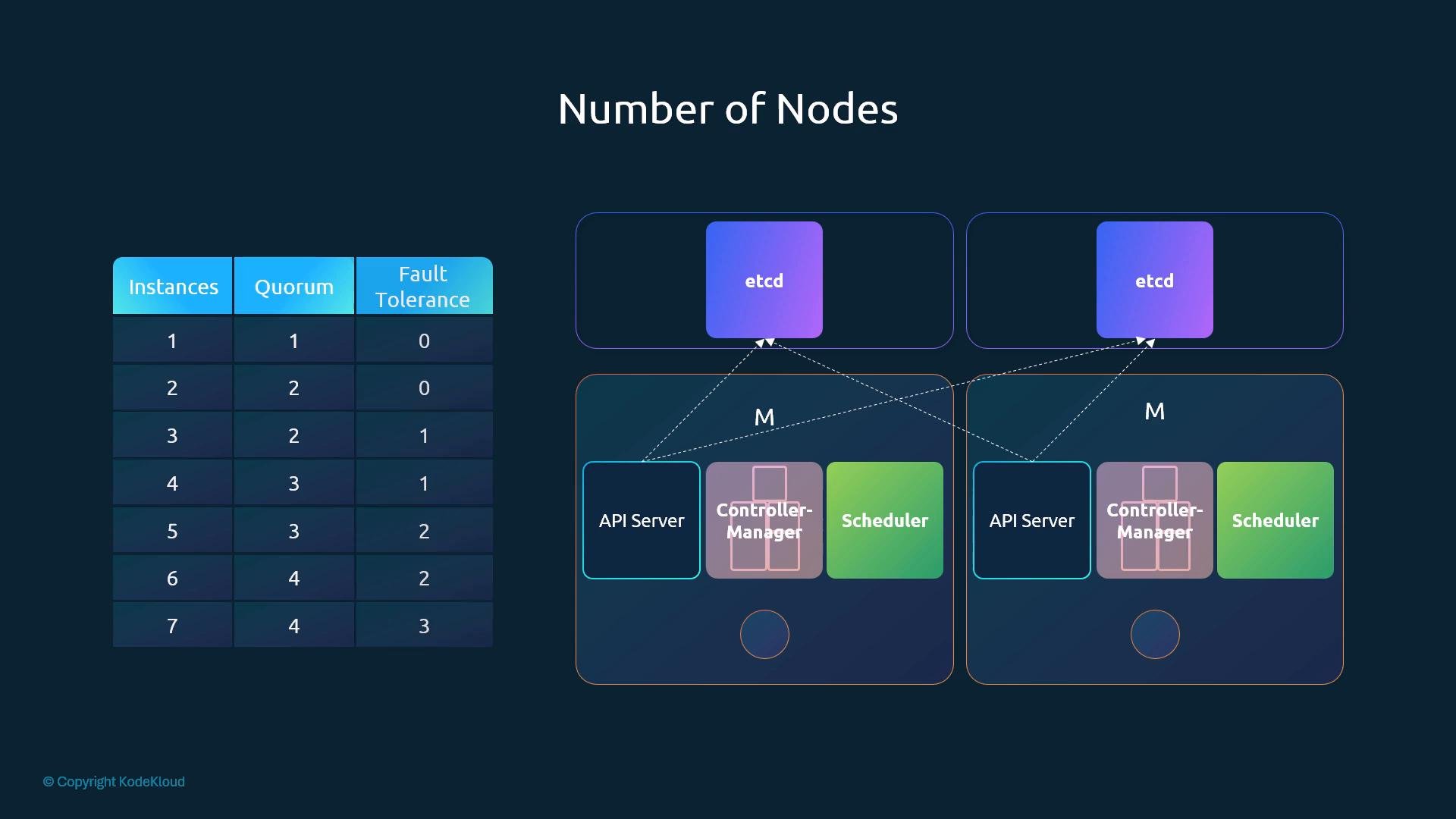
Quorum is the minimum number of members required to make progress (commit writes). For N members:
quorum = floor(N / 2) + 1
Examples:
| Instances (N) | Quorum | Fault tolerance (N - quorum) |
| -: | :-: | :-: |
| 1 | 1 | 0 |
| 2 | 2 | 0 |
| 3 | 2 | 1 |
| 4 | 3 | 1 |
| 5 | 3 | 2 |
| 6 | 4 | 2 |
| 7 | 4 | 3 |
Key takeaways:
* A 3‑node cluster tolerates 1 node failure.
* A 5‑node cluster tolerates 2 node failures.
* A 2‑node cluster is not recommended: quorum is 2, so losing one node prevents commits.
Use an odd number of members (3, 5, 7 ...) to minimize the chance of a partition leaving no majority.
Use an odd number of etcd members (minimum 3) for HA. Three is a good starting point; five increases fault tolerance to two node failures.
Leader election and Raft (3‑node example)
Raft handles leader election using randomized election timeouts:
* Each node starts with a randomized election timeout.
* The first node whose timeout expires becomes a candidate and requests votes.
* If it receives votes from a majority of members, it becomes leader.
* Leader sends periodic heartbeats (AppendEntries RPCs) to prevent new elections.
* If heartbeats stop (leader crash or partition), followers trigger a new election.
If the leader fails or is partitioned, the remaining quorum elects a new leader automatically.
Quorum and fault tolerance
Quorum is the minimum number of members required to make progress (commit writes). For N members:
quorum = floor(N / 2) + 1
Examples:
| Instances (N) | Quorum | Fault tolerance (N - quorum) |
| -: | :-: | :-: |
| 1 | 1 | 0 |
| 2 | 2 | 0 |
| 3 | 2 | 1 |
| 4 | 3 | 1 |
| 5 | 3 | 2 |
| 6 | 4 | 2 |
| 7 | 4 | 3 |
Key takeaways:
* A 3‑node cluster tolerates 1 node failure.
* A 5‑node cluster tolerates 2 node failures.
* A 2‑node cluster is not recommended: quorum is 2, so losing one node prevents commits.
Use an odd number of members (3, 5, 7 ...) to minimize the chance of a partition leaving no majority.
Use an odd number of etcd members (minimum 3) for HA. Three is a good starting point; five increases fault tolerance to two node failures.
 Deployment notes and ports
* Client communication: port 2379
* Peer (cluster) communication: port 2380
* When creating members, provide the initial cluster membership so each member knows the other peers and the cluster token/state.
* Ensure certificate SANs include the advertise/listen IPs and hostnames for TLS.
Ports quick reference:
| Purpose | Port |
| - | :-: |
| etcd client API | 2379 |
| etcd peer communication | 2380 |
Installing etcd (binary-based example)
A straightforward installation approach is to download the official release tarball, extract it, and move the binaries to a system path. Replace the version below with the latest supported release for production.
```bash theme={null}
# Download the etcd release tarball
wget -q --https-only "https://github.com/coreos/etcd/releases/download/v3.3.9/etcd-v3.3.9-linux-amd64.tar.gz"
# Extract the tarball
tar -xvf etcd-v3.3.9-linux-amd64.tar.gz
# Move into extracted directory and install binaries
cd etcd-v3.3.9-linux-amd64
sudo mv etcd etcdctl /usr/local/bin/
```
Place TLS certificates under `/etc/etcd/` (paths in the systemd example below assume this). Make sure certificates are generated using your PKI process and that SANs match the advertise/listen URLs.
Example systemd unit (etcd.service)
A minimal systemd unit demonstrates important flags. The `--initial-cluster` option lists all peers in the bootstrap. Update names/IPs and file paths to match your environment.
```ini theme={null}
[Unit]
Description=etcd key-value store
Documentation=https://github.com/coreos
[Service]
Type=notify
Environment=ETCD_NAME=peer-1
Environment=INTERNAL_IP=10.0.0.1
ExecStart=/usr/local/bin/etcd \
--name ${ETCD_NAME} \
--cert-file=/etc/etcd/kubernetes.pem \
--key-file=/etc/etcd/kubernetes-key.pem \
--peer-cert-file=/etc/etcd/kubernetes.pem \
--peer-key-file=/etc/etcd/kubernetes-key.pem \
--trusted-ca-file=/etc/etcd/ca.pem \
--peer-trusted-ca-file=/etc/etcd/ca.pem \
--peer-client-cert-auth \
--client-cert-auth \
--initial-advertise-peer-urls https://${INTERNAL_IP}:2380 \
--listen-peer-urls https://${INTERNAL_IP}:2380 \
--listen-client-urls https://${INTERNAL_IP}:2379,https://127.0.0.1:2379 \
--advertise-client-urls https://${INTERNAL_IP}:2379 \
--initial-cluster-token etcd-cluster-0 \
--initial-cluster peer-1=https://10.0.0.1:2380,peer-2=https://10.0.0.2:2380,peer-3=https://10.0.0.3:2380 \
--initial-cluster-state new \
--data-dir=/var/lib/etcd
Restart=on-failure
RestartSec=5s
[Install]
WantedBy=multi-user.target
```
Notes:
* Replace `peer-1/peer-2/peer-3` and IP addresses with your hostnames/IPs.
* Ensure TLS certificate paths, auth flags, and advertise/listen URLs match your certificates and network.
* Use `--initial-cluster-state new` for a fresh cluster. Use `existing` when re‑joining an existing cluster.
Certificates must include correct SANs that match advertise/listen hostnames and IPs. Mismatched SANs will cause peer/client TLS handshakes to fail and prevent cluster formation.
Using etcdctl for basic operations
Use etcdctl v3 API to interact with the cluster. If needed, set `ETCDCTL_API=3`. For secured clusters pass TLS flags or set environment variables.
Examples:
```bash theme={null}
# Set v3 API
export ETCDCTL_API=3
# Put a key (insecure example)
etcdctl put name "john"
# Get a key
etcdctl get name
# List keys only under a prefix
etcdctl get "" --keys-only --prefix
# Secure cluster example (add endpoints and TLS files)
etcdctl --endpoints=https://10.0.0.1:2379 \
--cacert=/etc/etcd/ca.pem \
--cert=/etc/etcd/kubernetes.pem \
--key=/etc/etcd/kubernetes-key.pem \
get name
```
Useful troubleshooting commands:
```bash theme={null}
# List members and their statuses
etcdctl member list
# Check cluster health (v3)
etcdctl endpoint health --endpoints=https://10.0.0.1:2379
# Get cluster status information
etcdctl endpoint status --write-out=table
```
Design guidance recap
* Minimum recommended HA cluster: 3 etcd members (odd number).
* 3 members tolerate 1 node failure; 5 members tolerate 2.
* Avoid 2‑node clusters — they do not improve availability.
* Choose between stacked topology (etcd co‑located on control-plane nodes) or an external dedicated etcd cluster based on operational needs, fault tolerance, and cost.
Practical note
For demos or local testing you may run fewer nodes for resource reasons, but for production HA deploy at least three etcd members on separate, resilient control-plane hosts.
Further reading and references
* etcd official docs: [https://etcd.io](https://etcd.io)
* Kubernetes docs: [https://kubernetes.io/docs/](https://kubernetes.io/docs/)
* etcd GitHub releases: [https://github.com/etcd-io/etcd/releases](https://github.com/etcd-io/etcd/releases)
That concludes this lesson on etcd in high availability mode.
This documentation is built and hosted on [Mintlify](https://mintlify.com), a developer documentation platform.
Deployment notes and ports
* Client communication: port 2379
* Peer (cluster) communication: port 2380
* When creating members, provide the initial cluster membership so each member knows the other peers and the cluster token/state.
* Ensure certificate SANs include the advertise/listen IPs and hostnames for TLS.
Ports quick reference:
| Purpose | Port |
| - | :-: |
| etcd client API | 2379 |
| etcd peer communication | 2380 |
Installing etcd (binary-based example)
A straightforward installation approach is to download the official release tarball, extract it, and move the binaries to a system path. Replace the version below with the latest supported release for production.
```bash theme={null}
# Download the etcd release tarball
wget -q --https-only "https://github.com/coreos/etcd/releases/download/v3.3.9/etcd-v3.3.9-linux-amd64.tar.gz"
# Extract the tarball
tar -xvf etcd-v3.3.9-linux-amd64.tar.gz
# Move into extracted directory and install binaries
cd etcd-v3.3.9-linux-amd64
sudo mv etcd etcdctl /usr/local/bin/
```
Place TLS certificates under `/etc/etcd/` (paths in the systemd example below assume this). Make sure certificates are generated using your PKI process and that SANs match the advertise/listen URLs.
Example systemd unit (etcd.service)
A minimal systemd unit demonstrates important flags. The `--initial-cluster` option lists all peers in the bootstrap. Update names/IPs and file paths to match your environment.
```ini theme={null}
[Unit]
Description=etcd key-value store
Documentation=https://github.com/coreos
[Service]
Type=notify
Environment=ETCD_NAME=peer-1
Environment=INTERNAL_IP=10.0.0.1
ExecStart=/usr/local/bin/etcd \
--name ${ETCD_NAME} \
--cert-file=/etc/etcd/kubernetes.pem \
--key-file=/etc/etcd/kubernetes-key.pem \
--peer-cert-file=/etc/etcd/kubernetes.pem \
--peer-key-file=/etc/etcd/kubernetes-key.pem \
--trusted-ca-file=/etc/etcd/ca.pem \
--peer-trusted-ca-file=/etc/etcd/ca.pem \
--peer-client-cert-auth \
--client-cert-auth \
--initial-advertise-peer-urls https://${INTERNAL_IP}:2380 \
--listen-peer-urls https://${INTERNAL_IP}:2380 \
--listen-client-urls https://${INTERNAL_IP}:2379,https://127.0.0.1:2379 \
--advertise-client-urls https://${INTERNAL_IP}:2379 \
--initial-cluster-token etcd-cluster-0 \
--initial-cluster peer-1=https://10.0.0.1:2380,peer-2=https://10.0.0.2:2380,peer-3=https://10.0.0.3:2380 \
--initial-cluster-state new \
--data-dir=/var/lib/etcd
Restart=on-failure
RestartSec=5s
[Install]
WantedBy=multi-user.target
```
Notes:
* Replace `peer-1/peer-2/peer-3` and IP addresses with your hostnames/IPs.
* Ensure TLS certificate paths, auth flags, and advertise/listen URLs match your certificates and network.
* Use `--initial-cluster-state new` for a fresh cluster. Use `existing` when re‑joining an existing cluster.
Certificates must include correct SANs that match advertise/listen hostnames and IPs. Mismatched SANs will cause peer/client TLS handshakes to fail and prevent cluster formation.
Using etcdctl for basic operations
Use etcdctl v3 API to interact with the cluster. If needed, set `ETCDCTL_API=3`. For secured clusters pass TLS flags or set environment variables.
Examples:
```bash theme={null}
# Set v3 API
export ETCDCTL_API=3
# Put a key (insecure example)
etcdctl put name "john"
# Get a key
etcdctl get name
# List keys only under a prefix
etcdctl get "" --keys-only --prefix
# Secure cluster example (add endpoints and TLS files)
etcdctl --endpoints=https://10.0.0.1:2379 \
--cacert=/etc/etcd/ca.pem \
--cert=/etc/etcd/kubernetes.pem \
--key=/etc/etcd/kubernetes-key.pem \
get name
```
Useful troubleshooting commands:
```bash theme={null}
# List members and their statuses
etcdctl member list
# Check cluster health (v3)
etcdctl endpoint health --endpoints=https://10.0.0.1:2379
# Get cluster status information
etcdctl endpoint status --write-out=table
```
Design guidance recap
* Minimum recommended HA cluster: 3 etcd members (odd number).
* 3 members tolerate 1 node failure; 5 members tolerate 2.
* Avoid 2‑node clusters — they do not improve availability.
* Choose between stacked topology (etcd co‑located on control-plane nodes) or an external dedicated etcd cluster based on operational needs, fault tolerance, and cost.
Practical note
For demos or local testing you may run fewer nodes for resource reasons, but for production HA deploy at least three etcd members on separate, resilient control-plane hosts.
Further reading and references
* etcd official docs: [https://etcd.io](https://etcd.io)
* Kubernetes docs: [https://kubernetes.io/docs/](https://kubernetes.io/docs/)
* etcd GitHub releases: [https://github.com/etcd-io/etcd/releases](https://github.com/etcd-io/etcd/releases)
That concludes this lesson on etcd in high availability mode.
This documentation is built and hosted on [Mintlify](https://mintlify.com), a developer documentation platform.