> ## Documentation Index
> Fetch the complete documentation index at: https://notes.kodekloud.com/llms.txt
> Use this file to discover all available pages before exploring further.
# What is Helm
> Helm is a package manager and release management tool designed for simplifying Kubernetes application management.
Helm is a package manager and release management tool designed for Kubernetes applications. While Kubernetes excels at orchestrating complex infrastructures, managing a multitude of interdependent YAML files for a single application can quickly become overwhelming. Consider a basic WordPress deployment, which might involve multiple Kubernetes objects such as:
* **Deployment:** Runs Pods for services like MySQL or web servers.
* **Persistent Volume (PV) and Persistent Volume Claim (PVC):** Provides storage for databases.
* **Service:** Exposes the web server to the Internet.
* **Secret:** Stores sensitive data like admin passwords.
* **Job:** Handles periodic tasks like backups.
Each of these resources requires its own YAML configuration file and separate `kubectl apply` commands. For instance, a simplified collection of YAML definitions may look like this:
```yaml theme={null}
apiVersion: v1
kind: Secret
metadata:
name: wordpress-admin-password
data:
key: CalksdlkeB6mxcv23kjsdkljke==
---
apiVersion: apps/v1
kind: Deployment
metadata:
name: wordpress-mysql
labels:
app: wordpress
spec:
selector:
matchLabels:
app: wordpress
tier: mysql
strategy:
type: Recreate
template:
metadata:
labels:
app: wordpress
tier: mysql
spec:
containers:
- image: mysql:5.6
---
apiVersion: v1
kind: Service
metadata:
name: wordpress
labels:
app: wordpress
spec:
ports:
- port: 80
selector:
app: wordpress
tier: frontend
type: LoadBalancer
---
apiVersion: v1
kind: PersistentVolumeClaim
metadata:
name: wp-pv-claim
labels:
app: wordpress
spec:
accessModes:
- ReadWriteOnce
resources:
requests:
storage: 20Gi
---
apiVersion: v1
kind: PersistentVolume
metadata:
name: pv0003
spec:
capacity:
storage: 20Gi
volumeMode: Filesystem
accessModes:
- ReadWriteOnce
```
Managing these files individually can be tedious, especially when default configurations such as storage size need to be updated or changed. If you download YAML files from an external source, modifying each file to fit your needs can be labor-intensive. Furthermore, as your application evolves, you might have to update numerous configurations repeatedly.
With Helm, you can treat your application as a single package rather than a collection of disparate Kubernetes objects.
## The Cumbersome Approach: Multiple YAML Files
Imagine updating your application configuration over time. For example, you might modify several YAML files and then apply them individually:
1. **Update the Secret:**
```yaml theme={null}
apiVersion: v1
kind: Secret
metadata:
name: wordpress-admin-password
data:
key: CaklsdIkEeB6mxcv23kjsdIkljke==
```
```bash theme={null}
$ kubectl apply -f wp-secret.yaml
```
2. **Update the Deployment:**
```yaml theme={null}
apiVersion: apps/v1
kind: Deployment
metadata:
name: wordpress-mysql
labels:
app: wordpress
tier: mysql
spec:
strategy: Recreate
template:
metadata:
labels:
app: wordpress
tier: mysql
spec:
containers:
- image: mysql:5.6
```
```bash theme={null}
$ kubectl apply -f wp-deploy.yaml
```
3. **Update the Service:**
```yaml theme={null}
apiVersion: v1
kind: Service
metadata:
name: wordpress
labels:
app: wordpress
spec:
ports:
- port: 80
selector:
app: wordpress
type: LoadBalancer
```
```bash theme={null}
$ kubectl apply -f wp-svc.yaml
```
4. **Update the PersistentVolumeClaim:**
```yaml theme={null}
apiVersion: v1
kind: PersistentVolumeClaim
metadata:
name: wp-pv-claim
labels:
app: wordpress
spec:
accessModes:
- ReadWriteOnce
resources:
requests:
storage: 20Gi
```
```bash theme={null}
$ kubectl apply -f wp-pvc.yaml
```
5. **Update the PersistentVolume:**
```yaml theme={null}
apiVersion: v1
kind: PersistentVolume
metadata:
name: pv003
spec:
capacity:
storage: 20Gi
volumeMode: Filesystem
accessModes:
- ReadWriteOnce
```
```bash theme={null}
$ kubectl apply -f wp-pv.yaml
```
Later, when it comes time to upgrade or delete parts of the application, the process involves updating or removing each object—a process that can be both time-consuming and error-prone.
## Introducing Helm
Helm transforms the management of Kubernetes applications by packaging all the necessary objects—Persistent Volumes, Deployments, Secrets, Services, and more—into a single, cohesive unit. This means you no longer have to manage individual YAML files for each component.
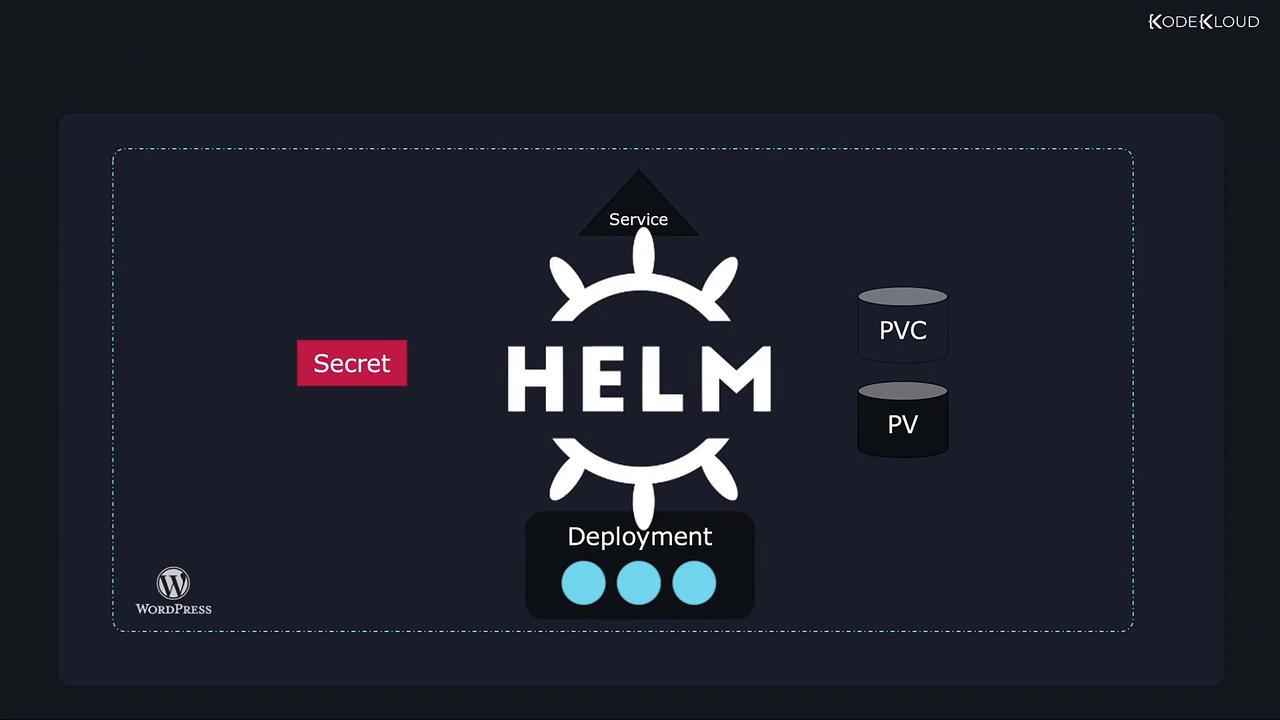
With Helm, you work with the entire application as a single package. Installing your WordPress app, for example, becomes as simple as executing:
```bash theme={null}
$ helm install wordpress
```
### Key Benefits of Helm
* **Centralized Configuration:** Customize your application using a single `values.yaml` file. This file can store essential settings such as:
| Parameter | Description | Example Value |
| ------------------ | ------------------------------------------------- | ------------------------------------------- |
| wordpressUsername | The WordPress admin username | user |
| wordpressPassword | The WordPress admin password (defaults to random) | (optional) |
| wordpressEmail | The admin email address | [user@example.com](mailto:user@example.com) |
| wordpressFirstName | The admin's first name | FirstName |
| wordpressLastName | The admin's last name | LastName |
| wordpressBlogName | The name of the blog | "User's Blog!" |
An example `values.yaml` file might look like this:
```yaml theme={null}
wordpressUsername: user
## Application password
## Defaults to a random 10-character alphanumeric string if not set
# wordpressPassword:
## Admin email
wordpressEmail: user@example.com
## First name
wordpressFirstName: FirstName
## Last name
wordpressLastName: LastName
## Blog name
wordpressBlogName: "User's Blog!"
```
* **Streamlined Upgrades and Rollbacks:** Helm allows you to:
* Upgrade your application effortlessly with:
```bash theme={null}
$ helm upgrade wordpress
```
* Roll back to a previous release quickly using:
```bash theme={null}
$ helm rollback wordpress
```
* **Simplified Uninstallation:** Remove all associated resources with a single command:
```bash theme={null}
$ helm uninstall wordpress
```
Helm abstracts away the complexity of managing individual Kubernetes objects, enabling you to handle your application deployments as cohesive units. This can drastically reduce manual effort and minimize potential errors during upgrades or deletions.
## In Summary
Helm acts as both a package manager and a release manager for Kubernetes. It provides an elegant solution for bundling together the various objects that make up complex applications. By doing so, Helm drastically simplifies the processes of installation, configuration, upgrade, rollback, and deletion.
This introduction to Helm sets the stage for more advanced topics that will be explored in upcoming lessons. Stay tuned as we delve deeper into Helm's features and commands, and learn how to harness its full power to manage your Kubernetes applications efficiently.
For further information, check out the [Helm documentation](https://helm.sh/docs/) and keep exploring the world of Kubernetes package management.