> ## Documentation Index
> Fetch the complete documentation index at: https://notes.kodekloud.com/llms.txt
> Use this file to discover all available pages before exploring further.
# Deployment With kubeadm Introduction
> Introduction to kubeadm for bootstrapping secure multi node Kubernetes clusters, automating control plane setup while requiring manual host provisioning, container runtime installation, and CNI networking
In this lesson we introduce kubeadm — a Kubernetes project tool designed to bootstrap a secure, best-practice multi-node cluster quickly and consistently.
kubeadm automates many of the manual steps required to create a functioning control plane: generating certificates, creating static pod manifests for control-plane components, and producing kubeconfig files for administrative access. It does not, however, replace a full lifecycle or infrastructure management solution; provisioning hosts, installing container runtimes, and choosing a CNI plugin remain your responsibility.
Kubernetes control-plane and node components typically include:
| Component | Role |
| -: | - |
| kube-apiserver | Central API server; handles all REST requests and cluster state operations |
| etcd | Cluster state datastore |
| kube-controller-manager | Runs controller loops for nodes, replication, endpoints, etc. |
| kube-scheduler | Assigns pods to nodes |
| kubelet | Agent that runs on every node to manage pods and containers |
| Container runtime (e.g., containerd) | Runs container images used by pods |
Why use kubeadm? Installing these components manually on different hosts, creating and distributing certificates, and updating config files so components can authenticate and communicate is error-prone and time-consuming. kubeadm standardizes and automates the bootstrapping phase so you get a working control plane reliably and reproducibly.
High-level kubeadm workflow
* Provision the systems (VMs or physical machines) that will form the cluster.
* Designate one host as the control-plane (master) and the rest as worker nodes.
* Install a container runtime on every host. This lesson uses `containerd`.
* Install kubeadm (and the associated `kubelet` and `kubectl`) on all nodes.
* Initialize the control-plane host with `kubeadm init`. This generates certificates, writes kubeconfig files, and creates static pod manifests for control-plane components.
* Ensure networking prerequisites are satisfied; Kubernetes requires a Pod network (CNI) beyond standard host connectivity.
* Apply a Pod network add-on (CNI) on the control-plane host after `kubeadm init` to enable cross-node Pod communication.
* Join worker nodes to the control plane using the `kubeadm join` command produced during initialization.
* Once nodes are joined and the Pod network is active, deploy applications to the cluster.
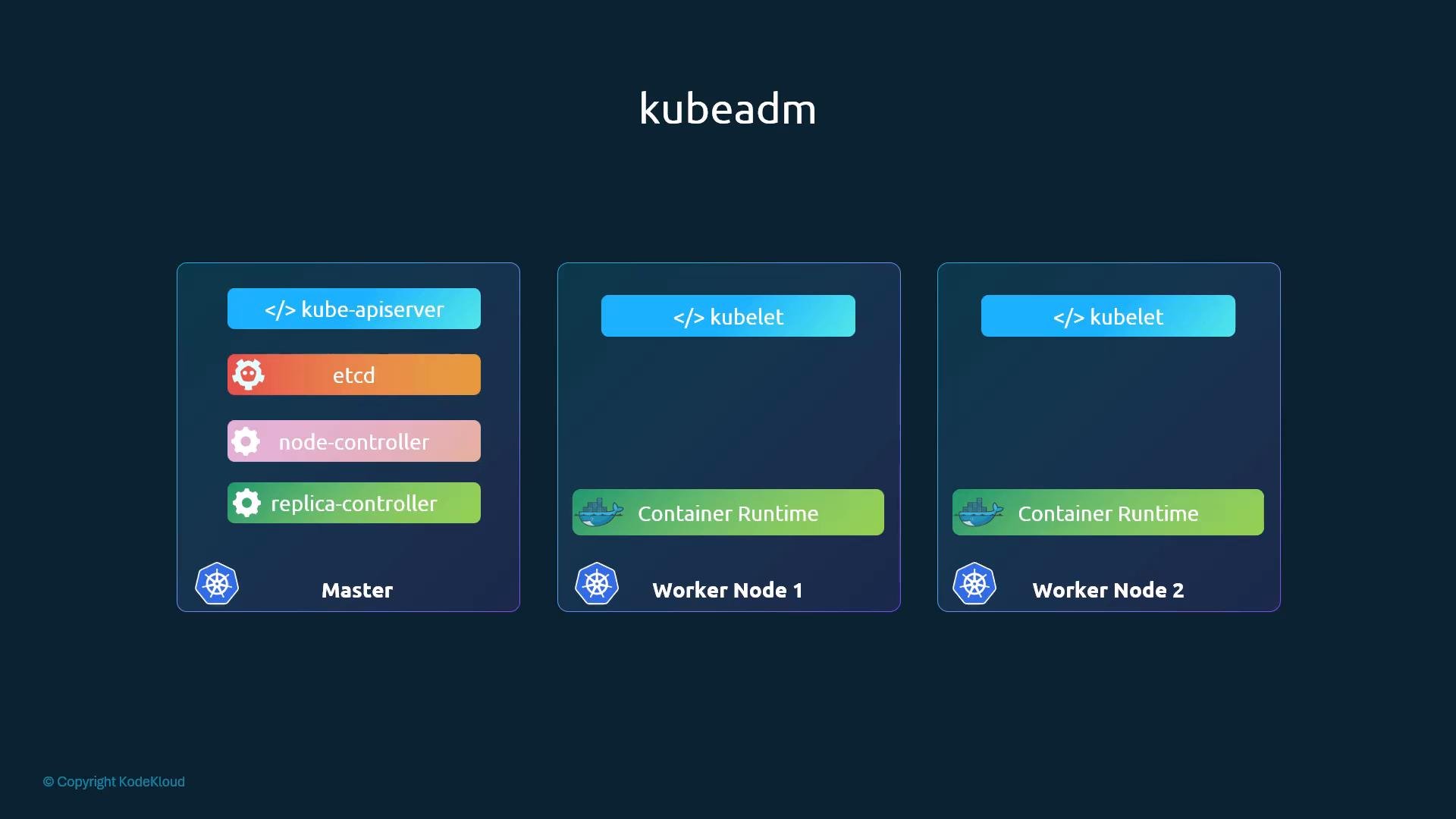 Installing all control-plane components individually across nodes, creating and distributing certificates, and editing configuration files so the components point to one another is a tedious task. kubeadm handles these responsibilities for the bootstrap phase and produces a working control plane quickly and consistently.
kubeadm does not manage everything. You still need to be responsible for:
* Provisioning and maintaining the underlying machines (VMs or bare metal).
* Installing and patching the container runtime (we use `containerd` in this lesson).
* Choosing and installing a CNI plugin for Pod networking (for example, Flannel, Calico, or Weave Net).
* Setting and maintaining required system-level prerequisites (disable swap, load kernel modules, and set required sysctl values).
Before running `kubeadm`, make sure system prerequisites are met: disable swap, enable bridged IPv4/IPv6 traffic to iptables, load required kernel modules, and configure any `containerd`-specific settings. Remember: kubeadm does not install a CNI plugin — apply a Pod network add-on after `kubeadm init`.
Installing all control-plane components individually across nodes, creating and distributing certificates, and editing configuration files so the components point to one another is a tedious task. kubeadm handles these responsibilities for the bootstrap phase and produces a working control plane quickly and consistently.
kubeadm does not manage everything. You still need to be responsible for:
* Provisioning and maintaining the underlying machines (VMs or bare metal).
* Installing and patching the container runtime (we use `containerd` in this lesson).
* Choosing and installing a CNI plugin for Pod networking (for example, Flannel, Calico, or Weave Net).
* Setting and maintaining required system-level prerequisites (disable swap, load kernel modules, and set required sysctl values).
Before running `kubeadm`, make sure system prerequisites are met: disable swap, enable bridged IPv4/IPv6 traffic to iptables, load required kernel modules, and configure any `containerd`-specific settings. Remember: kubeadm does not install a CNI plugin — apply a Pod network add-on after `kubeadm init`.
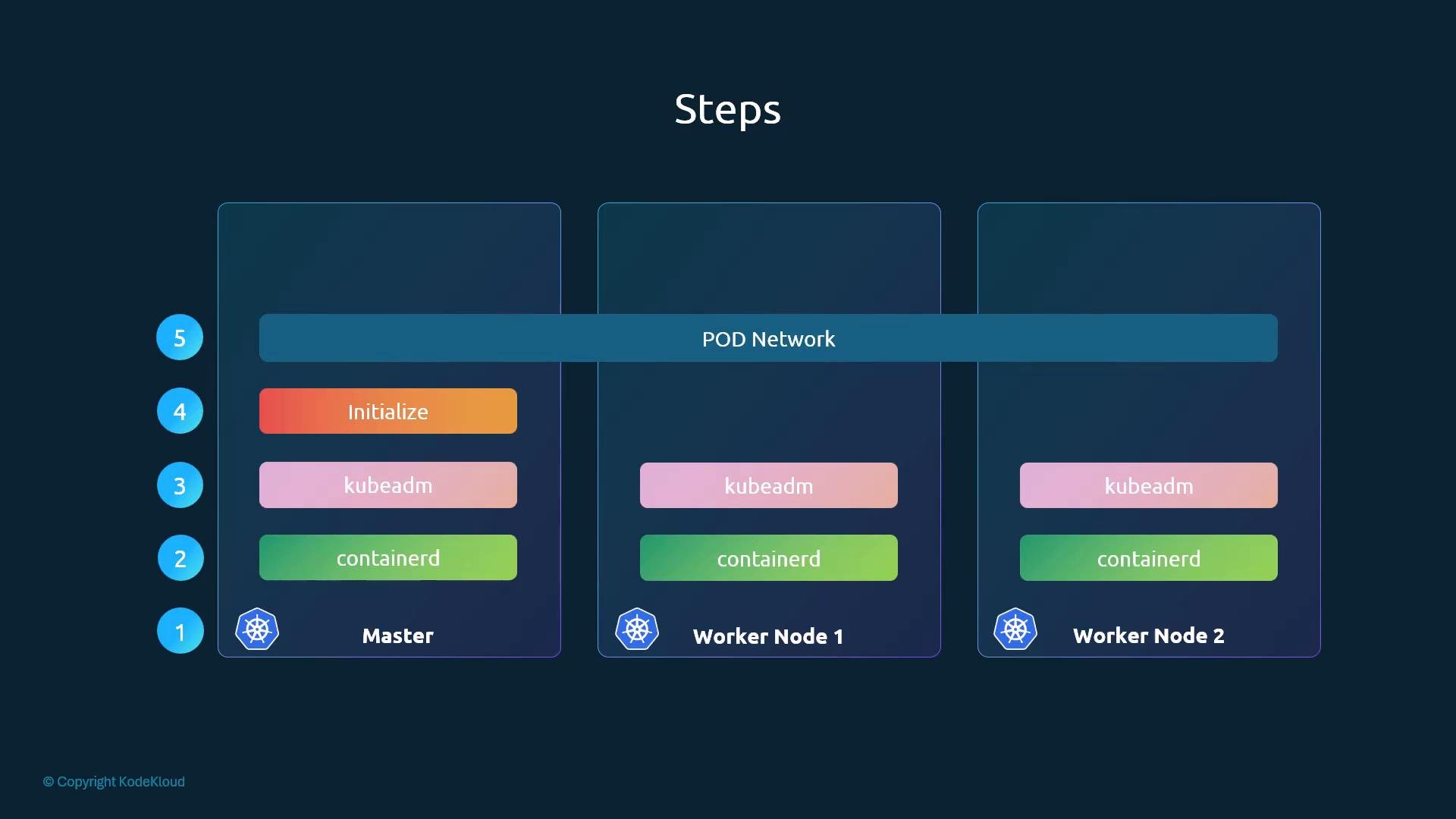 The final step is joining worker nodes to the control plane. After nodes are joined and the Pod network is functioning, the cluster is ready for application deployment.
Next in this lesson: a hands-on walkthrough covering host preparation, installing `containerd` and kubeadm, initializing the control plane with `kubeadm init`, applying a CNI Pod network add-on, and joining worker nodes using `kubeadm join`.
Links and references
* Kubernetes documentation: [https://kubernetes.io/docs/](https://kubernetes.io/docs/)
* kubeadm: [https://kubernetes.io/docs/setup/production-environment/tools/kubeadm/](https://kubernetes.io/docs/setup/production-environment/tools/kubeadm/)
* containerd: [https://containerd.io/](https://containerd.io/)
* CNI plugins (Flannel, Calico, Weave Net): [https://github.com/containernetworking/plugins](https://github.com/containernetworking/plugins)
This documentation is built and hosted on [Mintlify](https://mintlify.com), a developer documentation platform.
The final step is joining worker nodes to the control plane. After nodes are joined and the Pod network is functioning, the cluster is ready for application deployment.
Next in this lesson: a hands-on walkthrough covering host preparation, installing `containerd` and kubeadm, initializing the control plane with `kubeadm init`, applying a CNI Pod network add-on, and joining worker nodes using `kubeadm join`.
Links and references
* Kubernetes documentation: [https://kubernetes.io/docs/](https://kubernetes.io/docs/)
* kubeadm: [https://kubernetes.io/docs/setup/production-environment/tools/kubeadm/](https://kubernetes.io/docs/setup/production-environment/tools/kubeadm/)
* containerd: [https://containerd.io/](https://containerd.io/)
* CNI plugins (Flannel, Calico, Weave Net): [https://github.com/containernetworking/plugins](https://github.com/containernetworking/plugins)
This documentation is built and hosted on [Mintlify](https://mintlify.com), a developer documentation platform.