> ## Documentation Index
> Fetch the complete documentation index at: https://notes.kodekloud.com/llms.txt
> Use this file to discover all available pages before exploring further.
# Managing Directories Demo
> This article explores managing Kubernetes manifest directories and introduces Kustomize for simplifying resource management and deployment.
In this lesson, we explore how to effectively manage directories containing Kubernetes manifests. The demonstration uses a structured "K8s" directory that holds all Kubernetes configurations organized into three subdirectories: one for the API, one for the cache (acting as a readers' database), and one for the MongoDB database.
When you open the K8s directory, you'll see three distinct folders. Each folder includes configuration files (YAML manifests) tailored for a specific component. For instance, the database folder contains the deployment YAML files for MongoDB, while the API and cache directories contain configurations for services such as ClusterIP or LoadBalancer services along with associated ConfigMaps.
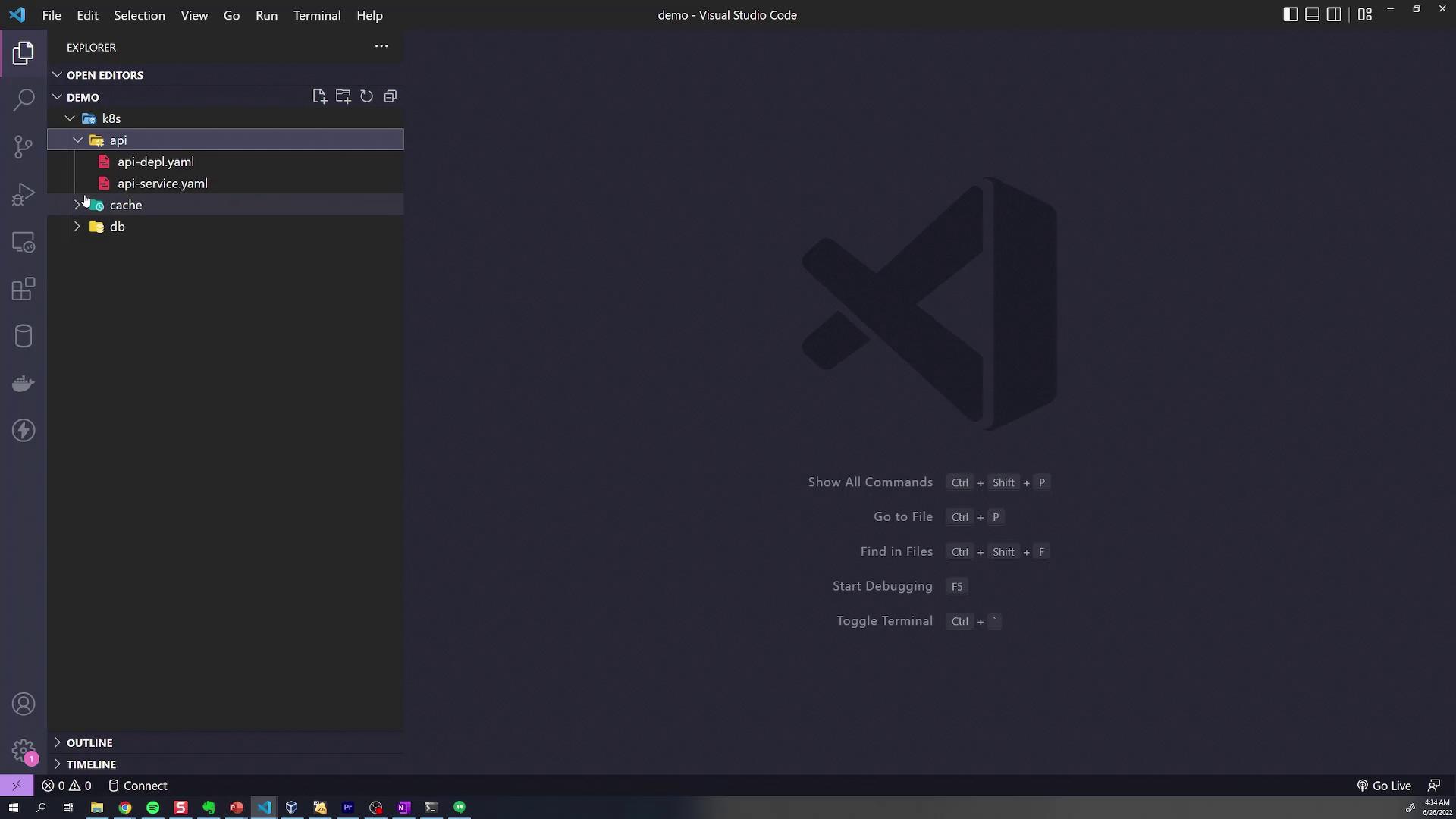
Below is an excerpt showcasing a typical service configuration for the cache component:
```yaml theme={null}
apiVersion: v1
kind: Service
metadata:
name: redis-cluster-ip-service
spec:
type: ClusterIP
selector:
component: redis
ports:
- port: 6379
targetPort: 6379
```
Before we introduce Kustomize, let's deploy these resources using the conventional approach without customization. Typically, you navigate into each directory and run the `kubectl apply` command as shown below:
```bash theme={null}
kubectl apply -f k8s/api
# Output:
# deployment.apps/api-deployment created
kubectl apply -f k8s/cache
# (Applies cache-related configurations)
```
You can also deploy all configurations in one command by appending multiple `-f` flags:
```bash theme={null}
kubectl apply -f k8s/api
kubectl apply -f k8s/cache
kubectl apply -f k8s/db
```
To delete all resources simultaneously, you can run:
```bash theme={null}
kubectl delete -f k8s/db -f k8s/cache -f k8s/api
```
Using multiple `-f` flags simplifies bulk deployment and deletion. However, as your infrastructure grows, managing these commands can become cumbersome.
## Simplifying Resource Management with Kustomize
Kustomize makes it easier to manage and customize your application configurations. Begin by creating a `kustomization.yaml` file in the root of your K8s directory. This file specifies the API version and kind required by Kustomize:
```yaml theme={null}
apiVersion: kustomize.config.k8s.io/v1beta1
kind: Kustomization
```
Next, define the resources you wish to manage by listing the file paths relative to the `kustomization.yaml` file's location. For example:
```yaml theme={null}
apiVersion: kustomize.config.k8s.io/v1beta1
kind: Kustomization
resources:
- api/api-depl.yaml
- api/api-service.yaml
- cache/redis-config.yaml
- cache/redis-depl.yaml
- cache/redis-service.yaml
- db/db-config.yaml
- db/db-depl.yaml
- db/db-service.yaml
```
You can then build the complete set of manifests using the Kustomize CLI:
```bash theme={null}
kustomize build k8s/
```
This command outputs the final Kubernetes manifests, combining configurations from the API, cache, and database folders. While `kustomize build` displays the resulting configuration, it does not apply it to your cluster. To deploy these resources, pipe the output to `kubectl apply`:
```bash theme={null}
kustomize build k8s/ | kubectl apply -f -
```
Alternatively, leverage the built-in support for Kustomize in kubectl with the `-k` flag:
```bash theme={null}
kubectl apply -k k8s/
```
After applying the configurations, verify that the resources have been successfully created by checking the pods:
```bash theme={null}
kubectl get pods
```
Expected output:
```bash theme={null}
NAME READY STATUS RESTARTS AGE
api-deployment-64dd567b46-1mw4c 1/1 Running 0 27s
db-deployment-657c8fbd8-vnjs7 1/1 Running 0 26s
redis-deployment-587fd758cf-7pt57 1/1 Running 0 26s
```
For quick troubleshooting, always verify your pods' status with `kubectl get pods` after deploying configurations.
## Advanced Directory Structuring with Kustomize
While maintaining a single `kustomization.yaml` in the root directory works for simple projects, a more scalable practice is to include a `kustomization.yaml` file in each subdirectory. In this method, each directory imports only the YAML files specific to its component, while a root `kustomization.yaml` aggregates these directories.
### API Directory Configuration
In the API folder, create a `kustomization.yaml` that lists the API deployment and service manifests:
```yaml theme={null}
apiVersion: kustomize.config.k8s.io/v1beta1
kind: Kustomization
resources:
- api-depl.yaml
- api-service.yaml
```
### Cache Directory Configuration
In the cache directory, set up the following `kustomization.yaml`:
```yaml theme={null}
apiVersion: kustomize.config.k8s.io/v1beta1
kind: Kustomization
resources:
- redis-config.yaml
- redis-depl.yaml
- redis-service.yaml
```
### Database Directory Configuration
Similarly, for the database directory, create a `kustomization.yaml`:
```yaml theme={null}
apiVersion: kustomize.config.k8s.io/v1beta1
kind: Kustomization
resources:
- db-config.yaml
- db-depl.yaml
- db-service.yaml
```
### Root Directory Aggregation
Finally, update the root `kustomization.yaml` to reference these subdirectories. When a directory is specified as a resource, Kustomize automatically searches for a `kustomization.yaml` file inside:
```yaml theme={null}
apiVersion: kustomize.config.k8s.io/v1beta1
kind: Kustomization
resources:
- api/
- cache/
- db/
```
Before re-deploying, delete any previously applied resources:
```bash theme={null}
kubectl delete -f k8s/db -f k8s/cache -f k8s/api
```
Then, build the final configuration with Kustomize:
```bash theme={null}
kustomize build k8s/
```
Review the output to ensure it meets your expectations, then apply the aggregated configuration:
```bash theme={null}
kubectl apply -k k8s/
```
The expected output should be similar to:
```bash theme={null}
configmap/redis-credentials created
service/api-service created
service/db-service created
service/redis-cluster-ip-service created
deployment.apps/api-deployment created
deployment.apps/db-deployment created
deployment.apps/redis-deployment created
```
Verify the pods again:
```bash theme={null}
kubectl get pods
```
Expected output:
```bash theme={null}
NAME READY STATUS RESTARTS AGE
api-deployment-64dd567b46-1mw4c 1/1 Running 0 27s
db-deployment-657c8fbd8-vnjs7 1/1 Running 0 26s
redis-deployment-587fd758cf-7pt57 1/1 Running 0 26s
```
This structured approach using Kustomize not only centralizes the management of your Kubernetes configurations but also offers a scalable solution for handling an expanding set of resources within your infrastructure.