> ## Documentation Index
> Fetch the complete documentation index at: https://notes.kodekloud.com/llms.txt
> Use this file to discover all available pages before exploring further.
# Overlays
> Overlays in Kustomize allow customization of base Kubernetes configurations for different environments like development, staging, and production.
Overlays in Kustomize allow you to customize a base Kubernetes configuration on a per-environment basis. This method is particularly useful for environments such as development, staging, and production, where you need to apply environment-specific adjustments to shared configurations.
Kustomize projects are typically organized into two main sections:
1. **Base Configuration:** Contains all shared and default Kubernetes resource definitions.
2. **Overlay Directories:** Each environment (e.g., dev, stg, prod) has its own overlay folder with patches to modify the base configuration as needed.
Below is a diagram illustrating a common directory structure for managing these configurations:
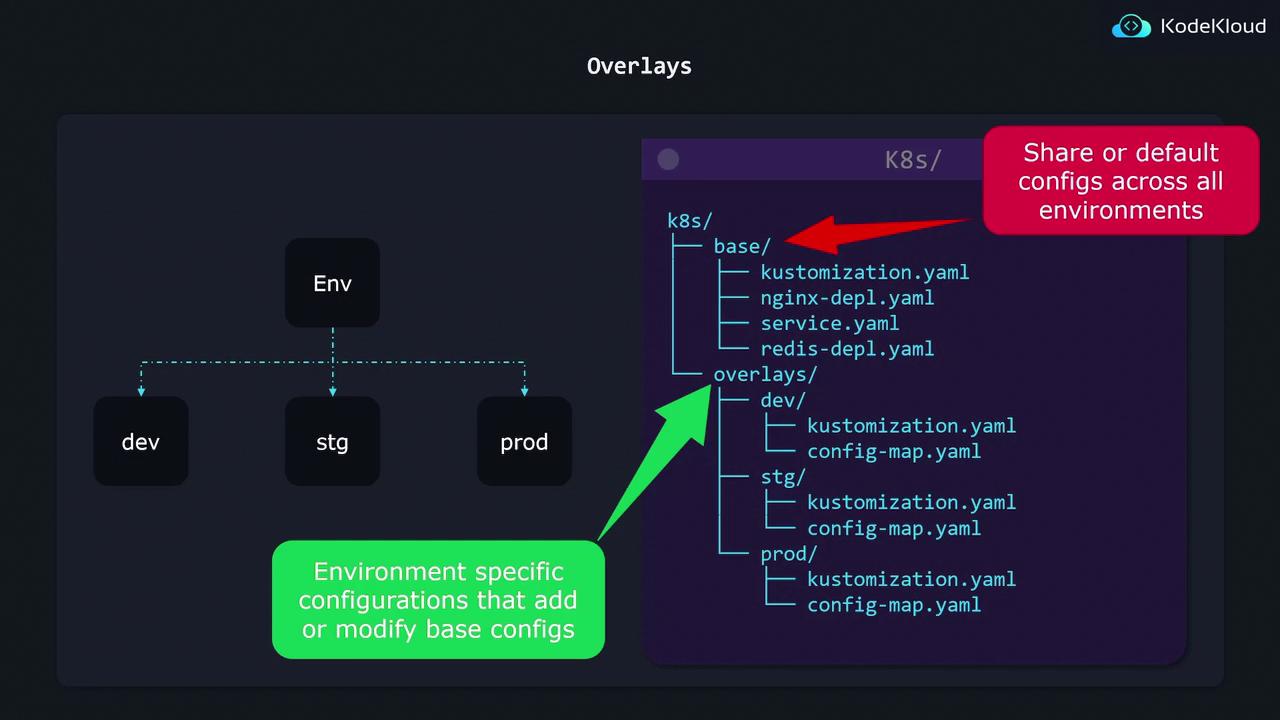
In this setup, the base folder holds the shared resource files, while each overlay folder contains a `kustomization.yaml` that references the shared resources in the base along with overlays (patches or additional resources) specific to that environment.
## Base Configuration Example
Imagine that you have an `nginx-deployment.yaml` file within your base folder with a replica count set to 1. The corresponding `kustomization.yaml` in the base folder might look like this:
```yaml theme={null}
# base/kustomization.yaml
resources:
- nginx-depl.yaml
- service.yaml
- redis-depl.yaml
```
And the `nginx-depl.yaml` file is defined as follows:
```yaml theme={null}
# base/nginx-depl.yaml
apiVersion: apps/v1
kind: Deployment
metadata:
name: nginx-deployment
spec:
replicas: 1
```
## Creating Overlays
### Development Overlay
To create an overlay for the development environment, you would set up a `kustomization.yaml` file in the `dev` overlay folder. This file references the base configuration and includes a patch to update the replica count:
```yaml theme={null}
# overlays/dev/kustomization.yaml
bases:
- ../../base
patch: |-
- op: replace
path: /spec/replicas
value: 2
```
In this overlay, the `bases` property points to the shared base resources using the relative path `../../base`. The patch then modifies the replica count from 1 to 2 for the development environment.
### Production Overlay
Similarly, to tailor the configuration for production, the overlay can reference the same base while applying a different patch:
```yaml theme={null}
# overlays/prod/kustomization.yaml
bases:
- ../../base
patch: |-
- op: replace
path: /spec/replicas
value: 3
```
This overlay increases the replica count to 3 for production.
### Adding New Resources in Overlays
Overlays can also introduce new resources that don’t exist in the base configuration. For instance, if you want to add a production-specific Grafana deployment, you can include its YAML file in the production overlay:
```yaml theme={null}
# overlays/prod/kustomization.yaml
bases:
- ../../base
resources:
- grafana-depl.yaml
patch: |-
- op: replace
path: /spec/replicas
value: 2
```
In this configuration, the overlay imports the base resources, applies a patch to change the replica count for the existing deployment, and adds a new Grafana deployment.
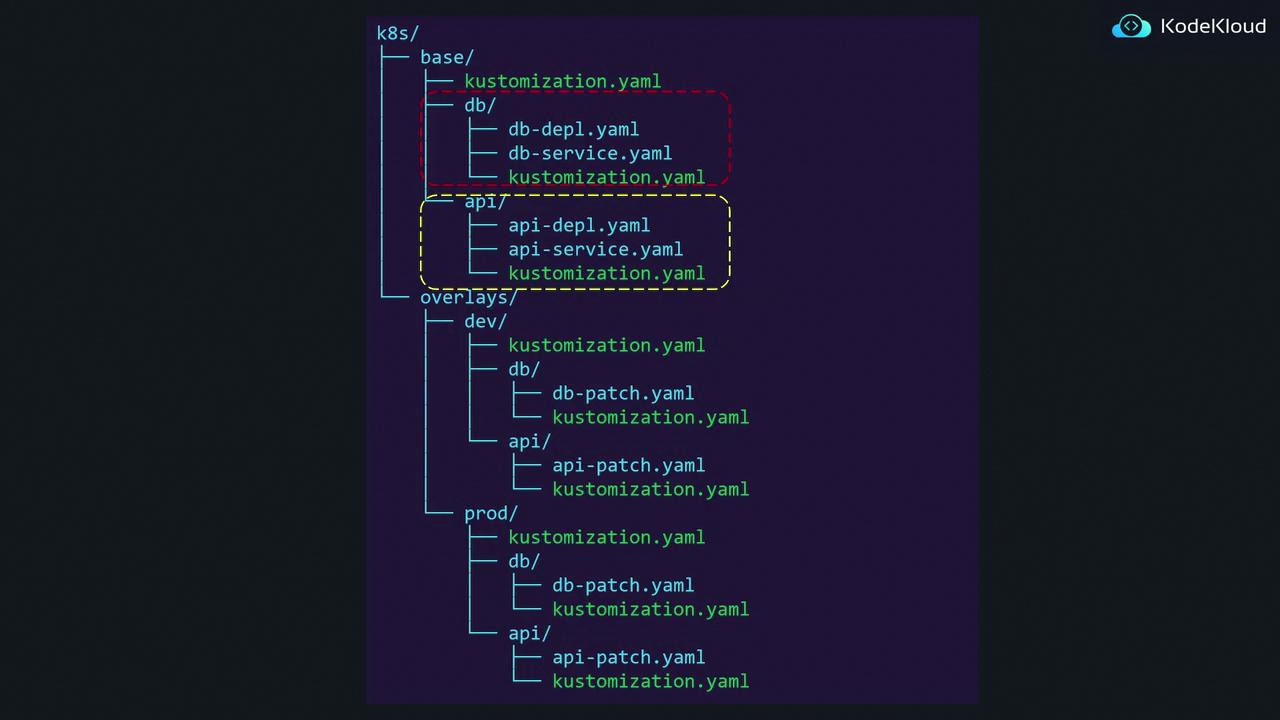
Kustomize is flexible in the way you structure your configurations. While the base can be organized into subdirectories based on features, the overlay directories do not need to mirror that structure. The critical factor is correctly referencing the shared resources in the appropriate `kustomization.yaml` file.
Below is another diagram that provides a more detailed look at the directory structure using Kustomize, showing both the base and overlay directories across different environments:
## Summary
Overlays in Kustomize enable you to:
* Import and reuse a base configuration containing shared resources.
* Apply environment-specific patches to adjust base resources such as replica counts.
* Introduce new resources within an overlay without affecting the base configuration.
This approach helps maintain a clean separation between shared configurations and environment-specific customizations while taking full advantage of Kustomize's powerful features for managing Kubernetes deployments.
For further information on Kubernetes configuration management, consider exploring additional resources in the [Kubernetes Documentation](https://kubernetes.io/docs/) and [Kustomize GitHub repository](https://github.com/kubernetes-sigs/kustomize).