> ## Documentation Index
> Fetch the complete documentation index at: https://notes.kodekloud.com/llms.txt
> Use this file to discover all available pages before exploring further.
# ipam
> Explains Kubernetes IP address management, how CNI plugins allocate and track Pod IPs, host-local versus external allocators and storage locations
Hello and welcome — this lesson explains IP address management (IPAM) for Kubernetes networking.
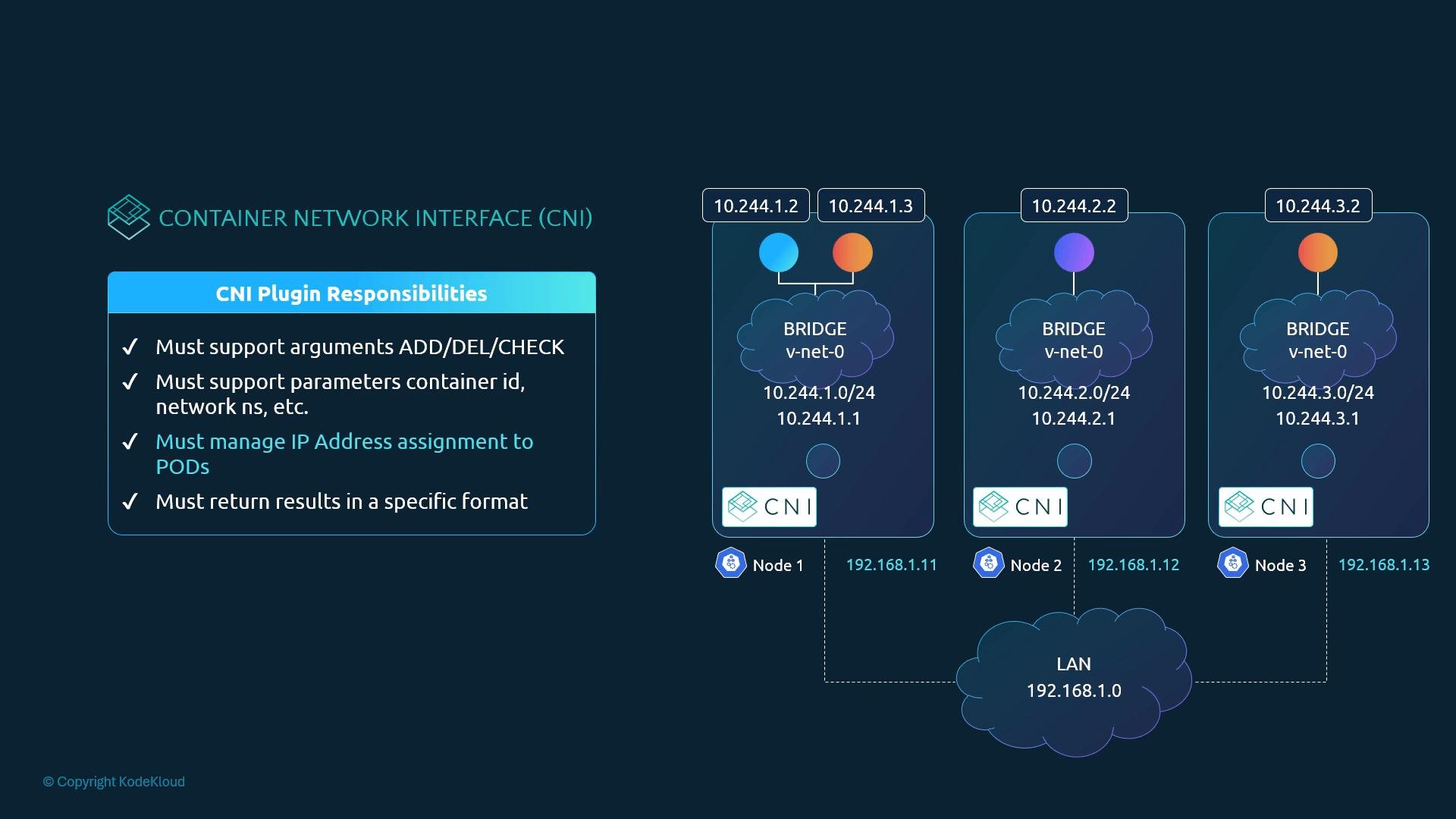
This article focuses on how Pod IPs and node-level bridge networks are assigned and tracked by CNI plugins. It does not cover the IP addresses assigned to Kubernetes nodes by your cloud provider or on-prem network — those are managed externally. Instead, we’ll cover:
* How each node’s virtual bridge gets a subnet
* How Pods receive IP addresses
* Where allocation state is stored
* Who ensures IP uniqueness across allocations
Who is responsible? The CNI (Container Network Interface) specification delegates IP allocation to the CNI plugin. The plugin must ensure Pods receive unique IPs and maintain allocation state (locally or via an external allocator).
 ## How IP allocation is typically implemented
A minimal CNI-style network script can both create the veth pair and configure the Pod-side IP. A simplified implementation might follow these steps:
```bash theme={null}
#!/usr/bin/env bash
# Create veth pair
ip link add veth-host type veth peer name veth-container
# Move the container end into the container netns
ip link set veth-container netns
# Assign IP address inside the container namespace
ip -n addr add 10.244.1.5/24 dev veth-container
# Bring up interfaces
ip -n link set veth-container up
ip link set veth-host up
# (On teardown) Delete the veth pair
ip link del veth-host
```
Kubernetes itself does not prescribe how a plugin must choose IPs — it only requires no duplicate assignments. Simple plugins can store allocations in a local file (and update it atomically). However, the CNI ecosystem provides reusable IPAM plugins that handle allocation details for you.
## Common IPAM approaches
| Approach | Description | Typical storage / coordination |
| - | - | - |
| `host-local` (local file-based) | Allocations are managed per-node on disk. Simple and common for single-host allocation semantics. | `/var/lib/cni/networks/` |
| External IPAM / controller | Centralized allocator coordinating assignments across nodes for cluster-wide addressing or integration with external IPAM systems. | External datastore (API server, database, or controller) |
## How a plugin invokes IPAM
Instead of hard-coding an allocator, a network plugin reads the `ipam` block in the CNI configuration and invokes the indicated IPAM implementation. Conceptually:
```bash theme={null}
#!/usr/bin/env bash
# Example: retrieve a free IP from a file-based allocator (simplified)
ip=$(get_free_ip_from_file "/var/lib/cni/networks/mynet")
# OR: invoke the host-local IPAM plugin (the plugin returns JSON with the allocated IP)
# The actual invocation is performed by the CNI runtime calling the IPAM plugin binary
ip_json=$(./host-local < /etc/cni/net.d/net-script.conf)
ip=$(jq -r '.ips[0].address' <<< "$ip_json")
# Assign IP to the container interface
ip -n addr add "$ip" dev veth-container
# Add routes (e.g., default route) inside the namespace
ip -n route add default via 10.244.0.1
```
A good plugin parses the `ipam` block, calls the configured IPAM plugin binary, reads the JSON response (which contains the allocated IP and any routes), and then applies the IP and routes inside the Pod network namespace.
## Example CNI configuration (with IPAM block)
Place CNI configs in `/etc/cni/net.d/`. The `ipam` section tells the network plugin which IPAM implementation to invoke and any subnet or routes to use:
```json theme={null}
$ cat /etc/cni/net.d/net-script.conf
{
"cniVersion": "0.2.0",
"name": "mynet",
"type": "net-script",
"bridge": "cni0",
"isGateway": true,
"ipMasq": true,
"ipam": {
"type": "host-local",
"subnet": "10.244.0.0/16",
"routes": [
{ "dst": "0.0.0.0/0" }
]
}
}
```
When `"type": "host-local"` is configured, the host-local IPAM plugin will allocate an IP and return JSON like:
```json theme={null}
{
"cniVersion": "0.2.0",
"ips": [{ "version": "4", "address": "10.244.1.5/24", "gateway": "10.244.0.1" }],
"routes": [{ "dst": "0.0.0.0/0" }]
}
```
Your network plugin then configures the interface and routes inside the Pod namespace based on that output.
The CNI spec expects the network plugin to invoke the configured IPAM plugin. Using `host-local` stores allocations on the node (under `/var/lib/cni/networks/`), while other IPAM plugins can provide cluster-wide coordination if you need globally unique addresses.
## Host-local storage location
The `host-local` IPAM plugin persists allocation state on the node under:
* `/var/lib/cni/networks/`
Each file records which IPs are allocated for that network on that host. This local persistence makes `host-local` straightforward to inspect and debug.
## Best practices
* Prefer a maintained IPAM plugin (like `host-local`) instead of rolling custom file allocators.
* Use external IPAM controllers if you need cluster-wide IP coordination or integration with enterprise IPAM systems.
* Always parse and respect the `ipam` block in the CNI config so your plugin can support different IPAM implementations.
* Inspect `/var/lib/cni/networks/` and the CNI config files in `/etc/cni/net.d/` when troubleshooting Pod IP allocation issues.
## Links and references
* CNI specification: [https://github.com/containernetworking/cni](https://github.com/containernetworking/cni)
* host-local IPAM plugin: [https://github.com/containernetworking/plugins/tree/main/plugins/ipam/host-local](https://github.com/containernetworking/plugins/tree/main/plugins/ipam/host-local)
* Kubernetes networking concepts: [https://kubernetes.io/docs/concepts/cluster-administration/networking/](https://kubernetes.io/docs/concepts/cluster-administration/networking/)
That concludes this lesson. Try experimenting with different `ipam` types and observe where allocations are stored on each node using a hands-on lab or a practice cluster.
This documentation is built and hosted on [Mintlify](https://mintlify.com), a developer documentation platform.
## How IP allocation is typically implemented
A minimal CNI-style network script can both create the veth pair and configure the Pod-side IP. A simplified implementation might follow these steps:
```bash theme={null}
#!/usr/bin/env bash
# Create veth pair
ip link add veth-host type veth peer name veth-container
# Move the container end into the container netns
ip link set veth-container netns
# Assign IP address inside the container namespace
ip -n addr add 10.244.1.5/24 dev veth-container
# Bring up interfaces
ip -n link set veth-container up
ip link set veth-host up
# (On teardown) Delete the veth pair
ip link del veth-host
```
Kubernetes itself does not prescribe how a plugin must choose IPs — it only requires no duplicate assignments. Simple plugins can store allocations in a local file (and update it atomically). However, the CNI ecosystem provides reusable IPAM plugins that handle allocation details for you.
## Common IPAM approaches
| Approach | Description | Typical storage / coordination |
| - | - | - |
| `host-local` (local file-based) | Allocations are managed per-node on disk. Simple and common for single-host allocation semantics. | `/var/lib/cni/networks/` |
| External IPAM / controller | Centralized allocator coordinating assignments across nodes for cluster-wide addressing or integration with external IPAM systems. | External datastore (API server, database, or controller) |
## How a plugin invokes IPAM
Instead of hard-coding an allocator, a network plugin reads the `ipam` block in the CNI configuration and invokes the indicated IPAM implementation. Conceptually:
```bash theme={null}
#!/usr/bin/env bash
# Example: retrieve a free IP from a file-based allocator (simplified)
ip=$(get_free_ip_from_file "/var/lib/cni/networks/mynet")
# OR: invoke the host-local IPAM plugin (the plugin returns JSON with the allocated IP)
# The actual invocation is performed by the CNI runtime calling the IPAM plugin binary
ip_json=$(./host-local < /etc/cni/net.d/net-script.conf)
ip=$(jq -r '.ips[0].address' <<< "$ip_json")
# Assign IP to the container interface
ip -n addr add "$ip" dev veth-container
# Add routes (e.g., default route) inside the namespace
ip -n route add default via 10.244.0.1
```
A good plugin parses the `ipam` block, calls the configured IPAM plugin binary, reads the JSON response (which contains the allocated IP and any routes), and then applies the IP and routes inside the Pod network namespace.
## Example CNI configuration (with IPAM block)
Place CNI configs in `/etc/cni/net.d/`. The `ipam` section tells the network plugin which IPAM implementation to invoke and any subnet or routes to use:
```json theme={null}
$ cat /etc/cni/net.d/net-script.conf
{
"cniVersion": "0.2.0",
"name": "mynet",
"type": "net-script",
"bridge": "cni0",
"isGateway": true,
"ipMasq": true,
"ipam": {
"type": "host-local",
"subnet": "10.244.0.0/16",
"routes": [
{ "dst": "0.0.0.0/0" }
]
}
}
```
When `"type": "host-local"` is configured, the host-local IPAM plugin will allocate an IP and return JSON like:
```json theme={null}
{
"cniVersion": "0.2.0",
"ips": [{ "version": "4", "address": "10.244.1.5/24", "gateway": "10.244.0.1" }],
"routes": [{ "dst": "0.0.0.0/0" }]
}
```
Your network plugin then configures the interface and routes inside the Pod namespace based on that output.
The CNI spec expects the network plugin to invoke the configured IPAM plugin. Using `host-local` stores allocations on the node (under `/var/lib/cni/networks/`), while other IPAM plugins can provide cluster-wide coordination if you need globally unique addresses.
## Host-local storage location
The `host-local` IPAM plugin persists allocation state on the node under:
* `/var/lib/cni/networks/`
Each file records which IPs are allocated for that network on that host. This local persistence makes `host-local` straightforward to inspect and debug.
## Best practices
* Prefer a maintained IPAM plugin (like `host-local`) instead of rolling custom file allocators.
* Use external IPAM controllers if you need cluster-wide IP coordination or integration with enterprise IPAM systems.
* Always parse and respect the `ipam` block in the CNI config so your plugin can support different IPAM implementations.
* Inspect `/var/lib/cni/networks/` and the CNI config files in `/etc/cni/net.d/` when troubleshooting Pod IP allocation issues.
## Links and references
* CNI specification: [https://github.com/containernetworking/cni](https://github.com/containernetworking/cni)
* host-local IPAM plugin: [https://github.com/containernetworking/plugins/tree/main/plugins/ipam/host-local](https://github.com/containernetworking/plugins/tree/main/plugins/ipam/host-local)
* Kubernetes networking concepts: [https://kubernetes.io/docs/concepts/cluster-administration/networking/](https://kubernetes.io/docs/concepts/cluster-administration/networking/)
That concludes this lesson. Try experimenting with different `ipam` types and observe where allocations are stored on each node using a hands-on lab or a practice cluster.
This documentation is built and hosted on [Mintlify](https://mintlify.com), a developer documentation platform.