> ## Documentation Index
> Fetch the complete documentation index at: https://notes.kodekloud.com/llms.txt
> Use this file to discover all available pages before exploring further.
# Priority Classes
> Understanding priority classes is essential for managing workload scheduling in Kubernetes by assigning numerical values to Pods based on their importance.
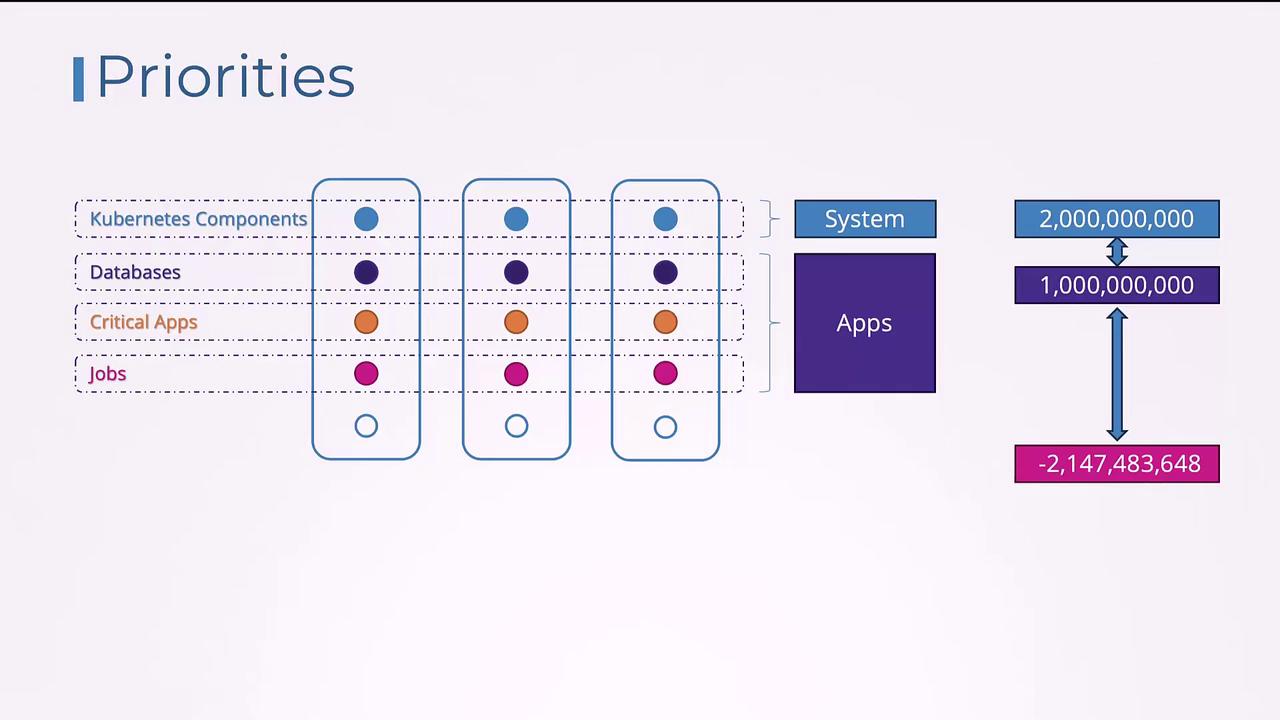
Understanding priority classes is essential for managing workload scheduling in Kubernetes. Kubernetes runs various applications as Pods with different levels of importance. For instance, control plane components run within the cluster as Pods and are vital for its operation. Similarly, production databases and critical applications are high-priority while background jobs generally have lower priority. To ensure that more important workloads are scheduled before less critical ones, Kubernetes uses priority classes.
Priority classes allow you to assign a numerical value to Pods, where a higher number indicates higher priority. For user-deployed applications, the value can range from approximately -2 billion to +1 billion. Additionally, there is a reserved range for internal system-critical Pods (like the Kubernetes control plane) which can have values up to 2 billion.
:::note Note
To check the current priority classes in your cluster, run the following command:
:::
```bash theme={null}
kubectl get priorityclass
```
The output may appear as follows:
```bash theme={null}
NAME VALUE GLOBAL-DEFAULT AGE PREEMPTIONPOLICY
system-cluster-critical 2000000000 false 7m33s PreemptLowerPriority
system-node-critical 2000010000 false 7m33s PreemptLowerPriority
```
## Creating a New Priority Class
To create a new priority class, define an object with the API version `scheduling.k8s.io/v1`, set the kind to `PriorityClass`, and include metadata with a name, numerical value, and an optional description. For example:
```yaml theme={null}
apiVersion: scheduling.k8s.io/v1
kind: PriorityClass
metadata:
name: high-priority
value: 1000000000
description: "Priority class for mission critical pods"
```
After creating the priority class, you can assign it to a Pod by specifying the `priorityClassName` field in your Pod's specification. If you do not specify a priority class, the Pod is assigned a default priority value of zero. To change the default priority for Pods, create a priority class with the `globalDefault` property set to `true`. Note that only one priority class can be marked as the global default.
Below is an example that demonstrates both the creation of a priority class and how to use it in a Pod definition:
```yaml theme={null}
# priority-class.yaml
apiVersion: scheduling.k8s.io/v1
kind: PriorityClass
metadata:
name: high-priority
value: 1000000000
description: "Priority class for mission critical pods"
globalDefault: true
# pod-definition.yaml
apiVersion: v1
kind: Pod
metadata:
name: nginx
labels:
app: nginx
spec:
containers:
- name: nginx
image: nginx
ports:
- containerPort: 8080
priorityClassName: high-priority
```
## Pod Priority and Preemption
Consider a scenario where there are two workloads waiting to be scheduled: a critical application with a priority of 7 and a job with a priority of 5. With available resources, the higher priority critical application is scheduled first. If resources remain, the lower priority job is also scheduled.
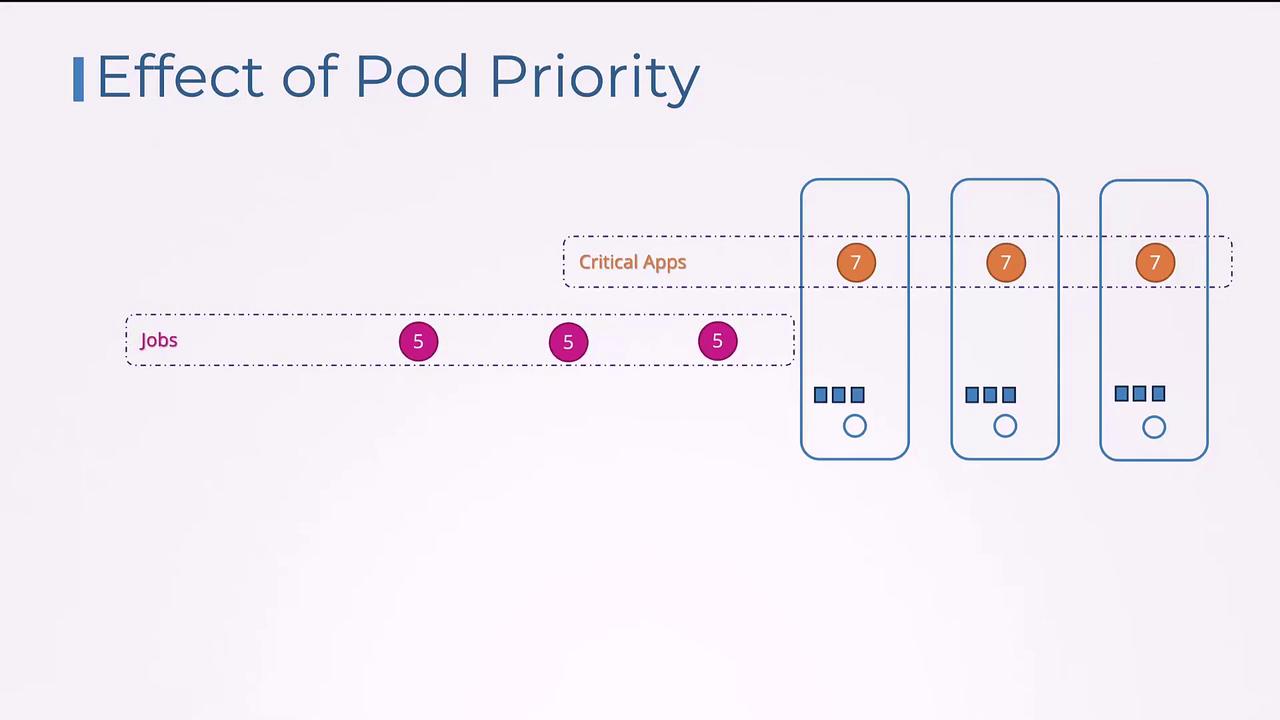
Now, suppose a new job with a priority of 6 is submitted when no extra resources are available. Whether this new Pod preempts (or evicts) an existing lower priority Pod depends on the preemption policy defined in its priority class. By default, Kubernetes applies the `PreemptLowerPriority` policy, meaning the scheduler will evict lower priority Pods to free up resources for higher priority ones.
The following YAML snippet demonstrates setting the preemption policy to `PreemptLowerPriority`:
```yaml theme={null}
apiVersion: scheduling.k8s.io/v1
kind: PriorityClass
metadata:
name: high-priority
value: 1000000000
description: "Priority class for mission critical pods"
preemptionPolicy: PreemptLowerPriority
```
If you prefer that a higher priority Pod waits for resources rather than preempting lower priority Pods, set the `preemptionPolicy` to `Never`. This change ensures the Pod remains in the scheduling queue without evicting any existing Pods:
```yaml theme={null}
apiVersion: scheduling.k8s.io/v1
kind: PriorityClass
metadata:
name: high-priority
value: 1000000000
description: "Priority class for mission critical pods"
preemptionPolicy: Never
```
:::note Additional Information
For more details on Kubernetes scheduling and priority, refer to the [Kubernetes documentation](https://kubernetes.io/docs/concepts/scheduling-eviction/pod-priority-preemption/).
:::
This concludes the discussion on priority classes. You can now implement these concepts to better manage workload priorities in your Kubernetes cluster.