> ## Documentation Index
> Fetch the complete documentation index at: https://notes.kodekloud.com/llms.txt
> Use this file to discover all available pages before exploring further.
# Custom Resource Definition CRD 2025 Updates
> This article introduces Custom Resource Definitions and custom controllers in Kubernetes to extend cluster functionality and manage tailored resources.
In this article, we explore Custom Resource Definitions (CRDs) in Kubernetes and demonstrate how they extend your cluster's functionality. We begin by reviewing how Kubernetes manages built-in resources like Deployments and then move toward creating custom resources and controllers.
***
## Kubernetes Resources and Controllers
When you create a Deployment in Kubernetes, the API server stores its configuration in the etcd datastore. Consider the following Deployment definition:
```yaml theme={null}
apiVersion: apps/v1
kind: Deployment
metadata:
name: myapp-deployment
spec:
replicas: 3
selector:
matchLabels:
type: front-end
template:
metadata:
name: myapp-pod
labels:
type: front-end
spec:
containers:
- image: nginx
```
To create, list, and delete the Deployment, you run:
```bash theme={null}
kubectl create -f deployment.yml
kubectl get deployments
# Output:
# NAME DESIRED CURRENT UP-TO-DATE AVAILABLE AGE
kubectl delete -f deployment.yml
# Output: deployment "myapp-deployment" deleted
```
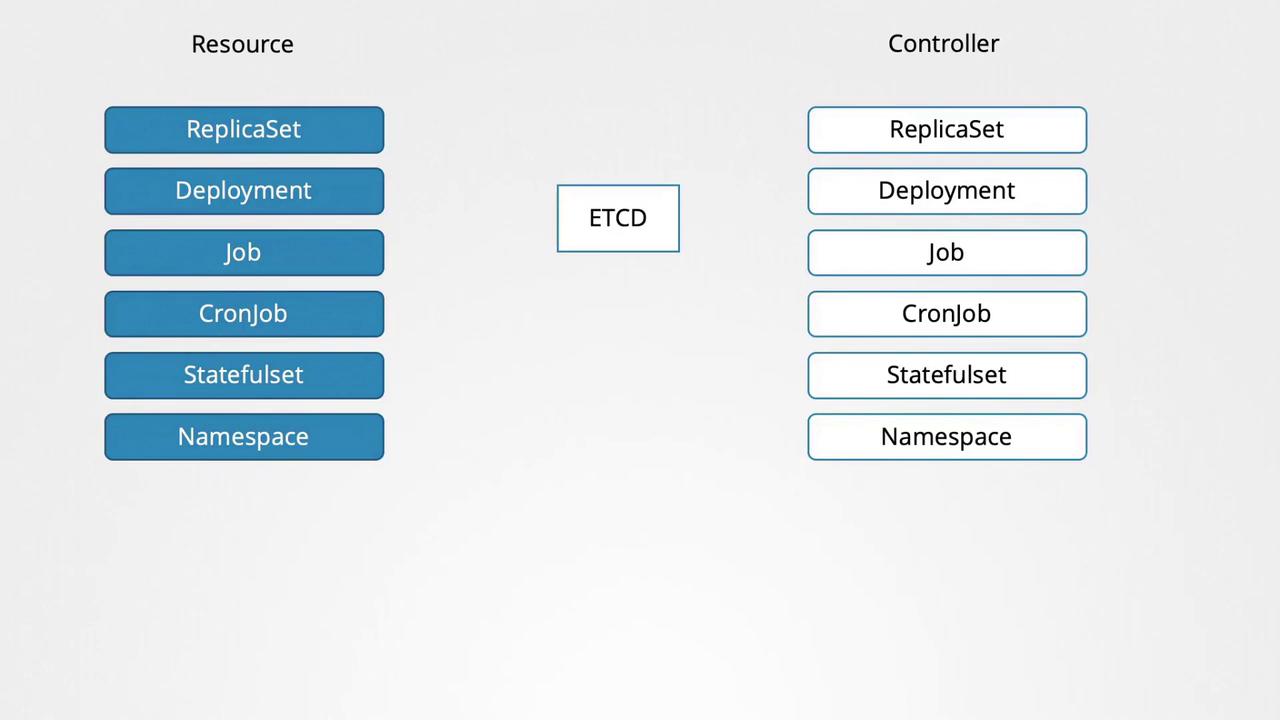
When the Deployment is created, Kubernetes automatically launches the specified number of Pods (3 in this example) according to the replica count. This behavior is managed by the deployment controller, a key built-in process that continuously monitors cluster resources to ensure the actual state matches your manifest's desired state.
Under the hood, the deployment controller creates a ReplicaSet, which in turn manages the creation of Pods. Although the controller is implemented in Go as a part of the Kubernetes source code, you do not need to understand its inner workings to effectively use it.
***
## Custom Resources: The Flight Ticket Example
Imagine managing flight ticket bookings in Kubernetes with a custom resource. In this scenario, you define an object of kind FlightTicket to specify the details for booking a flight ticket. Initially, the custom resource is defined as follows:
```yaml theme={null}
apiVersion: flights.com/v1
kind: FlightTicket
metadata:
name: my-flight-ticket
spec:
from: Mumbai
to: London
number: 2
```
Attempting to create this resource without proper configuration results in an error, as Kubernetes does not recognize the FlightTicket kind by default:
```bash theme={null}
kubectl create -f flightticket.yml
# Output: no matches for kind "FlightTicket" in version "flights.com/v1"
```
The error occurs because Kubernetes must be explicitly informed about the new resource type through a Custom Resource Definition (CRD).
***
## Defining a Custom Resource with CRD
A CRD informs Kubernetes about new custom resources, enabling their creation and management. Below is an example of how to define a CRD for a FlightTicket resource:
```yaml theme={null}
apiVersion: apiextensions.k8s.io/v1
kind: CustomResourceDefinition
metadata:
name: flighttickets.flights.com
spec:
scope: Namespaced
group: flights.com
names:
kind: FlightTicket
singular: flightticket
plural: flighttickets
shortNames:
- ft
versions:
- name: v1
served: true
storage: true
schema:
openAPIV3Schema:
type: object
properties:
spec:
type: object
properties:
from:
type: string
to:
type: string
number:
type: integer
minimum: 1
```
In this CRD definition:
* The API version is set to `apiextensions.k8s.io/v1`.
* The metadata name is `flighttickets.flights.com`.
* The resource is defined as namespaced.
* The API group is `flights.com` and the kind is `FlightTicket`.
* Singular, plural, and short names (ft) are specified.
* Version `v1` is marked as both served and the storage version.
* An OpenAPI v3 schema validates the `spec` fields: `from`, `to`, and `number`.
After applying the CRD, you can successfully create the custom resource:
```bash theme={null}
kubectl create -f flightticket-custom-definition.yml
# Output: customresourcedefinition "flighttickets.flights.com" created
```
Now, when you create, list, and delete the custom resource, the commands work seamlessly:
```bash theme={null}
kubectl create -f flightticket.yml
kubectl get flightticket
# Output:
# NAME STATUS
kubectl delete -f flightticket.yml
# Output: flightticket "my-flight-ticket" deleted
```
Additionally, using the short name confirms that the resource is available:
```bash theme={null}
kubectl api-resources
# Relevant output:
# NAME SHORTNAMES APIGROUP NAMESPACED KIND
# flighttickets ft flights.com true FlightTicket
```
***
## Beyond Data Storage: Custom Controllers
While a CRD and its corresponding custom resource primarily store data in etcd, you often need to automate real operations—such as booking a flight ticket through an external service. This is where a custom controller comes into play.
A custom controller, typically written in Go, watches for changes to FlightTicket resources and triggers the appropriate actions (e.g., calling an external API) when a resource is created, updated, or deleted. Without this controller, the FlightTicket remains merely a data entry in etcd without any external effect.
In future lessons, we will walk through the process of creating a custom controller that can effectively integrate these resources with your external systems.
***
This article provided an introduction to Custom Resource Definitions and custom controllers within Kubernetes. By harnessing these capabilities, you can extend Kubernetes to manage any resource tailored to your business needs.
For more detailed information, visit the [Kubernetes Documentation](https://kubernetes.io/docs/).