> ## Documentation Index
> Fetch the complete documentation index at: https://notes.kodekloud.com/llms.txt
> Use this file to discover all available pages before exploring further.
# Solution Cluster Roles
> This lab article explores Kubernetes cluster roles and bindings, guiding you through inspecting, creating, and managing custom roles for team members.
In this lab article, we explore Kubernetes cluster roles and cluster role bindings. You will learn how to inspect existing roles and bindings, then create custom roles and bindings for a team member named Michelle. Follow along for step-by-step commands and detailed explanations.
***
## Inspecting Cluster Roles and Cluster Role Bindings
Begin by counting the defined cluster roles. Since these objects are cluster-wide (not namespaced), run the command:
```bash theme={null}
k get clusterroles --no-headers | wc -l
```
For example, you might see an output of 69 cluster roles.
Next, determine the number of cluster role bindings with a similar command:
```bash theme={null}
k get clusterrolebindings --no-headers | wc -l
```
This command returns 54. Note that although the `cluster-admin` role will appear in the list, both cluster roles and their bindings apply across the entire cluster.
***
## Examining the Cluster Admin Role Binding
To view the user groups associated with the `cluster-admin` role, filter the cluster role bindings with:
```bash theme={null}
k get clusterrolebindings | grep cluster-admin
```
The output may look like this:
```bash theme={null}
cluster-admin 12m ClusterRole/cluster-admin
helm-kube-system-traefik 12m ClusterRole/cluster-admin
helm-kube-system-traefik-crd 12m ClusterRole/cluster-admin
```
Now, inspect the `cluster-admin` binding in detail:
```bash theme={null}
k describe clusterrolebindings cluster-admin
```
You should see a section similar to this:
```YAML theme={null}
Name: cluster-admin
Labels: kubernetes.io/bootstrapping=rbac-defaults
Annotations: rbac.authorization.kubernetes.io/autoupdate: true
Role:
Kind: ClusterRole
Name: cluster-admin
Subjects:
Kind Name Namespace
---- ---- ---------
Group system:masters
```
This output confirms that the `cluster-admin` role is bound to the `system:masters` group.
To understand the full range of permissions granted, describe the cluster role itself:
```bash theme={null}
k describe clusterrole cluster-admin
```
The result includes a policy rule with wildcards:
```text theme={null}
Name: cluster-admin
Labels: kubernetes.io/bootstrapping=rbac-defaults
Annotations: rbac.authorization.kubernetes.io/autoupdate: true
PolicyRule:
Resources Non-Resource URLs Resource Names Verbs
___________ _________________ ______________ _____
** [] [] [*]
```
This rule signifies that the `cluster-admin` role can perform any action on any resource within the cluster.
***
## Granting Node Access to Michelle
Suppose Michelle, a new team member, requires access to view nodes. Even though the `cluster-admin` role grants full privileges, creating a custom role for node-specific operations can enforce a principle of least privilege.
Create a cluster role named `michelle-role` with the permissions `get`, `list`, and `watch` on nodes:
```bash theme={null}
kubectl create clusterrole michelle-role --verb=get,list,watch --resource=nodes
```
Bind this role to Michelle by creating a cluster role binding:
```bash theme={null}
kubectl create clusterrolebinding michelle-role-binding --clusterrole=michelle-role --user=michelle
```
Confirm the binding details with:
```bash theme={null}
k describe clusterrolebinding michelle-role-binding
```
Finally, test Michelle’s node access:
```bash theme={null}
k get nodes --as michelle
```
This should display the list of nodes accessible to her.
Creating targeted roles ensures that team members have only the permissions needed for their current responsibilities.
***
## Extending Michelle’s Permissions to Storage
As Michelle’s responsibilities expand, she now requires access to storage resources, such as persistent volumes and storage classes.
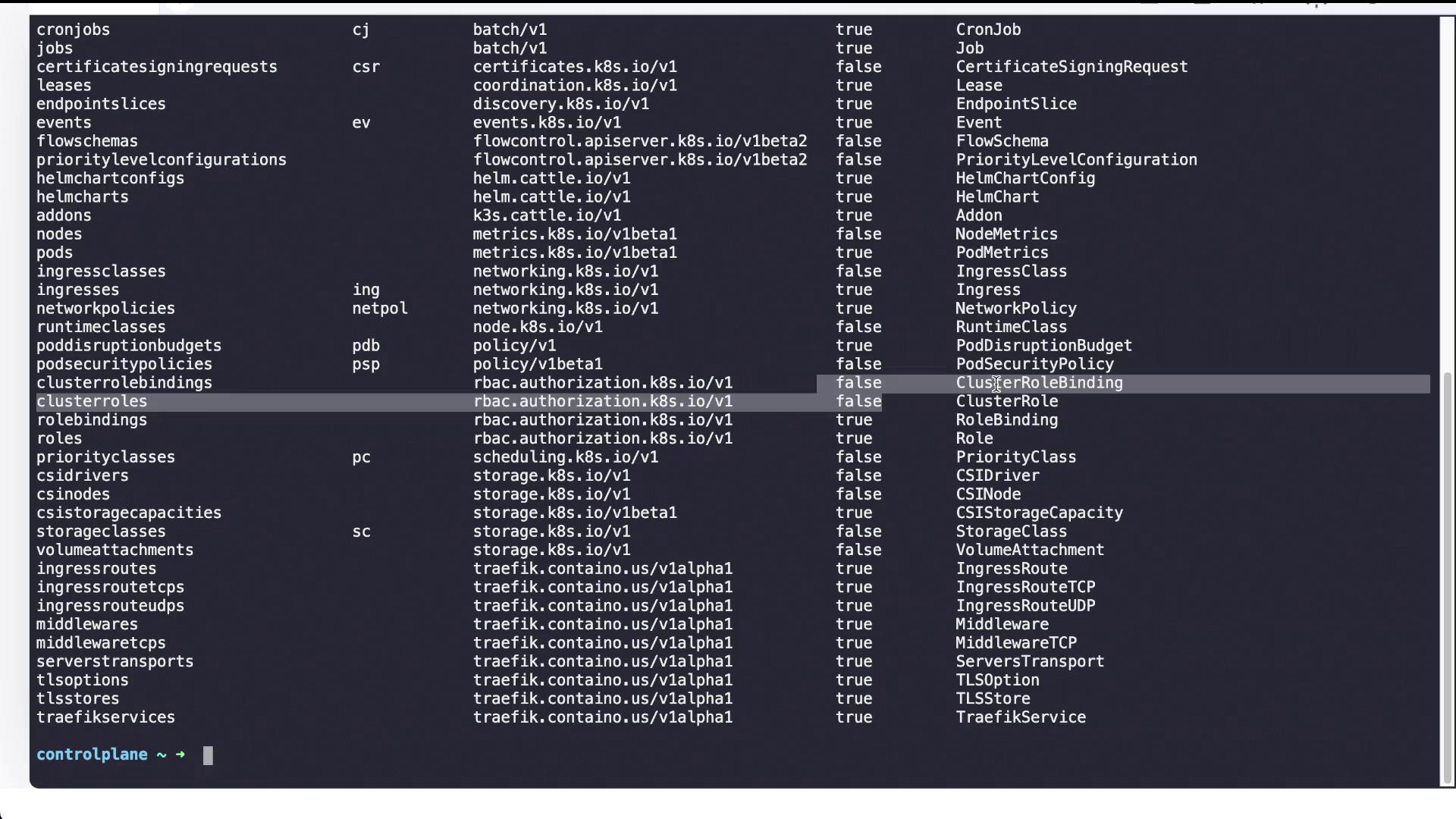
First, review available API resources to verify the exact resource names and versions:
```bash theme={null}
kubectl api-resources
```
This command lists all available resources along with their short names, API groups, and versions.
Create a new cluster role called `storage-admin` with permissions to `list`, `create`, `get`, and `watch` on persistent volumes and storage classes:
```bash theme={null}
k create clusterrole storage-admin --resource=persistentvolumes,storageclasses --verb=list,create,get,watch
```
Verify the role with:
```bash theme={null}
k describe clusterrole storage-admin
```
You should see output similar to:
```text theme={null}
Name: storage-admin
PolicyRule:
Resources Non-Resource URLs Resource Names Verbs
persistentvolumes [] [] [list create get watch]
storageclasses.storage.k8s.io [] [] [list create get watch]
```
Finally, bind the new role to Michelle:
```bash theme={null}
k create clusterrolebinding michelle-storage-admin --user=michelle --clusterrole=storage-admin
```
Check the binding details using:
```bash theme={null}
k describe clusterrolebinding michelle-storage-admin
```
This confirms that Michelle now has the necessary permissions to manage storage resources.
***
## Kubernetes API Resources Overview
For a complete overview of Kubernetes resources, including their short names and API versions, use the following command:
```bash theme={null}
kubectl api-resources
```
This command outputs a detailed list, including items such as:
* nodes (no) with API version v1
* persistentvolumeclaims (pvc) with API version v1
* pods (po) with API version v1
* … and many more resources
This overview is invaluable when you create resource definitions and need to know whether a resource is namespaced or available cluster-wide.
***
## Conclusion
In summary, this article guided you through inspecting cluster roles and cluster role bindings in Kubernetes. You examined the `cluster-admin` role and its binding to the `system:masters` group, then created a tailored role and binding for Michelle to access nodes. Finally, you extended her permissions to cover storage resources by setting up a `storage-admin` role and the corresponding binding. These steps illustrate how Kubernetes RBAC can be efficiently adapted to meet evolving team responsibilities.
Leveraging custom roles and bindings not only enhances security by enforcing the principle of least privilege but also simplifies management as responsibilities within the team evolve.