> ## Documentation Index
> Fetch the complete documentation index at: https://notes.kodekloud.com/llms.txt
> Use this file to discover all available pages before exploring further.
# Node Affinity
> This guide explores node affinity in Kubernetes for controlling Pod scheduling on specific nodes with advanced capabilities.
Welcome to this detailed guide on node affinity in Kubernetes. In this lesson, we explore how node affinity can help control where Pods are scheduled by ensuring they run on specific nodes. This feature is especially useful when you need a large data processing Pod to run on a designated node.
Previously, developers used node selectors to achieve this control. However, node selectors lack the flexibility to handle advanced query expressions, such as logical "or" or "not." Node affinity overcomes these limitations by providing advanced scheduling capabilities.
## Using a Node Selector
Below is an example of a simple node selector to schedule a Pod on a node labeled as Large:
```yaml theme={null}
apiVersion: v1
kind: Pod
metadata:
name: myapp-pod
spec:
containers:
- name: data-processor
image: data-processor
nodeSelector:
size: Large
```
## Transition to Node Affinity
With node affinity, you can achieve the same scheduling requirements with more flexibility. The following YAML configuration demonstrates how to specify the node affinity equivalent:
```yaml theme={null}
apiVersion: v1
kind: Pod
metadata:
name: myapp-pod
spec:
containers:
- name: data-processor
image: data-processor
affinity:
nodeAffinity:
requiredDuringSchedulingIgnoredDuringExecution:
nodeSelectorTerms:
- matchExpressions:
- key: size
operator: In
values:
- Large
```
### Explanation of the Configuration
* Under `spec`, the `affinity` field is introduced with a child field named `nodeAffinity`.
* The property `requiredDuringSchedulingIgnoredDuringExecution` ensures that the scheduler places the Pod on a node that complies with the specified rules. Once the Pod runs, modifications to node labels are ignored.
* Inside `nodeSelectorTerms` (an array), you define one or more match expressions. Each match expression includes:
* A `key` (e.g., "size")
* An `operator` (e.g., `In`) that specifies how the label's value is evaluated using the provided `values` list. In this case, the Pod will be placed on nodes where the label "size" is set to "Large".
If your deployment requires extra flexibility—say, allowing execution on either a large or medium node—simply add both values to the `values` list.
## Excluding Nodes Using Node Affinity
To exclude nodes with a specific label value, you can use the `NotIn` operator. For instance:
```yaml theme={null}
apiVersion: v1
kind: Pod
metadata:
name: myapp-pod
spec:
containers:
- name: data-processor
image: data-processor
affinity:
nodeAffinity:
requiredDuringSchedulingIgnoredDuringExecution:
nodeSelectorTerms:
- matchExpressions:
- key: size
operator: NotIn
values:
- Small
```
In this configuration, the Pod is scheduled on nodes where the "size" label is not "Small." In cases where the label is absent, this rule further limits the scheduler's candidate nodes.
## Using the Exists Operator
When you simply need to check for the presence of a label, regardless of its value, the `Exists` operator is ideal:
```yaml theme={null}
apiVersion: v1
kind: Pod
metadata:
name: myapp-pod
spec:
containers:
- name: data-processor
image: data-processor
affinity:
nodeAffinity:
requiredDuringSchedulingIgnoredDuringExecution:
nodeSelectorTerms:
- matchExpressions:
- key: size
operator: Exists
```
The `Exists` operator does not require a `values` array since it only verifies the existence of the specified label.
## Node Affinity Types
After defining affinity rules, the Kubernetes scheduler evaluates these rules when placing Pods on nodes. Here’s how different affinity types work:
1. **Required During Scheduling, Ignored During Execution:**
* **During Scheduling:** The Pod must run on a node that meets the affinity rules; if there's no match, the Pod is not scheduled.
* **During Execution:** Once running, changes to node labels do not affect the Pod.
2. **Preferred During Scheduling, Ignored During Execution:**
* **During Scheduling:** The scheduler prefers nodes that meet the affinity rules but will schedule the Pod on any available node if no perfect match exists.
* **During Execution:** Similar to the required type, changes to node labels do not impact the running Pod.
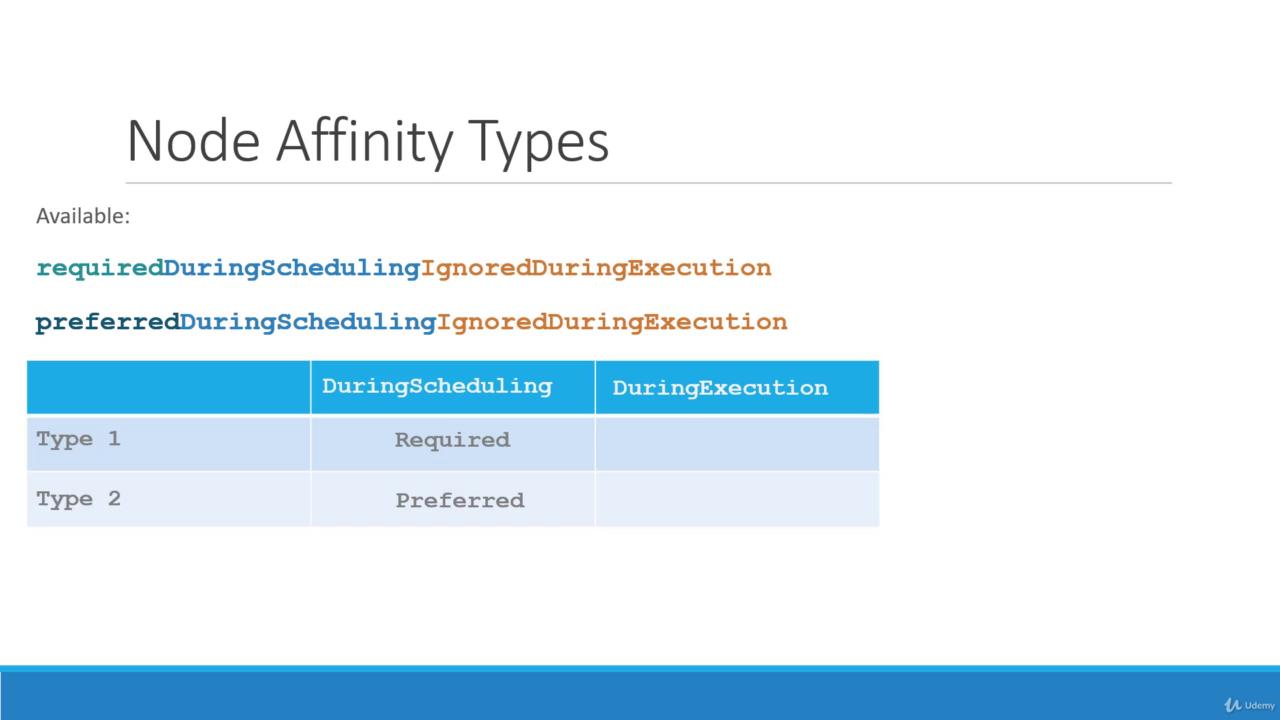
"Required During Scheduling, Ignored During Execution" mandates that a Pod only starts on a node meeting the rules, whereas "Preferred During Scheduling, Ignored During Execution" allows flexibility during scheduling by placing the Pod on an alternative node if necessary.
### Future Enhancements
There is ongoing discussion about a new category called "required during execution." Unlike current settings, this model would evict a running Pod if its node's labels change, making it non-compliant with the affinity rules.
For instance, if a node loses its "size=Large" label while hosting a Pod configured with this future type, the Pod would be terminated. Currently, with the "ignored during execution" setting, the Pod continues to run despite changes.
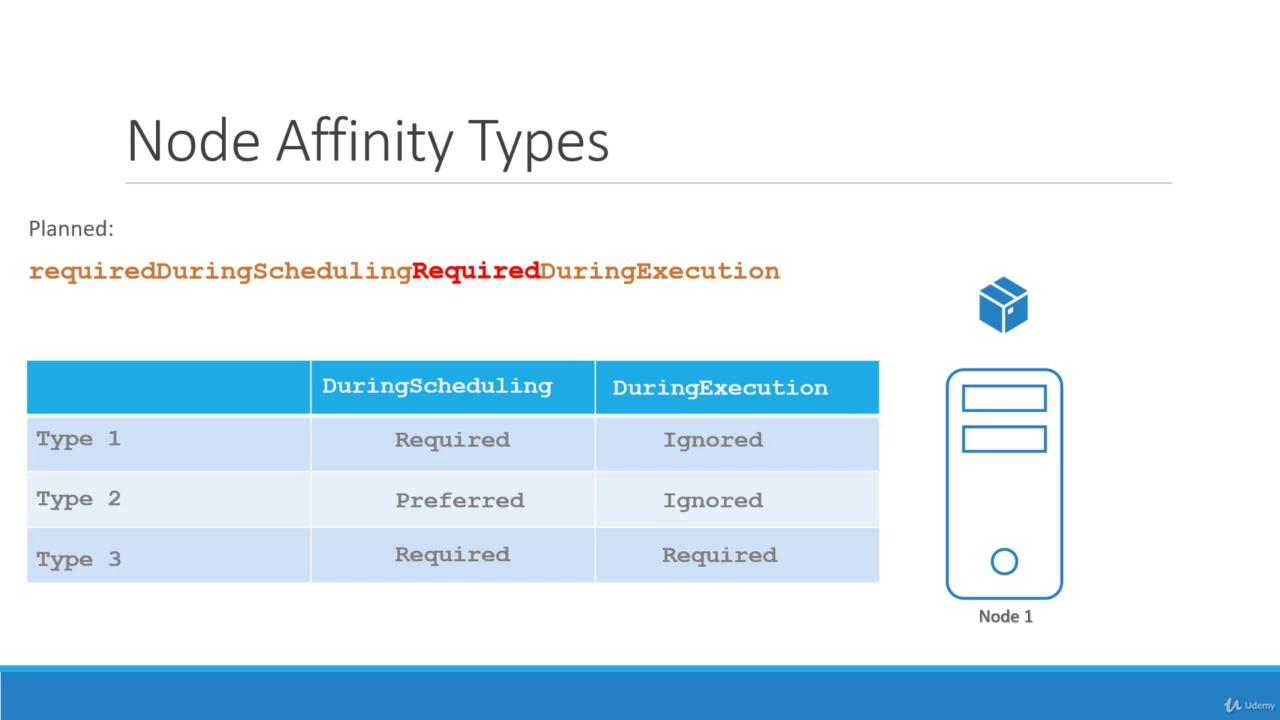
The diagram illustrates the three node affinity types, highlighting that while current models ignore label changes post-scheduling, a "required during execution" model would enforce rules dynamically by evicting Pods when necessary.
## Conclusion
This guide has covered the fundamentals of node affinity: from basic node selectors to advanced expressions using `In`, `NotIn`, and `Exists` operators. Understanding these configurations will help you tailor your Kubernetes deployments for optimized scheduling.
Proceed to practice these rules with coding exercises, and stay tuned for upcoming sections comparing taints and tolerations with node affinity.
For further details, you may also refer to the following resources:
* [Kubernetes Documentation](https://kubernetes.io/docs/)
* [Kubernetes Basics](https://kubernetes.io/docs/concepts/overview/what-is-kubernetes/)
* [Docker Hub](https://hub.docker.com/)
* [Terraform Registry](https://registry.terraform.io/)