> ## Documentation Index
> Fetch the complete documentation index at: https://notes.kodekloud.com/llms.txt
> Use this file to discover all available pages before exploring further.
# API Deprecations
> This article explores API deprecations in Kubernetes, covering lifecycle management, versioning, and guidelines for efficient API transitions.
In this lesson, we explore API deprecations and their impact on managing API lifecycles in Kubernetes. We explain how a single API group can support multiple versions, why multiple versions are necessary, how many versions should be supported, and when older versions can be removed. The API deprecation policy provides guidelines for efficient API lifecycle management.
***
## API Group Lifecycle Example
Imagine contributing to the Kubernetes project by creating an API group named `kodekloud.com` that contains two resources: `Course` and `Webinar`. Initially, both resources are developed and tested in-house. Once ready for integration, a pull request is created, and the API group is released as an alpha version (specifically, `v1alpha1`). For example, a YAML file to create a `Course` might look like:
```yaml theme={null}
apiVersion: kodekloud.com/v1alpha1
kind: Course
metadata:
name: ckad
spec:
```
If user feedback suggests that the `Webinar` resource is no longer needed, the first rule of the API deprecation policy states that API elements can only be removed by incrementing the API group's version. Therefore, the `Webinar` resource is removed in the subsequent version (v1alpha2), while v1alpha1 remains available. The `Course` definition in the two versions is as follows:
```yaml theme={null}
apiVersion: kodekloud.com/v1alpha1
kind: Course
metadata:
name: ckad
spec:
```
```yaml theme={null}
apiVersion: kodekloud.com/v1alpha2
kind: Course
metadata:
name: ckad
spec:
```
Even though the in-memory resource remains stored as v1alpha1, the current API version gets updated to v1alpha2. Both versions need to be supported until the change is fully adopted. Eventually, one of these versions (typically v1alpha2) becomes the preferred or storage version—ensuring that while users may continue to use v1alpha1 YAML files, the resource is stored internally as v1alpha2.
***
## Round-Trip Conversion Between API Versions
The second rule of the API deprecation policy mandates that API objects must support round-trip conversion between versions without any loss of information (except for complete REST resources that do not exist in all versions). For instance, consider a `Course` object created in v1alpha1 with a `spec` field:
```yaml theme={null}
apiVersion: kodekloud.com/v1alpha1
kind: Course
metadata:
name: ckad
spec:
type: video
```
In v1alpha2, a new field named `duration` is introduced. The conversion to v1alpha2 could be represented as:
```yaml theme={null}
apiVersion: kodekloud.com/v1alpha2
kind: Course
metadata:
name: ckad
spec:
type: video
duration:
```
To ensure fidelity when converting back to v1alpha1, an equivalent field for `duration` must be provided in v1alpha1—even if only as a placeholder—so that the round-trip conversion retains its integrity.
***
## Evolving Through Beta to GA
After addressing bugs and refining the API in the alpha stages, the next phase is beta. For example, after releasing the first beta version (`v1beta1`), further refinements result in `v1beta2`, and finally, the stable GA version (`v1`) is released. The typical evolution follows this sequence:
1. v1alpha1 → v1alpha2 (with potentially additional alpha versions)
2. v1beta1 and v1beta2 (both beta versions are supported for a defined period)
3. v1 GA (stable release)
The API deprecation policy requires continued support for older versions as follows:
* GA: At least 12 months or three releases.
* Beta: At least nine months or three releases.
* Alpha: No support beyond the current release.
For example, consider a Kubernetes release sequence:
* In release x, `v1alpha1` is introduced.
* In release x+1, `v1alpha2` is introduced. Since alpha versions do not have extended support beyond the next release, `v1alpha1` is dropped.
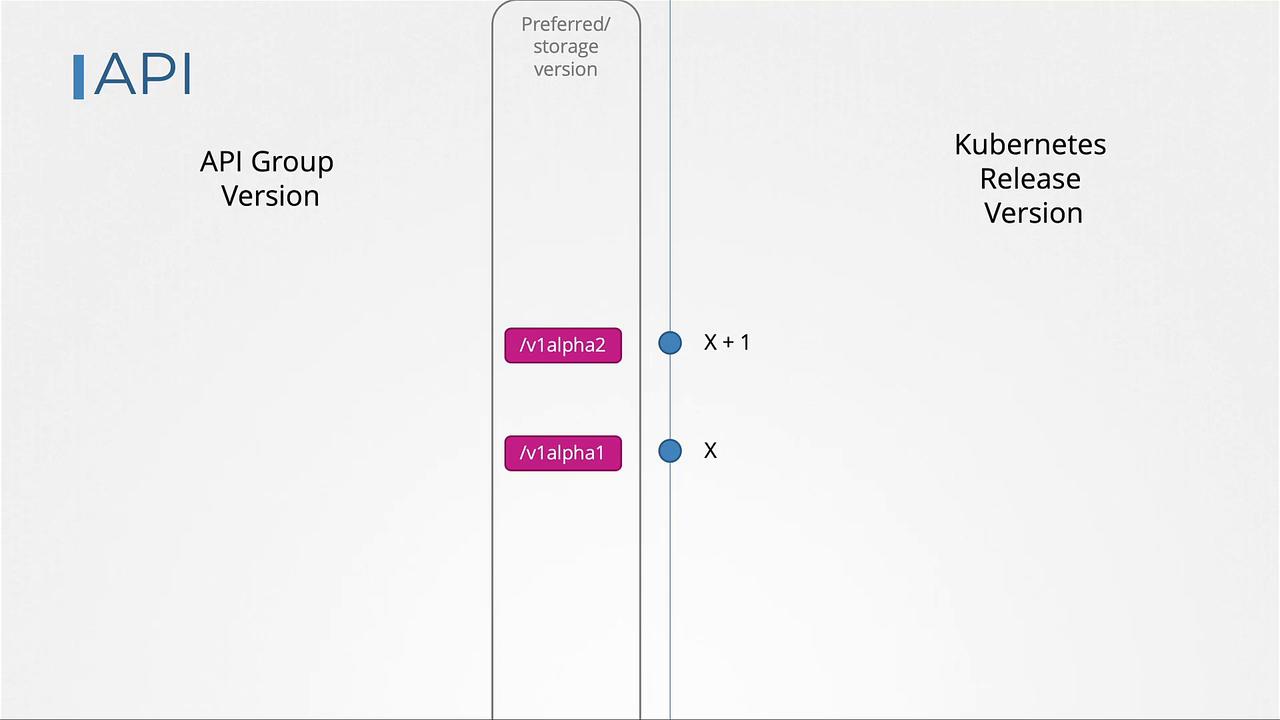
According to the deprecation policy (rule four), older API versions must be supported after deprecation for a mandated period. In release x+1, if `v1alpha1` is removed, this change must be clearly documented in the release notes. Future updates may also include the removal of deprecated APIs, such as v1alpha2, urging users to migrate to newer versions.
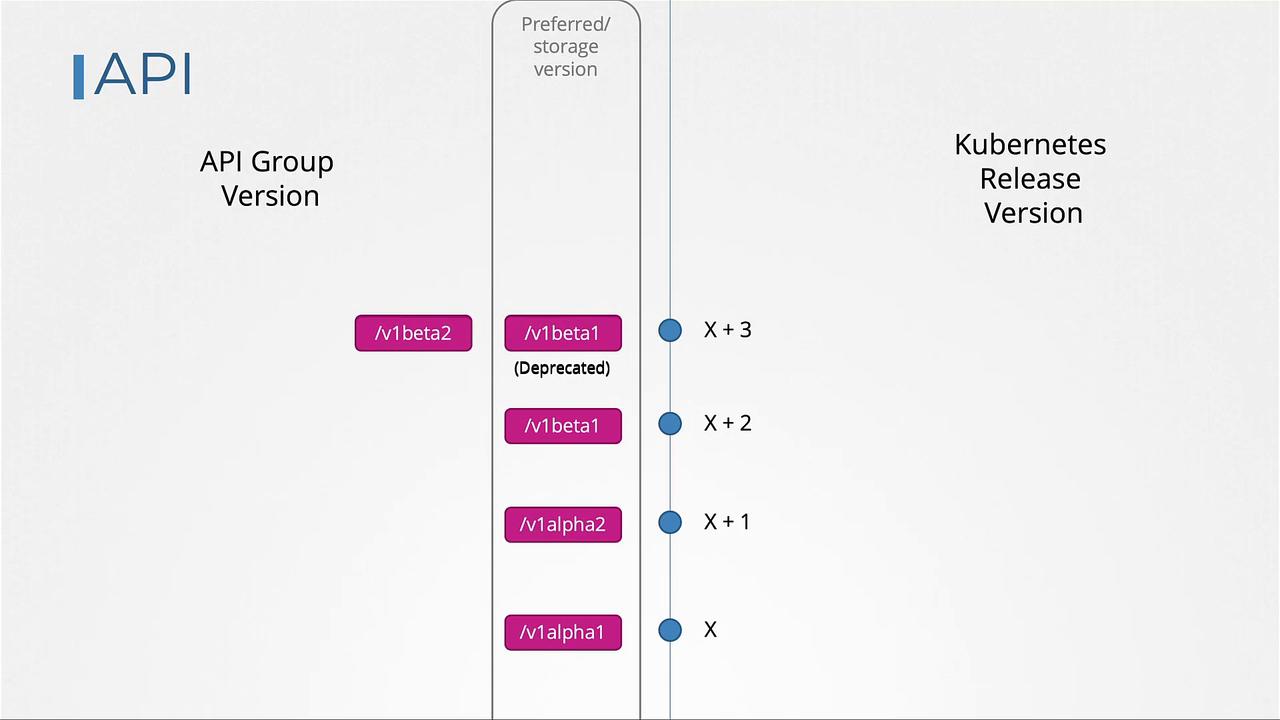
In release x+2, the first beta version (`v1beta1`) appears. Over subsequent releases (x+3, x+4, etc.), both the current and previous beta versions are supported for compatibility. During this overlap:
* The older beta version (e.g., `v1beta1`) is deprecated but is not removed immediately.
* Users receive deprecation warnings prompting migration to the newer beta version.
* The preferred API version (and storage version) remains unchanged until the next release when only the newer version is supported.
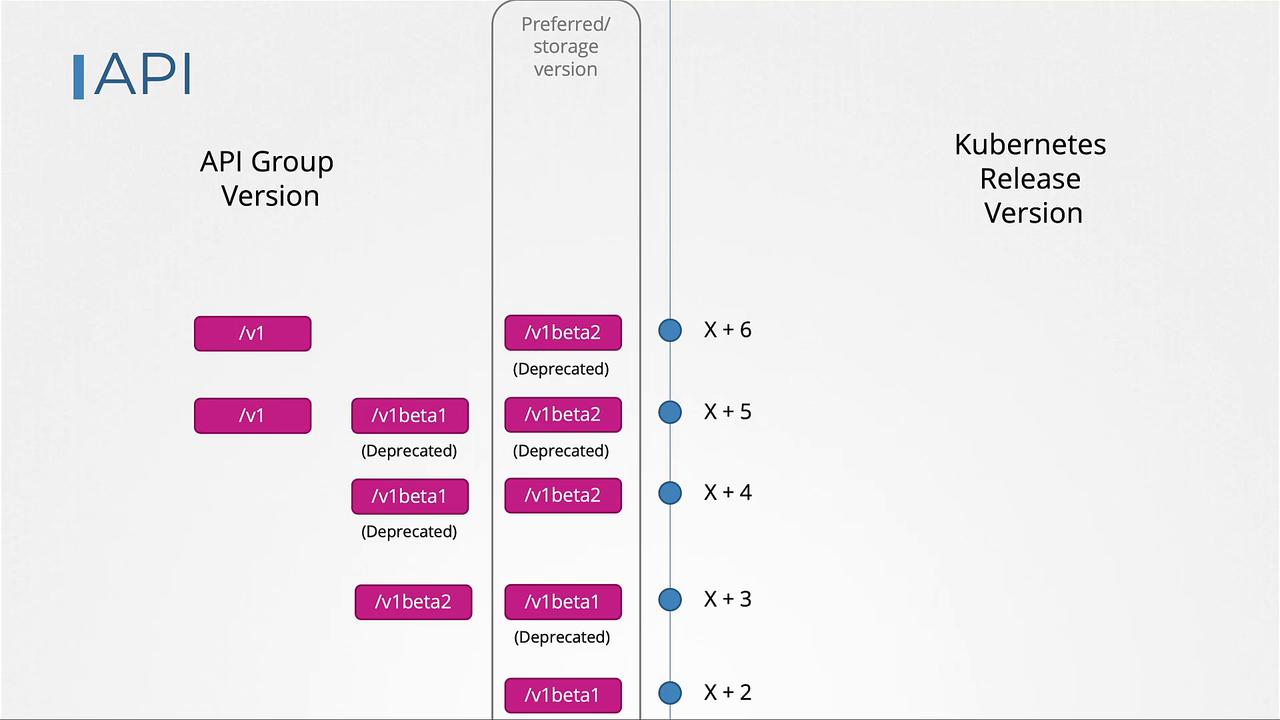
When the GA version (v1) is released (e.g., in release x+5), beta versions (`v1beta1` and `v1beta2`) remain available temporarily until they satisfy the support duration requirements. In release x+6, `v1beta1` may be removed after supporting it for three releases, while `v1beta2` continues to be supported until it completes its deprecation period and is eventually dropped (e.g., in release x+8).
***
## Introducing a New API Version (v2)
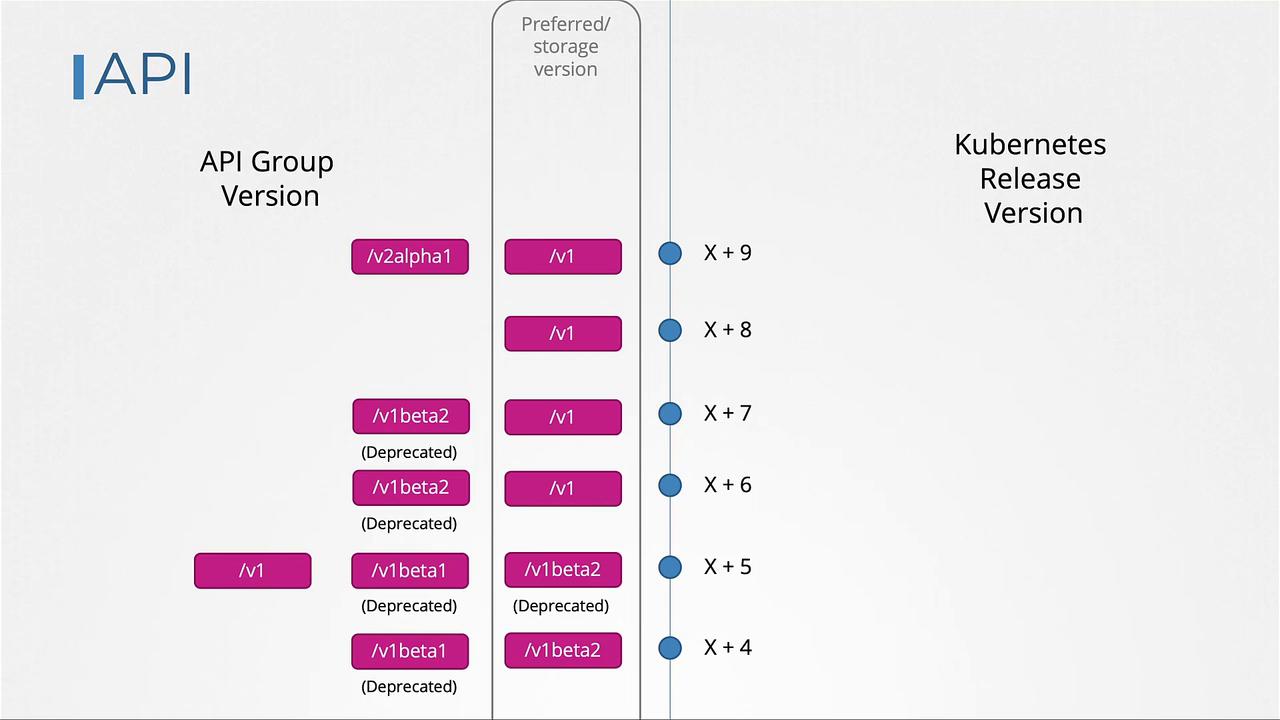
When a new major API version such as `v2alpha1` is introduced, the previous stable version (v1, GA) is not immediately deprecated. The third rule of the API deprecation policy specifies that an API version must not be deprecated until an equivalent or more stable version is available. Since `v2alpha1` is an alpha release and v1 is in GA, v1 continues to be supported. The new version will then progress through its lifecycle—v2alpha2, v2beta1, v2beta2, and finally v2—before it can deprecate v1.
***
## Using kubectl convert
As Kubernetes evolves and older API versions are removed, manifest files must be updated to the current API versions. For example, if you have a YAML file with a deployment definition using `v1beta1` and your Kubernetes upgrade removes that version, you must update your manifest to use `apps/v1`:
```yaml theme={null}
apiVersion: apps/v1
kind: Deployment
metadata:
name: nginx
spec:
```
For projects with numerous YAML files requiring conversion, the `kubectl convert` command is an efficient tool. To convert your deployment file to `apps/v1`, run:
```plaintext theme={null}
kubectl convert -f nginx.yaml --output-version apps/v1
```
The converted YAML manifest will be displayed on your screen.
!!! note "Note"
The `kubectl convert` command might not be installed by default as it is available as a separate plugin. Follow these steps to install it:
```bash theme={null}
curl -LO "https://dl.k8s.io/release/$(curl -L -s https://dl.k8s.io/release/stable.txt)/bin/linux/amd64/kubectl-convert"
```
```bash theme={null}
curl -LO "https://dl.k8s.io/$(curl -L -s https://dl.k8s.io/release/stable.txt)/bin/linux/amd64/kubectl-convert.sha256"
```
```bash theme={null}
echo "$(