> ## Documentation Index
> Fetch the complete documentation index at: https://notes.kodekloud.com/llms.txt
> Use this file to discover all available pages before exploring further.
# View Certificate Details
> How to locate, inspect, and validate Kubernetes control plane TLS certificates, check SANs and expiry, and troubleshoot certificate-related failures
Hello — welcome to this lesson. You'll learn how to locate, inspect, and validate TLS certificates used by Kubernetes control plane components so you can perform a cluster-wide certificate health check.
Scenario: you're a new administrator asked to audit certificates in an existing cluster. The first diagnostic step is to identify how the cluster was provisioned, because certificate storage and component invocation change depending on the provisioning method:
* If the control plane runs as native systemd services (custom from-scratch installs), certificate file paths and TLS flags are visible from unit files or the running processes.
* If the cluster was provisioned with kubeadm, control plane components run as static pods; manifests live under /etc/kubernetes/manifests and certificates are typically under /etc/kubernetes/pki.
Note: kubeadm places static manifests under /etc/kubernetes/manifests and certificates under /etc/kubernetes/pki by default.
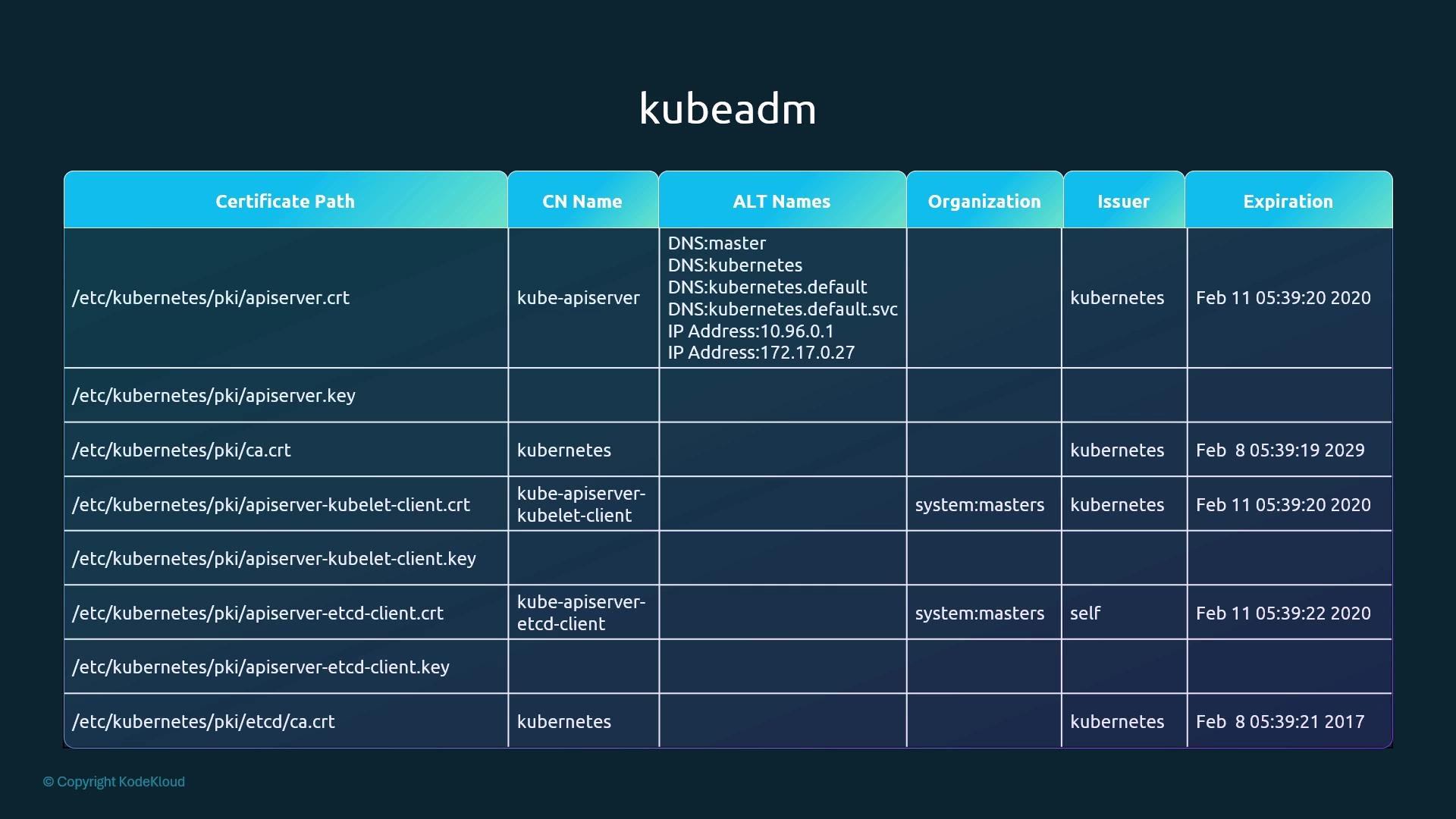
When doing a certificate health check, create a simple spreadsheet (paths, CN, SANs, organization, issuer, expiry) to track the findings across all nodes. Use this spreadsheet format to guide your tracking.
Why inspect certificates?
* Confirm each component presents the correct Subject Common Name (CN) for identity.
* Ensure required Subject Alternative Names (SANs) — DNS and IP — are present.
* Verify the issuer matches your expected CA.
* Detect expired or soon-to-expire certificates to plan rotations and prevent outages.
How to identify certificate files used by control plane components
1. Systemd-managed control plane
* If the control plane is managed via systemd, inspect unit files (typically in /etc/systemd/system or /lib/systemd/system) to find flags pointing at cert/key files. Example unit excerpt for kube-apiserver:
```bash theme={null}
$ cat /etc/systemd/system/kube-apiserver.service
[Service]
ExecStart=/usr/local/bin/kube-apiserver \
--advertise-address=172.17.0.32 \
--allow-privileged=true \
--apiserver-count=3 \
--authorization-mode=Node,RBAC \
--bind-address=0.0.0.0 \
--client-ca-file=/var/lib/kubernetes/ca.pem \
--enable-swagger-ui=true \
--etcd-cafile=/var/lib/kubernetes/ca.pem \
--etcd-certfile=/var/lib/kubernetes/kubernetes.pem \
--etcd-keyfile=/var/lib/kubernetes/kubernetes-key.pem \
--event-ttl=1h \
--kubelet-certificate-authority=/var/lib/kubernetes/ca.pem \
--kubelet-client-key=/var/lib/kubernetes/kubernetes-key.pem \
--kubelet-https=true \
--service-node-port-range=30000-32767 \
--tls-cert-file=/var/lib/kubernetes/kubernetes.pem \
--tls-private-key-file=/var/lib/kubernetes/kubernetes-key.pem \
--v=2
```
2. kubeadm / static pod control plane
* Inspect the static pod manifest for the kube-apiserver under /etc/kubernetes/manifests to find the exact certificate paths and filenames used by the control plane container:
```bash theme={null}
$ cat /etc/kubernetes/manifests/kube-apiserver.yaml
spec:
containers:
- command:
- kube-apiserver
- --authorization-mode=Node,RBAC
- --advertise-address=172.17.0.32
- --allow-privileged=true
- --client-ca-file=/etc/kubernetes/pki/ca.crt
- --disable-admission-plugins=PersistentVolumeLabel
- --enable-admission-plugins=NodeRestriction
- --enable-bootstrap-token-auth=true
- --etcd-cafile=/etc/kubernetes/pki/etcd/ca.crt
- --etcd-certfile=/etc/kubernetes/pki/apiserver-etcd-client.crt
- --etcd-keyfile=/etc/kubernetes/pki/apiserver-etcd-client.key
- --etcd-servers=https://127.0.0.1:2379
- --insecure-port=0
- --kubelet-client-certificate=/etc/kubernetes/pki/apiserver-kubelet-client.crt
- --kubelet-client-key=/etc/kubernetes/pki/apiserver-kubelet-client.key
- --kubelet-preferred-address-types=InternalIP,ExternalIP,Hostname
- --proxy-client-cert-file=/etc/kubernetes/pki/front-proxy-client.crt
- --proxy-client-key-file=/etc/kubernetes/pki/front-proxy-client.key
- --requestheader-allowed-names=front-proxy-client
- --requestheader-client-ca-file=/etc/kubernetes/pki/front-proxy-ca.crt
- --requestheader-extra-headers-prefix=X-Remote-Extra-
- --requestheader-group-headers=X-Remote-Group
- --requestheader-username-headers=X-Remote-User
- --secure-port=6443
- --service-account-key-file=/etc/kubernetes/pki/sa.pub
- --service-cluster-ip-range=10.96.0.0/12
- --tls-cert-file=/etc/kubernetes/pki/apiserver.crt
- --tls-private-key-file=/etc/kubernetes/pki/apiserver.key
```
Once you have the certificate file list, inspect each certificate to extract metadata (subject CN, SANs, issuer, validity, etc.).
How to decode and inspect certificates
* Use openssl to read a PEM certificate and inspect its fields:
```bash theme={null}
$ openssl x509 -in /etc/kubernetes/pki/apiserver.crt -text -noout
Certificate:
Data:
Version: 3 (0x2)
Serial Number: 3147495682089747350 (0x2bae26a58f090396)
Signature Algorithm: sha256WithRSAEncryption
Issuer: CN=kubernetes
Validity
Not Before: Feb 11 05:39:19 2019 GMT
Not After : Feb 11 05:39:20 2020 GMT
Subject: CN=kube-apiserver
Subject Public Key Info:
Public Key Algorithm: rsaEncryption
Public-Key: (2048 bit)
Modulus:
00:d9:69:38:80:68:3b:b7:2e:9e:25:00:e8:fd:01:
Exponent: 65537 (0x10001)
X509v3 extensions:
X509v3 Key Usage: critical
Digital Signature, Key Encipherment
X509v3 Extended Key Usage:
TLS Web Server Authentication
X509v3 Subject Alternative Name:
DNS:master, DNS:kubernetes, DNS:kubernetes.default,
DNS:kubernetes.default.svc, DNS:kubernetes.default.svc.cluster.local, IP
Address:10.96.0.1, IP Address:172.17.0.27
```
What to verify for each certificate
* Subject CN matches the component (e.g., CN=kube-apiserver).
* Expected DNS and IP SANs are present.
* Issuer is the expected CA (kubeadm typically uses CA with CN=kubernetes).
* Certificate validity period is current (check the Not After date for expiry).
Use the table in the first figure below as a pattern for your spreadsheet: include certificate path, CN, SANs, organization, issuer, and expiration.
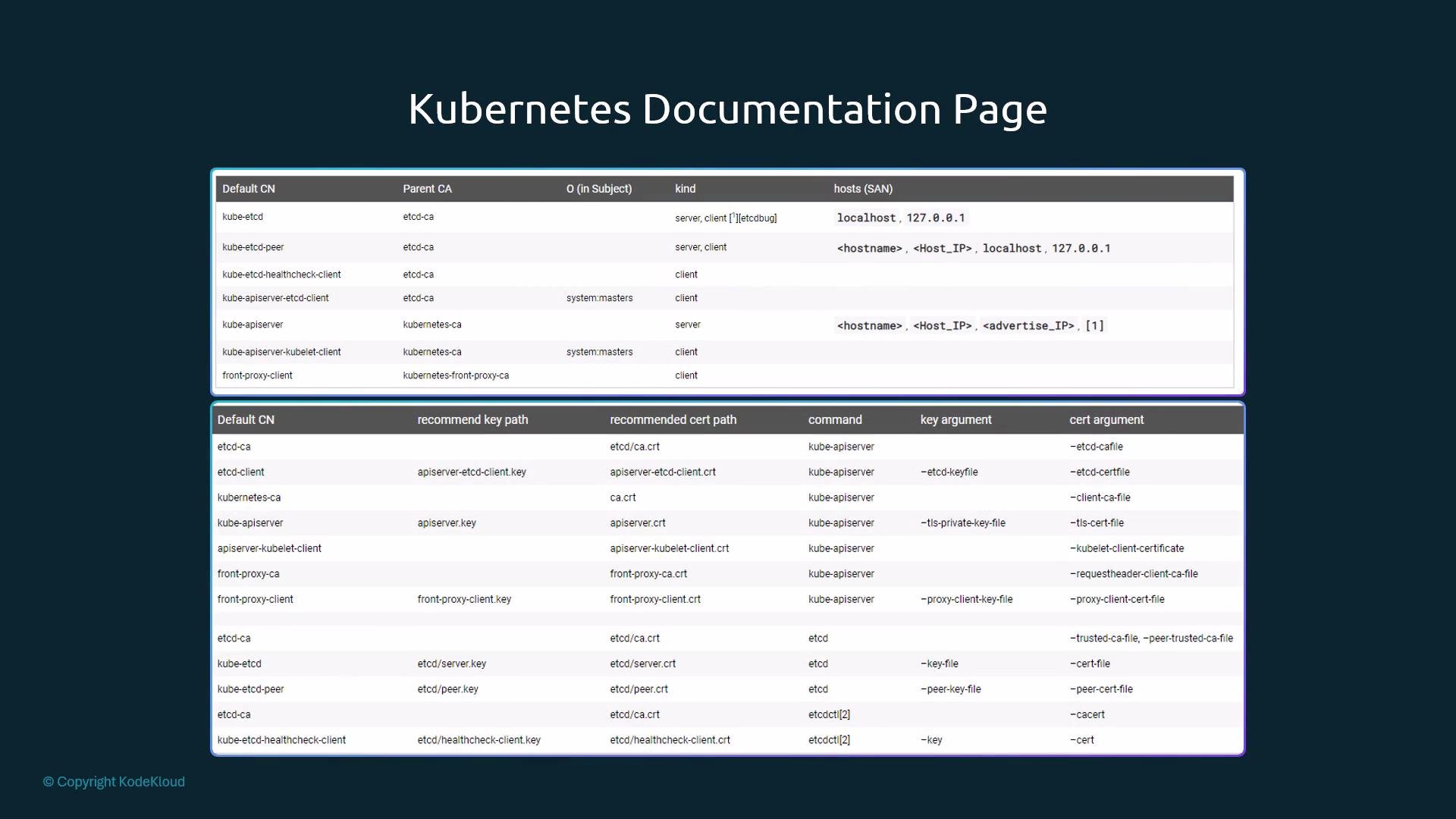
 Reference the official Kubernetes documentation for recommended certificate CNs, default paths, and component requirements: [https://kubernetes.io/docs/concepts/cluster-administration/certificates/](https://kubernetes.io/docs/concepts/cluster-administration/certificates/). The docs include tables of default CNs and expected parent CA relationships.
 Checking logs when certificates fail
* If components run under systemd, start with the system journal to find TLS handshake and certificate errors:
```bash theme={null}
$ journalctl -u etcd.service -l
```
Example etcd log snippets showing TLS configuration and handshake failure:
```text theme={null}
2019-02-13 02:53:28.144631 I | etcdmain: etcd Version: 3.2.18
2019-02-13 02:53:28.185588 I | embed: ClientTLS: cert = /etc/kubernetes/pki/etcd/server.crt, key = /etc/kubernetes/pki/etcd/server.key, ca = , trusted-ca = /etc/kubernetes/pki/etcd/old-ca.crt, client-cert-auth = true
2019-02-13 02:53:30.080130 I | etcdserver: published {Name:master ClientURLs:[https://127.0.0.1:2379]} to cluster
WARNING: 2019/02/13 02:53:30 Failed to dial 127.0.0.1:2379: connection error: desc = "transport: authentication handshake failed: remote error: tls: bad certificate"; please retry.
```
* If control plane components are running as static pods (kubeadm), view pod logs with kubectl. Replace \ with the actual pod name and add -n kube-system if necessary:
```bash theme={null}
$ kubectl logs -n kube-system
```
Example pod log output (you may see TLS/handshake errors similar to the systemd example above).
* If the control plane is down and kubectl cannot reach the API server, check the container runtime logs directly:
* For CRI-based runtimes (containerd/crio) use crictl:
```bash theme={null}
$ crictl ps -a
$ crictl logs
```
* For Docker runtime:
```bash theme={null}
$ docker ps -a
$ docker logs
```
What to do with findings
* Missing SANs: reissue the certificate including the correct DNS/IP SANs.
* Expired certificates: rotate/reissue them. Kubeadm provides certificate management helpers (see kubeadm certs docs).
* Unexpected issuer: investigate whether a certificate was manually replaced or issued by an unknown CA.
Quick verification checklist
| Check | Command / Method | Expected result |
| -------------------------------------------- | -------------------------------------------------- | -------------------------------------------------------------------------- |
| Locate kube-apiserver cert flags | Inspect systemd unit or static manifest | Flags point to cert/key paths under /etc/kubernetes or /var/lib/kubernetes |
| Read certificate metadata | openssl x509 -in /path/to/cert -text -noout | CN, SANs, issuer and Not After present and correct |
| Check certificate expiry | openssl x509 -in /path/to/cert -noout -dates | Not After should be in the future |
| Search component TLS errors | journalctl -u \ -l or kubectl logs \ | TLS handshake errors or bad certificate messages indicate issues |
| Inspect container logs if control plane down | crictl logs / docker logs | Determine why the control plane cannot present or validate certs |
Useful links and references
* Kubernetes Certificates concept: [https://kubernetes.io/docs/concepts/cluster-administration/certificates/](https://kubernetes.io/docs/concepts/cluster-administration/certificates/)
* kubeadm certificate management: [https://kubernetes.io/docs/reference/setup-tools/kubeadm/kubeadm-certs/](https://kubernetes.io/docs/reference/setup-tools/kubeadm/kubeadm-certs/)
Closing notes
* Collect findings into the spreadsheet described in the callout to track certificate path, CN, SANs, issuer, and expiry across nodes.
* Test these steps in a lab environment before running them on production clusters to avoid accidental outages.
Checking logs when certificates fail
* If components run under systemd, start with the system journal to find TLS handshake and certificate errors:
```bash theme={null}
$ journalctl -u etcd.service -l
```
Example etcd log snippets showing TLS configuration and handshake failure:
```text theme={null}
2019-02-13 02:53:28.144631 I | etcdmain: etcd Version: 3.2.18
2019-02-13 02:53:28.185588 I | embed: ClientTLS: cert = /etc/kubernetes/pki/etcd/server.crt, key = /etc/kubernetes/pki/etcd/server.key, ca = , trusted-ca = /etc/kubernetes/pki/etcd/old-ca.crt, client-cert-auth = true
2019-02-13 02:53:30.080130 I | etcdserver: published {Name:master ClientURLs:[https://127.0.0.1:2379]} to cluster
WARNING: 2019/02/13 02:53:30 Failed to dial 127.0.0.1:2379: connection error: desc = "transport: authentication handshake failed: remote error: tls: bad certificate"; please retry.
```
* If control plane components are running as static pods (kubeadm), view pod logs with kubectl. Replace \ with the actual pod name and add -n kube-system if necessary:
```bash theme={null}
$ kubectl logs -n kube-system
```
Example pod log output (you may see TLS/handshake errors similar to the systemd example above).
* If the control plane is down and kubectl cannot reach the API server, check the container runtime logs directly:
* For CRI-based runtimes (containerd/crio) use crictl:
```bash theme={null}
$ crictl ps -a
$ crictl logs
```
* For Docker runtime:
```bash theme={null}
$ docker ps -a
$ docker logs
```
What to do with findings
* Missing SANs: reissue the certificate including the correct DNS/IP SANs.
* Expired certificates: rotate/reissue them. Kubeadm provides certificate management helpers (see kubeadm certs docs).
* Unexpected issuer: investigate whether a certificate was manually replaced or issued by an unknown CA.
Quick verification checklist
| Check | Command / Method | Expected result |
| -------------------------------------------- | -------------------------------------------------- | -------------------------------------------------------------------------- |
| Locate kube-apiserver cert flags | Inspect systemd unit or static manifest | Flags point to cert/key paths under /etc/kubernetes or /var/lib/kubernetes |
| Read certificate metadata | openssl x509 -in /path/to/cert -text -noout | CN, SANs, issuer and Not After present and correct |
| Check certificate expiry | openssl x509 -in /path/to/cert -noout -dates | Not After should be in the future |
| Search component TLS errors | journalctl -u \ -l or kubectl logs \ | TLS handshake errors or bad certificate messages indicate issues |
| Inspect container logs if control plane down | crictl logs / docker logs | Determine why the control plane cannot present or validate certs |
Useful links and references
* Kubernetes Certificates concept: [https://kubernetes.io/docs/concepts/cluster-administration/certificates/](https://kubernetes.io/docs/concepts/cluster-administration/certificates/)
* kubeadm certificate management: [https://kubernetes.io/docs/reference/setup-tools/kubeadm/kubeadm-certs/](https://kubernetes.io/docs/reference/setup-tools/kubeadm/kubeadm-certs/)
Closing notes
* Collect findings into the spreadsheet described in the callout to track certificate path, CN, SANs, issuer, and expiry across nodes.
* Test these steps in a lab environment before running them on production clusters to avoid accidental outages.