> ## Documentation Index
> Fetch the complete documentation index at: https://notes.kodekloud.com/llms.txt
> Use this file to discover all available pages before exploring further.
# OPA in Kubernetes
> This article explores integrating OPA with Kubernetes using the Gatekeeper approach for enhanced policy enforcement and governance.
In this article, we explore the integration of OPA (Open Policy Agent) with Kubernetes using the Gatekeeper approach. This method leverages the OPA Constraint Framework alongside Kubernetes admission controllers for enhanced policy enforcement and governance.
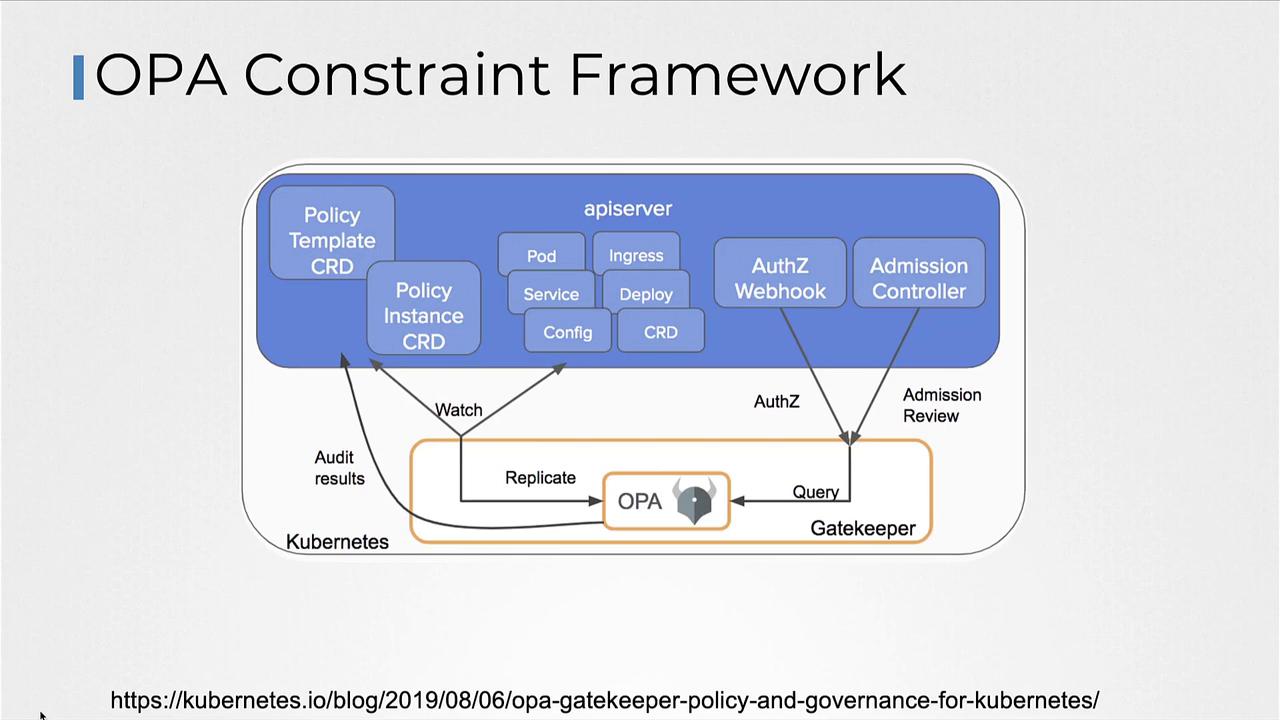
With the Gatekeeper approach, the admission controller collaborates with the OPA Constraint Framework by using CRD-based (Custom Resource Definition) policies. This facilitates easier policy sharing and builds trust across your Kubernetes environment.
Before diving into the details of the OPA Constraint Framework, let’s review how to deploy OPA Gatekeeper in Kubernetes.
## Installing OPA Gatekeeper
Deploying OPA Gatekeeper is simple. Execute the following command to apply the Gatekeeper specification files:
```bash theme={null}
kubectl apply -f https://raw.githubusercontent.com/open-policy-agent/gatekeeper/v3.14.0/deploy/gatekeeper
```
After deployment, verify that all Gatekeeper components are installed and running in the `gatekeeper-system` namespace:
```bash theme={null}
kubectl get all -n gatekeeper-system
```
Expected output:
```bash theme={null}
NAME READY STATUS RESTARTS AGE
pod/gatekeeper-audit-6699999786d-6n8xt 1/1 Running 1 (12s ago) 31s
pod/gatekeeper-controller-manager-854f95df4f-dbhp7 1/1 Running 0 31s
pod/gatekeeper-controller-manager-854f95df4f-k96kj 1/1 Running 0 31s
pod/gatekeeper-controller-manager-854f95df4f-zfnbw 1/1 Running 0 31s
NAME TYPE CLUSTER-IP EXTERNAL-IP PORT(S) AGE
service/gatekeeper-webhook-service ClusterIP 172.20.60.127 443/TCP 31s
NAME READY UP-TO-DATE AVAILABLE AGE
deployment.apps/gatekeeper-audit 1/1 1 1 31s
deployment.apps/gatekeeper-controller-manager 3/3 3 3 31s
NAME DESIRED CURRENT READY AGE
replicaset.apps/gatekeeper-audit-6699999786 1 1 1 31s
replicaset.apps/gatekeeper-controller-manager-854f95df4f 3 3 3 31s
```
Ensure that you have adequate RBAC permissions before deploying Gatekeeper in your cluster.
## Understanding the OPA Constraint Framework
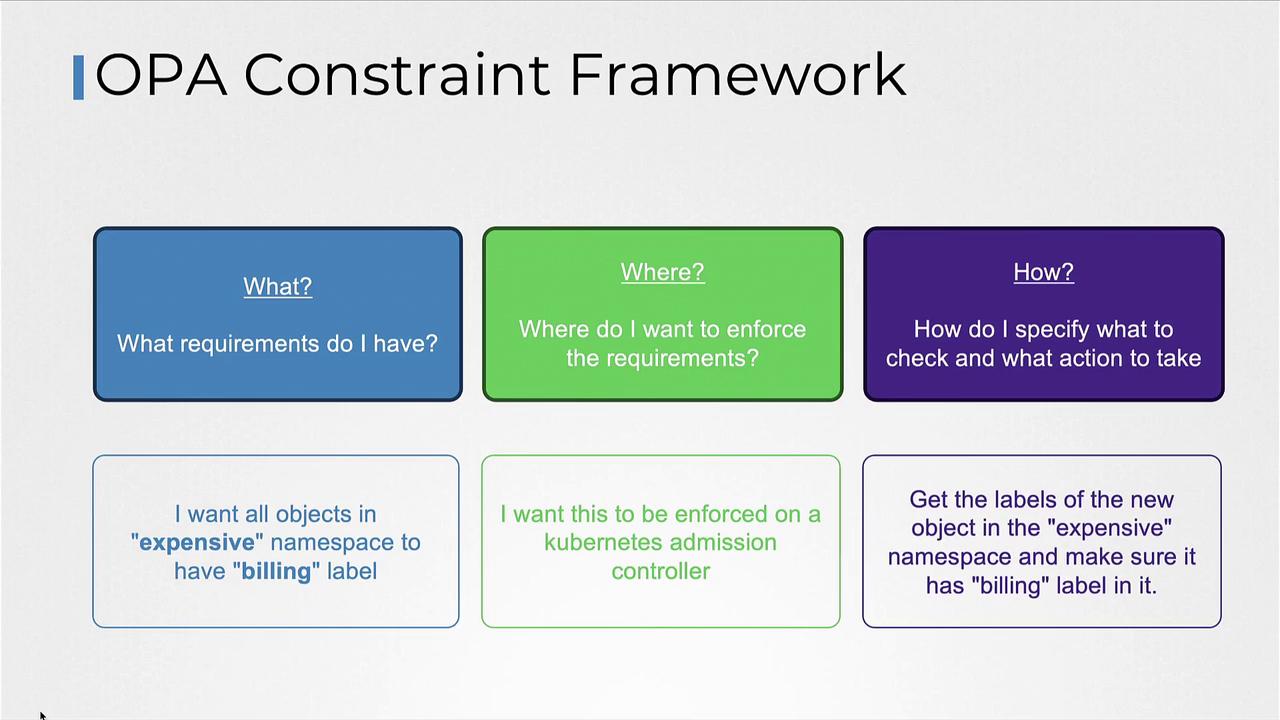
The OPA Constraint Framework allows you to declare policies that specify required conditions, enforce those conditions at the appropriate locations, and define the checks to be performed. For example, if you want all objects in a specific namespace (e.g., "example") to include a "billing" label, the framework will enforce this rule via the Kubernetes admission controller.
When a pod creation request is submitted, the admission controller follows these steps:
1. Retrieve the labels from the pod.
2. Verify if the required label (e.g., "billing") is present.
3. Return an error if the label is missing.
## Implementing Label Validation with Rego
Below is an example of Rego code that validates the presence of a required label (e.g., "billing") on a pod. The code compares the provided labels with a hard-coded required label.
### Example 1
```rego theme={null}
package systemrequiredlabels
import data.lib.helpers
violation["msg": msg, "details": {"missing_labels": missing}} {
provided := {label | input.request.object.metadata.labels[label]}
required := {label | label == ["billing"]}
missing = required - provided
count(missing) > 0
msg = sprintf("you must provide labels: %v", [missing])
}
```
### Example 2
A similar rule with a slightly different format:
```rego theme={null}
package systemrequiredlabels
import data.lib.helpers
violation["msg"] = msg {
details := {"missing_labels": missing}
provided := {label | input.request.object.metadata.labels[label]}
required := {label | label := ["billing"]}
missing = required - provided
count(missing) > 0
msg = sprintf("you must provide labels: %v", [missing])
}
```
### Example 3
An alternative format with syntactical differences:
```rego theme={null}
package systemrequiredlabels
import data.lib.helpers
violation["msg": msg, "details": {"missing_labels": missing}} {
provided := {label | input.request.object.metadata.labels[label]}
required := {label | label = ["billing"]}
missing := required - provided
count(missing) > 0
msg = sprintf("you must provide labels: %v", [missing])
}
```
In these examples:
* The `provided` variable extracts labels from the incoming pod object.
* The `required` set is fixed to include "billing".
* The `missing` variable determines any labels from the `required` set that are absent.
* If any required labels are missing (`count(missing) > 0`), an error message is generated.
## Extending the Use Case with Parameterization
To support more dynamic scenarios—such as enforcing different labels based on the namespace—you can create a Constraint Template. This enables you to pass the required label as a parameter instead of hardcoding it.
Below is an example Constraint Template that encapsulates the Rego code while exposing a parameter for the required label:
```yaml theme={null}
apiVersion: templates.gatekeeper.sh/v1
kind: ConstraintTemplate
metadata:
name: systemrequiredlabels
spec:
crd:
spec:
names:
kind: SystemRequiredLabel
validation:
# Schema for the 'parameters' field goes here
targets:
- target: admission.k8s.gatekeeper.sh
rego: |
package systemrequiredlabels
import data.lib.helpers
violation[{"msg": msg, "details": {"missing_labels": missing}}] {
provided := {label | input.request.object.metadata.labels[label]}
# Use the parameter passed in the constraint instead of hardcoding
required := {label | label == input.parameters.labels[_]}
missing = required - provided
count(missing) > 0
msg = sprintf("you must provide labels: %v", [missing])
}
```
Once your Constraint Template is ready, define specific constraints to enforce policies for different namespaces. For instance:
### Constraint for Billing Label
```yaml theme={null}
apiVersion: constraints.gatekeeper.sh/v1beta1
kind: SystemRequiredLabel
metadata:
name: require-billing-label
spec:
match:
namespaces: ["expensive"]
parameters:
labels: ["billing"]
```
### Constraint for Tech Label
```yaml theme={null}
apiVersion: constraints.gatekeeper.sh/v1beta1
kind: SystemRequiredLabel
metadata:
name: require-tech-label
spec:
match:
namespaces: ["engineering"]
parameters:
labels: ["tech"]
```
These constraints dynamically pass the required labels via the `input.parameters` object in Rego based on the namespace.
## Summary
Below is a quick reference table summarizing the key steps for integrating OPA with Kubernetes using Gatekeeper:
| Step | Description | Example Command/Definition |
| --------------------------- | -------------------------------------------------------- | ------------------------------------------------------------------ |
| Install OPA Gatekeeper | Deploy Gatekeeper components using Kubernetes manifests. | `kubectl apply -f [Gatekeeper URL]` |
| Verify Deployment | Check that all Gatekeeper components are running. | `kubectl get all -n gatekeeper-system` |
| Validate Labels with Rego | Use Rego code to compare provided and required labels. | See provided Rego examples |
| Create Constraint Template | Define a CRD that accepts dynamic parameters for labels. | Provided YAML for Constraint Template |
| Define Constraint Resources | Enforce policies on specific namespaces with parameters. | Provided YAML for `require-billing-label` and `require-tech-label` |
Any object creation that violates the defined policies will trigger an error during the admission phase, preventing non-compliant objects from being admitted into the cluster.
### Example Files
#### requiredlabels-template.yaml
```yaml theme={null}
apiVersion: templates.gatekeeper.sh/v1
kind: ConstraintTemplate
metadata:
name: systemrequiredlabels
spec:
crd:
spec:
names:
kind: SystemRequiredLabel
validation:
# Schema for the 'parameters' field goes here
targets:
- target: admission.k8s.gatekeeper.sh
rego: |
package systemrequiredlabels
import data.lib.helpers
violation[{"msg": msg, "details": {"missing_labels": missing}}] {
provided := {label | input.request.object.metadata.labels[label]}
required := {label | label == input.parameters.labels[_]}
missing = required - provided
count(missing) > 0
msg = sprintf("you must provide labels: %v", [missing])
}
```
#### require-label-billing.yaml
```yaml theme={null}
apiVersion: constraints.gatekeeper.sh/v1beta1
kind: SystemRequiredLabel
metadata:
name: require-billing-label
spec:
match:
namespaces: ["expensive"]
parameters:
labels: ["billing"]
```
Apply these configurations with the following commands:
```bash theme={null}
kubectl apply -f requiredlabels-template.yaml
kubectl apply -f require-label-billing.yaml
# Output: Constraint require-billing-label created
```
With these steps in place, any new Kubernetes object that fails to meet the policy requirements will be rejected at admission time, ensuring continued compliance within your cluster.
That concludes our exploration of integrating OPA with Kubernetes using Gatekeeper. Experiment with these policies in your environment to tailor enforcement to your specific needs.
For further details on OPA and Kubernetes, consider visiting:
* [OPA Documentation](https://www.openpolicyagent.org/docs/)
* [Kubernetes Documentation](https://kubernetes.io/docs/)