> ## Documentation Index
> Fetch the complete documentation index at: https://notes.kodekloud.com/llms.txt
> Use this file to discover all available pages before exploring further.
# Falco Overview and Installation
> This guide covers installing Falco on Kubernetes to detect and analyze potential threats through system call monitoring.
In this guide, we will walk through installing Falco on a Kubernetes cluster and show you how to use it to detect and analyze potential threats.
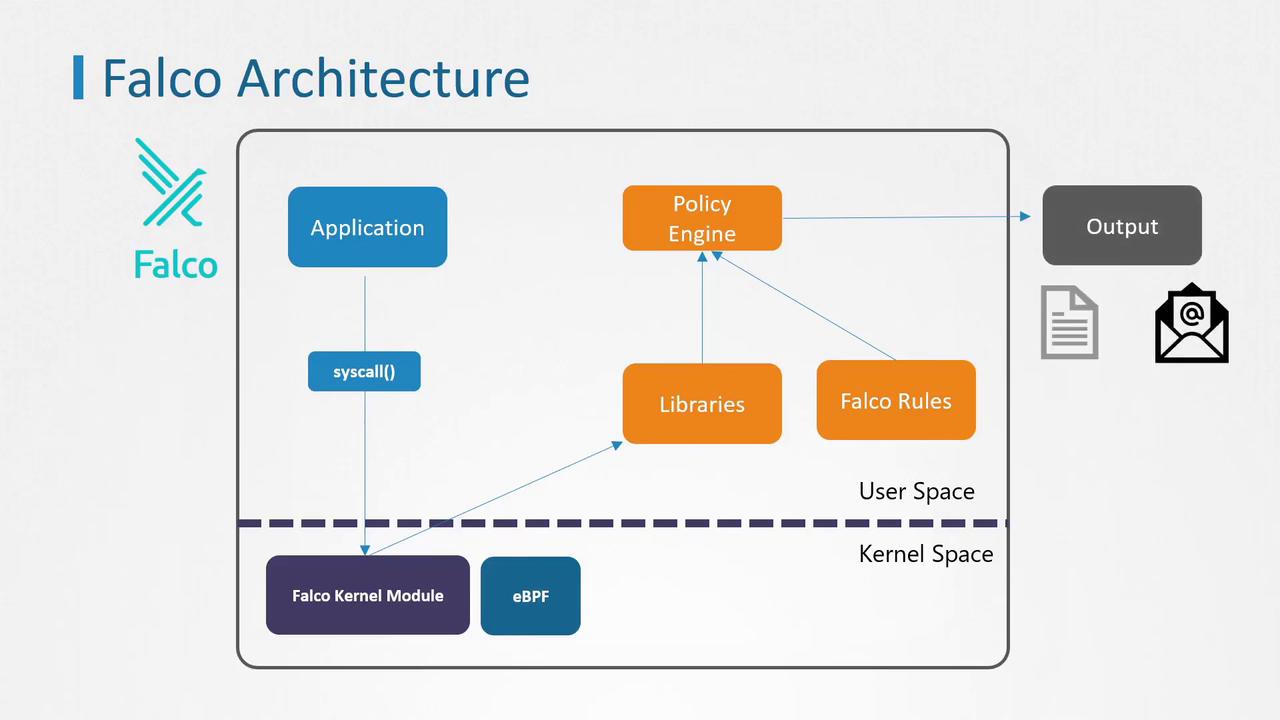
Falco works by monitoring system calls from user-space applications into the Linux kernel. It captures these calls and processes them with its policy engine, which uses predefined rules to identify suspicious activities. When an anomaly is detected, Falco can alert administrators via syslog, standard output, Slack, email notifications, and other channels.
## How Falco Operates
Falco has two methods to interact with the Linux kernel:
1. **Kernel Module Method**\
Falco can insert a kernel module, adding extra code to the Linux kernel. Although this approach is effective, it is considered intrusive. Some managed Kubernetes service providers restrict the use of kernel modules due to security policies.
2. **eBPF (Extended Berkeley Packet Filter) Method**\
Alternatively, Falco leverages eBPF to interact with the kernel in a less invasive way. This method is generally preferred by many providers for its lower impact on system integrity.
Once system calls are captured by either method, they are passed through user-space syscall libraries and then filtered by Falco's policy engine. This engine evaluates the data using Falco rules and generates alerts if any suspicious events occur.
Installing Falco directly on a node as a service ensures that even in the event of a compromise, Falco remains isolated from the Kubernetes environment and continues to effectively detect suspicious behavior.
## Installing Falco on a Node
Since Falco interacts directly with the kernel, installing it as a standard software package involves also installing the corresponding kernel module. Follow these steps to install Falco on a node:
1. Import the Falco public key and add the repository:
```bash theme={null}
curl -s https://falco.org/repo/falcosecurity-3672BA8F.asc | apt-key add -
echo "deb https://download.falco.org/packages/deb stable main" | tee -a /etc/apt/sources.list.d/falcosecurity.list
```
2. Update the package list, install the appropriate kernel headers and Falco, then start the service:
```bash theme={null}
apt update -y
apt-get install -y linux-headers-$(uname -r)
apt install -y falco
systemctl start falco
```
## Deploying Falco as a DaemonSet
If installing Falco directly on the node is not feasible, you can deploy it as a DaemonSet across all cluster nodes. The easiest way to achieve this is by using Helm charts. For detailed deployment instructions, please refer to the detailed steps provided in the [reference section](#links-and-references) below.
## Verifying the Installation
After installing Falco, verify that the Falco pods are running on all nodes by executing:
```bash theme={null}
kubectl get pods
NAME READY STATUS RESTARTS AGE
falco-7grdt 1/1 Running 0 2m21s
falco-tmq28 1/1 Running 0 2m21s
```
If the pods are running, your Falco installation is successfully monitoring your Kubernetes environment for any anomalous behavior.
With Falco up and running, you are well-equipped to utilize its robust rules engine to detect potential threats and secure your Kubernetes cluster.
## Links and References
* [Falco Official Documentation](https://falco.org/docs/)
* [Kubernetes Documentation](https://kubernetes.io/docs/)
* [Helm Charts Repository](https://artifacthub.io/)
By following these steps, you will ensure a secure and efficient Falco deployment that continuously monitors your Kubernetes environment for any suspicious activity. Happy monitoring!