> ## Documentation Index
> Fetch the complete documentation index at: https://notes.kodekloud.com/llms.txt
> Use this file to discover all available pages before exploring further.

# Demo Run Experiment Pod Delete on EKS

> Learn to execute a pod-deletion experiment on Amazon EKS using AWS FIS to validate Kubernetes pod replacement without user disruption.

In this guide, you’ll learn how to execute a pod-deletion experiment on Amazon EKS using AWS FIS. We’ll walk through:

1. Selecting the built-in EKS pod-delete scenario
2. Creating and configuring an experiment template
3. Launching the experiment
4. Monitoring pod replacement and service continuity

This approach helps you validate your Kubernetes Deployment or ReplicaSet automatically replaces pods without user-facing disruption.

***

## Prerequisites

Before you begin, ensure:

* You have an existing Amazon EKS cluster named `pet-site`.
* The IAM role you’ll assign to FIS (e.g., `EKS-FIS-Role`) has permissions to delete pods and write logs.
* CloudWatch Logs group (e.g., `FISExperiments`) is either created or will be created by FIS.

| IAM Permission               | Purpose                               |
| ---------------------------- | ------------------------------------- |
| fis:CreateExperimentTemplate | Create FIS experiment templates       |
| fis:StartExperiment          | Launch experiments                    |
| eks:DeletePods               | Delete pods in the target EKS cluster |
| logs:CreateLogGroup          | Create CloudWatch Logs groups         |
| logs:PutLogEvents            | Publish experiment logs               |

<Callout icon="lightbulb" color="#1CB2FE">
  Make sure your IAM role trusts the `fis.amazonaws.com` service principal. For more details, see [AWS FIS IAM permissions](https://docs.aws.amazon.com/fis/latest/userguide/security_iam_id-based-policy-examples.html).
</Callout>

***

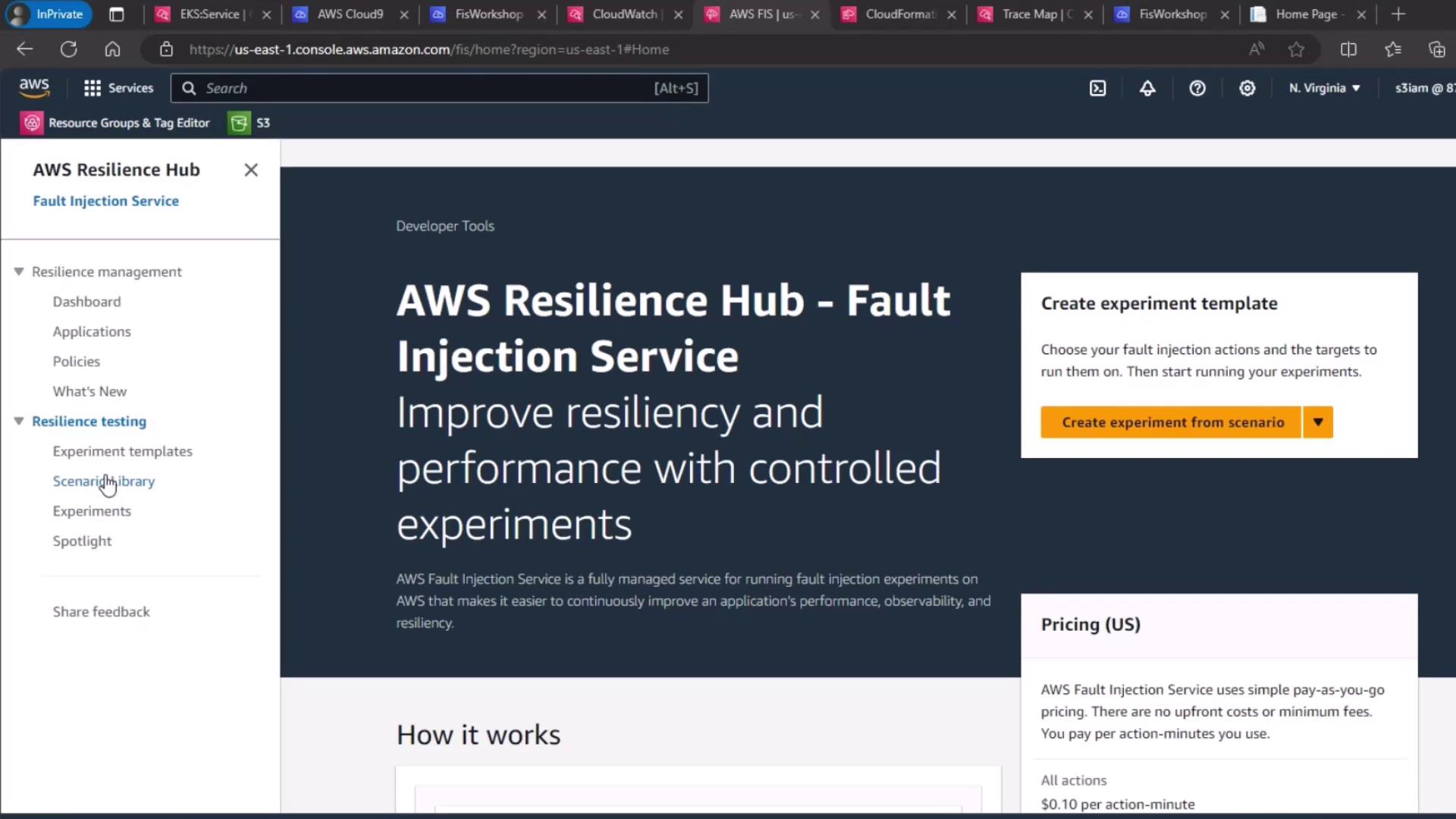
## 1. Navigate to Fault Injection Service

1. Open the AWS Management Console.
2. Go to **AWS Resilience Hub** → **Fault Injection Service**.
3. Click **Experiment templates** in the sidebar.
<Frame>
  ![The image shows the AWS Resilience Hub - Fault Injection Service webpage, which offers tools for improving resiliency and performance through controlled experiments. It includes options for creating experiment templates and provides pricing information.](https://kodekloud.com/kk-media/image/upload/v1752871882/notes-assets/images/Chaos-Engineering-Demo-Run-Experiment-Pod-Delete-on-EKS/aws-resilience-hub-fault-injection.jpg)
</Frame>

***

## 2. Select the EKS Pod Delete Scenario

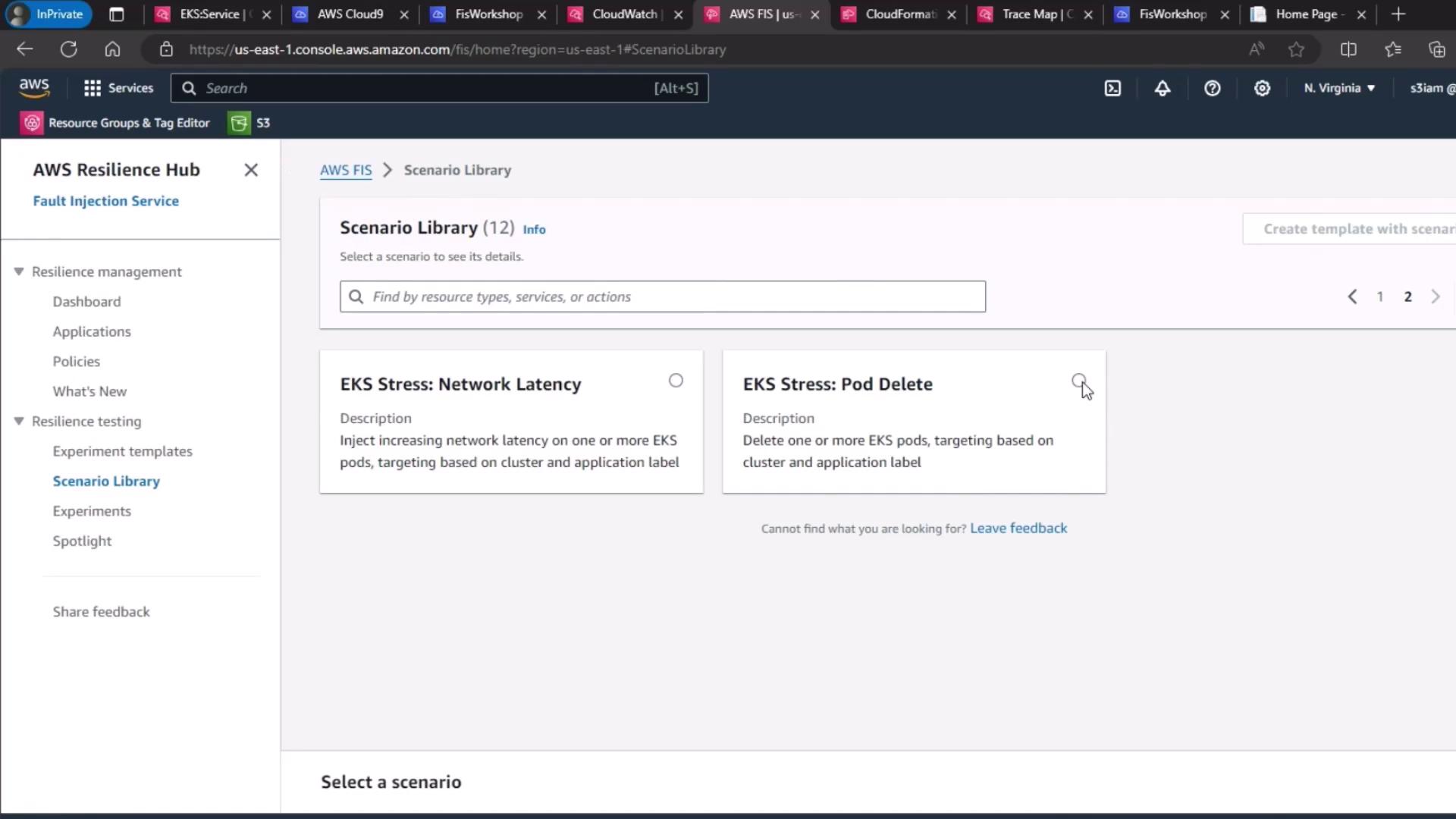
1. Under **Scenario library**, search for **EKS Stress: Pod Delete**.
2. Click **Create experiment template**.

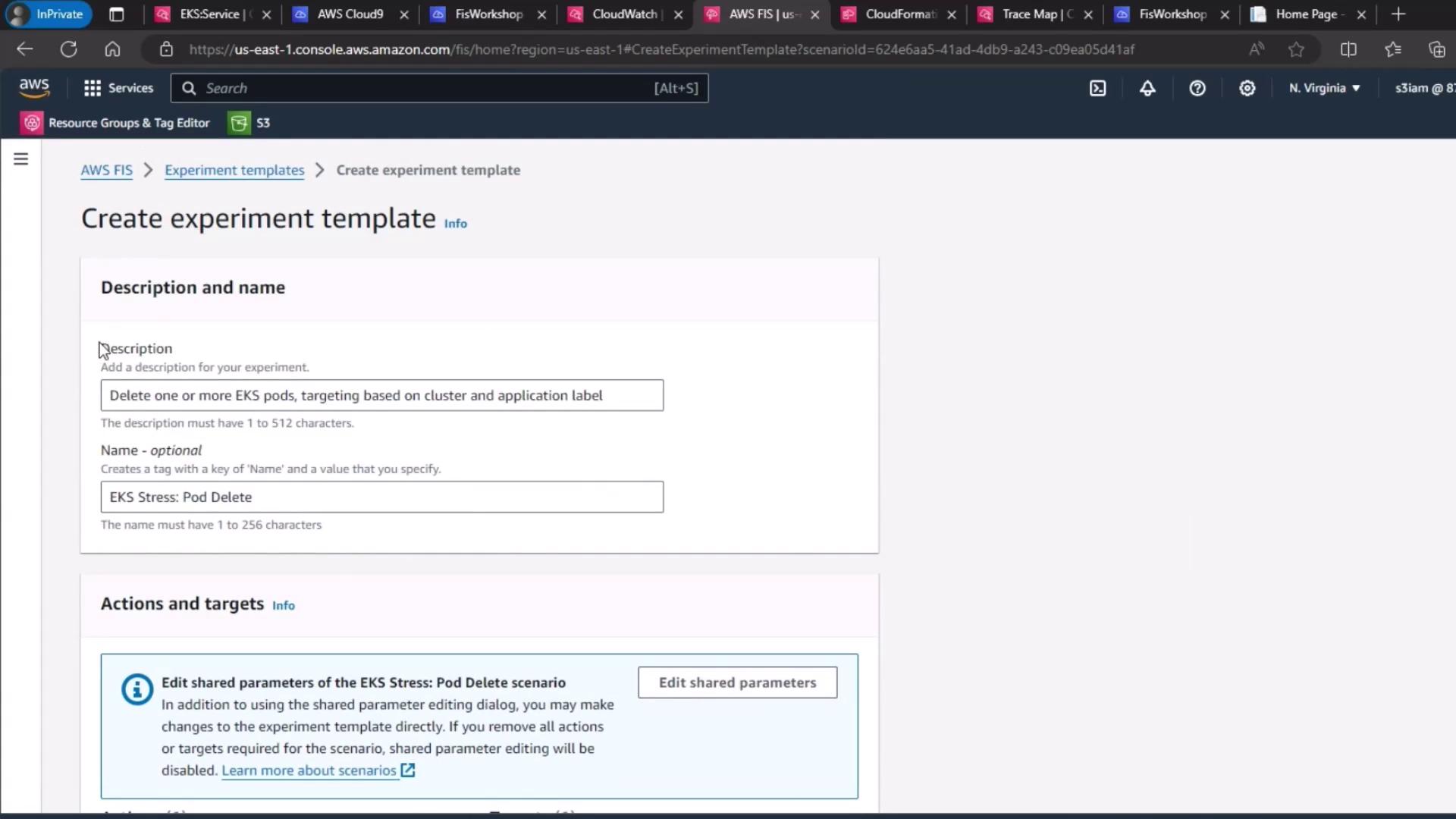
FIS immediately populates the template’s name, description, actions, and targets based on the built-in scenario.
<Frame>
  ![The image shows the AWS Fault Injection Service (FIS) Scenario Library interface, displaying options for "EKS Stress: Network Latency" and "EKS Stress: Pod Delete" scenarios.](https://kodekloud.com/kk-media/image/upload/v1752871883/notes-assets/images/Chaos-Engineering-Demo-Run-Experiment-Pod-Delete-on-EKS/aws-fis-scenario-library-eks-stress.jpg)
</Frame>

<Frame>
  ![The image shows an AWS console interface for creating an experiment template, specifically for deleting EKS pods based on cluster and application labels. It includes fields for description, name, and actions/targets.](https://kodekloud.com/kk-media/image/upload/v1752871884/notes-assets/images/Chaos-Engineering-Demo-Run-Experiment-Pod-Delete-on-EKS/aws-console-experiment-template-eks-pods.jpg)
</Frame>

***

## 3. Configure the Target

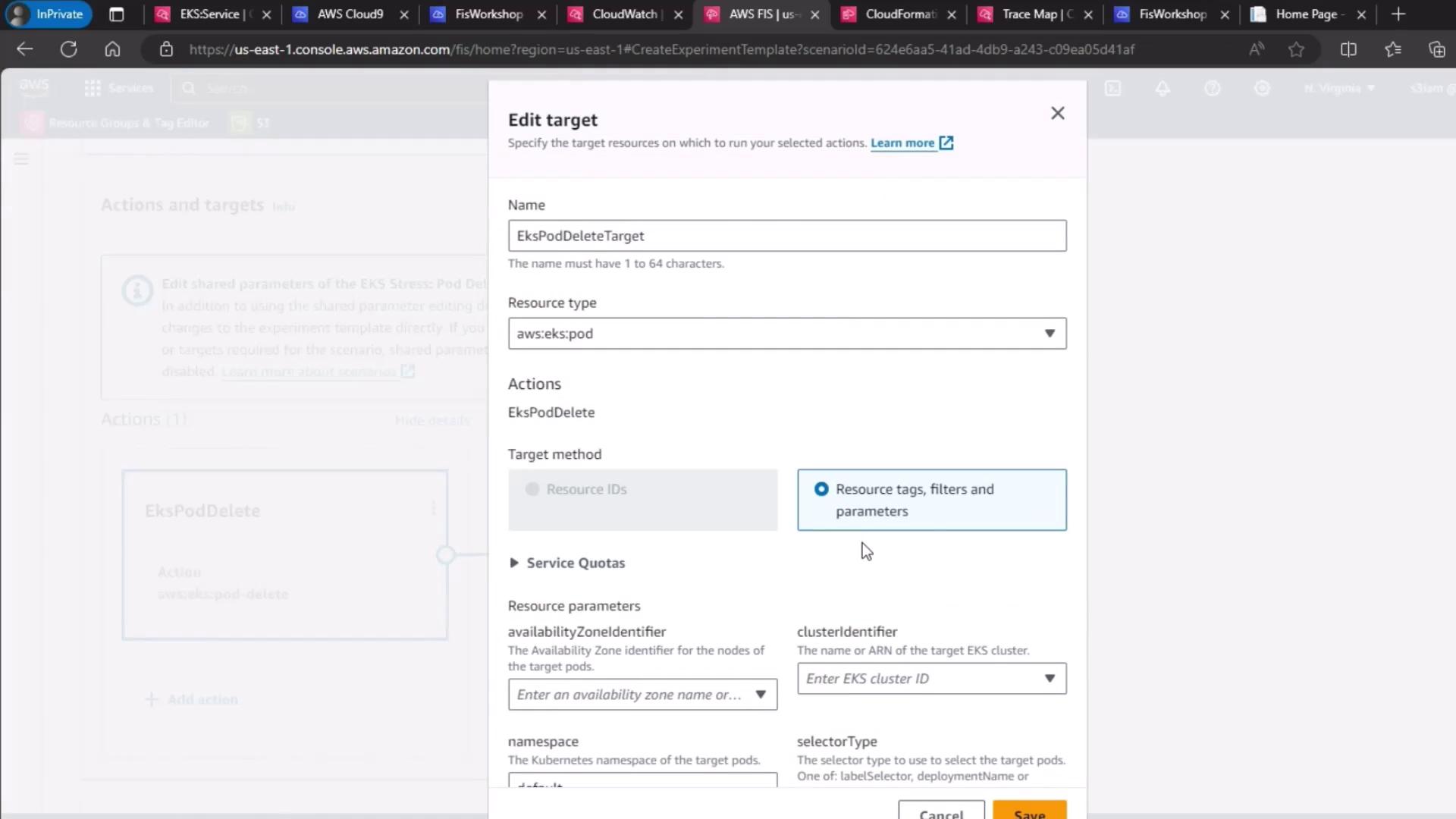
By default, the scenario target is set to delete pods in your cluster. Verify or update:

* **Resource type**: `eks:pod`
* **Cluster**: `pet-site`
* **Label selector**: `app=pet-site`

Ensure these match your Deployment labels so FIS deletes only the intended pods.
<Frame>
  ![The image shows an AWS console interface for editing a target in an EKS (Elastic Kubernetes Service) environment, with options to specify resource type, actions, and parameters.](https://kodekloud.com/kk-media/image/upload/v1752871886/notes-assets/images/Chaos-Engineering-Demo-Run-Experiment-Pod-Delete-on-EKS/aws-console-eks-target-editing.jpg)
</Frame>

Review the auto-generated actions and targets:
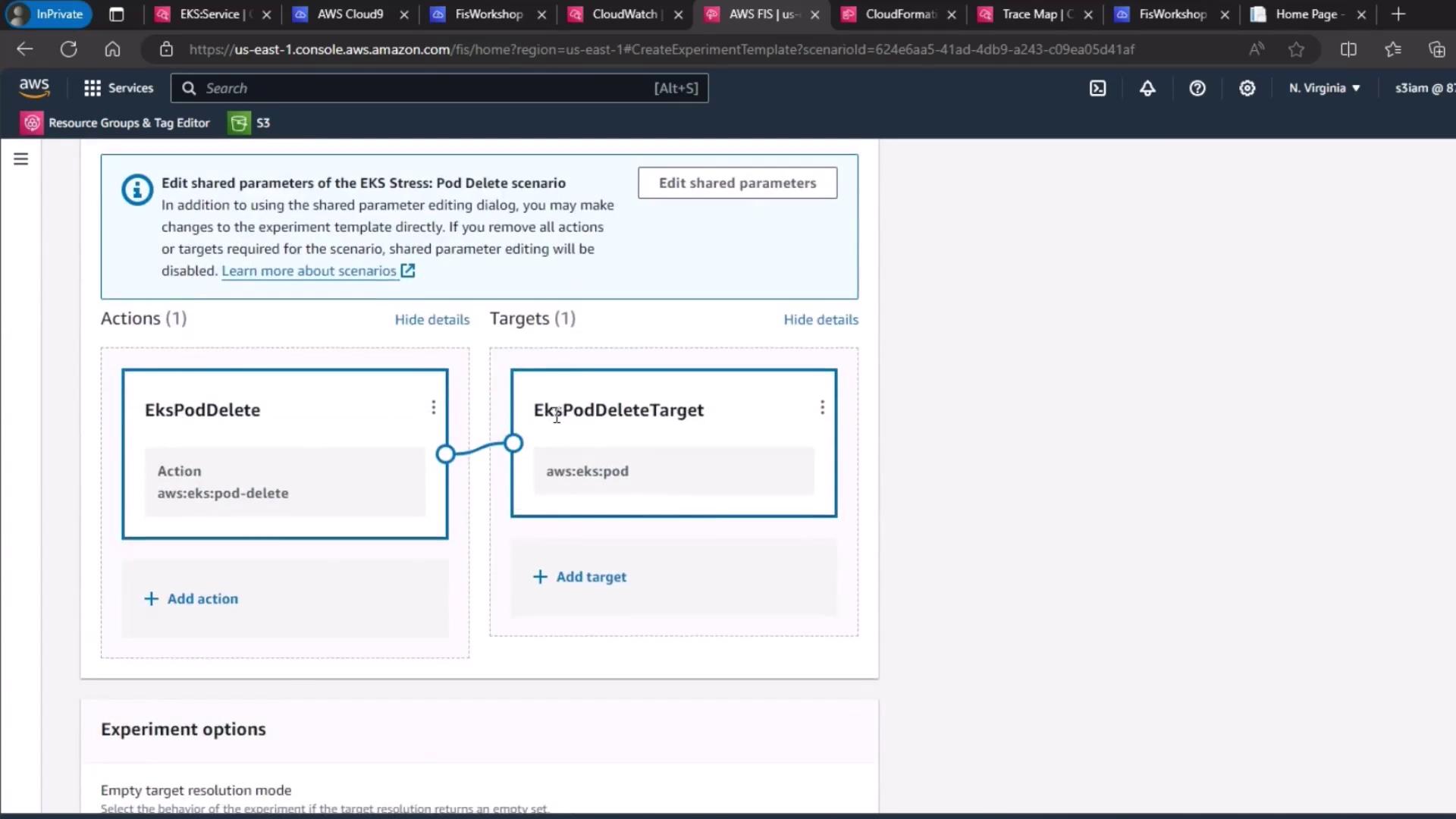
<Frame>
  ![The image shows an AWS console interface for creating an experiment template, specifically for an EKS pod delete scenario. It includes sections for actions and targets, with "EksPodDelete" and "EksPodDeleteTarget" specified.](https://kodekloud.com/kk-media/image/upload/v1752871887/notes-assets/images/Chaos-Engineering-Demo-Run-Experiment-Pod-Delete-on-EKS/aws-console-eks-pod-delete-template.jpg)
</Frame>

***

## 4. Select IAM Role and Logging

1. Under **Service role**, choose your FIS execution role (`EKS-FIS-Role`).
2. For **Experiment logging**, select the CloudWatch Logs group (`FISExperiments`) or create one on the fly.
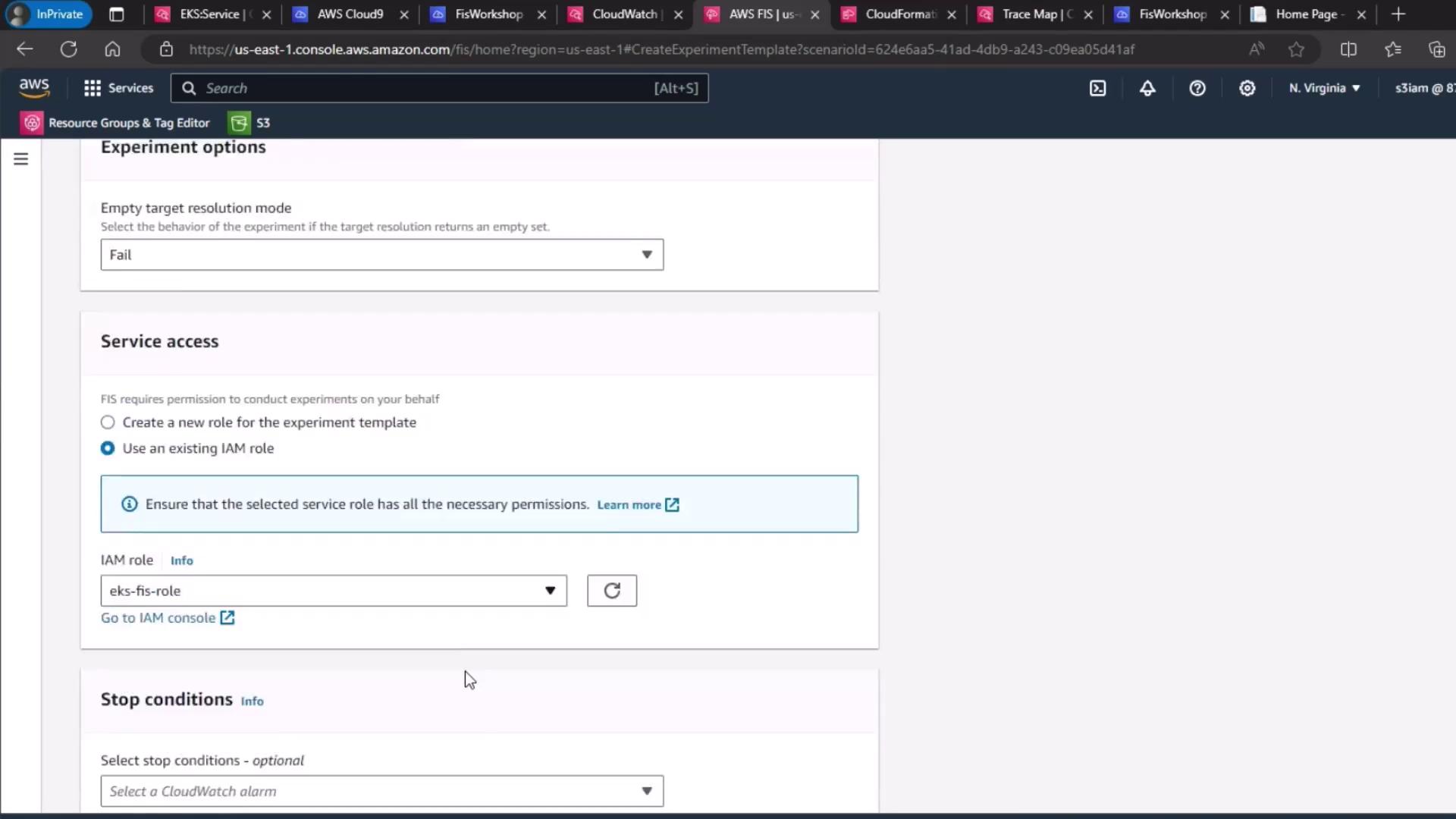
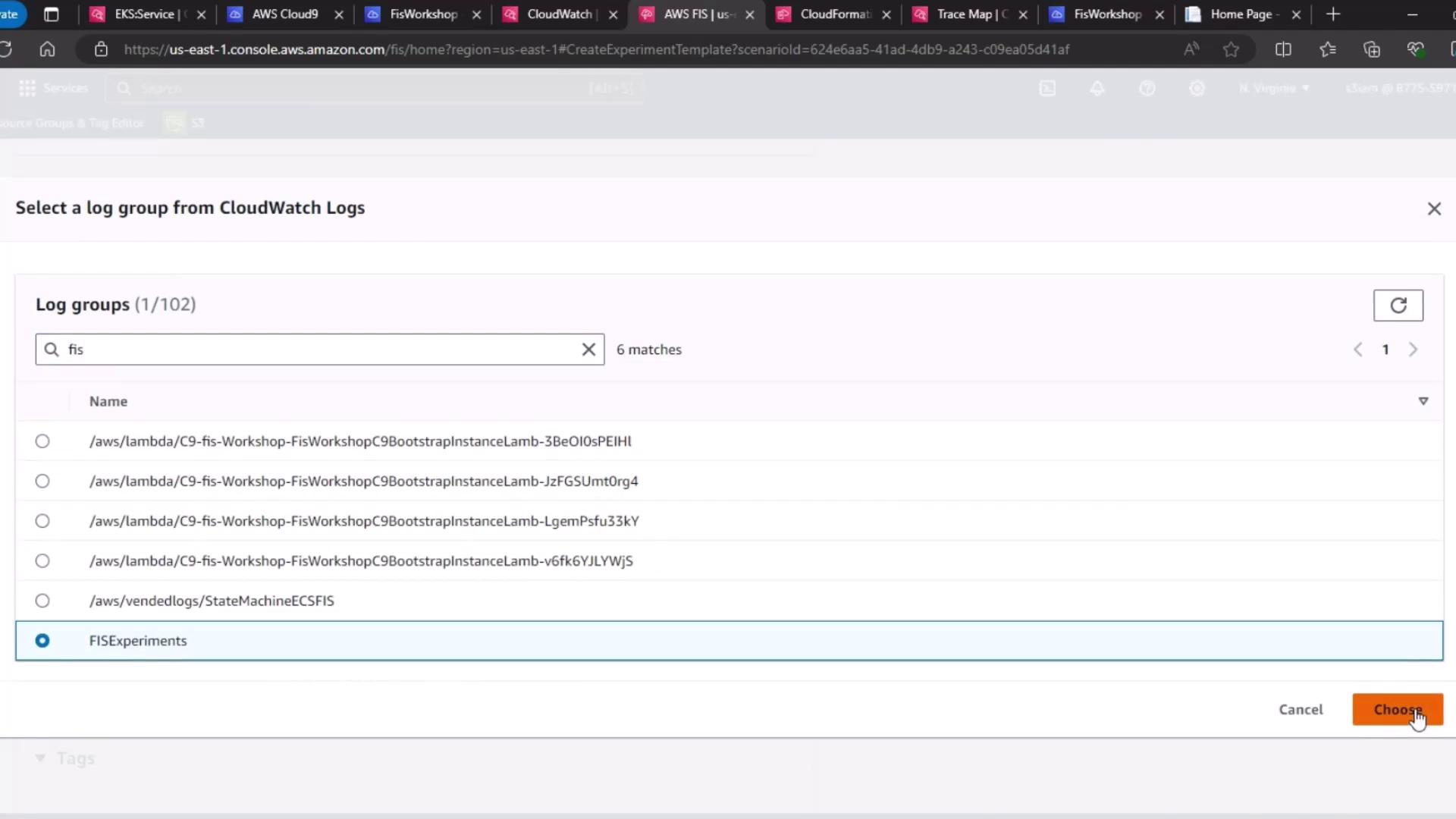
<Frame>
  ![The image shows a screenshot of the AWS console, specifically the section for creating an experiment template in AWS Fault Injection Simulator (FIS). It includes options for service access and IAM role selection.](https://kodekloud.com/kk-media/image/upload/v1752871888/notes-assets/images/Chaos-Engineering-Demo-Run-Experiment-Pod-Delete-on-EKS/aws-fault-injection-simulator-template-screenshot.jpg)
</Frame>

<Frame>
  ![The image shows an AWS CloudWatch interface where a user is selecting a log group from a list, with "FISExperiments" highlighted. The "Choose" button is visible at the bottom right.](https://kodekloud.com/kk-media/image/upload/v1752871889/notes-assets/images/Chaos-Engineering-Demo-Run-Experiment-Pod-Delete-on-EKS/aws-cloudwatch-log-group-selection.jpg)
</Frame>

***

## 5. Define the Hypothesis

> **Hypothesis:** When FIS deletes a `pet-site` pod, the Kubernetes control plane immediately spins up a replacement pod. Service latency and availability remain within SLAs.

Validate this by monitoring your Deployment or ReplicaSet’s desired vs. actual pod counts.
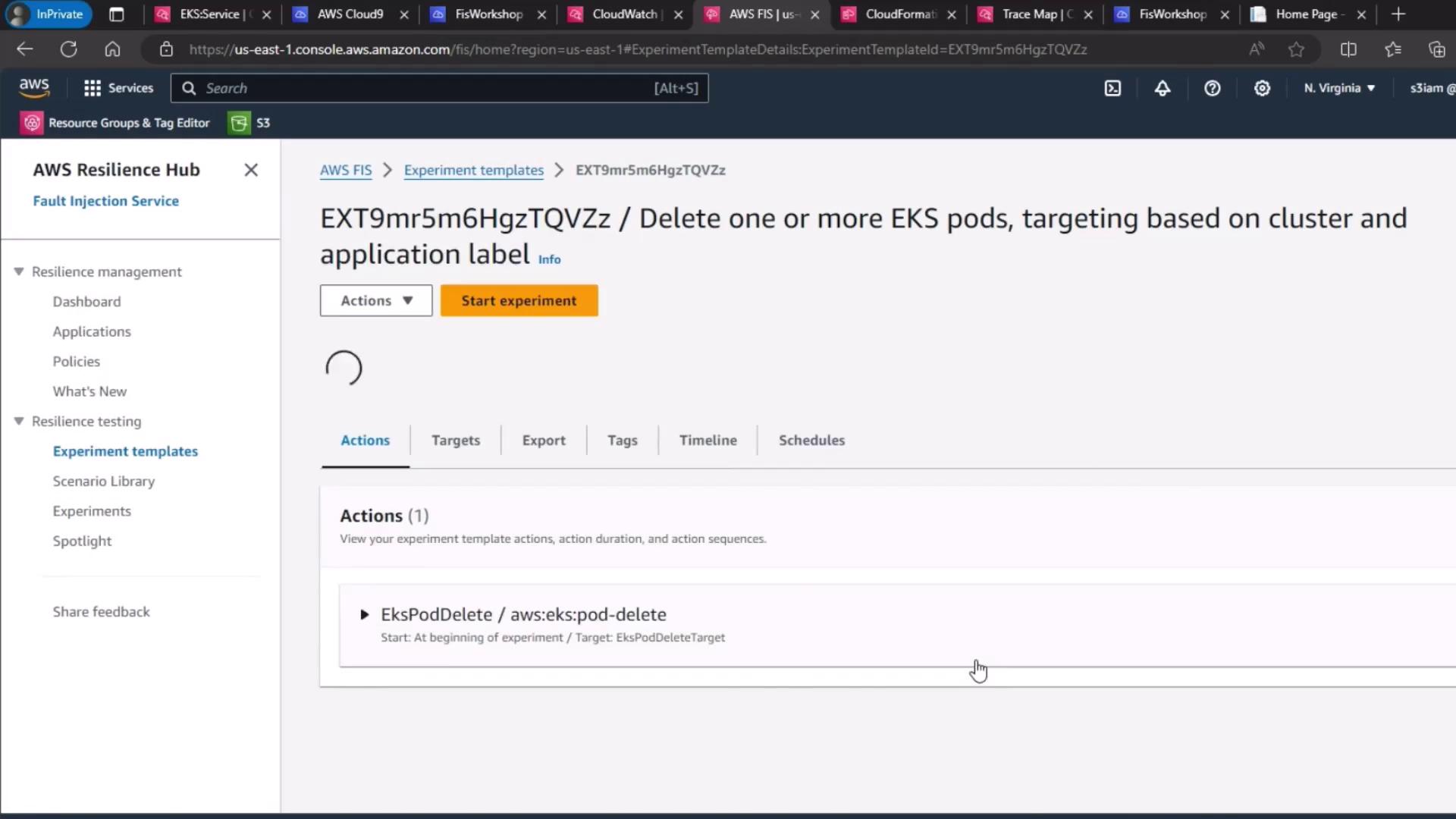
<Frame>
  ![The image shows an AWS Fault Injection Simulator (FIS) interface, specifically an experiment template for deleting one or more EKS pods based on cluster and application label.](https://kodekloud.com/kk-media/image/upload/v1752871890/notes-assets/images/Chaos-Engineering-Demo-Run-Experiment-Pod-Delete-on-EKS/aws-fis-experiment-template-eks-pods.jpg)
</Frame>

***

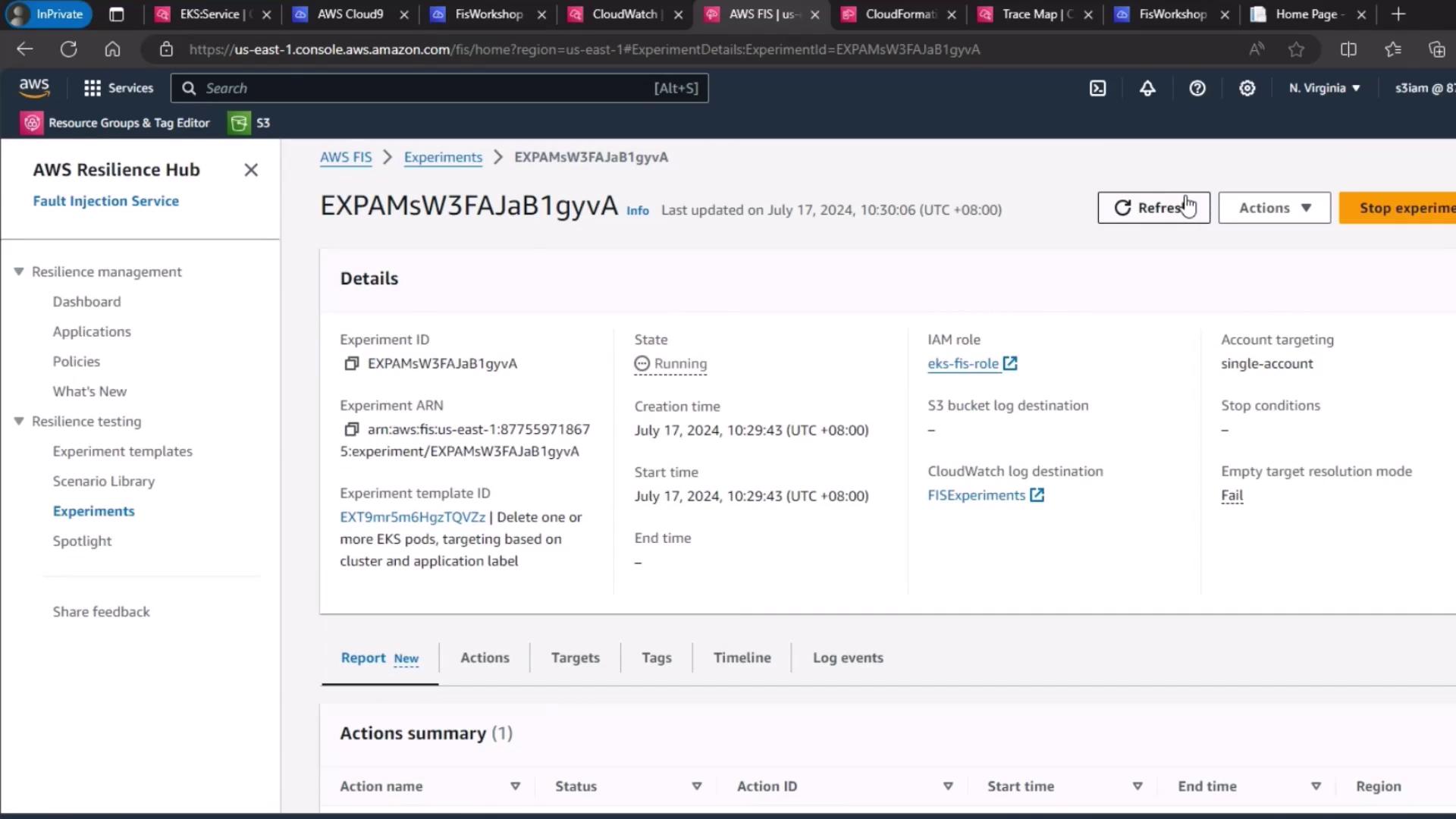
## 6. Start and Monitor the Experiment

1. Click **Start experiment**.
2. Watch the experiment lifecycle transition from **Initiating** → **Running** → **Completed**.
3. Use the FIS dashboard and CloudWatch metrics (e.g., `kube_deployment_status_replicas_available`) to confirm a new pod appears within seconds.
<Frame>
  ![The image shows an AWS Fault Injection Simulator (FIS) dashboard displaying details of a running experiment, including its ID, state, creation time, and associated resources.](https://kodekloud.com/kk-media/image/upload/v1752871892/notes-assets/images/Chaos-Engineering-Demo-Run-Experiment-Pod-Delete-on-EKS/aws-fault-injection-simulator-dashboard.jpg)
</Frame>

<Callout icon="triangle-alert" color="#FF6B6B">
  Run FIS experiments only in non-production or controlled environments. Always validate on staging clusters before production.
</Callout>

### AWS CLI Shortcut

After creating the template, you can start the experiment via CLI:

```bash theme={null}
aws fis start-experiment \
  --experiment-template-id <your-template-id>
```

***

## Links and References

* [AWS Fault Injection Simulator User Guide](https://docs.aws.amazon.com/fis/latest/userguide/)
* [Amazon EKS Documentation](https://docs.aws.amazon.com/eks/latest/userguide/)
* [Kubernetes ReplicaSet Concepts](https://kubernetes.io/docs/concepts/workloads/controllers/replicaset/)
* [CloudWatch Logs Developer Guide](https://docs.aws.amazon.com/AmazonCloudWatch/latest/logs/)

<CardGroup>
  <Card title="Watch Video" icon="video" cta="Learn more" href="https://learn.kodekloud.com/user/courses/chaos-engineering/module/67947884-154a-43e4-a0cf-1137e1264eee/lesson/e709ef78-c1de-430c-9a5e-31dd30aae656" />
</CardGroup>
