> ## Documentation Index
> Fetch the complete documentation index at: https://notes.kodekloud.com/llms.txt
> Use this file to discover all available pages before exploring further.
# Demo Database Design and Migrations
> Migrating a MariaDB contacts table into a single-file SQLite database using a Python script with schema mapping, safe parameterized imports, auditing SQL artifacts, and verification.
This lesson demonstrates migrating a small MariaDB database into a single-file SQLite database. The goal is to read schema and data from a local MariaDB instance and produce a SQLite file containing the same records and an approximation of the schema — suitable for low-traffic or archival databases where the operational overhead of running MariaDB is unnecessary.
We use a compact, iterative workflow: start with a concise prompt to generate an approach, then expand to a reproducible Python script when the quick approach is brittle.
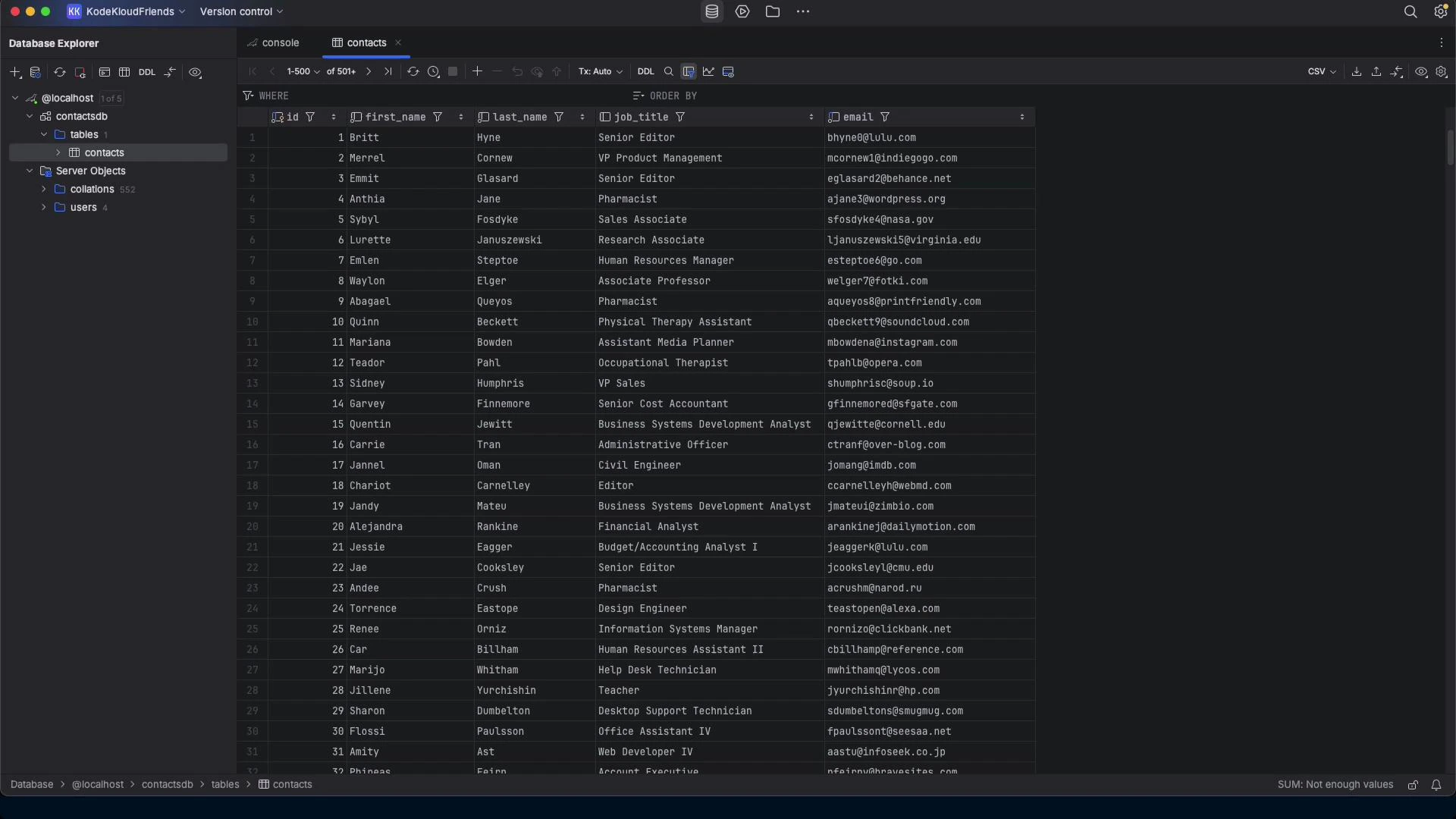 ## Scenario
* Source: local MariaDB server with a contacts table (id, first\_name, last\_name, job\_title, email).
* Target: a single SQLite database file (contacts.db) containing the same rows and a mapped schema.
* Motivation: reduce operational complexity for small/low-traffic databases by moving to SQLite.
Primary objectives:
* Detect schema and map types with sensible defaults.
* Export rows safely and import into SQLite using parameterized inserts.
* Produce .sql artifacts for auditing and replay.
* Verify migration (row counts and spot checks).
## Prompt‑first workflow
1. Try a concise instruction and let the model propose a plan.
2. If that plan is brittle or incomplete, request a production-quality script (Python) implementing:
* Schema discovery (INFORMATION\_SCHEMA),
* Type affinity mapping,
* Safe data export/import with parameterized queries,
* Optional CLI args and logging,
* Simple verification (row counts),
* Optional output .sql files for auditing.
Example concise prompt used:
```text theme={null}
I want to migrate my database from a local MariaDB server to a SQLite database and have the data moved from the MariaDB server to the SQLite database.
```
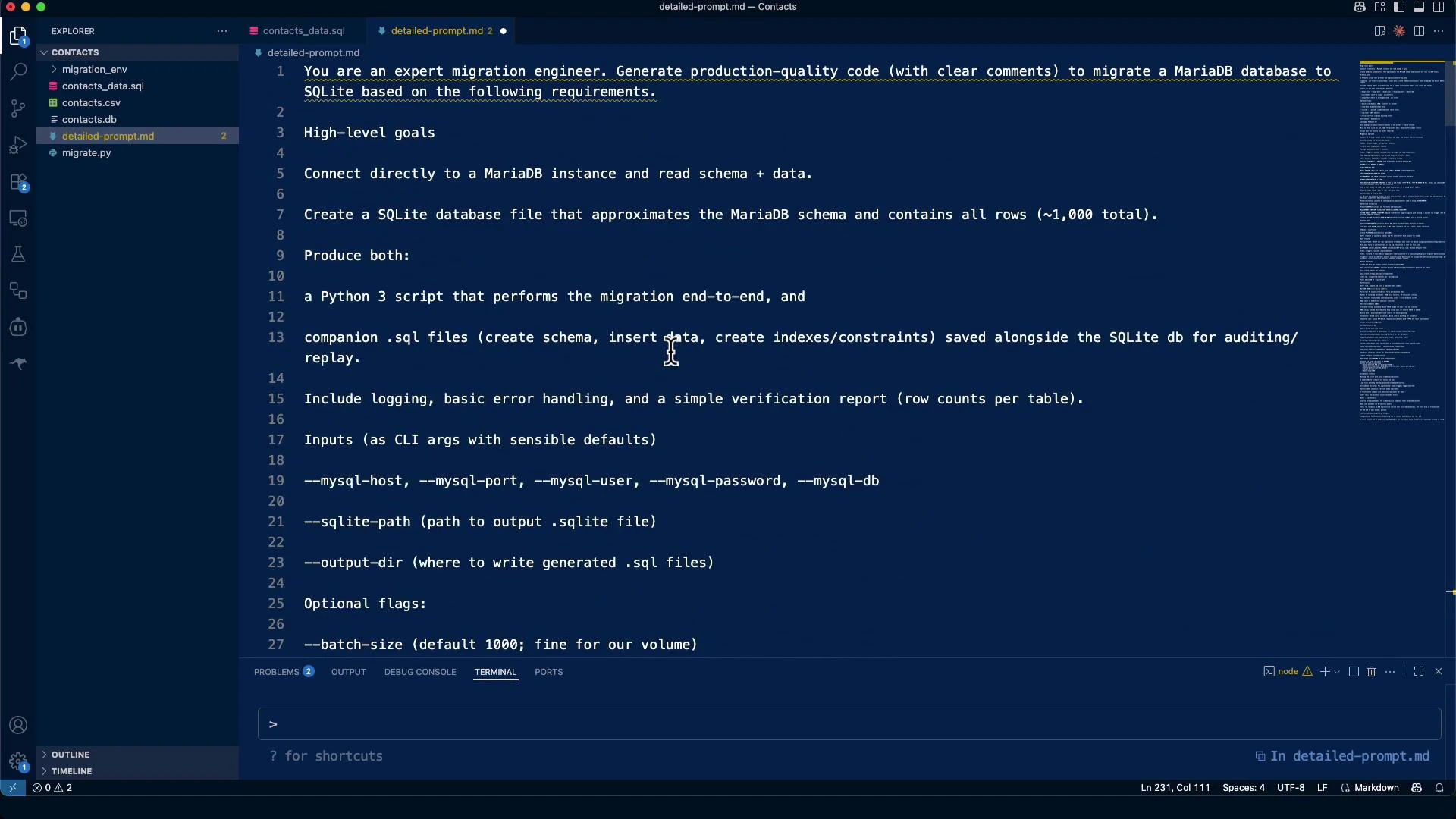
If you prefer a prescriptive, production-ready specification, the later detailed prompt included environment, language, CLI args, and migration steps.
## Example detailed requirements (used to generate the final script)
* Environment & dependencies:
* Language: Python 3.10+
* Connectors: mysql-connector-python (or pymysql) + stdlib sqlite3
* Optional: click (CLI), tqdm (progress), tenacity (retries)
* Script requirements:
* Run locally; accept connection via CLI args or environment variables
* Detect server version and charset
* Discover schema: tables, columns, nullability, defaults
* Primary keys/unique keys/indexes; document foreign keys, views, triggers
* Export data safely and import into SQLite with parameterized queries
* Emit .sql artifacts for auditing/replay
* CLI args (examples):
\--mysql-host, --mysql-port, --mysql-user, --mysql-password, --mysql-db
\--sqlite-path, --output-dir, --force-overwrite
## MariaDB → SQLite: Type mapping (approximate)
| MariaDB types | Suggested SQLite affinity / representation |
| --------------------------------------------- | ---------------------------------------------------- |
| INT / BIGINT / MEDIUMINT / SMALLINT / TINYINT | INTEGER |
| TINYINT(1) used as boolean | INTEGER (0/1) |
| DECIMAL(p,s), NUMERIC | NUMERIC |
| FLOAT / DOUBLE | REAL |
| BIT | INTEGER (0/1) or BLOB if wide |
| CHAR / VARCHAR / TEXT / ENUM / SET | TEXT |
| BINARY / VARBINARY / BLOB | BLOB |
| DATE / DATETIME / TIMESTAMP / TIME / YEAR | TEXT (ISO formats: YYYY-MM-DD / YYYY-MM-DD HH:MM:SS) |
Note: SQLite uses type affinity, so these are pragmatic mappings rather than exact conversions. Document and review columns with special constraints (e.g., unsigned integers, auto-increment semantics).
## Practical run — repository inspection and initial interaction
The model inspected repository files (contacts CSV, contacts\_data.sql, migration.md) and asked for connection info. Never share production credentials in untrusted environments — use a local test account or pass secrets at runtime.
Do not share production credentials or secrets in an environment you do not control. Use local test credentials or create scripts that accept credentials at runtime (environment variables or interactive input) rather than embedding secrets in chat history or files.
Sample connection details used interactively for testing:
```text theme={null}
Host: localhost
Port: 3306
Database name: contactsdb
Username: jeremy
Password: password123
Table name: contacts
```
## Initial inspection & mysqldump
Quick inspection commands the model proposed:
Inspect table schema:
```bash theme={null}
mysql -h localhost -u jeremy -ppassword123 contactsdb -e "DESCRIBE contacts;"
```
Export schema + data using mysqldump for auditing / replay:
```bash theme={null}
mysqldump -h localhost -u jeremy -ppassword123 --no-create-db --single-transaction contactsdb contacts > contacts_data.sql
```
Excerpt from contacts\_data.sql (example):
```sql theme={null}
DROP TABLE IF EXISTS `contacts`;
CREATE TABLE `contacts` (
`id` int(11) NOT NULL,
`first_name` varchar(50) NOT NULL,
`last_name` varchar(50) NOT NULL,
`job_title` varchar(100) DEFAULT NULL,
`email` varchar(255) NOT NULL,
PRIMARY KEY (`id`),
UNIQUE KEY `uq_email` (`email`)
) ENGINE=InnoDB DEFAULT CHARSET=utf8mb4 COLLATE=utf8mb4_unicode_ci;
...
INSERT INTO `contacts` VALUES
(1,'Britt','Hyne','Senior Editor','bhyne@lulu.com'),
(2,'Merrel','Cornew','VP Product Management','mcornew1@indiegogo.com'),
...
(1000,'Enos','Dalliston','Nurse Practitioner','edallistonrr@mozilla.com');
```
## Why quick shell-based piping is brittle
A naive pipeline that reads mysql tab-separated output and pipes it into sqlite3 (with sed and shell parsing) often fails on real data: names with apostrophes, embedded tabs, newline characters in text fields, or other quoting issues break the parsing and produce invalid SQL.
Example brittle approach (DO NOT use in production):
```bash theme={null}
mysql -h localhost -u jeremy -ppassword123 contactsdb -e "SELECT * FROM contacts;" \
| sed 's/\t/|/g' | tail -n +2 \
| while IFS='|' read -r id first_name last_name job_title email; do
sqlite3 contacts.db "INSERT INTO contacts (id, first_name, last_name, job_title, email) VALUES ('$id', '$first_name', '$last_name', '$job_title', '$email');"
done
```
Common failure: apostrophes in names (e.g., O'Connolly) or embedded separators break quoting and allow SQL injection.
## Safer approach: Python migration script with parameterized queries
A robust approach uses a Python script that:
* Reads rows via a MariaDB client (mysql-connector-python or pymysql),
* Inserts rows into SQLite using parameterized queries to avoid quoting/injection issues,
* Creates a minimal SQLite schema with mapped types,
* Optionally writes .sql files for auditing.
Concise example of migrate.py used for the contacts table:
```python theme={null}
#!/usr/bin/env python3
"""
migrate.py - simple migration of the 'contacts' table from MariaDB to SQLite.
Usage: configure connection details below or adapt to accept CLI args / env vars.
"""
import sqlite3
import mysql.connector
import sys
# --- Configuration (replace or adapt to parse CLI args) ---
MYSQL_CONFIG = {
"host": "localhost",
"port": 3306,
"user": "jeremy",
"password": "password123",
"database": "contactsdb",
}
SQLITE_PATH = "contacts.db"
TABLE_NAME = "contacts"
def create_sqlite_table(conn):
# Approximate schema mapping for the known contacts table
conn.execute("""
CREATE TABLE IF NOT EXISTS contacts (
id INTEGER PRIMARY KEY,
first_name TEXT NOT NULL,
last_name TEXT NOT NULL,
job_title TEXT,
email TEXT NOT NULL UNIQUE
);
""")
conn.commit()
def migrate():
# Connect to MariaDB
mysql_conn = mysql.connector.connect(**MYSQL_CONFIG)
mysql_cursor = mysql_conn.cursor(dictionary=True)
# Connect to SQLite
sqlite_conn = sqlite3.connect(SQLITE_PATH)
create_sqlite_table(sqlite_conn)
sqlite_cur = sqlite_conn.cursor()
# Read rows from MariaDB and insert into SQLite using parameterized queries
mysql_cursor.execute(f"SELECT id, first_name, last_name, job_title, email FROM {TABLE_NAME}")
rows = mysql_cursor.fetchall()
insert_sql = "INSERT OR REPLACE INTO contacts (id, first_name, last_name, job_title, email) VALUES (?, ?, ?, ?, ?)"
count = 0
for r in rows:
sqlite_cur.execute(insert_sql, (r['id'], r['first_name'], r['last_name'], r.get('job_title'), r['email']))
count += 1
sqlite_conn.commit()
mysql_cursor.close()
mysql_conn.close()
sqlite_conn.close()
print(f"Successfully migrated {count} records from MariaDB to SQLite")
if __name__ == "__main__":
try:
migrate()
except Exception as e:
print("Migration failed:", e, file=sys.stderr)
sys.exit(1)
```
Tips:
* Expand the script to discover schema programmatically (INFORMATION\_SCHEMA) if migrating multiple or unknown tables.
* Add CLI parsing (click/argparse) and optional logging for production use.
* Optionally write INSERT statements to .sql files for auditing or replay.
## Environment setup
Create and activate a virtual environment, then install the connector:
```bash theme={null}
python3 -m venv migration_env
source migration_env/bin/activate
pip install mysql-connector-python
```
Run the migration:
```bash theme={null}
source migration_env/bin/activate
python migrate.py
```
## Verification
Verify row counts and sample rows after migration.
Row count comparison:
```bash theme={null}
sqlite3 contacts.db "SELECT COUNT(*) as total_records FROM contacts;"
mysql -h localhost -u jeremy -ppassword123 contactsdb -e "SELECT COUNT(*) as total_records FROM contacts;"
# => total_records
# 1000
```
Sample rows from SQLite:
```bash theme={null}
sqlite3 contacts.db "SELECT * FROM contacts LIMIT 5;"
# Example output:
# 1|Britt|Hyne|Senior Editor|bhyne@lulu.com
# 2|Merrel|Cornew|VP Product Management|mcornew1@indiegogo.com
# 3|Emmit|Glasard|Senior Editor|eglasard2@behance.net
```
## Artifacts and repeatability
For repeatability and auditing, keep:
* The migration script (migrate.py),
* The mysqldump (contacts\_data.sql) or generated .sql insert files,
* The detailed prompt or runbook describing how the migration was performed.
These artifacts make the process auditable and allow re-running the migration or adapting it to other tables.
## Scenario
* Source: local MariaDB server with a contacts table (id, first\_name, last\_name, job\_title, email).
* Target: a single SQLite database file (contacts.db) containing the same rows and a mapped schema.
* Motivation: reduce operational complexity for small/low-traffic databases by moving to SQLite.
Primary objectives:
* Detect schema and map types with sensible defaults.
* Export rows safely and import into SQLite using parameterized inserts.
* Produce .sql artifacts for auditing and replay.
* Verify migration (row counts and spot checks).
## Prompt‑first workflow
1. Try a concise instruction and let the model propose a plan.
2. If that plan is brittle or incomplete, request a production-quality script (Python) implementing:
* Schema discovery (INFORMATION\_SCHEMA),
* Type affinity mapping,
* Safe data export/import with parameterized queries,
* Optional CLI args and logging,
* Simple verification (row counts),
* Optional output .sql files for auditing.
Example concise prompt used:
```text theme={null}
I want to migrate my database from a local MariaDB server to a SQLite database and have the data moved from the MariaDB server to the SQLite database.
```
If you prefer a prescriptive, production-ready specification, the later detailed prompt included environment, language, CLI args, and migration steps.
## Example detailed requirements (used to generate the final script)
* Environment & dependencies:
* Language: Python 3.10+
* Connectors: mysql-connector-python (or pymysql) + stdlib sqlite3
* Optional: click (CLI), tqdm (progress), tenacity (retries)
* Script requirements:
* Run locally; accept connection via CLI args or environment variables
* Detect server version and charset
* Discover schema: tables, columns, nullability, defaults
* Primary keys/unique keys/indexes; document foreign keys, views, triggers
* Export data safely and import into SQLite with parameterized queries
* Emit .sql artifacts for auditing/replay
* CLI args (examples):
\--mysql-host, --mysql-port, --mysql-user, --mysql-password, --mysql-db
\--sqlite-path, --output-dir, --force-overwrite
## MariaDB → SQLite: Type mapping (approximate)
| MariaDB types | Suggested SQLite affinity / representation |
| --------------------------------------------- | ---------------------------------------------------- |
| INT / BIGINT / MEDIUMINT / SMALLINT / TINYINT | INTEGER |
| TINYINT(1) used as boolean | INTEGER (0/1) |
| DECIMAL(p,s), NUMERIC | NUMERIC |
| FLOAT / DOUBLE | REAL |
| BIT | INTEGER (0/1) or BLOB if wide |
| CHAR / VARCHAR / TEXT / ENUM / SET | TEXT |
| BINARY / VARBINARY / BLOB | BLOB |
| DATE / DATETIME / TIMESTAMP / TIME / YEAR | TEXT (ISO formats: YYYY-MM-DD / YYYY-MM-DD HH:MM:SS) |
Note: SQLite uses type affinity, so these are pragmatic mappings rather than exact conversions. Document and review columns with special constraints (e.g., unsigned integers, auto-increment semantics).
## Practical run — repository inspection and initial interaction
The model inspected repository files (contacts CSV, contacts\_data.sql, migration.md) and asked for connection info. Never share production credentials in untrusted environments — use a local test account or pass secrets at runtime.
Do not share production credentials or secrets in an environment you do not control. Use local test credentials or create scripts that accept credentials at runtime (environment variables or interactive input) rather than embedding secrets in chat history or files.
Sample connection details used interactively for testing:
```text theme={null}
Host: localhost
Port: 3306
Database name: contactsdb
Username: jeremy
Password: password123
Table name: contacts
```
## Initial inspection & mysqldump
Quick inspection commands the model proposed:
Inspect table schema:
```bash theme={null}
mysql -h localhost -u jeremy -ppassword123 contactsdb -e "DESCRIBE contacts;"
```
Export schema + data using mysqldump for auditing / replay:
```bash theme={null}
mysqldump -h localhost -u jeremy -ppassword123 --no-create-db --single-transaction contactsdb contacts > contacts_data.sql
```
Excerpt from contacts\_data.sql (example):
```sql theme={null}
DROP TABLE IF EXISTS `contacts`;
CREATE TABLE `contacts` (
`id` int(11) NOT NULL,
`first_name` varchar(50) NOT NULL,
`last_name` varchar(50) NOT NULL,
`job_title` varchar(100) DEFAULT NULL,
`email` varchar(255) NOT NULL,
PRIMARY KEY (`id`),
UNIQUE KEY `uq_email` (`email`)
) ENGINE=InnoDB DEFAULT CHARSET=utf8mb4 COLLATE=utf8mb4_unicode_ci;
...
INSERT INTO `contacts` VALUES
(1,'Britt','Hyne','Senior Editor','bhyne@lulu.com'),
(2,'Merrel','Cornew','VP Product Management','mcornew1@indiegogo.com'),
...
(1000,'Enos','Dalliston','Nurse Practitioner','edallistonrr@mozilla.com');
```
## Why quick shell-based piping is brittle
A naive pipeline that reads mysql tab-separated output and pipes it into sqlite3 (with sed and shell parsing) often fails on real data: names with apostrophes, embedded tabs, newline characters in text fields, or other quoting issues break the parsing and produce invalid SQL.
Example brittle approach (DO NOT use in production):
```bash theme={null}
mysql -h localhost -u jeremy -ppassword123 contactsdb -e "SELECT * FROM contacts;" \
| sed 's/\t/|/g' | tail -n +2 \
| while IFS='|' read -r id first_name last_name job_title email; do
sqlite3 contacts.db "INSERT INTO contacts (id, first_name, last_name, job_title, email) VALUES ('$id', '$first_name', '$last_name', '$job_title', '$email');"
done
```
Common failure: apostrophes in names (e.g., O'Connolly) or embedded separators break quoting and allow SQL injection.
## Safer approach: Python migration script with parameterized queries
A robust approach uses a Python script that:
* Reads rows via a MariaDB client (mysql-connector-python or pymysql),
* Inserts rows into SQLite using parameterized queries to avoid quoting/injection issues,
* Creates a minimal SQLite schema with mapped types,
* Optionally writes .sql files for auditing.
Concise example of migrate.py used for the contacts table:
```python theme={null}
#!/usr/bin/env python3
"""
migrate.py - simple migration of the 'contacts' table from MariaDB to SQLite.
Usage: configure connection details below or adapt to accept CLI args / env vars.
"""
import sqlite3
import mysql.connector
import sys
# --- Configuration (replace or adapt to parse CLI args) ---
MYSQL_CONFIG = {
"host": "localhost",
"port": 3306,
"user": "jeremy",
"password": "password123",
"database": "contactsdb",
}
SQLITE_PATH = "contacts.db"
TABLE_NAME = "contacts"
def create_sqlite_table(conn):
# Approximate schema mapping for the known contacts table
conn.execute("""
CREATE TABLE IF NOT EXISTS contacts (
id INTEGER PRIMARY KEY,
first_name TEXT NOT NULL,
last_name TEXT NOT NULL,
job_title TEXT,
email TEXT NOT NULL UNIQUE
);
""")
conn.commit()
def migrate():
# Connect to MariaDB
mysql_conn = mysql.connector.connect(**MYSQL_CONFIG)
mysql_cursor = mysql_conn.cursor(dictionary=True)
# Connect to SQLite
sqlite_conn = sqlite3.connect(SQLITE_PATH)
create_sqlite_table(sqlite_conn)
sqlite_cur = sqlite_conn.cursor()
# Read rows from MariaDB and insert into SQLite using parameterized queries
mysql_cursor.execute(f"SELECT id, first_name, last_name, job_title, email FROM {TABLE_NAME}")
rows = mysql_cursor.fetchall()
insert_sql = "INSERT OR REPLACE INTO contacts (id, first_name, last_name, job_title, email) VALUES (?, ?, ?, ?, ?)"
count = 0
for r in rows:
sqlite_cur.execute(insert_sql, (r['id'], r['first_name'], r['last_name'], r.get('job_title'), r['email']))
count += 1
sqlite_conn.commit()
mysql_cursor.close()
mysql_conn.close()
sqlite_conn.close()
print(f"Successfully migrated {count} records from MariaDB to SQLite")
if __name__ == "__main__":
try:
migrate()
except Exception as e:
print("Migration failed:", e, file=sys.stderr)
sys.exit(1)
```
Tips:
* Expand the script to discover schema programmatically (INFORMATION\_SCHEMA) if migrating multiple or unknown tables.
* Add CLI parsing (click/argparse) and optional logging for production use.
* Optionally write INSERT statements to .sql files for auditing or replay.
## Environment setup
Create and activate a virtual environment, then install the connector:
```bash theme={null}
python3 -m venv migration_env
source migration_env/bin/activate
pip install mysql-connector-python
```
Run the migration:
```bash theme={null}
source migration_env/bin/activate
python migrate.py
```
## Verification
Verify row counts and sample rows after migration.
Row count comparison:
```bash theme={null}
sqlite3 contacts.db "SELECT COUNT(*) as total_records FROM contacts;"
mysql -h localhost -u jeremy -ppassword123 contactsdb -e "SELECT COUNT(*) as total_records FROM contacts;"
# => total_records
# 1000
```
Sample rows from SQLite:
```bash theme={null}
sqlite3 contacts.db "SELECT * FROM contacts LIMIT 5;"
# Example output:
# 1|Britt|Hyne|Senior Editor|bhyne@lulu.com
# 2|Merrel|Cornew|VP Product Management|mcornew1@indiegogo.com
# 3|Emmit|Glasard|Senior Editor|eglasard2@behance.net
```
## Artifacts and repeatability
For repeatability and auditing, keep:
* The migration script (migrate.py),
* The mysqldump (contacts\_data.sql) or generated .sql insert files,
* The detailed prompt or runbook describing how the migration was performed.
These artifacts make the process auditable and allow re-running the migration or adapting it to other tables.
 ## Inspect the resulting SQLite database
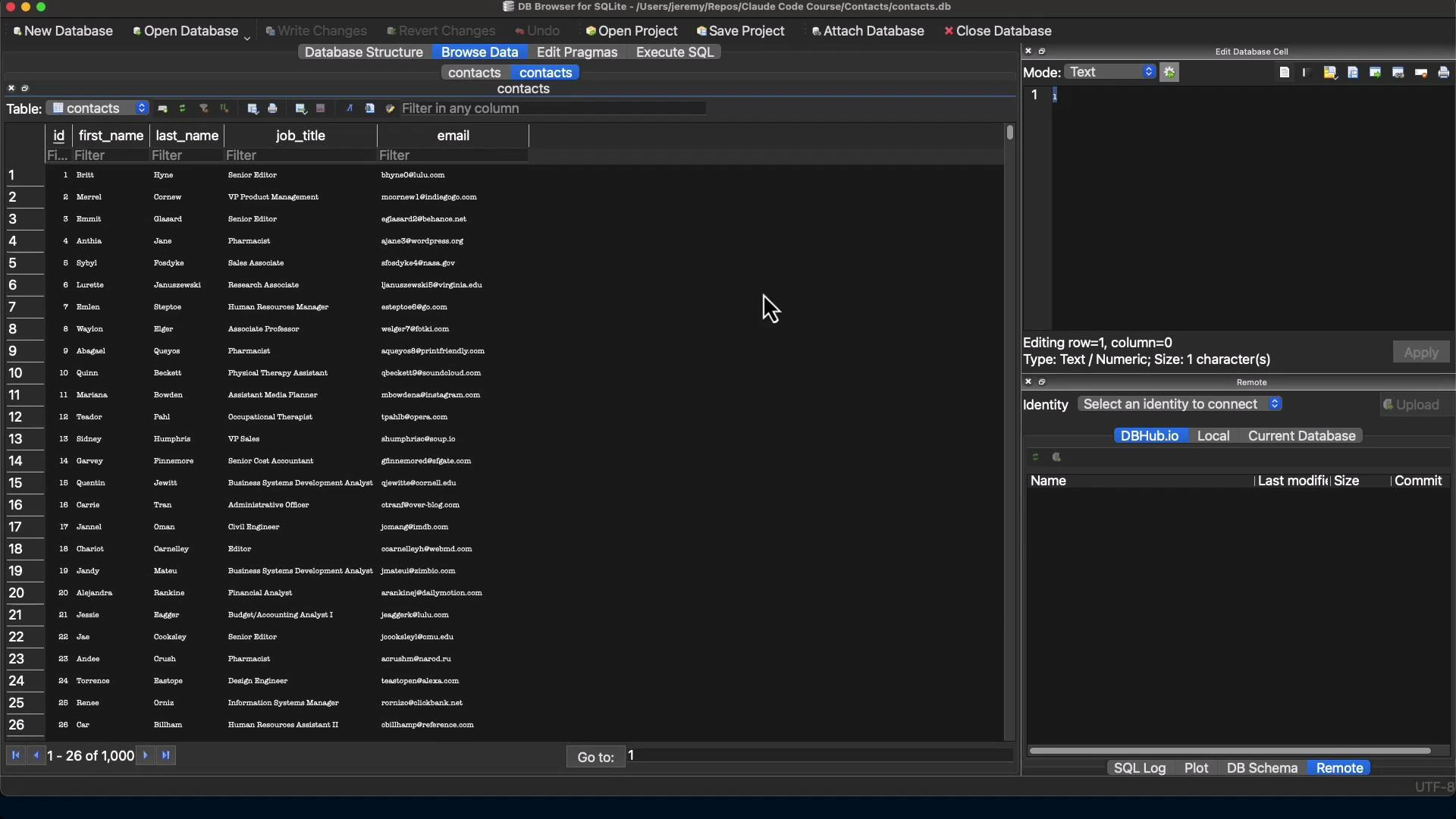
Open contacts.db in a GUI such as DB Browser for SQLite to inspect schema, indexes, and rows.
## Inspect the resulting SQLite database
Open contacts.db in a GUI such as DB Browser for SQLite to inspect schema, indexes, and rows.
 ## Summary and practical notes
* For simple tables, a compact Python script using mysql-connector-python + sqlite3 is reliable and avoids quoting pitfalls.
* For complex schemas (foreign keys, triggers, stored routines), plan for manual mapping or schema redesign; SQLite lacks some MariaDB features.
* Always test migrations in a sandbox and verify row counts and spot-check data.
* Prefer parameterized queries to avoid quoting and injection issues.
* Keep a dump (.sql) or TSV export for auditing and replay.
This migration converted 1,000 contacts from MariaDB (contactsdb.contacts) into a single-file SQLite database (contacts.db) and produced a reproducible migration script suitable for reruns or adaptation.
## Links and references
* [MariaDB Documentation](https://mariadb.org/)
* [SQLite Documentation](https://www.sqlite.org/docs.html)
* [DB Browser for SQLite](https://sqlitebrowser.org/)
* [Kubernetes Documentation — for related infra topics](https://kubernetes.io/docs/)
* [Python mysql-connector-python on PyPI](https://pypi.org/project/mysql-connector-python/)
## Summary and practical notes
* For simple tables, a compact Python script using mysql-connector-python + sqlite3 is reliable and avoids quoting pitfalls.
* For complex schemas (foreign keys, triggers, stored routines), plan for manual mapping or schema redesign; SQLite lacks some MariaDB features.
* Always test migrations in a sandbox and verify row counts and spot-check data.
* Prefer parameterized queries to avoid quoting and injection issues.
* Keep a dump (.sql) or TSV export for auditing and replay.
This migration converted 1,000 contacts from MariaDB (contactsdb.contacts) into a single-file SQLite database (contacts.db) and produced a reproducible migration script suitable for reruns or adaptation.
## Links and references
* [MariaDB Documentation](https://mariadb.org/)
* [SQLite Documentation](https://www.sqlite.org/docs.html)
* [DB Browser for SQLite](https://sqlitebrowser.org/)
* [Kubernetes Documentation — for related infra topics](https://kubernetes.io/docs/)
* [Python mysql-connector-python on PyPI](https://pypi.org/project/mysql-connector-python/)