> ## Documentation Index
> Fetch the complete documentation index at: https://notes.kodekloud.com/llms.txt
> Use this file to discover all available pages before exploring further.
# Demo Autonomous Task Completion
> Demonstrates Claude Code autonomously scaffolding a complete authentication system with Express, MongoDB, and React plus security best practices and deployment checklist.
In this lesson we demonstrate Autonomous Task Completion with Claude Code by building a complete authentication system from a single high-level instruction. Claude Code goes beyond simple code completion — it can create files, install dependencies, run shell commands, scaffold full apps, and orchestrate multi-component projects (backend + frontend) based on your prompt.
What you'll see demonstrated
* How to craft a single explicit prompt to generate a full auth system
* The typical to‑do list Claude Code composes before acting
* Project scaffolding, dependency installation, and file creation
* How to run and inspect the generated backend (Express + MongoDB) and frontend (React + TypeScript)
* Important security and production considerations
Be explicit: start with a high-level goal, then add concrete requirements (frameworks, database, auth flows, security constraints). Specify technologies and constraints to avoid unintended defaults and control Claude Code’s assumptions.
***
## Starting from an empty folder
Begin in an empty project folder. Claude Code will request permission to read and execute files in your workspace before proceeding. The approval prompt looks like this:
```bash theme={null}
jeremy@MACSTUDIO Simple-React-App %
Do you trust the files in this folder?
/Users/jeremy/Repos/Claude Code Course/Simple-React-App
Claude Code may read files in this folder. Reading untrusted files may lead Claude Code to behave in unexpected ways.
With your permission Claude Code may execute files in this folder. Executing untrusted code is unsafe.
https://docs.anthropic.com/s/claude-code-security
1. Yes, proceed
2. No, exit
Enter to confirm · Esc to exit
```
After granting permission, issue a single clear instruction. Example:
```bash theme={null}
Create a complete authentication system for a React application. Include user registration, login, password reset, JWT tokens, email verification, and a simple frontend. Use Express, MongoDB, and modern security best practices.
```
Claude Code inspects the workspace and then composes a to‑do list before generating files and running commands.
***
## Typical to‑do list Claude Code creates
Claude Code often presents a plan that outlines the steps it will take. Example items:
* Analyze existing project structure and dependencies
* Set up Express.js backend with MongoDB connection
* Install security dependencies (bcryptjs, jsonwebtoken, nodemailer, etc.)
* Create `User` model with MongoDB schema and secure password hashing
* Implement registration with email verification
* Implement login with JWT token generation
* Implement password reset flow (email tokens)
* Create authentication middleware for protected routes
* Scaffold React (TypeScript) frontend for Login, Register, Reset Password
* Implement JWT handling in frontend (storage, refresh, expiry)
* Add security headers, rate limiting, and input validation
***
## Project initialization and scaffolding
Claude Code will create a directory layout and initialize backend and frontend projects. It asks for confirmation before running commands. Typical commands include:
```bash theme={null}
# Create project directories and initialize backend
bash -c "mkdir -p backend frontend && cd backend && npm init -y"
# Scaffold a React frontend (TypeScript)
bash -c "cd /Users/jeremy/Repos/Claude\ Code\ Course/Simple-React-App/frontend && npx create-react-app . --template typescript"
```
If a relative path fails, Claude Code may retry with an absolute path. If `create-react-app` is deprecated in your environment, it may adapt the command and notify you.
Example backend dependency installation:
```bash theme={null}
cd /Users/jeremy/Repos/Claude\ Code\ Course/Simple-React-App/backend && \
npm install express mongoose bcryptjs jsonwebtoken nodemailer express-rate-limit helmet cors dotenv express-validator
```
Claude Code typically updates `package.json` with convenient scripts:
```json theme={null}
{
"name": "backend",
"version": "1.0.0",
"description": "",
"main": "index.js",
"scripts": {
"start": "node server.js",
"dev": "nodemon server.js",
"test": "echo \"Error: no test specified\" && exit 1"
},
"keywords": []
}
```
A sample `.env.example` is added so you can quickly configure environment variables:
```dotenv theme={null}
PORT=5000
MONGODB_URI=mongodb://localhost:27017/auth_app
JWT_SECRET=your_super_secret_jwt_key_change_this_in_production
JWT_EXPIRE=24h
EMAIL_FROM=noreply@yourapp.com
EMAIL_HOST=smtp.gmail.com
EMAIL_PORT=587
EMAIL_USER=your_email@gmail.com
EMAIL_PASS=your_app_password
FRONTEND_URL=http://localhost:3000
```
Claude Code creates core backend files (e.g., `server.js`, `routes/auth.js`, `models/User.js`, `utils/email.js`) and frontend React components, contexts, and styles. It reports file sizes as it writes them so you can inspect large generated files.
Example header for `server.js`:
```javascript theme={null}
// server.js
const express = require('express');
const mongoose = require('mongoose');
const cors = require('cors');
const helmet = require('helmet');
const rateLimit = require('express-rate-limit');
require('dotenv').config();
const authRoutes = require('./routes/auth');
const app = express();
app.use(helmet());
app.use(express.json());
app.use(cors());
// Add rate limiting, connect to MongoDB, mount auth routes, etc.
```
When generating models and routes, Claude Code often implements fully functional endpoints for register, login, verify email, and reset password, along with middleware and an email utility for delivery.
***
## Running the applications
Claude Code supplies a "get started" summary and recommended commands:
1. Start MongoDB (locally or via MongoDB Atlas)
2. Configure SMTP credentials in `.env`
3. Start backend: cd backend && npm run dev
4. Start frontend: cd frontend && npm start
5. Open [http://localhost:3000](http://localhost:3000)
Example backend startup with `nodemon`:
```bash theme={null}
cd backend && npm run dev
> backend@1.0.0 dev
> nodemon server.js
[nodemon] 3.1.10
[nodemon] to restart at any time, enter `rs`
[nodemon] watching path(s): *.*
[nodemon] starting `node server.js`
[dotenv@17.2.1] injecting env (10) from .env — tip: write to custom object with { processEnv: myObject }
Server running on port 5000
MongoDB connected
```
You may see runtime warnings when connecting to MongoDB or working with Mongoose. Example warnings:
```text theme={null}
(node:51439) [MONGOOSE] Warning: Duplicate schema index on {"email":1} found. ...
(node:51439) [MONGODB DRIVER] Warning: useNewUrlParser is a deprecated option ...
(node:51439) [MONGODB DRIVER] Warning: useUnifiedTopology is a deprecated option ...
```
Front-end startup can produce ESLint or TypeScript warnings for unused variables in generated code:
```text theme={null}
WARNING in [eslint]
src/components/auth/Register.tsx
Line 16:9: 'navigate' is assigned a value but never used @typescript-eslint/no-unused-vars
src/contexts/AuthContext.tsx
Line 2:25: 'AuthResponse' is defined but never used @typescript-eslint/no-unused-vars
src/services/api.ts
Line 163:1: Assign instance to a variable before exporting as module default import/no-anonymous-default-export
```
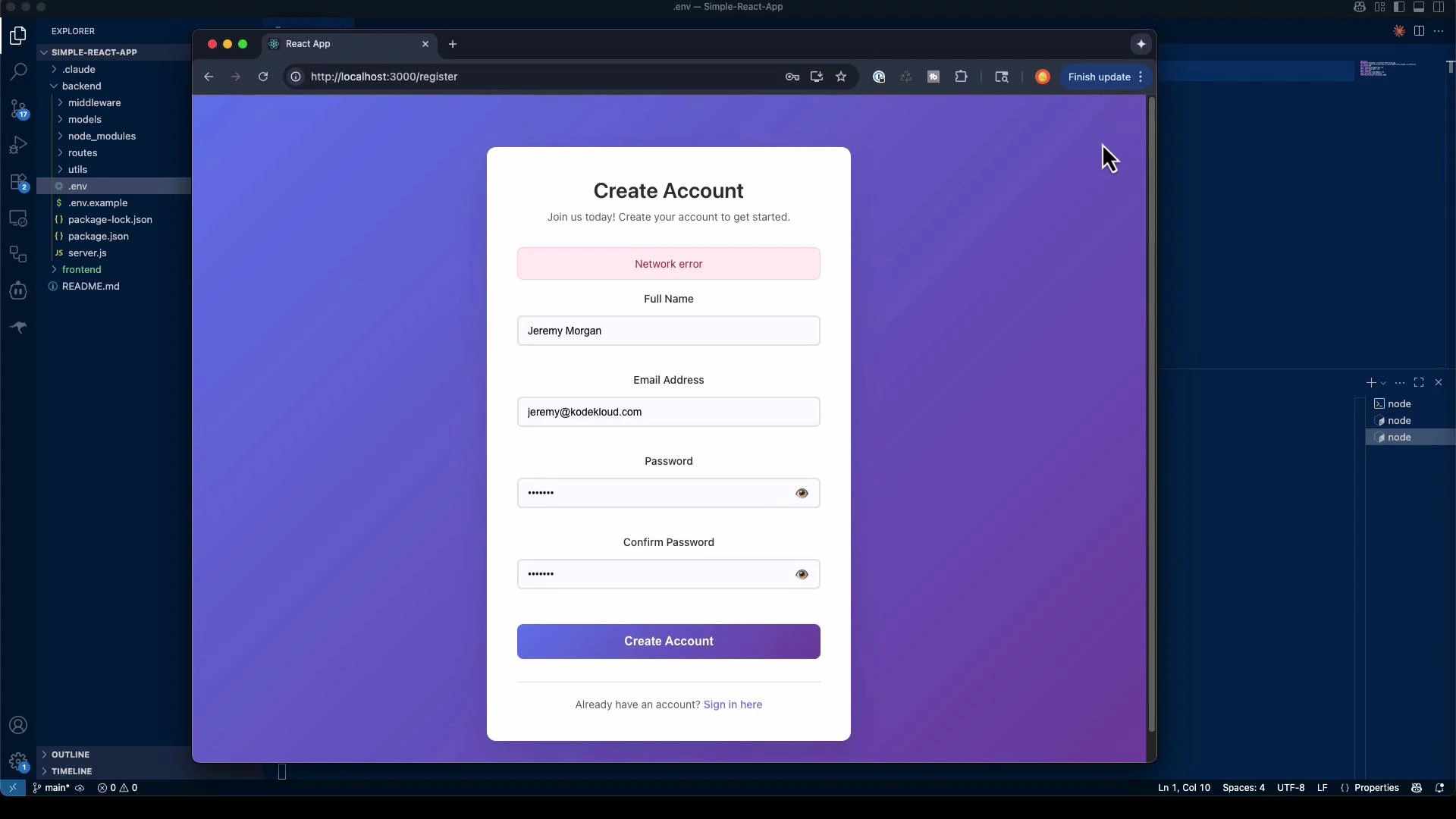
If SMTP credentials are not configured, actions that require sending email (verification or password reset) will fail and the UI may show a "Network error" until SMTP is configured.
 ***
## What was generated (summary)
Below is a concise summary table of the typical artifacts Claude Code generates for an authentication system.
| Component | Purpose | Typical Files / Features |
| ----------------------------- | ---------------------- | --------------------------------------------------------------------------------------- |
| Backend (Express + MongoDB) | API and auth logic | `server.js`, `routes/auth.js`, `models/User.js`, middleware, `utils/email.js` |
| Authentication | User flows & security | Registration, login, email verification, password reset, JWT issuance |
| Security | Hardening & validation | `helmet`, rate limiting, input validation, password hashing (`bcryptjs`) |
| Frontend (React + TypeScript) | UI & client-side auth | `Login`, `Register`, `ForgotPassword`, `ResetPassword`, `AuthContext`, protected routes |
| Dev tooling | Run & test locally | `nodemon` dev script, `.env.example`, build/start scripts |
Key details included in generated code
* Secure password hashing and comparison (bcrypt)
* JWT token generation and expiry handling
* Email-based verification and reset token flows (via nodemailer)
* Auth middleware for protected routes
* Basic responsive UI and loading/error states in React
***
## Auditing and production considerations
Claude Code can scaffold a working prototype quickly, but generated code contains assumptions that require manual review. Before deploying:
Generated code may include defaults and assumptions. Always audit authentication flows, secrets handling, input validation, token storage, and email configuration. Verify secure storage for JWTs, use HTTPS in production, and rotate any example secrets.
Important production checklist
* Review JWT secret management and consider using a secrets manager
* Enforce HTTPS and secure cookie flags if using cookies
* Harden rate limiting and account lockout policies
* Validate and sanitize all inputs; add strong password policies
* Configure robust SMTP or transactional email provider (e.g., SendGrid, SES)
* Add monitoring, logging, and alerting for auth failures and suspicious activity
* Run security tests, static analysis, and dependency vulnerability scans
***
## Key lessons from autonomous building
* Independent problem solving: Claude Code selects architectures and implements features — prompt precision controls assumptions.
* Multi-component orchestration: It can scaffold backend & frontend, install dependencies, and wire systems together.
* Time savings: Boilerplate that normally takes days can be scaffolded in minutes; use the output as a starting point.
* Control assumptions: Explicitly state technologies, constraints, and security requirements to get predictable results.
***
## Links and further reading
* Claude Code security & docs: [https://docs.anthropic.com/s/claude-code-security](https://docs.anthropic.com/s/claude-code-security)
* Express.js: [https://expressjs.com/](https://expressjs.com/)
* MongoDB: [https://www.mongodb.com/](https://www.mongodb.com/)
* Mongoose: [https://mongoosejs.com/](https://mongoosejs.com/)
* JSON Web Tokens (JWT): [https://jwt.io/](https://jwt.io/)
* React: [https://reactjs.org/](https://reactjs.org/)
* Nodemailer: [https://nodemailer.com/](https://nodemailer.com/)
This lesson showed how to instruct Claude Code to build a full authentication system from a single prompt, inspect the generated files, run the apps locally, and identify where manual review and hardening are required. Future lessons will cover prompt techniques to refine results and iterate on generated code.
***
## What was generated (summary)
Below is a concise summary table of the typical artifacts Claude Code generates for an authentication system.
| Component | Purpose | Typical Files / Features |
| ----------------------------- | ---------------------- | --------------------------------------------------------------------------------------- |
| Backend (Express + MongoDB) | API and auth logic | `server.js`, `routes/auth.js`, `models/User.js`, middleware, `utils/email.js` |
| Authentication | User flows & security | Registration, login, email verification, password reset, JWT issuance |
| Security | Hardening & validation | `helmet`, rate limiting, input validation, password hashing (`bcryptjs`) |
| Frontend (React + TypeScript) | UI & client-side auth | `Login`, `Register`, `ForgotPassword`, `ResetPassword`, `AuthContext`, protected routes |
| Dev tooling | Run & test locally | `nodemon` dev script, `.env.example`, build/start scripts |
Key details included in generated code
* Secure password hashing and comparison (bcrypt)
* JWT token generation and expiry handling
* Email-based verification and reset token flows (via nodemailer)
* Auth middleware for protected routes
* Basic responsive UI and loading/error states in React
***
## Auditing and production considerations
Claude Code can scaffold a working prototype quickly, but generated code contains assumptions that require manual review. Before deploying:
Generated code may include defaults and assumptions. Always audit authentication flows, secrets handling, input validation, token storage, and email configuration. Verify secure storage for JWTs, use HTTPS in production, and rotate any example secrets.
Important production checklist
* Review JWT secret management and consider using a secrets manager
* Enforce HTTPS and secure cookie flags if using cookies
* Harden rate limiting and account lockout policies
* Validate and sanitize all inputs; add strong password policies
* Configure robust SMTP or transactional email provider (e.g., SendGrid, SES)
* Add monitoring, logging, and alerting for auth failures and suspicious activity
* Run security tests, static analysis, and dependency vulnerability scans
***
## Key lessons from autonomous building
* Independent problem solving: Claude Code selects architectures and implements features — prompt precision controls assumptions.
* Multi-component orchestration: It can scaffold backend & frontend, install dependencies, and wire systems together.
* Time savings: Boilerplate that normally takes days can be scaffolded in minutes; use the output as a starting point.
* Control assumptions: Explicitly state technologies, constraints, and security requirements to get predictable results.
***
## Links and further reading
* Claude Code security & docs: [https://docs.anthropic.com/s/claude-code-security](https://docs.anthropic.com/s/claude-code-security)
* Express.js: [https://expressjs.com/](https://expressjs.com/)
* MongoDB: [https://www.mongodb.com/](https://www.mongodb.com/)
* Mongoose: [https://mongoosejs.com/](https://mongoosejs.com/)
* JSON Web Tokens (JWT): [https://jwt.io/](https://jwt.io/)
* React: [https://reactjs.org/](https://reactjs.org/)
* Nodemailer: [https://nodemailer.com/](https://nodemailer.com/)
This lesson showed how to instruct Claude Code to build a full authentication system from a single prompt, inspect the generated files, run the apps locally, and identify where manual review and hardening are required. Future lessons will cover prompt techniques to refine results and iterate on generated code.