> ## Documentation Index
> Fetch the complete documentation index at: https://notes.kodekloud.com/llms.txt
> Use this file to discover all available pages before exploring further.
# Building CLI Tools
> Demonstrates building compact CLI utilities in Python, Go, and C++ for project scaffolding, CSV to JSON conversion, and cryptographically strong password generation.
In this lesson we build several compact CLI utilities to demonstrate rapid prototyping and testing of command-line tools in three languages: Python, Go, and C++. The hands-on examples include:
* A Python project-structure generator that scaffolds basic HTML and Vue projects into `dist/`.
* A Go CLI that converts `data/contacts.csv` to JSON and supports a `--limit` flag.
* A C++ password generator that compiles on macOS via a Makefile.
Overview
* Python: quick scripting for scaffolding and automation.
* Go: compact, statically compiled utilities for file processing.
* C++: high-performance or system-level binaries for sensitive tasks (e.g., cryptographic-grade password generation).
When running Python scripts locally, consider using a virtual environment (`python3 -m venv .venv` and `source .venv/bin/activate`) to avoid polluting system packages.
Project generator (Python)
* Goal: scaffold a small project into `dist/` — either a minimal HTML site or a tiny Vue app.
* Output: a folder such as `dist/my-html-site` containing `index.html`, `style.css`, and `scripts.js` (or a minimal set for Vue).
The generator is straightforward and focused on clarity: map template filenames to content and write them into the target folder. This pattern is easy to extend with new templates or additional file types.
Example minimal startup of the generator (excerpt from `project_generator.py`):
```python theme={null}
#!/usr/bin/env python3
import argparse
from pathlib import Path
import json
import textwrap
class ProjectGenerator:
def __init__(self):
self.dist_dir = Path("dist")
self.templates = {
"html": {
"index.html": "\n\n\n \n \n My HTML Project\n \n\n\n
Welcome to My HTML Project
\n
Hello, World!
\n \n\n"
,
"style.css": "/* Basic styles */\nbody { font-family: system-ui, -apple-system, 'Segoe UI', Roboto, sans-serif; }",
"scripts.js": "document.getElementById('btn').addEventListener('click', ()=> alert('Hello!'))"
},
"vue": {
"index.html": "\n ... ",
"style.css": "/* Vue app styles */",
"app.js": "// Minimal Vue app"
}
}
def create(self, project_type: str, name: str):
target = self.dist_dir / name
target.mkdir(parents=True, exist_ok=True)
for fname, content in self.templates[project_type].items():
(target / fname).write_text(content, encoding="utf-8")
def parse_args():
p = argparse.ArgumentParser(description="Create a boilerplate project.")
p.add_argument("project_type", choices=["html", "vue"])
p.add_argument("project_name")
return p.parse_args()
if __name__ == "__main__":
args = parse_args()
gen = ProjectGenerator()
gen.create(args.project_type, args.project_name)
print(f"Successfully created '{args.project_type}' project: dist/{args.project_name}")
```
Quick run examples:
```bash theme={null}
mkdir -p dist
python3 project_generator.py html my-html-site
python3 project_generator.py vue my-vue-app
chmod +x project_generator.py
```
Result
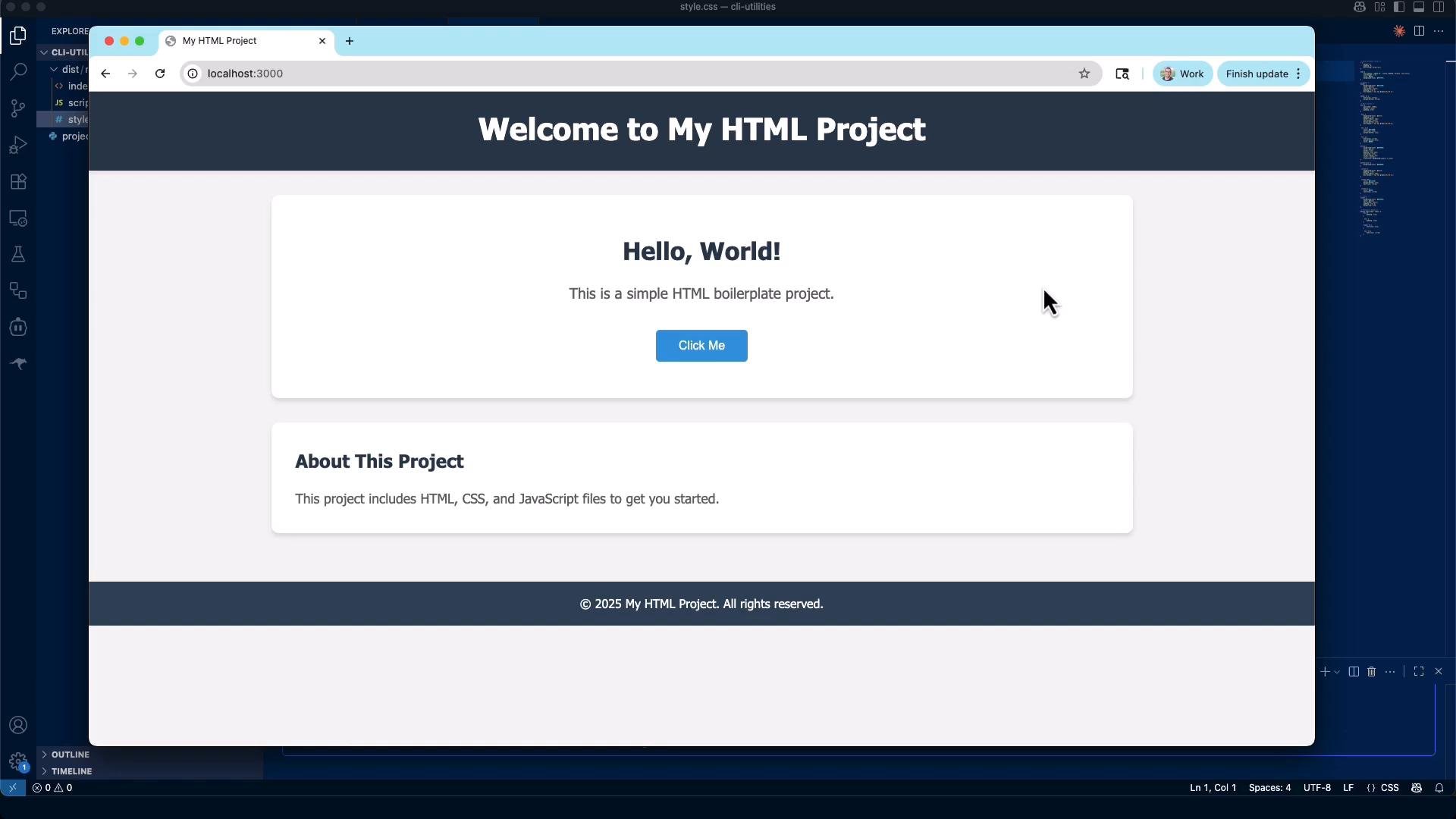
* The generated HTML boilerplate can be opened in a browser. The page includes a hero/title and a button wired via `scripts.js` to demonstrate a tiny interactive feature.
Vue project
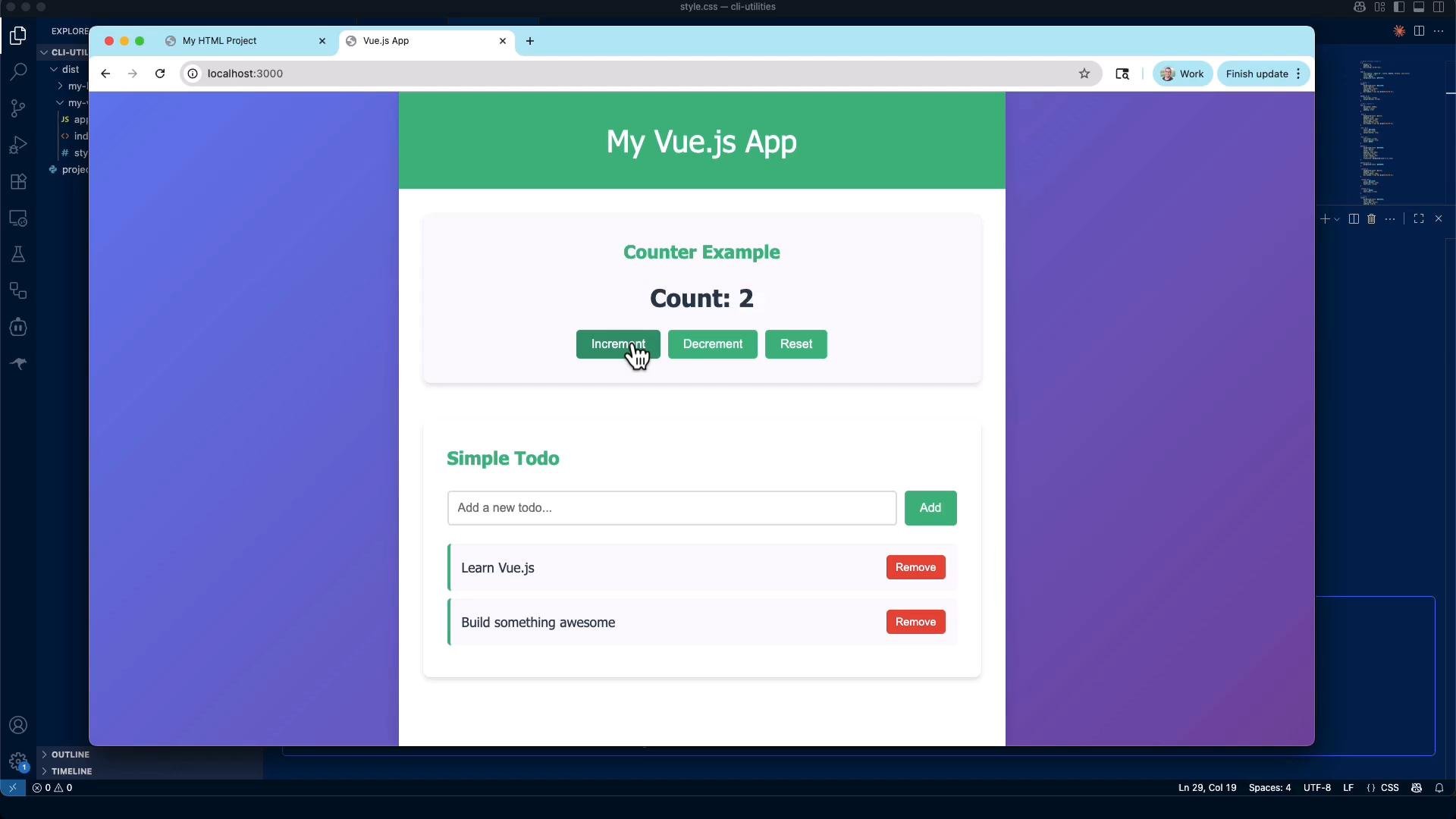
* The same generator can scaffold a minimal Vue app (files like `index.html`, `style.css`, `app.js`).
* The sample Vue output demonstrates reactive state: a counter and a simple todo list to illustrate how the scaffold can help you start a small SPA quickly.
CLI utility: CSV → JSON (Go)
* Purpose: convert `data/contacts.csv` to JSON and optionally limit the number of output records with `--limit` (or `-limit`).
* Design: robust error handling, sensible defaults, and a small data model (`Contact`) to shape JSON output.
This example assumes the first CSV row is a header: `id,first_name,last_name,job_title,email`. If your CSV differs, adjust the parsing logic accordingly.
Example `main.go` (concise and robust):
```go theme={null}
package main
import (
"encoding/csv"
"encoding/json"
"flag"
"fmt"
"os"
"strconv"
)
type Contact struct {
ID int `json:"id"`
FirstName string `json:"first_name"`
LastName string `json:"last_name"`
JobTitle string `json:"job_title"`
Email string `json:"email"`
}
func main() {
limit := flag.Int("limit", 0, "maximum number of records to output (0 = all)")
input := flag.String("input", "data/contacts.csv", "path to CSV file")
flag.Parse()
f, err := os.Open(*input)
if err != nil {
fmt.Fprintf(os.Stderr, "failed to open %s: %v\n", *input, err)
os.Exit(1)
}
defer f.Close()
r := csv.NewReader(f)
records, err := r.ReadAll()
if err != nil {
fmt.Fprintf(os.Stderr, "failed to read CSV: %v\n", err)
os.Exit(1)
}
if len(records) < 1 {
fmt.Fprintln(os.Stderr, "CSV has no header or data")
os.Exit(1)
}
// assume header: id,first_name,last_name,job_title,email
var contacts []Contact
for i, row := range records[1:] {
if *limit > 0 && len(contacts) >= *limit {
break
}
if len(row) < 5 {
continue
}
id, _ := strconv.Atoi(row[0])
contacts = append(contacts, Contact{
ID: id,
FirstName: row[1],
LastName: row[2],
JobTitle: row[3],
Email: row[4],
})
_ = i
}
out, err := json.MarshalIndent(contacts, "", " ")
if err != nil {
fmt.Fprintf(os.Stderr, "json marshal error: %v\n", err)
os.Exit(1)
}
fmt.Println(string(out))
}
```
Minimal `go.mod`:
```go theme={null}
module csv-to-json
go 1.21
```
Build & run examples:
```bash theme={null}
# Print all records (if file is large, be cautious)
go run main.go
# Limit to first 3 rows
go run main.go --limit=3
# Build and run binary
go build -o csv-to-json
./csv-to-json --limit=5
```
Typical JSON output (abbreviated):
```json theme={null}
[
{
"id": 1,
"first_name": "Britt",
"last_name": "Hyne",
"job_title": "Senior Editor",
"email": "bhyne0@lulu.com"
},
{
"id": 2,
"first_name": "Merrel",
"last_name": "Cornew",
"job_title": "VP Product Management",
"email": "mcornew1@indiegogo.com"
}
]
```
CLI utility: Strong password generator (C++)
* Purpose: generate cryptographically strong passwords with flags for length, count, and whether to include symbols.
* Approach: use `std::random_device` and `std::mt19937` for secure seeding and a uniform distribution over the chosen character set.
Example `passgen.cpp` (excerpt):
```cpp theme={null}
#include
#include
#include
#include
#include
std::string make_password(int length, bool use_symbols, std::mt19937 &rng) {
const std::string lower = "abcdefghijklmnopqrstuvwxyz";
const std::string upper = "ABCDEFGHIJKLMNOPQRSTUVWXYZ";
const std::string digits = "0123456789";
const std::string symbols = "!@#$%^&*()-_=+[]{}<>?,./";
std::string charset = lower + upper + digits;
if (use_symbols) charset += symbols;
std::uniform_int_distribution<> dist(0, (int)charset.size() - 1);
std::string out;
out.reserve(length);
for (int i = 0; i < length; ++i) out += charset[dist(rng)];
return out;
}
int main(int argc, char** argv) {
int length = 16;
int count = 1;
bool no_symbols = false;
const char* const short_opts = "l:c:s";
const option long_opts[] = {
{"length", required_argument, nullptr, 'l'},
{"count", required_argument, nullptr, 'c'},
{"no-symbols", no_argument, nullptr, 's'},
{"help", no_argument, nullptr, 'h'},
{nullptr, no_argument, nullptr, 0}
};
while (true) {
const auto opt = getopt_long(argc, argv, short_opts, long_opts, nullptr);
if (opt == -1) break;
switch (opt) {
case 'l': length = std::stoi(optarg); break;
case 'c': count = std::stoi(optarg); break;
case 's': no_symbols = true; break;
case 'h':
default:
std::cout << "Usage: passgen [-l length] [-c count] [--no-symbols]\n";
return 0;
}
}
std::random_device rd;
std::mt19937 rng(rd());
for (int i = 0; i < count; ++i) {
std::cout << make_password(length, !no_symbols, rng) << "\n";
}
return 0;
}
```
Makefile (macOS-compatible):
```makefile theme={null}
CXX = clang++
CXXFLAGS = -std=c++17 -O2 -Wall -Wextra
TARGET = passgen
SOURCE = passgen.cpp
$(TARGET): $(SOURCE)
$(CXX) $(CXXFLAGS) -o $(TARGET) $(SOURCE)
clean:
rm -f $(TARGET)
```
Build & run:
```bash theme={null}
make
./passgen # default 16-char password
./passgen -l 32 -c 3 # generate 3 x 32-char passwords
./passgen --no-symbols
./passgen --help
```
Summary and where these CLI tools fit
* CLI tools accelerate local automation: file conversion, data processing, and scripted maintenance tasks.
* They integrate well into CI/CD for repeatable tasks like formatters, validators, and transforms.
* Quick-tier summary:
| Language | Best for | Example use |
| - | - | - |
| `Python` | Rapid scripting & scaffolding | Project generator, quick prototyping |
| `Go` | Small, fast compiled utilities | CSV → JSON converters, single-binary tools |
| `C++` | High-performance or system binaries | Cryptographic password generators, cross-compiled tools |
Further reading and references
* [Kubernetes Basics](https://kubernetes.io/docs/concepts/overview/what-is-kubernetes/) (example resource)
* [Go documentation](https://go.dev/doc/) — packages, tooling, and best practices
* [C++ reference](https://en.cppreference.com/) — standard library and random utilities
* [Python virtual environments](https://docs.python.org/3/tutorial/venv.html) — isolate dependencies
These short examples show how small, well-scoped CLI utilities in different languages can automate repetitive workflows and become dependable parts of your development and deployment pipeline. Thank you for reading this lesson.
This documentation is built and hosted on [Mintlify](https://mintlify.com), a developer documentation platform.
 Overview
* Python: quick scripting for scaffolding and automation.
* Go: compact, statically compiled utilities for file processing.
* C++: high-performance or system-level binaries for sensitive tasks (e.g., cryptographic-grade password generation).
Overview
* Python: quick scripting for scaffolding and automation.
* Go: compact, statically compiled utilities for file processing.
* C++: high-performance or system-level binaries for sensitive tasks (e.g., cryptographic-grade password generation).
 Vue project
* The same generator can scaffold a minimal Vue app (files like `index.html`, `style.css`, `app.js`).
* The sample Vue output demonstrates reactive state: a counter and a simple todo list to illustrate how the scaffold can help you start a small SPA quickly.
Vue project
* The same generator can scaffold a minimal Vue app (files like `index.html`, `style.css`, `app.js`).
* The sample Vue output demonstrates reactive state: a counter and a simple todo list to illustrate how the scaffold can help you start a small SPA quickly.
 CLI utility: CSV → JSON (Go)
* Purpose: convert `data/contacts.csv` to JSON and optionally limit the number of output records with `--limit` (or `-limit`).
* Design: robust error handling, sensible defaults, and a small data model (`Contact`) to shape JSON output.
CLI utility: CSV → JSON (Go)
* Purpose: convert `data/contacts.csv` to JSON and optionally limit the number of output records with `--limit` (or `-limit`).
* Design: robust error handling, sensible defaults, and a small data model (`Contact`) to shape JSON output.