> ## Documentation Index
> Fetch the complete documentation index at: https://notes.kodekloud.com/llms.txt
> Use this file to discover all available pages before exploring further.
# Autonomous Task Completion
> Demonstrates Claude Code autonomously creating a full-stack authentication system for a React app using Express, MongoDB, JWTs, email verification, password reset, and security best practices.
In this lesson we demonstrate autonomous task completion: how Claude Code can go beyond simple code completion to create, wire up, and run a multi-component application from a single high-level prompt.
The demo below shows Claude Code building a complete authentication system (backend + frontend) from one focused request. The generated project includes project structure, dependencies, database models, routes, email sending utilities, and a React + TypeScript frontend with protected routes and token management.
This write-up preserves the original sequence and context while improving clarity, organizing code samples in proper blocks, and making the content more discoverable for readers searching for Claude Code, autonomous code generation, and full-stack authentication scaffolds.
## Starting point: granting access
The demo begins in an empty project folder for a simple React app. Claude Code asks permission to read and execute files in the working directory before proceeding:
```bash theme={null}
Do you trust the files in this folder?
/Users/jeremy/Repos/[Claude Code for Beginners](https://learn.kodekloud.com/user/courses/claude-code-for-beginners)/Simple-React-App
Claude Code may read files in this folder. Reading untrusted files may lead Claude Code to behave in unexpected ways.
With your permission Claude Code may execute files in this folder. Executing untrusted code is unsafe.
https://docs.anthropic.com/s/claude-code-security
1. Yes, proceed
2. No, exit
Enter to confirm · Esc to exit
```
After granting permission, Claude Code prints a short help message and the current working directory:
```text theme={null}
* Welcome to Claude Code!
/help for help, /status for your current setup
cwd: /Users/jeremy/Repos/[Claude Code for Beginners](https://learn.kodekloud.com/user/courses/claude-code-for-beginners)/Simple-React-App
Tips for getting started:
1. Ask Claude to create a new app or clone a repository
2. Use Claude to help with file analysis, editing, bash commands and git
3. Be as specific as you would with another engineer for the best results
4. ✓ Run /terminal-setup to set up terminal integration
? for shortcuts
```
## The single, focused prompt
A concise, well-scoped prompt helps constrain assumptions and produce more reliable output. In this demo the prompt is:
```text theme={null}
Create a complete authentication system for a React Application. Include user registration, login, password reset, JWT tokens, email verification, and a simple frontend. Use Express, MongoDB, and modern security best practices.
```
Claude Code responds by building a multi-step plan (a tracked to-do list) and then executes the tasks that require file creation, package installs, and scaffolding.
## The plan (to-do list)
Claude Code creates and tracks a to-do list covering analysis, backend and frontend setup, authentication flows, security, and testing:
```text theme={null}
● I'll help you create a complete authentication system for your React application. This is a complex multi-step task, so let me start by creating a todo list to track our progress.
Update Todos
☐ Analyze existing project structure and dependencies
☐ Set up Express.js backend with MongoDB connection
☐ Install required security dependencies (bcryptjs, jsonwebtoken, nodemailer, etc.)
☐ Create User model with MongoDB schema
☐ Implement user registration endpoint with email verification
☐ Implement login endpoint with JWT token generation
☐ Implement password reset functionality
☐ Create authentication middleware for protected routes
☐ Set up React frontend authentication components (Login, Register, ResetPassword)
☐ Implement JWT token management in frontend (storage, refresh, expiry)
☐ Create protected routes and authentication context in React
☐ Add security headers and rate limiting
```
This is a funnel approach: start broad, then narrow by explicitly listing features and technologies (React, Express, MongoDB, and security best practices).
## What Claude Code can do (high-level)
Claude Code is capable of:
* Initializing both backend and frontend directories and package metadata.
* Running CLI commands (e.g., `npm install`, `npx create-react-app`) when allowed.
* Creating server scaffolding, routes, models, email utilities, and frontend components.
* Installing and wiring security libraries (helmet, rate limiting, bcryptjs, jsonwebtoken, express-validator, nodemailer).
* Generating a React TypeScript frontend with authentication context and protected routes.
* Providing a concise summary and startup instructions.
Below are representative artifacts and actions Claude Code generates.
### Project initialization and scaffolding
Claude Code sets up `backend` and `frontend` directories, initializes package files, installs dependencies, and scaffolds the frontend using the TypeScript template. Example commands executed in the project root:
```bash theme={null}
mkdir -p backend frontend
cd backend && npm init -y
# then install backend dependencies
cd /Users/jeremy/Repos/[Claude Code for Beginners](https://learn.kodekloud.com/user/courses/claude-code-for-beginners)/Simple-React-App/backend && \
npm install express mongoose bcryptjs jsonwebtoken nodemailer express-rate-limit helmet cors dotenv express-validator
# create frontend using the TypeScript template
cd /Users/jeremy/Repos/[Claude Code for Beginners](https://learn.kodekloud.com/user/courses/claude-code-for-beginners)/Simple-React-App/frontend && \
npx create-react-app . --template typescript
```
Note: `create-react-app` may print deprecation messages and suggestions for alternative starters; adjust your toolchain if desired.
### Example generated environment configuration
A typical `backend/.env.example` generated by Claude Code:
```ini theme={null}
PORT=5000
MONGODB_URI=mongodb://localhost:27017/auth_app
JWT_SECRET=your_super_secret_jwt_key_change_this_in_production
JWT_EXPIRE=24h
EMAIL_FROM=noreply@yourapp.com
EMAIL_HOST=smtp.gmail.com
EMAIL_PORT=587
EMAIL_USER=your_email@gmail.com
EMAIL_PASS=your_app_password
FRONTEND_URL=http://localhost:3000
```
### Backend: models, utils, and routes
Claude Code generates a standard Express backend with:
* MongoDB connection via `mongoose`.
* `User` model including email index, password hashing (bcryptjs), verification and reset tokens.
* Auth routes: register, login (JWT generation), email verification, password reset endpoints.
* Utilities: nodemailer-based email sender with templates for verification and reset.
* Middleware: authentication checks, rate limiting, and input validation via `express-validator`.
* Security: helmet, rate limiting, and CORS configuration.
Claude Code can produce large route files (hundreds of lines) for full flows like `routes/auth.js`.
### Frontend: React + TypeScript
The generated frontend includes:
* An `AuthContext` (React context) for global authentication state.
* Components: `Login`, `Register`, `ForgotPassword`, `ResetPassword`, `EmailVerification`, and a protected `Dashboard`.
* A `ProtectedRoute` wrapper to guard private routes.
* Services to call backend APIs and manage JWT tokens (storage, expiry handling, automatic refresh where applicable).
* Basic styling and a header/navigation component.
A representative `package.json` scripts section for the backend:
```json theme={null}
{
"scripts": {
"start": "node server.js",
"dev": "nodemon server.js",
"test": "echo \"Error: no test specified\" && exit 1"
}
}
```
### Summary output
When the process finishes, Claude Code summarizes the generated stack:
* Backend (Express + MongoDB)
* User model with secure hashing, email verification, account lockout options
* JWT authentication with token generation and validation
* Email service for verification and password reset
* Security: rate limiting, Helmet headers, input validation
* Frontend (React + TypeScript)
* Authentication context and protected routes
* UI components for registration, login, and recovery flows
* Dashboard with profile and account actions
Implemented or recommended security best practices:
* Strong password hashing and optional complexity checks
* Account lockout after repeated failed attempts
* JWT expiration and refresh strategies
* Email verification before enabling accounts
* Rate limiting for sensitive endpoints
* Secure headers via Helmet and input validation/sanitization
Startup checklist and links:
1. Start MongoDB (locally or use a managed service such as MongoDB Atlas).
2. Configure email (Gmail app password is commonly used — see [Google's App Passwords](https://support.google.com/accounts/answer/185833)).
3. Run backend: `cd backend && npm run dev`.
4. Run frontend: `cd frontend && npm start`.
5. Open the app at `http://localhost:3000`.
Generated projects accelerate prototyping, but always audit and harden any generated code before using it in production.
## Running the services locally (examples)
Run backend and frontend in separate terminals.
Backend:
```bash theme={null}
cd backend
npm run dev
```
Typical backend startup messages (truncated for clarity):
```text theme={null}
> backend@1.0.0 dev
> nodemon server.js
[nodemon] starting `node server.js`
Server running on port 5000
MongoDB connected
```
Frontend:
```bash theme={null}
cd frontend
npm start
```
React dev server may emit ESLint warnings (unused variables, naming issues). These are generally quick fixes and do not prevent development.
## Generated project map (representative)
| Area | Location | Purpose / Notes |
| - | - | - |
| Backend root | `backend/` | Express server, routes, utilities |
| Database | `backend/models/` | `User` schema with indices and password hashing |
| Auth routes | `backend/routes/auth.*` | Register/login/verify/reset endpoints |
| Email utils | `backend/utils/email.*` | Templated verification and reset emails |
| Frontend root | `frontend/` | React + TypeScript app scaffold |
| Auth state | `frontend/src/contexts/AuthContext.tsx` | Global auth state and helper hooks |
| API services | `frontend/src/services/api.ts` | HTTP wrappers and token handling |
| UI components | `frontend/src/components/*` | Login/Register/Dashboard/ProtectedRoute |
(Adjust paths to match the exact output if you inspect the generated repository.)
## Visual: registration form with network error
Here is a captured screenshot of the frontend registration form showing a "Network error" (this happened because an email service was not configured):
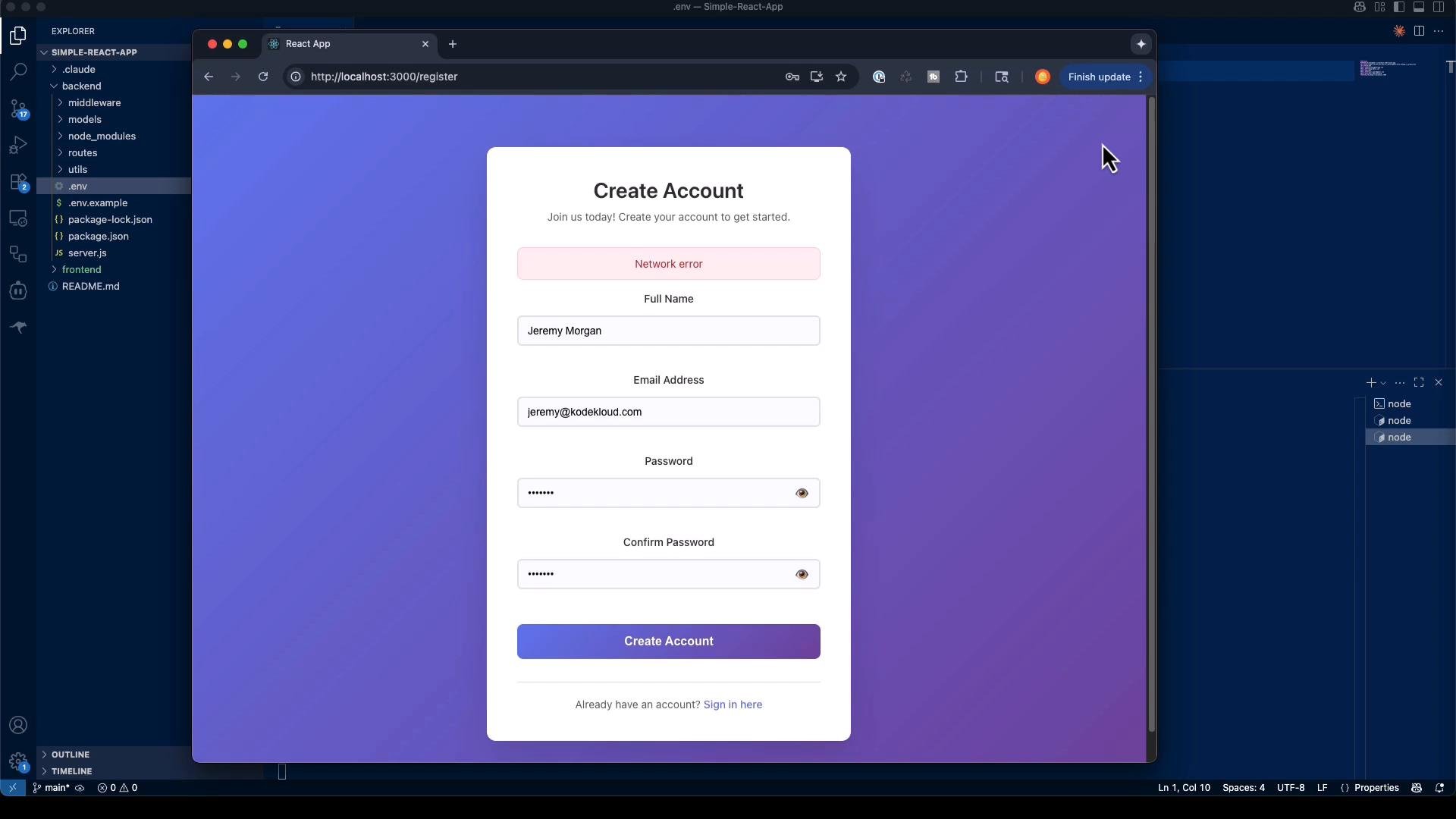 To resolve email-related network errors, configure SMTP credentials in the backend `.env` (for example: `EMAIL_USER`, `EMAIL_PASS`, `EMAIL_HOST`, `EMAIL_PORT`).
## Caveats and practical notes
* Generated defaults (TypeScript, dashboard, error handling) are reasonable starting points but may not match your product constraints — review and customize.
* Do not treat generated code as production-ready. Always perform security reviews, dependency audits, and add tests.
* CLI tools and templates evolve (e.g., `create-react-app` deprecations). Update commands and dependencies to match the latest ecosystem.
* Generation can take time because many files are written; this is expected for full-stack scaffolds.
Security warning: never deploy scaffolded code to production without reviewing secrets, hardening authentication flows, rotating keys, and adding proper rate limits, logging, monitoring, and tests.
## What autonomous task completion teaches us
Key takeaways about autonomous code generation:
* Independent problem solving: Claude Code can make and explain architectural decisions, ask clarifying questions, and autonomously execute steps when permitted.
* Multi-component orchestration: It can create backend, frontend, utilities, and wire them together.
* Rapid prototyping: You can obtain a working prototype (authentication flows, verification, password reset, protected routes) far faster than hand-coding boilerplate.
Combine autonomous generation with manual review, thorough testing, and security hardening before deploying any generated code.
## Next steps and further reading
* Learn about prompt patterns and how to control assumptions to get more reliable generation results.
* Explore stepwise refinement techniques to guide Claude Code through complex tasks incrementally.
* References:
* [MongoDB Atlas](https://www.mongodb.com/cloud/atlas)
* [Google App Passwords](https://support.google.com/accounts/answer/185833)
* [Express security best practices](https://expressjs.com/en/advanced/best-practice-security.html)
* [JWT Introduction](https://jwt.io/introduction)
Future articles will cover prompt design, strategies for iterative refinement, and practical examples of using autonomous generation tools safely and effectively.
This documentation is built and hosted on [Mintlify](https://mintlify.com), a developer documentation platform.
To resolve email-related network errors, configure SMTP credentials in the backend `.env` (for example: `EMAIL_USER`, `EMAIL_PASS`, `EMAIL_HOST`, `EMAIL_PORT`).
## Caveats and practical notes
* Generated defaults (TypeScript, dashboard, error handling) are reasonable starting points but may not match your product constraints — review and customize.
* Do not treat generated code as production-ready. Always perform security reviews, dependency audits, and add tests.
* CLI tools and templates evolve (e.g., `create-react-app` deprecations). Update commands and dependencies to match the latest ecosystem.
* Generation can take time because many files are written; this is expected for full-stack scaffolds.
Security warning: never deploy scaffolded code to production without reviewing secrets, hardening authentication flows, rotating keys, and adding proper rate limits, logging, monitoring, and tests.
## What autonomous task completion teaches us
Key takeaways about autonomous code generation:
* Independent problem solving: Claude Code can make and explain architectural decisions, ask clarifying questions, and autonomously execute steps when permitted.
* Multi-component orchestration: It can create backend, frontend, utilities, and wire them together.
* Rapid prototyping: You can obtain a working prototype (authentication flows, verification, password reset, protected routes) far faster than hand-coding boilerplate.
Combine autonomous generation with manual review, thorough testing, and security hardening before deploying any generated code.
## Next steps and further reading
* Learn about prompt patterns and how to control assumptions to get more reliable generation results.
* Explore stepwise refinement techniques to guide Claude Code through complex tasks incrementally.
* References:
* [MongoDB Atlas](https://www.mongodb.com/cloud/atlas)
* [Google App Passwords](https://support.google.com/accounts/answer/185833)
* [Express security best practices](https://expressjs.com/en/advanced/best-practice-security.html)
* [JWT Introduction](https://jwt.io/introduction)
Future articles will cover prompt design, strategies for iterative refinement, and practical examples of using autonomous generation tools safely and effectively.
This documentation is built and hosted on [Mintlify](https://mintlify.com), a developer documentation platform.