> ## Documentation Index
> Fetch the complete documentation index at: https://notes.kodekloud.com/llms.txt
> Use this file to discover all available pages before exploring further.
# File Handling Auditing
> Guide for auditing and hardening file upload handling with secure defaults, whitelisting, size limits, filename sanitization, antivirus scanning, archive protections, and example Express Multer configuration.
In this lesson we cover auditing file handling (primarily uploads) and recommend secure defaults for any future upload functionality. The repository analyzed here does not currently implement file uploads; this guide shows how to audit upload code, common pitfalls to look for, and practical hardening steps to apply if uploads are added.
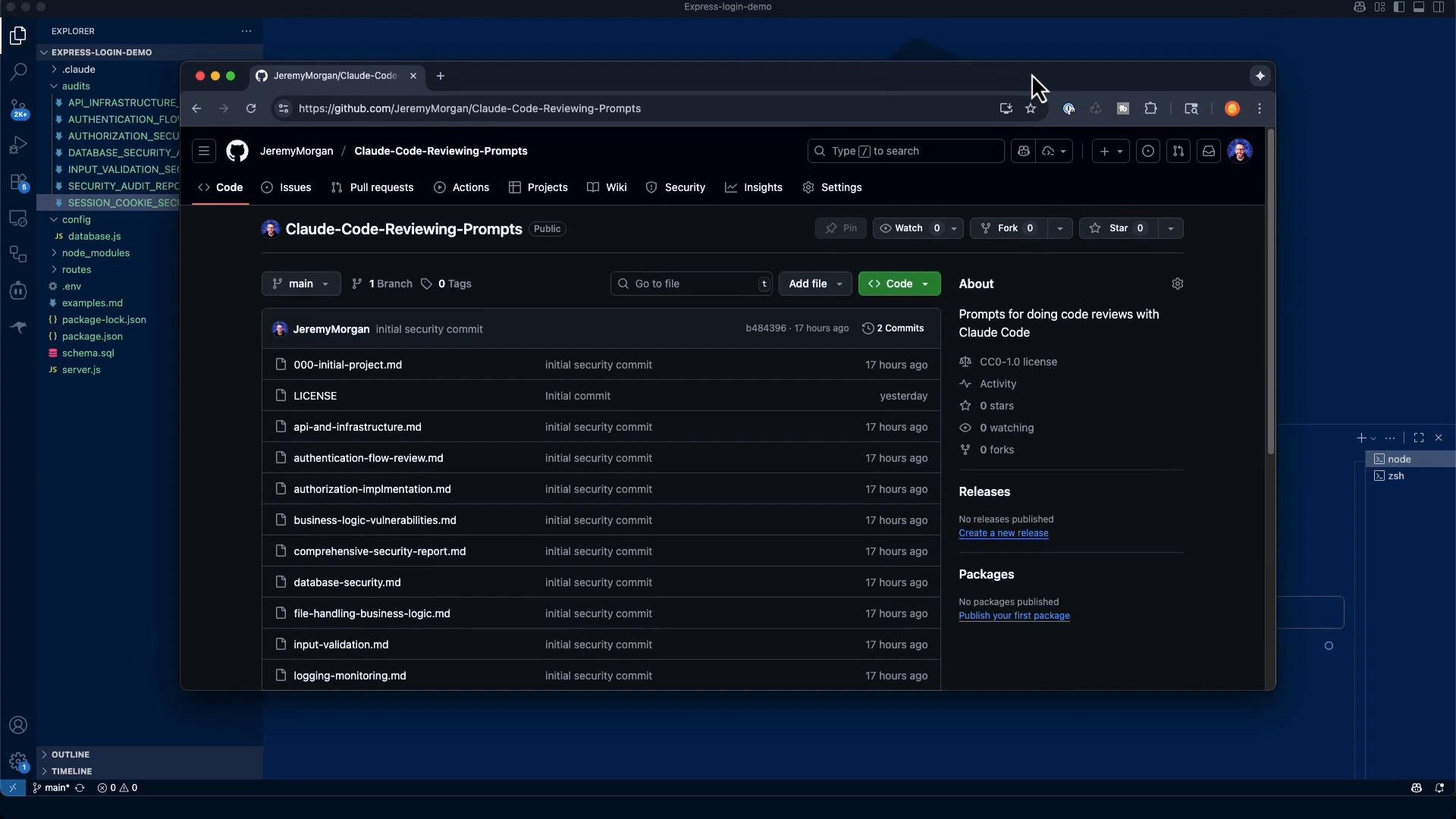
All audit prompts referenced are available at [https://github.com/JeremyMorgan/ClaudeCodeReviewingPrompts](https://github.com/JeremyMorgan/ClaudeCodeReviewingPrompts).
 ## Audit objectives (high-level)
When reviewing file upload code, target the following objectives:
* Use a whitelist for allowed file types (explicit allow list).
* Enforce file size and file count limits.
* Sanitize or generate safe filenames to prevent path traversal and unsafe characters.
* Integrate anti-virus / content inspection in upload pipelines for hostile content.
* Store uploads outside the webroot; serve them via a safe, controlled channel.
* Prevent uploaded content from being executed.
* Validate MIME types and verify file signatures ("magic numbers") where feasible.
* Inspect image and archive libraries for known vulnerabilities and pin versions.
* Implement protections against archive-based attacks (ZIP bombs, tar bombs).
## Example audit prompt
Use a consistent, structured prompt to guide a code auditor or automated review assistant. Here is an example you can adapt:
```markdown theme={null}
* Welcome to Claude Code!
/help for help, /status for your current setup
cwd: /Users/jeremy/Repos/Claude Code Course/Express-login-demo
> Review all file upload functionality:
Check for:
1. File type validation (whitelist, not blacklist)
2. File size limits
3. Filename sanitization
4. Anti-virus scanning integration
5. Storage location (outside webroot)
6. Direct execution prevention
7. MIME type validation
8. Magic number verification
9. Image manipulation library vulnerabilities
10. ZIP bomb protection
Provide recommendations for secure file handling.
## Provide:
A structured finding report with the following for each issue:
Title, Severity (Critical/High/Medium/Low), CWE (if applicable), Evidence (file, function, line ranges), and a short Why it matters.
Exploitability notes and, where safe, a minimal PoC or reproduction steps (no real secrets).
Remediation: precise code-level fix or config change (snippets welcome), plus defense-in-depth guidance.
A summary risk score (0–10) and top 3–5 prioritized fixes that reduce risk fastest.
A checklist diff: which items from the "Check for" list are Pass/Fail/Not Applicable.
## Constraints & style:
Be concrete and cite exact code locations and identifiers.
```
Maintain a repeatable audit checklist and require code locations (file/function/line ranges) for each finding to make remediation actionable. Prioritize fixes that reduce the largest attack surface first (whitelisting, size limits, and storage configuration).
## Key concepts explained
### Whitelisting vs. blacklisting
* Whitelist: explicitly allow only known-safe types (e.g., JPEG, PNG, PDF). This is the recommended approach.
* Blacklist: try to block known-bad types (e.g., `.exe`, `.sh`). Blacklists are error-prone and can miss novel threats.
### Filename sanitization
* Normalize filenames and remove path separators and control characters.
* Consider generating server-side filenames (UUIDs) and storing the original name in metadata for display only.
* Deny user-controlled paths when writing files.
### Anti-virus / content inspection
* Enterprise systems often route uploads through AV/IDS/IPS or content inspection services before storing or processing.
* If you cannot scan at upload time, mark files as untrusted and delay processing until they are inspected.
### ZIP bombs and archive attacks
* A ZIP bomb is a small archive that expands into an extremely large set of files or a very large file, exhausting disk/memory.
* Mitigations: limit decompressed size, limit recursion/levels, validate file types and sizes inside archives before extraction.
## Example audit findings (for this repository)
* The Express Login Demo application only handles JSON authentication requests and does not implement file uploads (no Multer, no express-fileupload, no multipart/form-data handling found).
* Because there is no upload functionality present, the file-upload risk score for this codebase is 0/10 for this assessment.
* A full audit report has been saved to `/audits/FILE_UPLOAD_SECURITY_AUDIT.md` with checklist results set to N/A where appropriate, and recommendations for secure implementation if uploads are added.
Here is a sample audit report you can use as a template:
```markdown theme={null}
**Audit Date:** 2025-08-21
**Application:** Express Login Demo
**Scope:** File upload functionality security assessment
**Auditor:** Claude Code Security Assessment
## Executive Summary
**Finding:** No file upload functionality present in the application.
The Express Login Demo application does not implement any file upload capabilities. The application is a simple authentication-only service with a single login endpoint that accepts JSON credentials.
## Risk Assessment
**Overall Risk Score:** 0/10 (No file upload functionality present)
Since there is no file upload functionality in the application, there are no file upload-related security vulnerabilities to address.
## Detailed Analysis
- Detailed analysis of the current architecture
- Security checklist results (all N/A due to no file upload functionality)
- Comprehensive recommendations for secure implementation if file uploads are added in the future
- Example code snippets for proper file validation, sanitization, and security controls
```
## Secure defaults: example in Express using Multer
If you add uploads to an Express application, start with strict defaults. Example Multer configuration:
```javascript theme={null}
const path = require('path');
const multer = require('multer');
const upload = multer({
dest: '/app/uploads/', // ensure this path is outside the webroot and not served by static middleware
limits: {
fileSize: 5 * 1024 * 1024, // 5 MB limit
files: 1
},
fileFilter: (req, file, cb) => {
// Whitelist approach: allow only these MIME types and extensions
const allowedTypes = ['image/jpeg', 'image/png', 'application/pdf'];
const allowedExtensions = ['.jpg', '.jpeg', '.png', '.pdf'];
const ext = path.extname(file.originalname).toLowerCase();
if (allowedTypes.includes(file.mimetype) && allowedExtensions.includes(ext)) {
cb(null, true);
} else {
cb(new Error('Invalid file type'), false);
}
}
});
```
Notes:
* Client-provided MIME types and extensions can be spoofed. Always verify file signatures ("magic numbers") server-side, especially for high-risk types.
* For any image processing, limit dimensions and validate images before processing.
* Consider scanning files with an anti-virus engine or sandboxing them before further processing.
## Defense-in-depth checklist (recommended controls)
* Whitelist MIME types + extension + magic number verification.
* Enforce file size and file count limits.
* Store uploads outside webroot and deny execution.
* Sanitize or generate server-side filenames.
* Scan uploads for malware where possible.
* Serve uploads from a separate domain/subdomain with strict headers (CSP, X-Content-Type-Options, X-Frame-Options).
* Limit and pin versions of image manipulation libraries.
* Validate archives before extraction; limit decompressed size and recursion depth.
## Example checklist diff for this repository
| Check | Status |
| - | - |
| File type validation (whitelist) | Not Applicable |
| File size limits | Not Applicable |
| Filename sanitization | Not Applicable |
| Anti-virus scanning integration | Not Applicable |
| Storage location (outside webroot) | Not Applicable |
| Direct execution prevention | Not Applicable |
| MIME type validation | Not Applicable |
| Magic number verification | Not Applicable |
| Image manipulation library vulnerabilities | Not Applicable |
| ZIP bomb protection | Not Applicable |
## Links and references
* [Express](https://expressjs.com/) — web framework
* [Multer](https://github.com/expressjs/multer) — middleware for handling `multipart/form-data`
* [Kubernetes Basics](https://kubernetes.io/docs/concepts/overview/what-is-kubernetes/) — general platform context
* [Docker Hub](https://hub.docker.com/) — container images
* [Terraform Registry](https://registry.terraform.io/) — infrastructure as code modules
If the application will accept uploads, start with strict whitelisting (MIME + extension + magic number), enforce size limits, store uploads outside the webroot, and treat every uploaded file as untrusted. These steps reduce the attack surface and make further defenses (AV scanning, sandboxing) more effective.
Summary
* This repository currently contains no file upload functionality; therefore, the file-upload risk in this assessment is minimal (0/10).
* If uploads are introduced, follow the checklist and secure Multer example above, and require an audit to validate the implementation and deployment configuration.
This documentation is built and hosted on [Mintlify](https://mintlify.com), a developer documentation platform.
## Audit objectives (high-level)
When reviewing file upload code, target the following objectives:
* Use a whitelist for allowed file types (explicit allow list).
* Enforce file size and file count limits.
* Sanitize or generate safe filenames to prevent path traversal and unsafe characters.
* Integrate anti-virus / content inspection in upload pipelines for hostile content.
* Store uploads outside the webroot; serve them via a safe, controlled channel.
* Prevent uploaded content from being executed.
* Validate MIME types and verify file signatures ("magic numbers") where feasible.
* Inspect image and archive libraries for known vulnerabilities and pin versions.
* Implement protections against archive-based attacks (ZIP bombs, tar bombs).
## Example audit prompt
Use a consistent, structured prompt to guide a code auditor or automated review assistant. Here is an example you can adapt:
```markdown theme={null}
* Welcome to Claude Code!
/help for help, /status for your current setup
cwd: /Users/jeremy/Repos/Claude Code Course/Express-login-demo
> Review all file upload functionality:
Check for:
1. File type validation (whitelist, not blacklist)
2. File size limits
3. Filename sanitization
4. Anti-virus scanning integration
5. Storage location (outside webroot)
6. Direct execution prevention
7. MIME type validation
8. Magic number verification
9. Image manipulation library vulnerabilities
10. ZIP bomb protection
Provide recommendations for secure file handling.
## Provide:
A structured finding report with the following for each issue:
Title, Severity (Critical/High/Medium/Low), CWE (if applicable), Evidence (file, function, line ranges), and a short Why it matters.
Exploitability notes and, where safe, a minimal PoC or reproduction steps (no real secrets).
Remediation: precise code-level fix or config change (snippets welcome), plus defense-in-depth guidance.
A summary risk score (0–10) and top 3–5 prioritized fixes that reduce risk fastest.
A checklist diff: which items from the "Check for" list are Pass/Fail/Not Applicable.
## Constraints & style:
Be concrete and cite exact code locations and identifiers.
```
Maintain a repeatable audit checklist and require code locations (file/function/line ranges) for each finding to make remediation actionable. Prioritize fixes that reduce the largest attack surface first (whitelisting, size limits, and storage configuration).
## Key concepts explained
### Whitelisting vs. blacklisting
* Whitelist: explicitly allow only known-safe types (e.g., JPEG, PNG, PDF). This is the recommended approach.
* Blacklist: try to block known-bad types (e.g., `.exe`, `.sh`). Blacklists are error-prone and can miss novel threats.
### Filename sanitization
* Normalize filenames and remove path separators and control characters.
* Consider generating server-side filenames (UUIDs) and storing the original name in metadata for display only.
* Deny user-controlled paths when writing files.
### Anti-virus / content inspection
* Enterprise systems often route uploads through AV/IDS/IPS or content inspection services before storing or processing.
* If you cannot scan at upload time, mark files as untrusted and delay processing until they are inspected.
### ZIP bombs and archive attacks
* A ZIP bomb is a small archive that expands into an extremely large set of files or a very large file, exhausting disk/memory.
* Mitigations: limit decompressed size, limit recursion/levels, validate file types and sizes inside archives before extraction.
## Example audit findings (for this repository)
* The Express Login Demo application only handles JSON authentication requests and does not implement file uploads (no Multer, no express-fileupload, no multipart/form-data handling found).
* Because there is no upload functionality present, the file-upload risk score for this codebase is 0/10 for this assessment.
* A full audit report has been saved to `/audits/FILE_UPLOAD_SECURITY_AUDIT.md` with checklist results set to N/A where appropriate, and recommendations for secure implementation if uploads are added.
Here is a sample audit report you can use as a template:
```markdown theme={null}
**Audit Date:** 2025-08-21
**Application:** Express Login Demo
**Scope:** File upload functionality security assessment
**Auditor:** Claude Code Security Assessment
## Executive Summary
**Finding:** No file upload functionality present in the application.
The Express Login Demo application does not implement any file upload capabilities. The application is a simple authentication-only service with a single login endpoint that accepts JSON credentials.
## Risk Assessment
**Overall Risk Score:** 0/10 (No file upload functionality present)
Since there is no file upload functionality in the application, there are no file upload-related security vulnerabilities to address.
## Detailed Analysis
- Detailed analysis of the current architecture
- Security checklist results (all N/A due to no file upload functionality)
- Comprehensive recommendations for secure implementation if file uploads are added in the future
- Example code snippets for proper file validation, sanitization, and security controls
```
## Secure defaults: example in Express using Multer
If you add uploads to an Express application, start with strict defaults. Example Multer configuration:
```javascript theme={null}
const path = require('path');
const multer = require('multer');
const upload = multer({
dest: '/app/uploads/', // ensure this path is outside the webroot and not served by static middleware
limits: {
fileSize: 5 * 1024 * 1024, // 5 MB limit
files: 1
},
fileFilter: (req, file, cb) => {
// Whitelist approach: allow only these MIME types and extensions
const allowedTypes = ['image/jpeg', 'image/png', 'application/pdf'];
const allowedExtensions = ['.jpg', '.jpeg', '.png', '.pdf'];
const ext = path.extname(file.originalname).toLowerCase();
if (allowedTypes.includes(file.mimetype) && allowedExtensions.includes(ext)) {
cb(null, true);
} else {
cb(new Error('Invalid file type'), false);
}
}
});
```
Notes:
* Client-provided MIME types and extensions can be spoofed. Always verify file signatures ("magic numbers") server-side, especially for high-risk types.
* For any image processing, limit dimensions and validate images before processing.
* Consider scanning files with an anti-virus engine or sandboxing them before further processing.
## Defense-in-depth checklist (recommended controls)
* Whitelist MIME types + extension + magic number verification.
* Enforce file size and file count limits.
* Store uploads outside webroot and deny execution.
* Sanitize or generate server-side filenames.
* Scan uploads for malware where possible.
* Serve uploads from a separate domain/subdomain with strict headers (CSP, X-Content-Type-Options, X-Frame-Options).
* Limit and pin versions of image manipulation libraries.
* Validate archives before extraction; limit decompressed size and recursion depth.
## Example checklist diff for this repository
| Check | Status |
| - | - |
| File type validation (whitelist) | Not Applicable |
| File size limits | Not Applicable |
| Filename sanitization | Not Applicable |
| Anti-virus scanning integration | Not Applicable |
| Storage location (outside webroot) | Not Applicable |
| Direct execution prevention | Not Applicable |
| MIME type validation | Not Applicable |
| Magic number verification | Not Applicable |
| Image manipulation library vulnerabilities | Not Applicable |
| ZIP bomb protection | Not Applicable |
## Links and references
* [Express](https://expressjs.com/) — web framework
* [Multer](https://github.com/expressjs/multer) — middleware for handling `multipart/form-data`
* [Kubernetes Basics](https://kubernetes.io/docs/concepts/overview/what-is-kubernetes/) — general platform context
* [Docker Hub](https://hub.docker.com/) — container images
* [Terraform Registry](https://registry.terraform.io/) — infrastructure as code modules
If the application will accept uploads, start with strict whitelisting (MIME + extension + magic number), enforce size limits, store uploads outside the webroot, and treat every uploaded file as untrusted. These steps reduce the attack surface and make further defenses (AV scanning, sandboxing) more effective.
Summary
* This repository currently contains no file upload functionality; therefore, the file-upload risk in this assessment is minimal (0/10).
* If uploads are introduced, follow the checklist and secure Multer example above, and require an audit to validate the implementation and deployment configuration.
This documentation is built and hosted on [Mintlify](https://mintlify.com), a developer documentation platform.