> ## Documentation Index
> Fetch the complete documentation index at: https://notes.kodekloud.com/llms.txt
> Use this file to discover all available pages before exploring further.
# Initial Scan
> Guide for performing an initial security audit of an Express app using Claude Code, identifying vulnerabilities, prioritizing fixes, and generating versioned Markdown audit reports.
In this lesson we perform a focused security audit of our Express application using Claude Code. The goal is to identify and prioritize security issues, produce actionable recommendations, and generate Markdown reports stored in an `audits/` folder. We won't necessarily fix every issue immediately—this scan creates a repeatable baseline you or another developer can act on.
Why this matters: authentication endpoints, database access, and middleware configuration are high-risk areas. Claude Code accelerates the discovery process (including optional `npm audit`) and helps you produce handoff-ready reports.
## Quick start — inspect the repo with Claude Code
Start Claude Code and let it inspect the repository. The interactive welcome and working directory might look like this:
```text theme={null}
* Welcome to Claude Code!
/help for help, /status for your current setup
cwd: /Users/jeremy/Repos/Claude Code Course/Express-login-demo
> Try "fix lint errors"
? for shortcuts
In SECURITY_AUDIT_REPORT.md
```
Create an `audits/` folder and save reports there so they are versioned with your repo and simple to share.
## Initial project analysis: sample prompt
Use a single focused prompt to locate entry points, middleware, auth flows, and other attack surfaces. Example prompt we use to drive the initial analysis:
```text theme={null}
Perform a Project Structure Audit
Analyze the entire project structure and identify:
1. All entry points (app.js, server.js, etc.)
2. All routes and endpoints
3. Middleware chain and order
4. External service integrations
5. Database connection points
6. Authentication/authorization flow
7. File upload handling locations
8. API rate limiting implementation
Start by examining these core files:
- package.json (for vulnerable dependencies)
- app.js or server.js (for middleware configuration)
- All files in routes/
- All files in middleware/
Create a security audit report with initial risk assessment.
```
Claude Code will traverse files and may run additional checks (for example `npm audit`) if you allow it. During the scan you may see output like:
```text theme={null}
Read 98 lines (ctrl+r to expand)
Read(config/database.js)
└ Read 19 lines (ctrl+r to expand)
Read(schema.sql)
└ Read 22 lines (ctrl+r to expand)
Update Todos
└ Analyze project structure and identify entry points
☐ Examine package.json for vulnerable dependencies
☐ Analyze server.js for middleware configuration
☐ Review all route files for security vulnerabilities
☐ Check authentication/authorization implementation
☐ Analyze database connection and query security
☐ Check for rate limiting and security headers
☐ Create comprehensive security audit report
Bash (npm audit --audit-level moderate)
└ Running…
Do you want to proceed?
> 1. Yes
2. Yes, and don't ask again for npm audit commands in /Users/jeremy/Repos/Claude Code Course/Express-login-demo
3. No, and tell Claude what to do differently (esc)
```
Choose whether to permit `npm audit` based on your workflow. Running it often uncovers known-vulnerability flags in dependencies and helps prioritize fixes.
## Creating the audit report
Claude Code can create the `audits/` directory and write a Markdown report for you. You will typically be asked to confirm edits before they are committed:
```text theme={null}
• Bash(mkdir -p audits)
(No content)
• Write(audits/SECURITY_AUDIT_REPORT.md)
Opened changes in Visual Studio Code
Save file to continue.
Do you want to make this edit to SECURITY_AUDIT_REPORT.md?
1. Yes
2. Yes, for this session only (shift+tab)
3. No, and tell Claude what to do differently (esc)
```
After accepting, you have a baseline report that documents entry points, risks, and prioritized recommendations.
## Example excerpt: Security Audit Report (Express Login Demo)
Below is an excerpt of a generated security audit. It highlights core components and high-priority findings with recommendations you can action immediately.
### Project structure & core components
* Database: PostgreSQL with `pg` driver
* Authentication: JWT for tokens and `bcrypt` for password hashing
* Validation: `express-validator`
### Actionable findings summary
| Vulnerability | Affected files | Risk Level | Recommendation |
| - | - | - | - |
| Missing security headers | `server.js:1-19` | `CRITICAL` | Add `helmet` middleware and configure HSTS, CSP, X-Frame-Options |
| No rate limiting | `server.js:1-19`, `routes/auth.js:9-96` | `CRITICAL` | Add `express-rate-limit` to auth routes with IP-based throttling |
| JWT secret not validated | `routes/auth.js:53` | `CRITICAL` | Validate `JWT_SECRET` at startup (fail-fast if missing or weak) |
| Verbose error messages / info leak | various | `HIGH` | Return generic client errors and log details server-side securely |
Full report entries include file locations, risk descriptions, impact statements, and remediation steps so developers can triage based on severity.
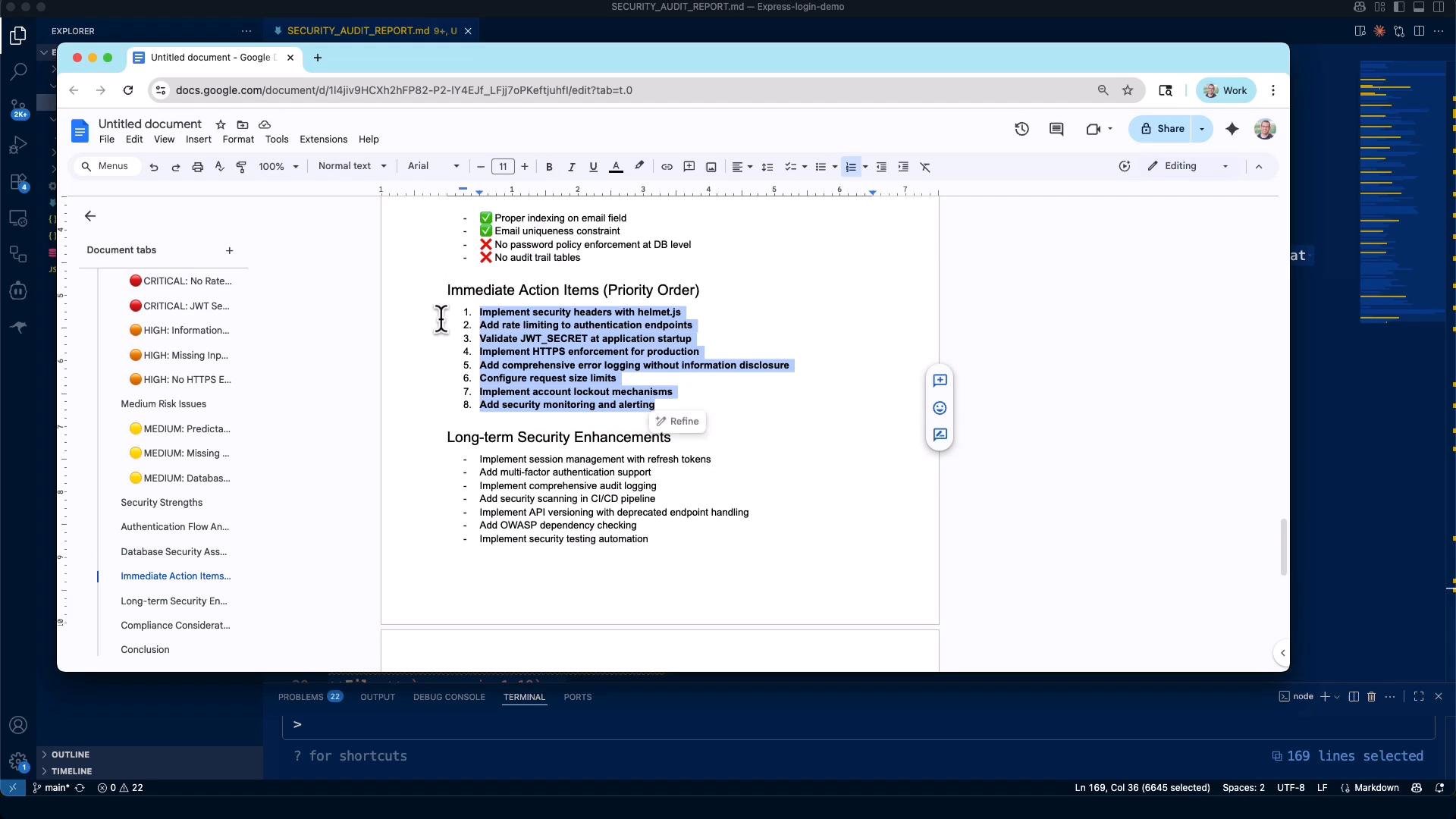
You can export these Markdown reports to Google Docs, Word, or share them directly with stakeholders. Claude Code also generates convenient “Immediate Action Items” lists for rapid remediation planning.
 The prompts used in this lesson are available at `github.com/JeremyMorgan/claude-code-reviewing-prompts`. They are released under Creative Commons—feel free to reuse and adapt them.
## How to use the audit outputs
* Prioritize fixes by risk level (CRITICAL → HIGH → MEDIUM → LOW).
* Create small PRs that address one class of issues (e.g., add `helmet`, then add rate limiting).
* Re-run Claude Code after changes to validate fixes and detect regressions.
* Keep `audits/SECURITY_AUDIT_REPORT.md` updated and link it in your project README for visibility.
## Next steps: deep dive into authentication
This initial scan surfaces broad issues. Next, we’ll deep dive into the authentication flow—login, token handling, and session management—because these endpoints are frequent targets. Subsequent sections will analyze the login and token code in detail and show how to harden them using Claude Code-driven checks and automated report updates.
## Links and references
* [Express documentation](https://expressjs.com/)
* [Helmet middleware](https://www.npmjs.com/package/helmet)
* [express-rate-limit](https://www.npmjs.com/package/express-rate-limit)
* [jsonwebtoken](https://www.npmjs.com/package/jsonwebtoken)
* [bcrypt](https://www.npmjs.com/package/bcrypt)
* [npm audit docs](https://docs.npmjs.com/cli/v9/commands/npm-audit)
This documentation is built and hosted on [Mintlify](https://mintlify.com), a developer documentation platform.
The prompts used in this lesson are available at `github.com/JeremyMorgan/claude-code-reviewing-prompts`. They are released under Creative Commons—feel free to reuse and adapt them.
## How to use the audit outputs
* Prioritize fixes by risk level (CRITICAL → HIGH → MEDIUM → LOW).
* Create small PRs that address one class of issues (e.g., add `helmet`, then add rate limiting).
* Re-run Claude Code after changes to validate fixes and detect regressions.
* Keep `audits/SECURITY_AUDIT_REPORT.md` updated and link it in your project README for visibility.
## Next steps: deep dive into authentication
This initial scan surfaces broad issues. Next, we’ll deep dive into the authentication flow—login, token handling, and session management—because these endpoints are frequent targets. Subsequent sections will analyze the login and token code in detail and show how to harden them using Claude Code-driven checks and automated report updates.
## Links and references
* [Express documentation](https://expressjs.com/)
* [Helmet middleware](https://www.npmjs.com/package/helmet)
* [express-rate-limit](https://www.npmjs.com/package/express-rate-limit)
* [jsonwebtoken](https://www.npmjs.com/package/jsonwebtoken)
* [bcrypt](https://www.npmjs.com/package/bcrypt)
* [npm audit docs](https://docs.npmjs.com/cli/v9/commands/npm-audit)
This documentation is built and hosted on [Mintlify](https://mintlify.com), a developer documentation platform.