> ## Documentation Index
> Fetch the complete documentation index at: https://notes.kodekloud.com/llms.txt
> Use this file to discover all available pages before exploring further.
# Secrets Management Audit
> Audit of an Express-login-demo repository for secrets management issues, including hard-coded secrets, .env handling, key rotation, password hashing, encryption practices, startup validations, and remediation steps
This audit inspects the Express-login-demo repository for secrets-management issues: hard-coded secrets, environment file handling, rotation and revocation capabilities, encryption and password-hashing practices, and startup validations that prevent insecure defaults from reaching production.
Below is the exact prompt used to drive the audit assistant (included for traceability and reproducibility):
```text theme={null}
* Welcome to Claude Code!
/help for help, /status for your current setup
cwd: /Users/jeremy/Repos/Claude Code Course/Express-login-demo
> Try "fix typecheck errors"
? for shortcuts
In SESSION_COOKIE_SECURITY_AUDIT.md
```
I'm using a stored prompt rather than typing it repeatedly. You can find these prompts at github.com/JeremyMorgan/claude-code-reviewing-prompts.
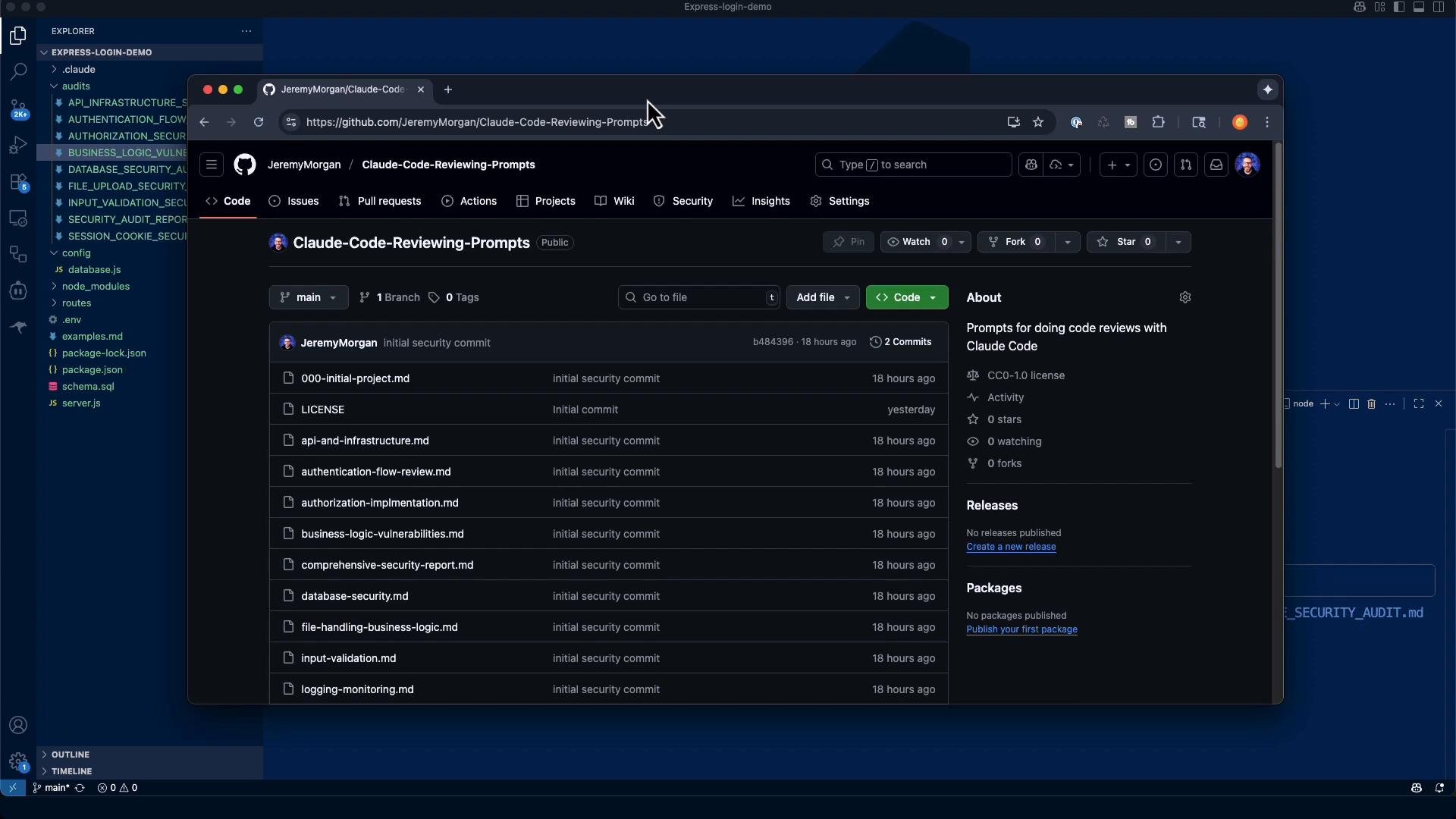 Audit runner (sample output, truncated)
```text theme={null}
Read config/database.js (25 lines)
Read schema.sql (22 lines)
Found routes/auth.js (98 lines)
Read .env (10 lines)
Search for secret-like patterns:
Found possible matches (212 lines)
Found possible JWT-related matches (68 lines)
Checked .gitignore:
No .gitignore file found
Search for process.env usage:
Found references across multiple .js files (92 lines)
Search for rotation, hashing, encryption:
Found rotation-related keywords (56 lines)
Found crypto/bcrypt/hash/salt references (597 lines)
```
What this audit checks
* Hard-coded secrets (API keys, DB credentials, JWT secrets, private keys)
* Proper environment variable usage and ensuring environment files are not committed
* Secret rotation and token revocation / refresh mechanisms
* Encryption key management and KDF/salt usage
* Password hashing configuration (bcrypt rounds)
* Startup validation to prevent insecure defaults in production
Executive summary (quick risk snapshot)
* Risk score (example): 7.5 / 10
* Critical findings: default JWT secret present, `.env` tracked in repo (no `.gitignore`), plaintext DB credentials with placeholder values, no token rotation/revocation.
* Medium findings: bcrypt rounds unspecified or low, no startup validation to block weak dev/test secrets in production.
This report provides concrete file-level evidence and minimal, drop-in remediation snippets where possible. If a referenced file is missing or context is incomplete, the report notes "Unable to verify" and explains what would prove it.
Findings, evidence and remediation (consolidated)
1. CRITICAL — Default JWT secret present in `.env`
* Evidence:
* `.env:2` -> `JWT_SECRET=your_jwt_secret_key_here`
* `routes/auth.js:53` -> `process.env.JWT_SECRET`
* Why it matters: A well-known or short default JWT secret allows attackers to forge tokens, bypass authentication, and escalate privileges.
* Immediate remediation:
* Replace the placeholder with a cryptographically secure secret (64+ bytes recommended when hex-encoded).
* Add startup validation to reject insecure JWT secrets in production.
Example: generate a secure JWT secret
```bash theme={null}
# Generate a 64-byte hex secret (128 hex chars)
node -e "console.log(require('crypto').randomBytes(64).toString('hex'))"
```
Startup validation snippet (drop-in for `server.js` or app entrypoint)
```javascript theme={null}
// server.js (startup validation)
if (process.env.NODE_ENV === 'production') {
if (!process.env.JWT_SECRET || process.env.JWT_SECRET.length < 64) {
throw new Error('Production requires a secure JWT_SECRET (64+ characters)');
}
if (!process.env.DB_PASSWORD || process.env.DB_PASSWORD === 'your_db_password') {
throw new Error('Production requires secure database credentials');
}
}
```
2. CRITICAL — `.env` file tracked in Git / no `.gitignore`
* Evidence: No `.gitignore` in repo root; `.env` exists and is tracked.
* Why it matters: Committed environment files leak credentials when pushed to remote repositories.
* Immediate remediation:
```bash theme={null}
# Add common ignores and stop tracking .env
echo ".env" >> .gitignore
echo ".env.*" >> .gitignore
echo "node_modules/" >> .gitignore
git rm --cached .env
git commit -m "Remove .env from tracking and add .gitignore"
# After removing, rotate any secrets that were exposed
```
If secrets were ever pushed to a remote (GitHub, GitLab, etc.), assume compromise: rotate secrets immediately and consider rotating keys stored in third-party services.
3. CRITICAL — Plain-text database credentials with placeholder values
* Evidence:
* `.env:9-10` -> `DB_USER=your_db_user`, `DB_PASSWORD=your_db_password`
* `config/database.js:4-8` -> configuration reads `process.env.DB_USER`/`process.env.DB_PASSWORD` directly
* Why it matters: Plain-text credentials are high-risk if exposed; placeholder credentials often remain unchanged after cloning.
* Remediation:
* Use unique strong credentials for production.
* For production, store credentials in a secure secrets manager (AWS Secrets Manager, Azure Key Vault, HashiCorp Vault).
* Add startup validation to reject placeholder DB credentials (see server.js snippet above).
4. HIGH/MEDIUM — No secret rotation or token revocation capability
* Evidence: No refresh token implementation, no blacklist/revocation store, and no token versioning detected.
* Why it matters: Compromised tokens remain valid indefinitely without rotation/revocation.
* Recommended fixes:
* Implement refresh tokens and store a revocation list (e.g., token IDs or tokenVersion in user records).
* Add an admin process to rotate secrets and fallback strategies for key rollover.
* Document and test rotation procedures.
5. MEDIUM — Password hashing configuration may be weak or unspecified
* Evidence: `bcrypt` used, but salt rounds are not enforced or may be low.
* Why it matters: Low bcrypt rounds make offline brute-force attacks cheaper.
* Remediation example (use in user registration and re-hash on login):
```javascript theme={null}
const bcrypt = require('bcrypt');
const saltRounds = 12; // 12+ recommended; tune for your environment
async function hashPassword(password) {
return await bcrypt.hash(password, saltRounds);
}
```
* Consider gradual re-hash on login for existing accounts after increasing rounds.
Proof-of-concept (for education only)
* Token forgery with a known default secret. Do not run this against systems you do not own.
```javascript theme={null}
// PoC: anyone with known secret can forge tokens
const jwt = require('jsonwebtoken');
const forgedToken = jwt.sign(
{ userId: 1, email: 'admin@example.com' },
'your_jwt_secret_key_here' // Known default secret from .env
);
console.log(forgedToken);
```
Or an example curl call against a local test endpoint (example only — do not run against production):
```bash theme={null}
# Example: POST to a local test endpoint (do not run against production)
curl -X POST http://localhost:3000/api/auth/forge \
-H "Content-Type: application/json" \
-d '{
"secret": "your_jwt_secret_key_here",
"payload": {"userId": 1, "email": "admin@example.com"}
}'
```
Prioritized remediation plan (short-term → mid-term → long-term)
| Priority | Actions (short description) | Files / Examples |
| - | - | - |
| Priority 1 — Immediate | Replace `JWT_SECRET` with a secure secret; rotate exposed credentials; add `.gitignore` and stop tracking `.env`; add startup validation to fail fast. | `.env`, `server.js` (startup), `routes/auth.js` |
| Priority 2 — This week | Implement refresh tokens + revocation; increase/enforce bcrypt rounds and re-hash strategy; add environment-specific configuration & validation. | `routes/auth.js`, `config/`, auth middleware |
| Priority 3 — Next sprint | Migrate production secrets to a managed secret store; add CI secret scanning; document and test rotation procedures. | Deployment/infra configs, CI scripts |
Defense-in-depth recommendations
* Use a managed secrets service (AWS Secrets Manager, Azure Key Vault, HashiCorp Vault) for production secrets and apply least-privilege IAM.
* Segregate secrets by environment (dev/staging/prod) and never reuse production credentials in development.
* Limit DB account privileges and rotate credentials on a schedule.
* Add monitoring/alerting for suspicious auth behavior (repeated token validation failures, sudden increase in token issuance).
* Add automated secret scanning into CI/CD to block accidental commits of secrets.
Audit checklist (summary)
* [x] Scan codebase for hard-coded secrets (API keys, passwords, JWT secrets, encryption keys)
* [x] Analyze environment variable usage and `.env` file security
* [ ] Check secret rotation capabilities
* [ ] Examine encryption key management practices
* [ ] Generate structured findings report with severity ratings
* [ ] Create remediation recommendations and risk assessment
Additional resources and references
* [Kubernetes Secrets](https://kubernetes.io/docs/concepts/configuration/secret/) — handling secrets in k8s
* [OWASP Cryptographic Storage Cheat Sheet](https://cheatsheetseries.owasp.org/cheatsheets/Cryptographic_Storage_Cheat_Sheet.html)
* [bcrypt npm package](https://www.npmjs.com/package/bcrypt)
Compliance and business impact
* Exposed secrets and weak secret management increase the risk of authentication bypass and data breaches, and can cause non-compliance with standards such as PCI-DSS, GDPR, and NIST guidelines. Do not deploy publicly until critical secret issues are remediated and validated.
Closing notes
* This audit identified clear, actionable problems: default JWT secret, tracked `.env`, and plaintext DB placeholders. Prioritize rotating any potentially exposed secrets and implementing startup validation to block insecure defaults in production.
* After applying the immediate remediations, re-run automated scans and add secret scanning to CI to prevent regressions.
Related topic: logging and monitoring — the audit chain continues.
This documentation is built and hosted on [Mintlify](https://mintlify.com), a developer documentation platform.
Audit runner (sample output, truncated)
```text theme={null}
Read config/database.js (25 lines)
Read schema.sql (22 lines)
Found routes/auth.js (98 lines)
Read .env (10 lines)
Search for secret-like patterns:
Found possible matches (212 lines)
Found possible JWT-related matches (68 lines)
Checked .gitignore:
No .gitignore file found
Search for process.env usage:
Found references across multiple .js files (92 lines)
Search for rotation, hashing, encryption:
Found rotation-related keywords (56 lines)
Found crypto/bcrypt/hash/salt references (597 lines)
```
What this audit checks
* Hard-coded secrets (API keys, DB credentials, JWT secrets, private keys)
* Proper environment variable usage and ensuring environment files are not committed
* Secret rotation and token revocation / refresh mechanisms
* Encryption key management and KDF/salt usage
* Password hashing configuration (bcrypt rounds)
* Startup validation to prevent insecure defaults in production
Executive summary (quick risk snapshot)
* Risk score (example): 7.5 / 10
* Critical findings: default JWT secret present, `.env` tracked in repo (no `.gitignore`), plaintext DB credentials with placeholder values, no token rotation/revocation.
* Medium findings: bcrypt rounds unspecified or low, no startup validation to block weak dev/test secrets in production.
This report provides concrete file-level evidence and minimal, drop-in remediation snippets where possible. If a referenced file is missing or context is incomplete, the report notes "Unable to verify" and explains what would prove it.
Findings, evidence and remediation (consolidated)
1. CRITICAL — Default JWT secret present in `.env`
* Evidence:
* `.env:2` -> `JWT_SECRET=your_jwt_secret_key_here`
* `routes/auth.js:53` -> `process.env.JWT_SECRET`
* Why it matters: A well-known or short default JWT secret allows attackers to forge tokens, bypass authentication, and escalate privileges.
* Immediate remediation:
* Replace the placeholder with a cryptographically secure secret (64+ bytes recommended when hex-encoded).
* Add startup validation to reject insecure JWT secrets in production.
Example: generate a secure JWT secret
```bash theme={null}
# Generate a 64-byte hex secret (128 hex chars)
node -e "console.log(require('crypto').randomBytes(64).toString('hex'))"
```
Startup validation snippet (drop-in for `server.js` or app entrypoint)
```javascript theme={null}
// server.js (startup validation)
if (process.env.NODE_ENV === 'production') {
if (!process.env.JWT_SECRET || process.env.JWT_SECRET.length < 64) {
throw new Error('Production requires a secure JWT_SECRET (64+ characters)');
}
if (!process.env.DB_PASSWORD || process.env.DB_PASSWORD === 'your_db_password') {
throw new Error('Production requires secure database credentials');
}
}
```
2. CRITICAL — `.env` file tracked in Git / no `.gitignore`
* Evidence: No `.gitignore` in repo root; `.env` exists and is tracked.
* Why it matters: Committed environment files leak credentials when pushed to remote repositories.
* Immediate remediation:
```bash theme={null}
# Add common ignores and stop tracking .env
echo ".env" >> .gitignore
echo ".env.*" >> .gitignore
echo "node_modules/" >> .gitignore
git rm --cached .env
git commit -m "Remove .env from tracking and add .gitignore"
# After removing, rotate any secrets that were exposed
```
If secrets were ever pushed to a remote (GitHub, GitLab, etc.), assume compromise: rotate secrets immediately and consider rotating keys stored in third-party services.
3. CRITICAL — Plain-text database credentials with placeholder values
* Evidence:
* `.env:9-10` -> `DB_USER=your_db_user`, `DB_PASSWORD=your_db_password`
* `config/database.js:4-8` -> configuration reads `process.env.DB_USER`/`process.env.DB_PASSWORD` directly
* Why it matters: Plain-text credentials are high-risk if exposed; placeholder credentials often remain unchanged after cloning.
* Remediation:
* Use unique strong credentials for production.
* For production, store credentials in a secure secrets manager (AWS Secrets Manager, Azure Key Vault, HashiCorp Vault).
* Add startup validation to reject placeholder DB credentials (see server.js snippet above).
4. HIGH/MEDIUM — No secret rotation or token revocation capability
* Evidence: No refresh token implementation, no blacklist/revocation store, and no token versioning detected.
* Why it matters: Compromised tokens remain valid indefinitely without rotation/revocation.
* Recommended fixes:
* Implement refresh tokens and store a revocation list (e.g., token IDs or tokenVersion in user records).
* Add an admin process to rotate secrets and fallback strategies for key rollover.
* Document and test rotation procedures.
5. MEDIUM — Password hashing configuration may be weak or unspecified
* Evidence: `bcrypt` used, but salt rounds are not enforced or may be low.
* Why it matters: Low bcrypt rounds make offline brute-force attacks cheaper.
* Remediation example (use in user registration and re-hash on login):
```javascript theme={null}
const bcrypt = require('bcrypt');
const saltRounds = 12; // 12+ recommended; tune for your environment
async function hashPassword(password) {
return await bcrypt.hash(password, saltRounds);
}
```
* Consider gradual re-hash on login for existing accounts after increasing rounds.
Proof-of-concept (for education only)
* Token forgery with a known default secret. Do not run this against systems you do not own.
```javascript theme={null}
// PoC: anyone with known secret can forge tokens
const jwt = require('jsonwebtoken');
const forgedToken = jwt.sign(
{ userId: 1, email: 'admin@example.com' },
'your_jwt_secret_key_here' // Known default secret from .env
);
console.log(forgedToken);
```
Or an example curl call against a local test endpoint (example only — do not run against production):
```bash theme={null}
# Example: POST to a local test endpoint (do not run against production)
curl -X POST http://localhost:3000/api/auth/forge \
-H "Content-Type: application/json" \
-d '{
"secret": "your_jwt_secret_key_here",
"payload": {"userId": 1, "email": "admin@example.com"}
}'
```
Prioritized remediation plan (short-term → mid-term → long-term)
| Priority | Actions (short description) | Files / Examples |
| - | - | - |
| Priority 1 — Immediate | Replace `JWT_SECRET` with a secure secret; rotate exposed credentials; add `.gitignore` and stop tracking `.env`; add startup validation to fail fast. | `.env`, `server.js` (startup), `routes/auth.js` |
| Priority 2 — This week | Implement refresh tokens + revocation; increase/enforce bcrypt rounds and re-hash strategy; add environment-specific configuration & validation. | `routes/auth.js`, `config/`, auth middleware |
| Priority 3 — Next sprint | Migrate production secrets to a managed secret store; add CI secret scanning; document and test rotation procedures. | Deployment/infra configs, CI scripts |
Defense-in-depth recommendations
* Use a managed secrets service (AWS Secrets Manager, Azure Key Vault, HashiCorp Vault) for production secrets and apply least-privilege IAM.
* Segregate secrets by environment (dev/staging/prod) and never reuse production credentials in development.
* Limit DB account privileges and rotate credentials on a schedule.
* Add monitoring/alerting for suspicious auth behavior (repeated token validation failures, sudden increase in token issuance).
* Add automated secret scanning into CI/CD to block accidental commits of secrets.
Audit checklist (summary)
* [x] Scan codebase for hard-coded secrets (API keys, passwords, JWT secrets, encryption keys)
* [x] Analyze environment variable usage and `.env` file security
* [ ] Check secret rotation capabilities
* [ ] Examine encryption key management practices
* [ ] Generate structured findings report with severity ratings
* [ ] Create remediation recommendations and risk assessment
Additional resources and references
* [Kubernetes Secrets](https://kubernetes.io/docs/concepts/configuration/secret/) — handling secrets in k8s
* [OWASP Cryptographic Storage Cheat Sheet](https://cheatsheetseries.owasp.org/cheatsheets/Cryptographic_Storage_Cheat_Sheet.html)
* [bcrypt npm package](https://www.npmjs.com/package/bcrypt)
Compliance and business impact
* Exposed secrets and weak secret management increase the risk of authentication bypass and data breaches, and can cause non-compliance with standards such as PCI-DSS, GDPR, and NIST guidelines. Do not deploy publicly until critical secret issues are remediated and validated.
Closing notes
* This audit identified clear, actionable problems: default JWT secret, tracked `.env`, and plaintext DB placeholders. Prioritize rotating any potentially exposed secrets and implementing startup validation to block insecure defaults in production.
* After applying the immediate remediations, re-run automated scans and add secret scanning to CI to prevent regressions.
Related topic: logging and monitoring — the audit chain continues.
This documentation is built and hosted on [Mintlify](https://mintlify.com), a developer documentation platform.