> ## Documentation Index
> Fetch the complete documentation index at: https://notes.kodekloud.com/llms.txt
> Use this file to discover all available pages before exploring further.
# Demo Context Management Techniques
> Demonstrates using focused context management to safely refactor a FastAPI casting lookup API, removing write endpoints and guiding an AI assistant to make minimal, reliable changes.
In this lesson we demonstrate context management techniques for safely refactoring APIs and guiding an AI assistant to make focused, minimal changes to a codebase. Using a small FastAPI example (a casting number lookup API), you'll see why starting with a narrow context—one file or a few adjacent files—usually produces more reliable results than feeding the tool the entire repository.
We’ll cover:
* The dataset the API serves (CSV excerpt)
* The existing endpoints in the route file
* How to instruct the AI to remove write endpoints (POST/PUT/DELETE)
* A minimal, cleaned `casting.py` after the change
* Verifying the result in Swagger/OpenAPI and with curl
* Notes on related dependencies (SQLAlchemy, Pydantic)
Resources
* FastAPI: [https://fastapi.tiangolo.com/](https://fastapi.tiangolo.com/)
* Swagger / OpenAPI UI: [https://swagger.io/tools/swagger-ui/](https://swagger.io/tools/swagger-ui/)
* SQLAlchemy: [https://www.sqlalchemy.org/](https://www.sqlalchemy.org/)
* Pydantic v2: [https://docs.pydantic.dev/latest/](https://docs.pydantic.dev/latest/)
CSV sample (excerpt)
```csv theme={null}
Years,Casting,CID,Low Power,High Power,Main Caps,Comments,
1956-67,3849839,283,-,-,2,,
1956-67,3849935,283,-,-,2,,
1964-67,3858174,327,-,-,2,"car, truck",
1968-76,3855961,350,-,-,2,car,
1964-67,3858174,327,275,350,2,"Full, A & Y",
1964-67,3858180,327,250,300,2,,
1962-67,3858190,327,-,-,2,,
1965-67,3862194,283,195,220,2,Chevy II,
1962-66,3864812,283,230,-,2,"car, truck",
1964-67,3868657,327,300,-,2,,
1962-67,3876132,327,-,-,2,,
1963,3889935,283,-,-,2,truck,
1967,3892657,302,290,290,2,"Z-28, small journal",
1967,3892657,327,210,350,2,car & truck,
1967,3892657,350,295,295,2,Camaro,
1968-69,3892659,327,210,-,2,,
1967,3896944,283,195,195,2,replaced by 307 in 68,
1967,3896948,283,195,195,2,identical to 3834810,
1967,3903352,327,210,350,2,cars only,
1969-80,3911460,350,-,-,2,A,
1968-73,3914635,307,-,-,2,car,
1968,3914636,307,200,200,2,car & truck,
1968-69,3914638,327,-,-,2,,
1968-73,3914653,307,-,-,2,A,
```
Goal: Make the API read-only for production or third-party consumption (expose only GET endpoints: list, get-by-casting-number, and search). Rather than hand-editing many files, we’ll show how to limit the AI’s context to the relevant endpoint file and any directly related files.
Existing route file (example)
* File: `app/api/endpoints/casting.py`
* This is the starting point for the AI assistant; it includes GET, POST, PUT, DELETE, and SEARCH routes.
```python theme={null}
from typing import List, Optional
from fastapi import APIRouter, Depends, HTTPException, Query
from sqlalchemy.orm import Session
from app.db.database import get_db
from app.models.casting import Casting as CastingModel
from app.schemas.casting import Casting, CastingCreate, CastingUpdate
router = APIRouter()
@router.get("/", response_model=List[Casting])
def get_castings(
skip: int = 0,
limit: int = 100,
db: Session = Depends(get_db)
):
"""
Retrieve a list of castings with pagination.
"""
castings = db.query(CastingModel).offset(skip).limit(limit).all()
return castings
@router.get("/{casting_id}", response_model=Casting)
def get_casting_by_id(
casting_id: str,
db: Session = Depends(get_db)
):
"""
Retrieve a specific casting by its casting number.
"""
casting = db.query(CastingModel).filter(
CastingModel.casting == casting_id
).first()
if casting is None:
raise HTTPException(
status_code=404,
detail=f"Casting with number {casting_id} not found"
)
return casting
@router.post("/", response_model=Casting)
def create_casting(
casting: CastingCreate,
db: Session = Depends(get_db)
):
"""
Create a new casting.
"""
db_casting = db.query(CastingModel).filter(
CastingModel.casting == casting.casting
).first()
if db_casting:
raise HTTPException(
status_code=400,
detail=f"Casting with number {casting.casting} already exists"
)
db_casting = CastingModel(**casting.dict())
db.add(db_casting)
db.commit()
db.refresh(db_casting)
return db_casting
@router.put("/{casting_id}", response_model=Casting)
def update_casting(
casting_id: str,
casting: CastingUpdate,
db: Session = Depends(get_db)
):
"""
Update an existing casting.
"""
db_casting = db.query(CastingModel).filter(
CastingModel.casting == casting_id
).first()
if db_casting is None:
raise HTTPException(status_code=404, detail="Not found")
for key, value in casting.dict(exclude_unset=True).items():
setattr(db_casting, key, value)
db.add(db_casting)
db.commit()
db.refresh(db_casting)
return db_casting
@router.delete("/{casting_id}", response_model=Casting)
def delete_casting(
casting_id: str,
db: Session = Depends(get_db)
):
"""
Delete a casting.
"""
db_casting = db.query(CastingModel).filter(
CastingModel.casting == casting_id
).first()
if db_casting is None:
raise HTTPException(
status_code=404,
detail=f"Casting with number {casting_id} not found"
)
db.delete(db_casting)
db.commit()
return db_casting
@router.get("/search/", response_model=List[Casting])
def search_castings(
years: Optional[str] = None,
cid: Optional[int] = None,
main_caps: Optional[str] = None,
comments: Optional[str] = None,
skip: int = 0,
limit: int = 100,
db: Session = Depends(get_db)
):
"""
Search for castings based on various criteria.
"""
query = db.query(CastingModel)
if years:
query = query.filter(CastingModel.years.ilike(f"%{years}%"))
if cid:
query = query.filter(CastingModel.cid == cid)
if main_caps:
query = query.filter(CastingModel.main_caps.ilike(f"%{main_caps}%"))
if comments:
query = query.filter(CastingModel.comments.ilike(f"%{comments}%"))
results = query.offset(skip).limit(limit).all()
return results
```
Which endpoints do we want to remove?
* POST /api/castings/ — create\_casting
* PUT /api/castings/{casting_id} — update\_casting
* DELETE /api/castings/{casting_id} — delete\_casting
Summary: endpoints before vs. after
| Endpoint | Before | After |
| ----------------------------------- | -------: | :-------- |
| `GET /api/castings/` | ✅ list | ✅ list |
| `GET /api/castings/{casting_id}` | ✅ get | ✅ get |
| `GET /api/castings/search/` | ✅ search | ✅ search |
| `POST /api/castings/` | ✅ create | ❌ removed |
| `PUT /api/castings/{casting_id}` | ✅ update | ❌ removed |
| `DELETE /api/castings/{casting_id}` | ✅ delete | ❌ removed |
Minimal, cleaned `casting.py`
* Remove the write route handlers and the now-unused schema imports (`CastingCreate`, `CastingUpdate`).
* Leaving only read/search routes keeps the OpenAPI surface minimal and easier to audit.
```python theme={null}
from typing import List, Optional
from fastapi import APIRouter, Depends, HTTPException, Query
from sqlalchemy.orm import Session
from app.db.database import get_db
from app.models.casting import Casting as CastingModel
from app.schemas.casting import Casting
router = APIRouter()
@router.get("/", response_model=List[Casting])
def get_castings(
skip: int = 0,
limit: int = 100,
db: Session = Depends(get_db)
):
"""
Retrieve a list of castings with pagination.
"""
castings = db.query(CastingModel).offset(skip).limit(limit).all()
return castings
@router.get("/{casting_id}", response_model=Casting)
def get_casting_by_id(
casting_id: str,
db: Session = Depends(get_db)
):
"""
Retrieve a specific casting by its casting number.
"""
casting = db.query(CastingModel).filter(
CastingModel.casting == casting_id
).first()
if casting is None:
raise HTTPException(
status_code=404,
detail=f"Casting with number {casting_id} not found"
)
return casting
@router.get("/search/", response_model=List[Casting])
def search_castings(
years: Optional[str] = None,
cid: Optional[int] = None,
main_caps: Optional[str] = None,
comments: Optional[str] = None,
skip: int = 0,
limit: int = 100,
db: Session = Depends(get_db)
):
"""
Search for castings based on various criteria.
"""
query = db.query(CastingModel)
if years:
query = query.filter(CastingModel.years.ilike(f"%{years}%"))
if cid:
query = query.filter(CastingModel.cid == cid)
if main_caps:
query = query.filter(CastingModel.main_caps.ilike(f"%{main_caps}%"))
if comments:
query = query.filter(CastingModel.comments.ilike(f"%{comments}%"))
results = query.offset(skip).limit(limit).all()
return results
```
API docs (Swagger/OpenAPI)
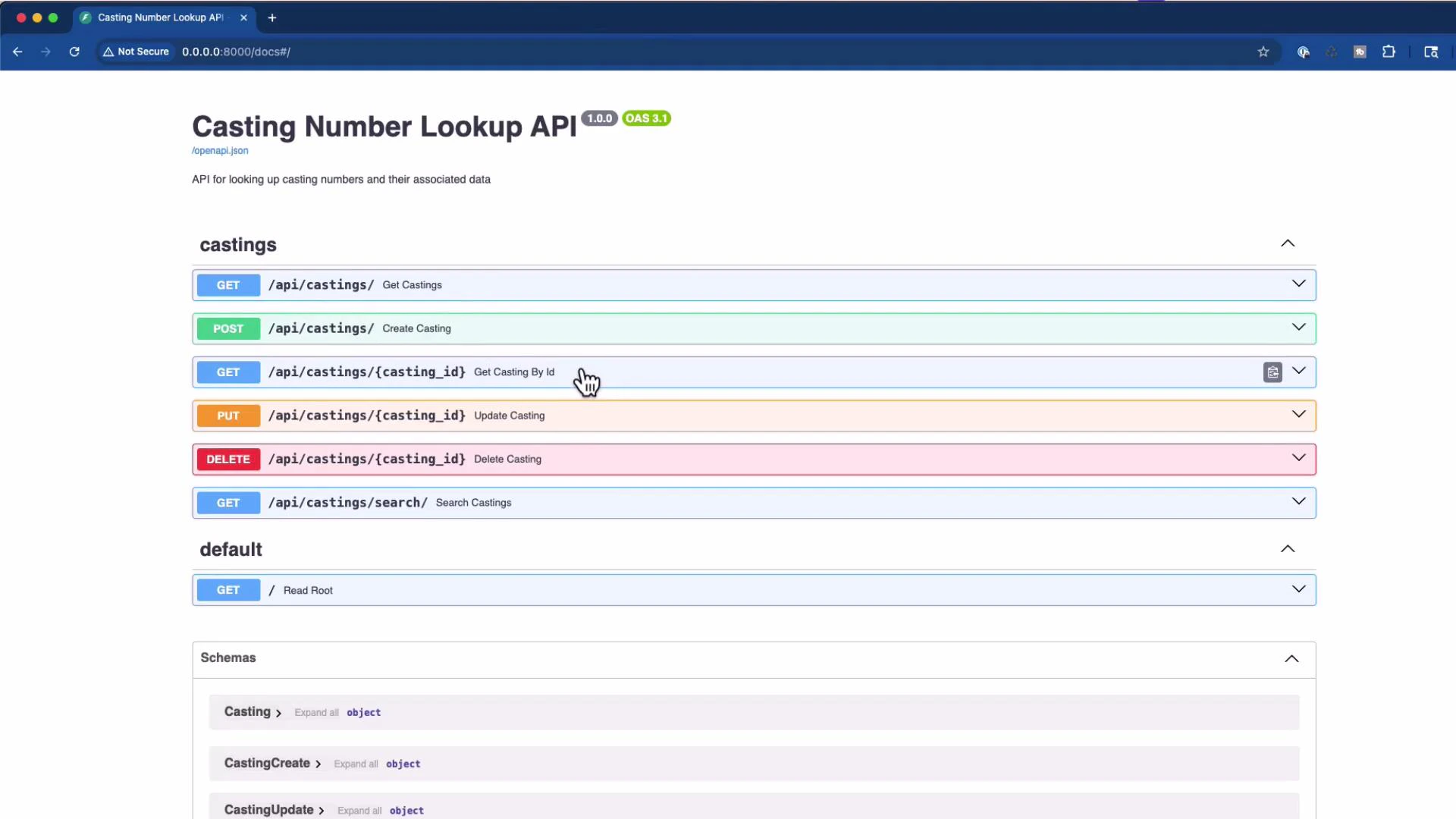
Below is the same screenshot used in the original workflow showing GET/POST/PUT/DELETE entries. After removing the write routes and unused imports, the Swagger UI should show only the GET endpoints (list, get-by-id, search, and the root).
 Run the server and verify the OpenAPI document
Example server logs after starting the FastAPI app (condensed):
```text theme={null}
INFO: Started server process [18745]
INFO: Waiting for application startup.
INFO: Application startup complete.
INFO: 127.0.0.1:54624 - "GET /docs HTTP/1.1" 200 OK
INFO: 127.0.0.1:54624 - "GET /openapi.json HTTP/1.1" 200 OK
```
Try the read endpoints with curl
Get a casting by number:
```bash theme={null}
curl -X 'GET' \
'http://0.0.0.0:8000/api/castings/3896944' \
-H 'accept: application/json'
```
Example JSON response:
```json theme={null}
{
"casting": "3896944",
"years": "1967",
"cid": 283,
"low_power": "195",
"high_power": "195",
"main_caps": "2",
"comments": "replaced by 307 in 68",
"id": 58
}
```
Another lookup:
```bash theme={null}
curl -X 'GET' \
'http://0.0.0.0:8000/api/castings/3862194' \
-H 'accept: application/json'
```
Response:
```json theme={null}
{
"casting": "3862194",
"years": "1965-67",
"cid": 283,
"low_power": "195",
"high_power": "220",
"main_caps": "2",
"comments": "Chevy II",
"id": 51
}
```
Database session dependency (reference)
Typical SQLAlchemy setup used in this example:
```python theme={null}
from sqlalchemy import create_engine
from sqlalchemy.ext.declarative import declarative_base
from sqlalchemy.orm import sessionmaker
# SQLite database URL
SQLALCHEMY_DATABASE_URL = "sqlite:///./castings.db"
# Create SQLAlchemy engine
engine = create_engine(
SQLALCHEMY_DATABASE_URL, connect_args={"check_same_thread": False}
)
# Create SessionLocal class
SessionLocal = sessionmaker(autocommit=False, autoflush=False, bind=engine)
# Create Base class
Base = declarative_base()
# Dependency to get DB session
def get_db():
db = SessionLocal()
try:
yield db
finally:
db.close()
```
Pydantic v2 note
Pydantic v2 changed model configuration keys. If you see warnings about `orm_mode`, update your schema models to use `from_attributes=True` in Pydantic v2 model configs. See the Pydantic migration guide for details: [https://docs.pydantic.dev/latest/](https://docs.pydantic.dev/latest/)
Best practices when using an AI assistant to refactor
* Start with a narrow context: provide the single target file (e.g., `app/api/endpoints/casting.py`) first.
* Be explicit about the desired change (e.g., “remove POST/PUT/DELETE endpoints and unused schema imports”).
* If the AI needs more context, iteratively provide only the adjacent files it imports (schemas, models, and the DB dependency), not the entire repo.
* Re-run your tests and check the Swagger/OpenAPI UI after edits to confirm only the intended endpoints are exposed.
Key takeaways
* Start small: give the AI one or a few files that are directly relevant to the change you want.
* Be explicit about what you want removed or changed (e.g., remove POST/PUT/DELETE).
* Verify that unused imports are removed (e.g., schema types you no longer use).
* Check Swagger/OpenAPI after the edit to confirm the intended surface is exposed.
* If needed, gradually add more context (related modules, terminal output, or recent git commits) until the AI has enough information.
Start with a single, focused file as context (e.g., `casting.py`). If the AI's edits are incomplete, iteratively add only the adjacent files it imports (schemas, models, or database) rather than the entire repository. Smaller, relevant context often produces more reliable edits.
Run the server and verify the OpenAPI document
Example server logs after starting the FastAPI app (condensed):
```text theme={null}
INFO: Started server process [18745]
INFO: Waiting for application startup.
INFO: Application startup complete.
INFO: 127.0.0.1:54624 - "GET /docs HTTP/1.1" 200 OK
INFO: 127.0.0.1:54624 - "GET /openapi.json HTTP/1.1" 200 OK
```
Try the read endpoints with curl
Get a casting by number:
```bash theme={null}
curl -X 'GET' \
'http://0.0.0.0:8000/api/castings/3896944' \
-H 'accept: application/json'
```
Example JSON response:
```json theme={null}
{
"casting": "3896944",
"years": "1967",
"cid": 283,
"low_power": "195",
"high_power": "195",
"main_caps": "2",
"comments": "replaced by 307 in 68",
"id": 58
}
```
Another lookup:
```bash theme={null}
curl -X 'GET' \
'http://0.0.0.0:8000/api/castings/3862194' \
-H 'accept: application/json'
```
Response:
```json theme={null}
{
"casting": "3862194",
"years": "1965-67",
"cid": 283,
"low_power": "195",
"high_power": "220",
"main_caps": "2",
"comments": "Chevy II",
"id": 51
}
```
Database session dependency (reference)
Typical SQLAlchemy setup used in this example:
```python theme={null}
from sqlalchemy import create_engine
from sqlalchemy.ext.declarative import declarative_base
from sqlalchemy.orm import sessionmaker
# SQLite database URL
SQLALCHEMY_DATABASE_URL = "sqlite:///./castings.db"
# Create SQLAlchemy engine
engine = create_engine(
SQLALCHEMY_DATABASE_URL, connect_args={"check_same_thread": False}
)
# Create SessionLocal class
SessionLocal = sessionmaker(autocommit=False, autoflush=False, bind=engine)
# Create Base class
Base = declarative_base()
# Dependency to get DB session
def get_db():
db = SessionLocal()
try:
yield db
finally:
db.close()
```
Pydantic v2 note
Pydantic v2 changed model configuration keys. If you see warnings about `orm_mode`, update your schema models to use `from_attributes=True` in Pydantic v2 model configs. See the Pydantic migration guide for details: [https://docs.pydantic.dev/latest/](https://docs.pydantic.dev/latest/)
Best practices when using an AI assistant to refactor
* Start with a narrow context: provide the single target file (e.g., `app/api/endpoints/casting.py`) first.
* Be explicit about the desired change (e.g., “remove POST/PUT/DELETE endpoints and unused schema imports”).
* If the AI needs more context, iteratively provide only the adjacent files it imports (schemas, models, and the DB dependency), not the entire repo.
* Re-run your tests and check the Swagger/OpenAPI UI after edits to confirm only the intended endpoints are exposed.
Key takeaways
* Start small: give the AI one or a few files that are directly relevant to the change you want.
* Be explicit about what you want removed or changed (e.g., remove POST/PUT/DELETE).
* Verify that unused imports are removed (e.g., schema types you no longer use).
* Check Swagger/OpenAPI after the edit to confirm the intended surface is exposed.
* If needed, gradually add more context (related modules, terminal output, or recent git commits) until the AI has enough information.
Start with a single, focused file as context (e.g., `casting.py`). If the AI's edits are incomplete, iteratively add only the adjacent files it imports (schemas, models, or database) rather than the entire repository. Smaller, relevant context often produces more reliable edits.