> ## Documentation Index
> Fetch the complete documentation index at: https://notes.kodekloud.com/llms.txt
> Use this file to discover all available pages before exploring further.

# Demo Prompt Specificity and Why it Matters

> Explains how prompt specificity affects design outcomes using a Chevy Casting Lookup app, contrasting creative exploration with constrained prompts for predictable, production-ready changes.

This lesson demonstrates how prompt specificity changes what a creative assistant produces. Use vague, open prompts to explore visual ideas and unexpected improvements. Use specific, constrained prompts when you need deterministic results (exact colors, layout rules, or API behavior). The examples below come from a small web-app redesign workflow — Chevy Casting Lookup — and show how different prompting styles lead to different UI and implementation changes.

## Starting point: current template and quick search

The home page uses a Jinja2 template that extends `base.html` and provides a quick casting-number search. This trimmed template shows the core structure and the simple search form used to look up casting numbers.

Reference: [Jinja2 Basics (Mini Course)](https://learn.kodekloud.com/user/courses/jinja2-basics-mini-course)

```html theme={null}
{% extends "base.html" %}

{% block title %}Home - Chevy Casting Lookup{% endblock %}

{% block content %}
<div class="row">
  <div class="col-lg-8 mx-auto">
    <div class="text-center mb-5">
      <h1 class="display-4">Chevy Casting Lookup</h1>
      <p class="lead">Search for Chevrolet casting numbers and engine specifications</p>
    </div>

    <!-- Quick Casting Number Search -->
    <div class="card mb-4">
      <div class="card-header">
        <h5 class="mb-0">Quick Casting Number Lookup</h5>
      </div>
      <div class="card-body">
        <form method="POST" action="{{ url_for('search_casting') }}">
          <div class="input-group">
            <input type="text" class="form-control form-control-lg" name="casting_number"
                   placeholder="Enter casting number (e.g., 3970010)" required>
            <button class="btn btn-primary btn-lg" type="submit">Search</button>
          </div>
        </form>
      </div>
    </div>
  </div>
</div>
{% endblock %}
```

This minimal starting template is ideal for demonstrating the difference between open-ended and constrained prompts because it contains the core UI and functionality without unrelated files or templates.

## Example: creative (vague) prompting — stylistic additions

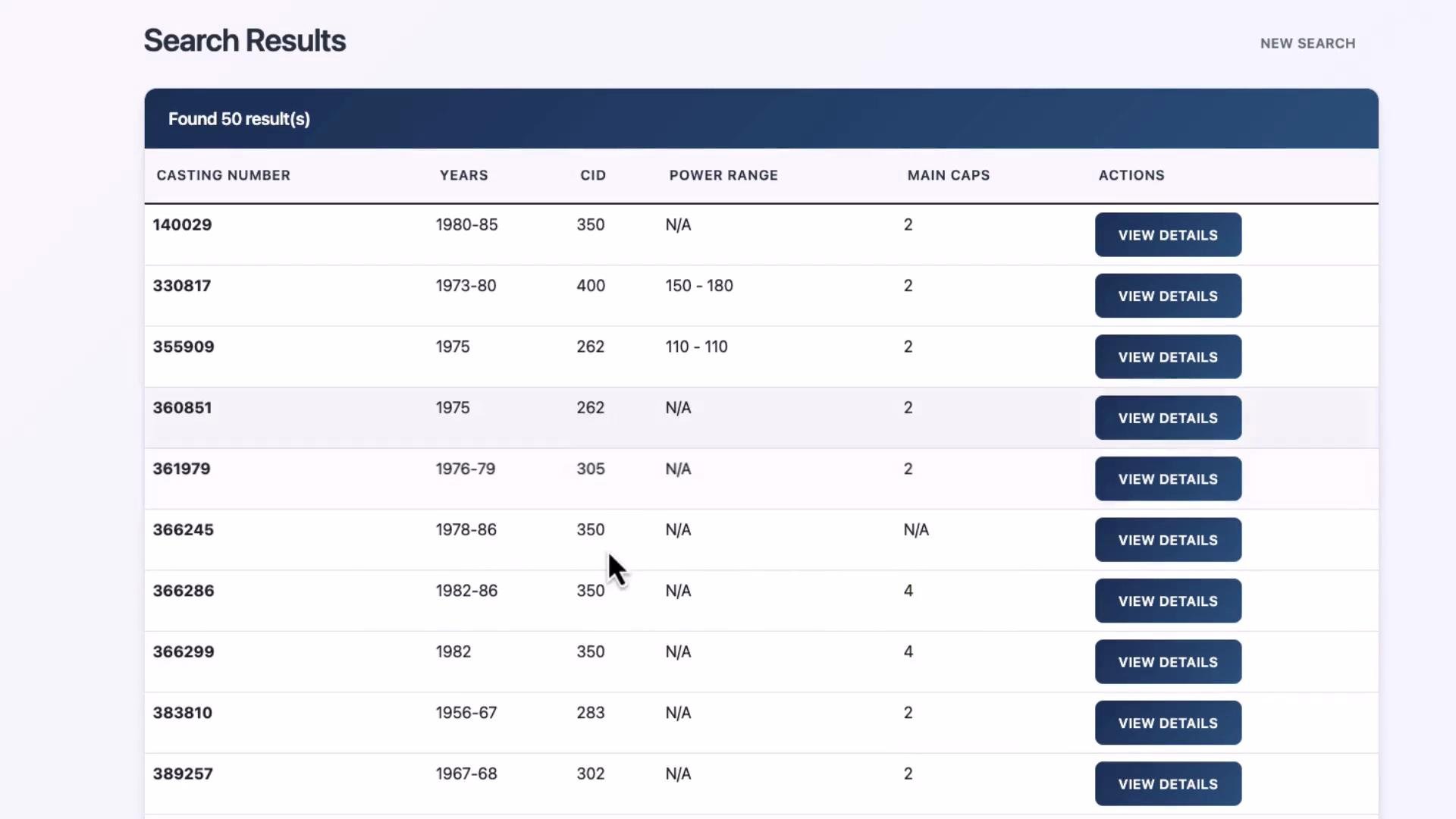
When the prompt was intentionally vague (for example, “make the design look more professional”), the assistant made many stylistic and UX assumptions. It introduced card elevation, hover feedback, table hover states, responsive tweaks, and even a few new UI elements (API-connected status indicator, advanced search collapse).

Representative CSS changes from that creative run:

```css theme={null}
/* Card elevation and hover */
.card {
  box-shadow: 0 0.125rem 0.25rem rgba(0, 0, 0, 0.075);
  border: 1px solid rgba(0, 0, 0, 0.125);
  transition: box-shadow 0.15s ease-in-out;
}

.card:hover {
  box-shadow: 0 0.5rem 1rem rgba(0, 0, 0, 0.15);
}

/* Table and hover */
.table th {
  border-top: none;
  font-weight: 600;
}

.table-hover tbody tr:hover {
  background-color: rgba(0, 123, 255, 0.075);
}

/* Loading spinner and responsive adjustments */
.spinner-border-sm {
  width: 1rem;
  height: 1rem;
}

@media (max-width: 768px) {
  .display-4 {
    font-size: 2rem;
  }

  .btn-lg {
    padding: 0.5rem 1rem;
    font-size: 1rem;
  }

  .table-responsive {
    font-size: 0.875rem;
  }
}
```

Because the assistant was given broad latitude, it introduced multiple UX improvements and new UI elements. After applying those changes and refreshing the app, the search-results table looked significantly different:

<Frame>
  <img src="https://mintcdn.com/kodekloud-c4ac6d9a/XqMRTrEG2GqQdgEv/images/Cline/Core-Workflows-Prompt-Engineering/Demo-Prompt-Specificity-and-Why-it-Matters/search-results-table-casting-cid-power.jpg?fit=max&auto=format&n=XqMRTrEG2GqQdgEv&q=85&s=edf514231e0c42e1d3c14333a2873863" alt="A webpage screenshot showing a search-results table with columns for casting number, years, CID, power range, main caps, and action buttons labeled &#x22;VIEW DETAILS.&#x22; The header indicates &#x22;Found 50 result(s).&#x22;" width="1920" height="1080" data-path="images/Cline/Core-Workflows-Prompt-Engineering/Demo-Prompt-Specificity-and-Why-it-Matters/search-results-table-casting-cid-power.jpg" />
</Frame>

<Callout icon="lightbulb" color="#1CB2FE">
  Creative prompting is ideal when you want visual exploration, alternative layouts, or multiple UX suggestions. Expect the model to make reasonable design choices and to introduce new UI elements.
</Callout>

## When to use creative prompting

* Visual exploration and moodboarding
* Prototyping alternative layouts quickly
* Generating multiple design variants for review

Creative prompts are less suitable when you need strict, verifiable constraints (database schemas, API contracts, accessibility requirements) unless you explicitly include those constraints in the prompt.

## Example: specific prompting — Chevy orange, dark mode

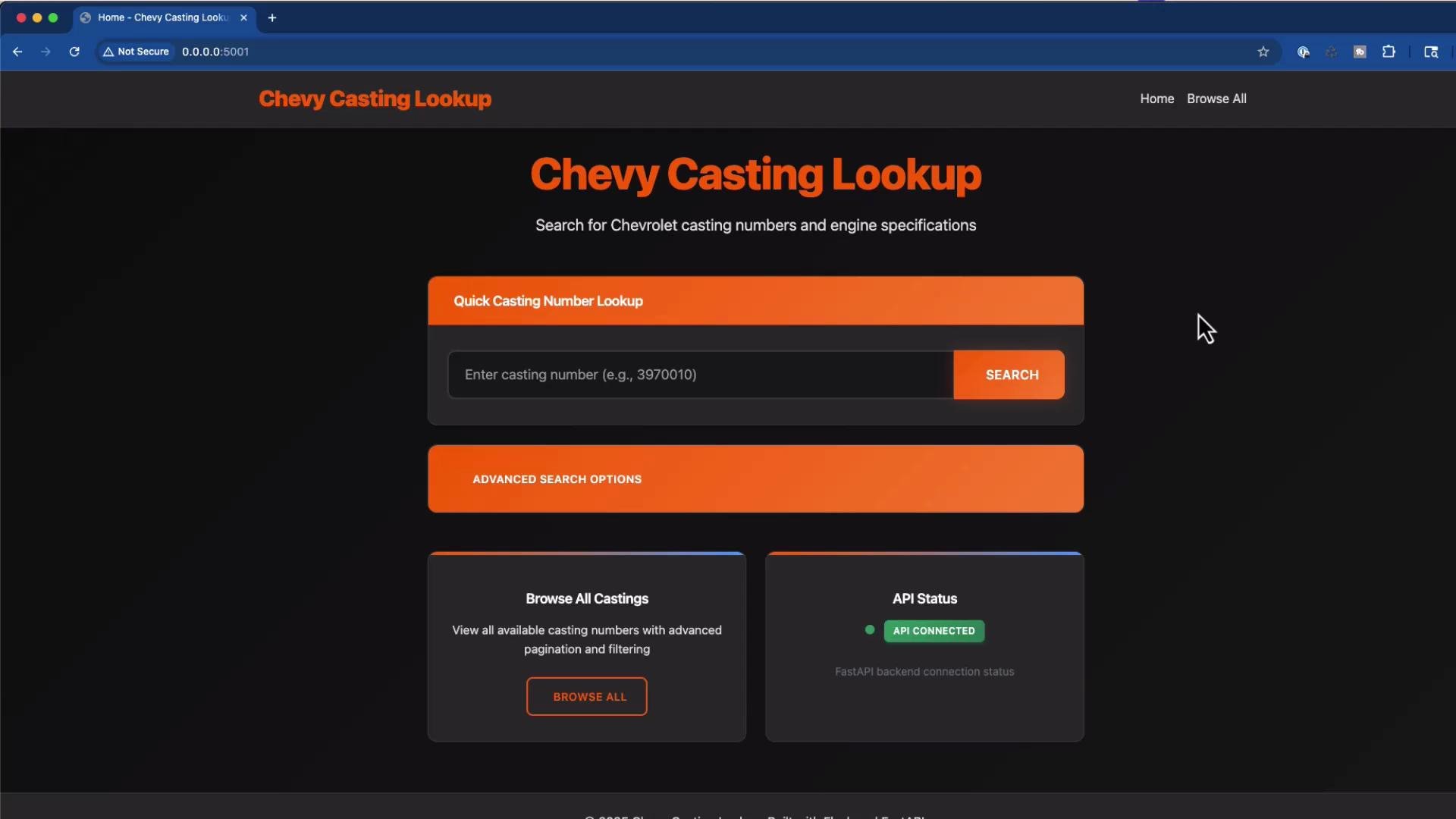
Then the prompt was made much more specific: use a “Chevy orange” primary color with subtle light-blue highlights, apply a dark mode (dark gray/black backgrounds), and preserve the existing layout and functionality.

Representative dark-mode CSS the assistant suggested:

```css theme={null}
/* Professional Chevy Casting Lookup Styles */
:root {
  --primary-color: #FF6600;  /* Chevy orange */
  --secondary-color: #FFB533;
  --accent-color: #4A9EFF;   /* light blue highlight */
  --success-color: #38a169;
  --warning-color: #d69e2e;
  --danger-color: #e53e3e;
  --light-bg: #1a1a1a;
  --card-bg: #2d2d2d;
  --text-primary: #ffffff;
  --text-secondary: #e0e0e0;
  --text-muted: #a0a0a0;
  --border-color: #404040;
  --shadow-sm: 0 1px 3px 0 rgba(0, 0, 0, 0.3);
  --shadow-md: 0 4px 6px -1px rgba(0, 0, 0, 0.4);
  --shadow-lg: 0 10px 15px -3px rgba(0, 0, 0, 0.5);
  --shadow-xl: 0 20px 25px -5px rgba(0, 0, 0, 0.6);
}

body {
  background: linear-gradient(135deg, #0d0d0d 0%, #1a1a1a 100%);
  color: var(--text-primary);
}

/* Card and header styling */
.card {
  background-color: var(--card-bg);
  border: 1px solid var(--border-color);
  border-radius: 12px;
  box-shadow: var(--shadow-sm);
}

.card-header {
  border-bottom: none;
  padding: 1.25rem 1.5rem;
  border-radius: 12px 12px 0 0 !important;
  background: linear-gradient(90deg, rgba(255,102,0,0.15), rgba(74,158,255,0.05));
}

.card-header h5 {
  color: var(--text-primary);
  font-weight: 600;
  margin: 0;
  font-size: 1.1rem;
}

.card-body {
  padding: 1.5rem;
}

/* Buttons */
.btn-primary {
  background-color: var(--primary-color);
  border-color: transparent;
  color: #fff;
}
.btn-primary:hover {
  background-color: var(--secondary-color);
}

/* Table header enhancements */
.table th {
  border-top: none;
  font-weight: 600;
  color: var(--text-primary);
  background-color: rgba(255, 255, 255, 0.03);
}
```

Because the prompt specified exact colors and a dark-mode intent, the assistant produced a focused design that retained the existing layout and functionality while shifting the visual language to a Chevrolet-inspired palette and dark backgrounds.

After those targeted changes, the UI reflected the dark theme, Chevy orange accents, status indicators, and navigation consistent with the original structure:

<Frame>
  <img src="https://mintcdn.com/kodekloud-c4ac6d9a/XqMRTrEG2GqQdgEv/images/Cline/Core-Workflows-Prompt-Engineering/Demo-Prompt-Specificity-and-Why-it-Matters/chevy-casting-lookup-search.jpg?fit=max&auto=format&n=XqMRTrEG2GqQdgEv&q=85&s=df2e3960be5e184708295793640f775e" alt="A dark-themed webpage titled &#x22;Chevy Casting Lookup&#x22; with a prominent search box to enter casting numbers, an &#x22;Advanced Search Options&#x22; button, and a &#x22;Browse All Castings&#x22; card. An API status panel shows &#x22;API Connected&#x22; and there are navigation links at the top." width="1920" height="1080" data-path="images/Cline/Core-Workflows-Prompt-Engineering/Demo-Prompt-Specificity-and-Why-it-Matters/chevy-casting-lookup-search.jpg" />
</Frame>

## Handling missing context and errors

When the assistant attempted to update templates that were not provided (for example, `base.html` or `404.html`), the runtime raised template-not-found errors. This consolidated traceback illustrates the common error when a required template is missing:

```bash theme={null}
File "/path/to/venv/lib/python3.12/site-packages/jinja2/environment.py", line 975, in _load_template
  template = self.loader.load(self, name, self.make_globals(globals))
File "/path/to/venv/lib/python3.12/site-packages/jinja2/loaders.py", line 126, in load
  source, filename, uptodate = self.get_source(environment, name)
File "/path/to/venv/lib/python3.12/site-packages/flask/templating.py", line 98, in _get_source_fast
  raise TemplateNotFound(template)
jinja2.exceptions.TemplateNotFound: 404.html
```

<Callout icon="warning" color="#FF6B6B">
  Start with a minimal, focused context: provide only the files you want the assistant to change. That reduces assumptions and prevents runtime errors. If more files are needed, let the model request them explicitly.
</Callout>

## Quick comparison: creative vs specific prompts

| Prompt Style           | Best for                                               | Typical outcomes                                                                  |
| ---------------------- | ------------------------------------------------------ | --------------------------------------------------------------------------------- |
| Creative (vague)       | Visual exploration, moodboards, rapid UX iteration     | Multiple UI changes, new components, inferred colors and behaviors                |
| Specific (constrained) | Deterministic output: exact colors, layout rules, APIs | Targeted changes that adhere to explicit constraints and reuse existing structure |

## Practical tips for effective prompting

* Provide the smallest possible context for the change you want to make; include only relevant files.
* For design exploration, allow broad freedom but constrain any non-negotiable items (e.g., accessibility or API contracts).
* For production-critical changes, include explicit requirements (hex values, layout breakpoints, accessibility checks).
* Iterate: request the assistant to explain assumptions before making large changes, or ask for a diff/PR with only the intended edits.

## Links and references

* [Jinja2 Documentation](https://jinja.palletsprojects.com/)
* [Flask Templating](https://flask.palletsprojects.com/en/latest/templating/)
* [Kubernetes Basics](https://kubernetes.io/docs/concepts/overview/what-is-kubernetes/)
* [Design Systems & Tokens — best practices](https://www.designbetter.co/design-systems-handbook)

## Conclusion

* Use creative prompts to surface visual ideas and explore multiple UX directions quickly.
* Use specific prompts to get deterministic, constraint-driven changes (exact colors, layout, or functionality).
* Start with minimal context and add files only as requested to avoid unnecessary assumptions and runtime errors.

This lesson applied both strategies to the Chevy Casting Lookup app: the creative prompt yielded broad stylistic enhancements, while the specific prompt produced a focused dark-mode redesign centered on a Chevy-orange primary color.

<CardGroup>
  <Card title="Watch Video" icon="video" cta="Learn more" href="https://learn.kodekloud.com/user/courses/cline/module/23f587ab-5d25-46ca-98cd-26fe001682a0/lesson/09f3e5f3-83fa-424e-a81a-d02c99b9b072" />
</CardGroup>