> ## Documentation Index
> Fetch the complete documentation index at: https://notes.kodekloud.com/llms.txt
> Use this file to discover all available pages before exploring further.
# Demo Using MCP Servers with Cline
> Integrating MCP servers with Cline to add web fetching and retrieval augmentation, using a fetch server that converts HTML to Markdown for real time web data.
We built an application with Cline and explored features such as context and slash commands. This lesson shows a practical next step: integrating Model Context Protocol (MCP) servers with Cline to extend the assistant’s capabilities—for example, adding web content fetching as a retrieval augmentation for real-time data.
The concrete example below uses the "fetch" MCP server. It allows LLMs to retrieve and process web pages (convert HTML to Markdown, extract text, follow links, etc.), making it a lightweight approach to add retrieval-augmented generation (RAG) functionality to a local stack.
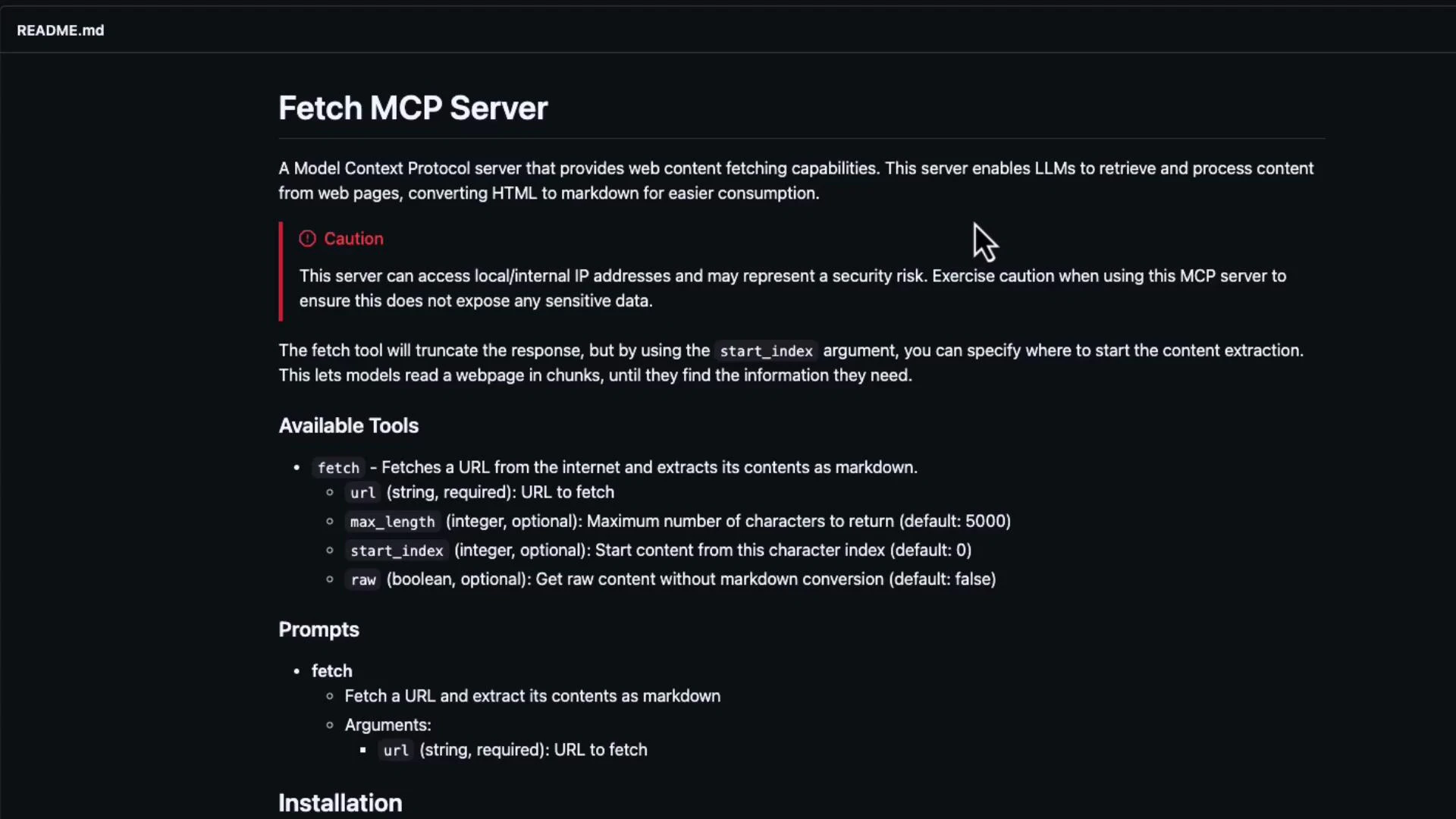 MCP servers can access network resources and run code locally. Be careful about security implications before running third-party MCP servers on sensitive machines or networks.
## What the fetch MCP server provides
* Retrieval of web pages and selected content.
* HTML → Markdown conversion for easier LLM consumption.
* Optional content extraction (headings, paragraphs, links).
* A simple, local MCP endpoint that Cline can query for up-to-date web data.
## Quick start — step-by-step
1. Install the fetch MCP server package
Run this in your activated virtual environment or system Python:
```bash theme={null}
(venv) jeremy@MACSTUDIO ChevyCastingLookup % pip install mcp-server-fetch
```
2. Start the fetch MCP server to verify it runs
Run the installed module with Python’s -m option so the package’s entry point executes:
```bash theme={null}
(venv) jeremy@MACSTUDIO ChevyCastingLookup % python -m mcp_server_fetch
```
If it starts successfully, the server will listen for MCP client requests. Check the package README for the default port and runtime options.
Tip: Use a virtual environment or an isolated container to run MCP servers, especially when testing third‑party modules.
3. Add the MCP servers to your Cline workspace settings
Open your workspace `settings.json` and add an `mcp` entry describing the servers you want to launch or connect to. The example below includes both a time server and the fetch server. Note that the `command` is `python` and we pass `-m` plus the module name in the `args` array so it runs the installed module:
```json theme={null}
{
"mcp": {
"inputs": [],
"servers": {
"mcp-server-time": {
"command": "python",
"args": [
"-m",
"mcp_server_time",
"--local-timezone=America/Los_Angeles"
],
"env": {}
},
"fetch": {
"command": "python",
"args": [
"-m",
"mcp_server_fetch"
],
"env": {}
}
}
}
}
```
Save the settings and (re)start your Cline client so it picks up the MCP configuration.
4. Use the MCP-enabled Cline client
With the fetch server configured and running, start a chat in Cline and ask the assistant to fetch a URL and summarize or extract details. Example prompts:
* "Fetch [https://learn.kodekloud.com](https://learn.kodekloud.com) and find a list of courses."
* "Retrieve the KodeKloud course page and list all course titles and links."
The fetch server will retrieve the page(s), convert content to a consumable format, and return structured results for the LLM to reason over. In sample runs, the assistant produced course listings such as:
* [AWS Certified CloudOps Engineer – Associate](https://learn.kodekloud.com/user/courses/aws-certified-sysops-administrator-associate)
* [Certified Jenkins Engineer](https://learn.kodekloud.com/user/courses/certified-jenkins-engineer)
* [Introduction to OpenAI](https://learn.kodekloud.com/user/courses/introduction-to-openai)
## Why use MCP servers with Cline?
| Benefit | Description |
| --------------: | -------------------------------------------------------------------------------------------------------------------------------------------- |
| Standardization | MCP defines a common protocol so different tools expose a consistent interface to the LLM instead of custom wiring for each API. |
| Real-time data | Provides live data (web content, repo state, system info) so assistants can answer questions about recent events or local resources. |
| Extensibility | Run many specialized MCP servers (fetchers, inspectors, GitHub connectors, DB adapters) and hook them into Cline with minimal configuration. |
| Local tooling | Encapsulate local operations (debugging, system inspection, batch tasks) and make them accessible to the assistant via MCP endpoints. |
## Additional usage tips
* Build custom MCP servers for domain‑specific connectors (internal docs, enterprise APIs).
* Use inspector utilities to debug MCP traffic and observe request/response shapes.
* Prefer isolated environments when testing third-party MCP servers.
* Monitor and control network access and privileges for each MCP server to reduce risk.
## Short reference: common MCP server types
| Server | Typical use case |
| --------------------------- | ------------------------------------------------------ |
| `fetch` | Retrieve and convert web pages for RAG-style summaries |
| `mcp_server_time` | Provide localized time or timezone-aware timestamps |
| `git` / `github` connectors | Index or read repositories for code-aware assistants |
| `database` adapters | Query local or remote DBs and present structured data |
## Security reminders
* Review the server code before running third-party MCP servers on production or sensitive machines.
* Limit network access and run MCP servers with least privilege where possible.
* Audit logs and set timeouts to prevent long-running or unexpected network operations.
This demonstrates how easy it is to plug MCP servers into Cline and leverage them to provide up-to-date or specialized data to your assistant.
MCP servers can access network resources and run code locally. Be careful about security implications before running third-party MCP servers on sensitive machines or networks.
## What the fetch MCP server provides
* Retrieval of web pages and selected content.
* HTML → Markdown conversion for easier LLM consumption.
* Optional content extraction (headings, paragraphs, links).
* A simple, local MCP endpoint that Cline can query for up-to-date web data.
## Quick start — step-by-step
1. Install the fetch MCP server package
Run this in your activated virtual environment or system Python:
```bash theme={null}
(venv) jeremy@MACSTUDIO ChevyCastingLookup % pip install mcp-server-fetch
```
2. Start the fetch MCP server to verify it runs
Run the installed module with Python’s -m option so the package’s entry point executes:
```bash theme={null}
(venv) jeremy@MACSTUDIO ChevyCastingLookup % python -m mcp_server_fetch
```
If it starts successfully, the server will listen for MCP client requests. Check the package README for the default port and runtime options.
Tip: Use a virtual environment or an isolated container to run MCP servers, especially when testing third‑party modules.
3. Add the MCP servers to your Cline workspace settings
Open your workspace `settings.json` and add an `mcp` entry describing the servers you want to launch or connect to. The example below includes both a time server and the fetch server. Note that the `command` is `python` and we pass `-m` plus the module name in the `args` array so it runs the installed module:
```json theme={null}
{
"mcp": {
"inputs": [],
"servers": {
"mcp-server-time": {
"command": "python",
"args": [
"-m",
"mcp_server_time",
"--local-timezone=America/Los_Angeles"
],
"env": {}
},
"fetch": {
"command": "python",
"args": [
"-m",
"mcp_server_fetch"
],
"env": {}
}
}
}
}
```
Save the settings and (re)start your Cline client so it picks up the MCP configuration.
4. Use the MCP-enabled Cline client
With the fetch server configured and running, start a chat in Cline and ask the assistant to fetch a URL and summarize or extract details. Example prompts:
* "Fetch [https://learn.kodekloud.com](https://learn.kodekloud.com) and find a list of courses."
* "Retrieve the KodeKloud course page and list all course titles and links."
The fetch server will retrieve the page(s), convert content to a consumable format, and return structured results for the LLM to reason over. In sample runs, the assistant produced course listings such as:
* [AWS Certified CloudOps Engineer – Associate](https://learn.kodekloud.com/user/courses/aws-certified-sysops-administrator-associate)
* [Certified Jenkins Engineer](https://learn.kodekloud.com/user/courses/certified-jenkins-engineer)
* [Introduction to OpenAI](https://learn.kodekloud.com/user/courses/introduction-to-openai)
## Why use MCP servers with Cline?
| Benefit | Description |
| --------------: | -------------------------------------------------------------------------------------------------------------------------------------------- |
| Standardization | MCP defines a common protocol so different tools expose a consistent interface to the LLM instead of custom wiring for each API. |
| Real-time data | Provides live data (web content, repo state, system info) so assistants can answer questions about recent events or local resources. |
| Extensibility | Run many specialized MCP servers (fetchers, inspectors, GitHub connectors, DB adapters) and hook them into Cline with minimal configuration. |
| Local tooling | Encapsulate local operations (debugging, system inspection, batch tasks) and make them accessible to the assistant via MCP endpoints. |
## Additional usage tips
* Build custom MCP servers for domain‑specific connectors (internal docs, enterprise APIs).
* Use inspector utilities to debug MCP traffic and observe request/response shapes.
* Prefer isolated environments when testing third-party MCP servers.
* Monitor and control network access and privileges for each MCP server to reduce risk.
## Short reference: common MCP server types
| Server | Typical use case |
| --------------------------- | ------------------------------------------------------ |
| `fetch` | Retrieve and convert web pages for RAG-style summaries |
| `mcp_server_time` | Provide localized time or timezone-aware timestamps |
| `git` / `github` connectors | Index or read repositories for code-aware assistants |
| `database` adapters | Query local or remote DBs and present structured data |
## Security reminders
* Review the server code before running third-party MCP servers on production or sensitive machines.
* Limit network access and run MCP servers with least privilege where possible.
* Audit logs and set timeouts to prevent long-running or unexpected network operations.
This demonstrates how easy it is to plug MCP servers into Cline and leverage them to provide up-to-date or specialized data to your assistant.